
前端開發(fā) =》es6 =》Vue
vscode
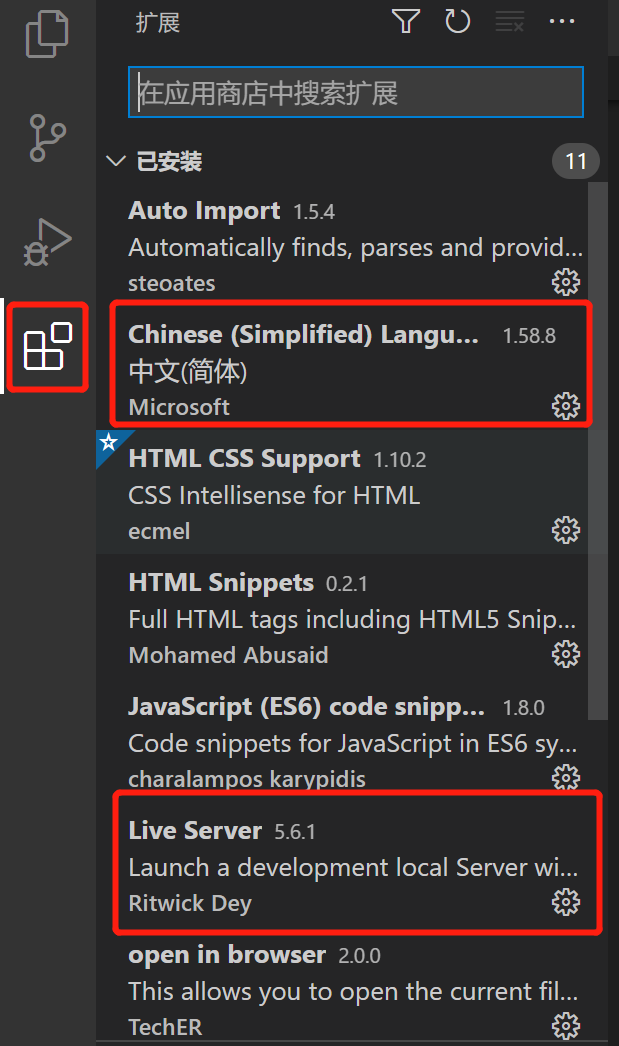
安裝插件
創(chuàng)建項(xiàng)目
在vscode里面選擇 File -> Open Folder 打開文件夾,這樣才可以創(chuàng)建項(xiàng)目。
工作區(qū)
打開文件夾后,選擇“文件 -> 將工作區(qū)另存為...”,為工作區(qū)文件起一個(gè)名字,存儲(chǔ)在剛才的文件夾下即可
es6介紹
什么是es6
ECMAScript 6.0(簡稱 ES6)是 JavaScript 語言的下一代標(biāo)準(zhǔn), 2015 年 6 月正式發(fā)布。它的目標(biāo),是使得 JavaScript 語言可以用來編寫復(fù)雜的大型應(yīng)用程序,成為企業(yè)級(jí)開發(fā)語言。
解構(gòu)賦值
 //對(duì)象解構(gòu)賦值
    <script>
     let user ={name:'xxx',age:12}
     let {name,age} = user;
     console.log(name,age);
    </script>
模板字符串
 <script>
    let name ='liugui'
    let age = 20;
    let info = `my name is ${name},
    I am ${age}`;
    console.log(info);
    </script>
聲明對(duì)象
 <script>
        //傳統(tǒng)定義對(duì)象
    let name ='liugui'
    let age = 20;
    let user ={name:name,age:age}
    console.log(user);
    //es6定義對(duì)象
    let user1={name,age};
    console.log(user1);
    </script>
對(duì)象擴(kuò)展運(yùn)算符
 <script>
        //對(duì)象的復(fù)制  只需要加...
        let user = {name:'xxx',age:12};
        let user2 ={...user};
        console.log(user2);
        //對(duì)象合并
        let name = {name:'xxx',test1:1};
        let age ={age:12,test1:5};
        let person = {...name,...age};
        console.log(person);

    </script>
箭頭函數(shù)
 <script>

        //傳統(tǒng)方式定義函數(shù)
        var f1 = function(a){
            return a*3;
        }
        console.log(f1(2));
        //es6
        var f2 = a => a*4;
        console.log(f2(3));
        //多參
        var f3 = function(m,n){
            return m+n;
        }
        console.log(f3(3,4));
        //es6
        var f4 = (m,n) => m+n;
        console.log(f4(3,4));

    </script>
vue語法
入門
 <script src="vue.js"></script>
    <div id="app">
        <!-- 插值表達(dá)式 -->
        {{message}}
    </div>
    <script>
         new Vue({
            el:'#app',
            data () {
                return {
                    message:'hello word'
                }
            }
        })
    </script>
單向綁定
 <div id="app">
        <div style="color:red;">單向綁定1</div>
        <div v-bind:style="msg">單向綁定2</div>
        <!-- 簡寫 : -->
        <div :style="msg">單向綁定3</div>
    </div>
    <script src="vue.js"></script>
    <script>
        new Vue({
            el: '#app',
            data: {
                msg:'color:green;'
            }
        })
    </script>
雙向綁定
 <div id="app">
        {{keyword}}
        <Input v-model="keyword" :value="keyword"></Input>

    </div>
    <script src="vue.js"></script>
    <script>
        new Vue({
            el: '#app',
            data: {
                keyword:'222'
            }
        })
    </script>
綁定事件
  <div id="app">
       <button v-on:click="show()">綁定事件1</button>

       <button @click="show()">綁定事件2</button>

    </div>
    <script src="vue.js"></script>
    <script>
        new Vue({
            el: '#app',
            data: {
                keyword:'222'
            },
            methods: {
                show(){
                    console.log("點(diǎn)擊成功");
                }
            }
        })
    </script>
條件指令
 <div id="app">
    <input type="checkbox" v-model="ok" />
        <br>
        <div v-if="ok">ok</div>
        <div v-else>no</div>
    </div>
    <script src="vue.js"></script>
    <script>
        new Vue({
            el: '#app',
            data: {
                ok:false
            },
            methods: {
                show(){
                    console.log("點(diǎn)擊成功");
                }
            }
        })
    </script>
循環(huán)指令
 <div id="app">
        <div v-for="user in userList">
            {{user.name}}
        </div>

        <br>
        <div v-for="(user,index) in userList">
            {{index+1}} --  {{user.name}} -- {{user.age}}
        </div>
    </div>
    <script src="vue.js"></script>
    <script>
        new Vue({
            el: '#app',
            data: {
                userList: [
                    {"name":"劉1","age":11},
                    {"name":"李2","age":12},
                    {"name":"孫3","age":13}
                ]
            },

        })
    </script>
vue的生命周期
<div id="app">
    {{msg}}
</div>
<script src="vue.min.js"></script>
<script>
    new Vue({
        el: '#app',
        data: {
            msg:'hello'
        },
        created() { //在頁面渲染之前執(zhí)行
            debugger
            console.log('created.....')
        },
        mounted() {//在頁面渲染之后執(zhí)行
            debugger
            console.log('mounted.....')
        }
    })
</script>
axios
axios是獨(dú)立于vue的一個(gè)項(xiàng)目,可以用于瀏覽器和node.js中發(fā)送ajax請(qǐng)求
html
<div id="app">
    <table>
        <tr v-for="user in userList">
            <td>{{user.name}}</td>
            <td>{{user.age}}</td>
        </tr>
    </table>
</div>
<script src="vue.min.js"></script>
<script src="axios.min.js"></script>
<script>
    new Vue({
        el: '#app',
        data: {
            userList:[]
        },
        created() { //在頁面渲染之前執(zhí)行
            //調(diào)用方法,得到返回json數(shù)據(jù)
            this.getList()
        },
        methods:{
            getList() {
                //使用axios方式ajax請(qǐng)求
                axios.get("user.json") //user.json相當(dāng)于后端返回的數(shù)據(jù)
                    .then(response => {//請(qǐng)求成功
                        //console.log(response)
                        this.userList =  response.data.data.items
                        console.log(this.userList)
                    })
                    .catch(error => {
                        console.log(error)
                    }) //請(qǐng)求失敗
            }
        }
    })
</script>
user.json
{
   "code":200,
   "message":"成功",
   "data":{
       "items":[
           {"name":"lucy1","age":21},
           {"name":"lucy2","age":22},
           {"name":"lucy3","age":23}
       ]
   }
}
評(píng)論
圖片
表情