
用Python實(shí)現(xiàn)文件上傳和下載
python HttpServer
python2與python3都可以基于Simple HTTP Server,快速創(chuàng)建一個(gè)http服務(wù)器,但方法略有不同。
首先進(jìn)入你需要設(shè)置的http服務(wù)器文件上傳目錄 (我以自己電腦路徑:F:/upload_file) 和文件下載目錄(我以自己電腦路徑:F:/download_file),進(jìn)入到文件下載目錄下,然后:
python2:
python -m SimpleHTTPServer 8888python3: ?
python -m http.server 8888
使用方式與樣式都是一樣的,如下圖:
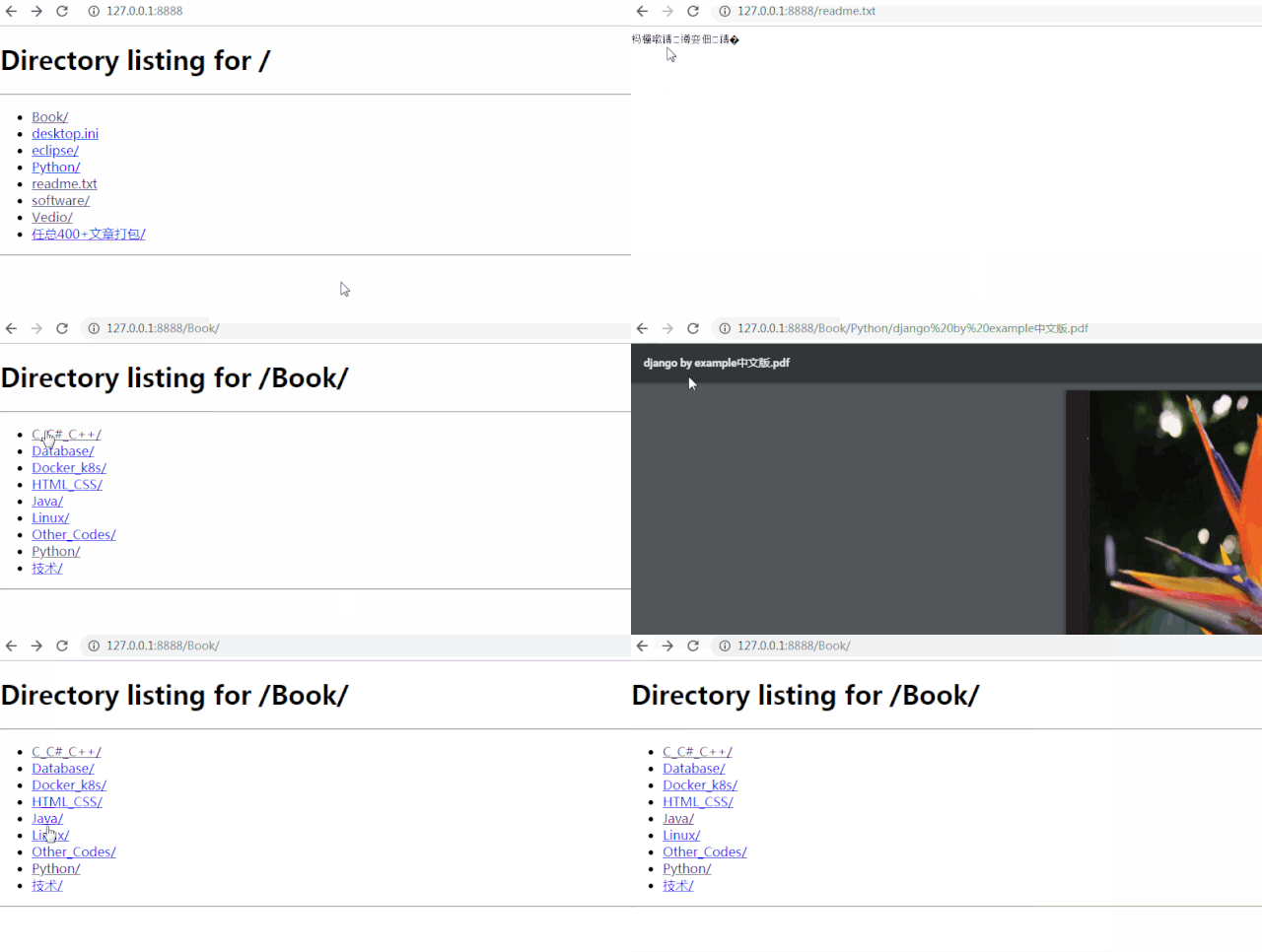
用起來(lái)沒(méi)問(wèn)題,但丑出天際…
提單時(shí)間到,來(lái)說(shuō)一說(shuō)有哪些存在的問(wèn)題吧:
啟動(dòng)服務(wù)器后,無(wú)登陸限制,任何人都能訪問(wèn)
訪問(wèn)鏈接后,顯示純html頁(yè)面,美觀性差,或者說(shuō)毫無(wú)美感可言
非ansi碼的文本打開(kāi),都是亂碼
文本與pdf等文件點(diǎn)擊時(shí),默認(rèn)打開(kāi)而非下載
文件夾與文件的差別僅僅在于是否有末尾/,識(shí)別度差
文件夾與文件的詳細(xì)信息無(wú)法獲取(如:創(chuàng)建時(shí)間,大小)
頁(yè)面點(diǎn)擊無(wú)返回按鈕,只能使用瀏覽器默認(rèn)的前進(jìn)后退
默認(rèn)的http只有下載,而沒(méi)有上傳功能(這個(gè)是硬傷啊!)
既然python自帶的http服務(wù)器,存在這么多的問(wèn)題,那決不能慣著它,今天咱們就自己重寫一個(gè)PythonHttpServer。
VIP HttpServer
先來(lái)看看最終的實(shí)現(xiàn)效果 :
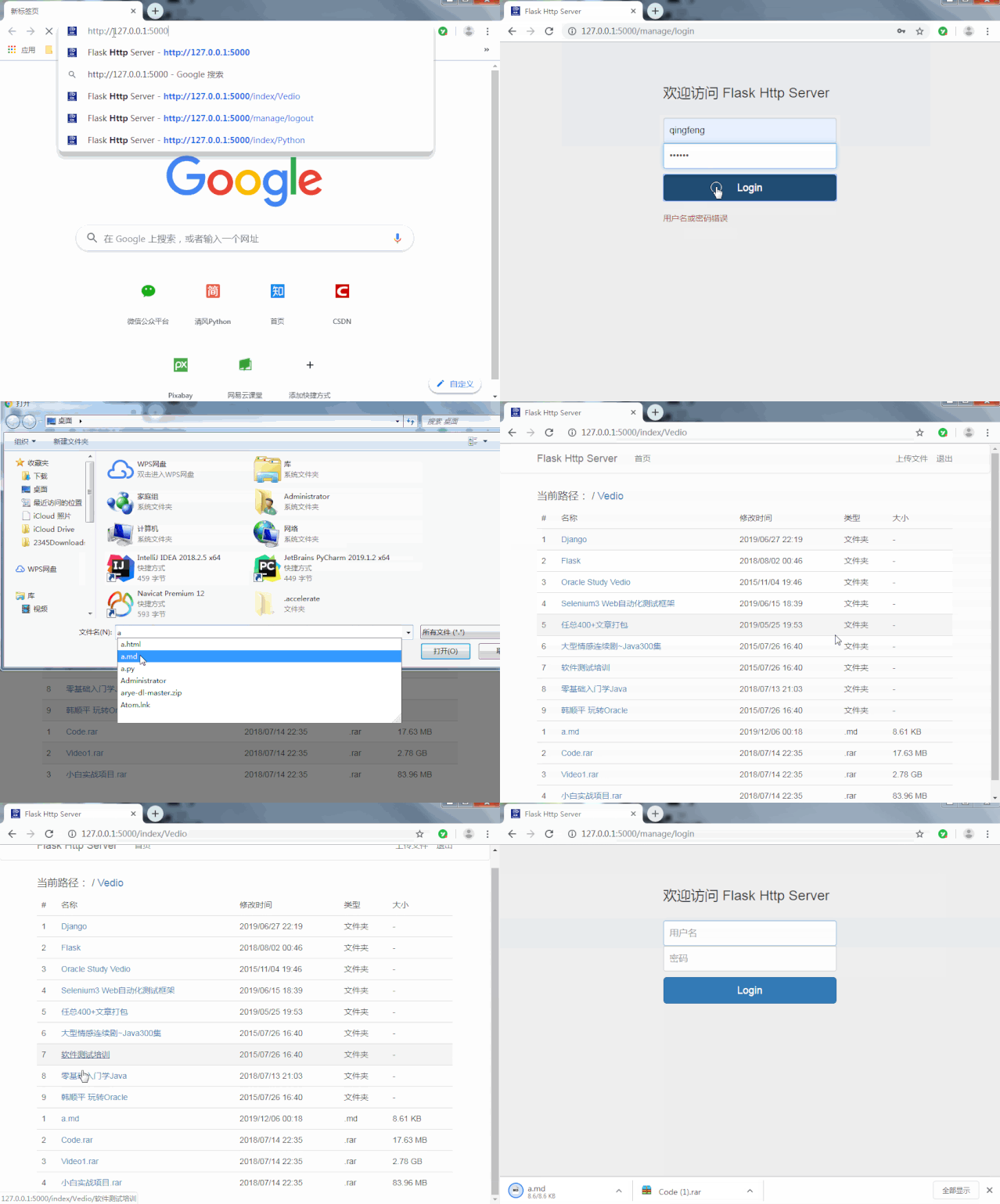 FlaskHttpServer.gif
簡(jiǎn)單的安全驗(yàn)證
添加了用戶名密碼的登陸限制(簡(jiǎn)單寫死了用戶名密碼,當(dāng)然可擴(kuò)展支持?jǐn)?shù)據(jù)庫(kù)讀取等方式),這個(gè)就不多說(shuō)了美化樣式
引入了bootstrap的表單樣式,簡(jiǎn)潔美觀下載調(diào)優(yōu)
設(shè)置所有文件均直接下載,解決了之前文本等直接打開(kāi)、并且亂碼的問(wèn)題上傳功能
jQuery配合Ajax,加上bootstrap的模態(tài)框,輕松完成上傳功能。
展示優(yōu)化
仿照windows系統(tǒng),添加了名稱、修改時(shí)間、文件類型、大小
優(yōu)化了文件夾、文件等展示方式,并針對(duì)兩者進(jìn)行大小寫的模糊排序,
針對(duì)文件大小,優(yōu)化動(dòng)態(tài)展示B、KB、MB、GB
頁(yè)面跳轉(zhuǎn)
增加了首頁(yè),與子路徑的快捷鍵訪問(wèn),每一層的路徑均可做為鏈接進(jìn)行跳轉(zhuǎn)
設(shè)計(jì)方案
使用藍(lán)圖構(gòu)建項(xiàng)目
雖然目前僅存在賬戶管理與頁(yè)面展示和下載兩個(gè)模塊,但使用藍(lán)圖的目的是為了便于擴(kuò)展,后期有空了還可以實(shí)現(xiàn)下上傳功能。
整體目錄如下:
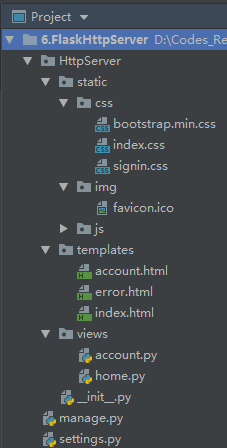 項(xiàng)目目錄2.
針對(duì)目錄展示
獲取path后,先獲取os.listdir()結(jié)果進(jìn)行排序:sorted(os.listdir('.'), key=lambda x: x.lower())
再將目錄分為兩個(gè)列表(文件夾、文件),并針對(duì)類型不同,分別獲取不同數(shù)據(jù),方法如下:
class?DocumentReader:
????def?__init__(self,?real_path):
????????self.real_path?=?real_path

????def?analysis_dir(self):
????????dirs?=?[]
????????files?=?[]
????????os.chdir(self.real_path)
????????for?name?in?sorted(os.listdir('.'),?key=lambda?x:?x.lower()):
????????????_time?=?time.strftime("%Y/%m/%d?%H:%M",?time.localtime(os.path.getctime(name)))
????????????if?os.path.isdir(name):
????????????????dirs.append([name,?_time,?'文件夾',?'-'])
????????????elif?os.path.isfile(name):
????????????????file_type?=?os.path.splitext(name)[1]
????????????????size?=?self.get_size(os.path.getsize(name))
????????????????files.append([name,?_time,?file_type,?size])
????????return?dirs,?files

????@staticmethod
????def?get_size(size):
????????if?size?1024:
????????????return?'%d??B'?%?size
????????elif?1024?<=?size?1024?*?1024:
????????????return?'%.2f?KB'?%?(size?/?1024)
????????elif?1024?*?1024?<=?size?1024?*?1024?*?1024:
????????????return?'%.2f?MB'?%?(size?/?(1024?*?1024))
????????else:
????????????return?'%.2f?GB'?%?(size?/?(1024?*?1024?*?1024))
創(chuàng)建自定義過(guò)濾器
將所有路徑進(jìn)行拆分,生成子路徑及對(duì)應(yīng)的path進(jìn)行跳轉(zhuǎn)
[email protected]_filter("split_path")
????def?split_path(path):
????????path_list?=?path.split('/')
????????path_list?=?[[path_list[i?-?1],?'/'.join(path_list[:i])]?for?i?in?range(1,?len(path_list)+1)]
????????return?path_list
因?yàn)樯婕暗奈募容^多,就不一個(gè)個(gè)的往上貼了,如果大家對(duì)這個(gè)小項(xiàng)目感興趣,可以公眾號(hào)回復(fù)關(guān)鍵字[服務(wù)器]獲取源碼….
上傳功能之模態(tài)框
使用bootstrap實(shí)現(xiàn)點(diǎn)擊按鈕彈出窗口,簡(jiǎn)直不要太簡(jiǎn)單。我們只需要將寫好的窗口內(nèi)容隱藏,然后調(diào)用bootstrap的框架即可,簡(jiǎn)單幾行就能完成相關(guān)功能實(shí)現(xiàn)….
前提條件是,我們需要引入bootstrap.min.js,直接上代碼看下準(zhǔn)備好的上傳文件彈框吧….
<html>
<head>
????<meta?charset="utf-8">?
????<title>Bootstrap?實(shí)例?-?模態(tài)框(Modal)插件title>
????<link?rel="stylesheet"?href="https://cdn.staticfile.org/twitter-bootstrap/3.3.7/css/bootstrap.min.css">
????<script?src="https://cdn.staticfile.org/jquery/2.1.1/jquery.min.js">script>
????<script?src="https://cdn.staticfile.org/twitter-bootstrap/3.3.7/js/bootstrap.min.js">script>
head>
<body>

<h2>創(chuàng)建模態(tài)框(Modal)h2>

<button?class="btn?btn-primary?btn-lg"?data-toggle="modal"?data-target="#myModal">
????文件上傳
button>

<div?class="modal?fade"?id="myModal"?tabindex="-1"?role="dialog"?aria-labelledby="myModalLabel"?aria-hidden="true">
????<div?class="modal-dialog">
????????<div?class="modal-content">
????????????<div?class="modal-header">
????????????????<h4?class="modal-title"?id="myModalLabel">
????????????????????請(qǐng)選擇所需上傳的本地文件
????????????????h4>
????????????div>
????????????<div?class="modal-body">
????????????????<form?id="upload-form"?enctype="multipart/form-data">
????????????????????<input?id='file'?class="btn?btn-info"?name="upload_file"?type="file">
????????????????form>
????????????div>
????????????<div?class="modal-footer">
????????????????<button?id='upload'?class="btn?btn-primary?">上傳button>
????????????????<button?type="button"?class="btn?btn-default"?data-dismiss="modal">關(guān)閉button>
????????????div>
????????div>
????div>
div>
body>
html>

bootstrap模態(tài)框.gif
jQuery事件與ajax
正常情況下,我們使用form表單進(jìn)行上傳文件,需要在表單內(nèi)部添加一個(gè)type="submit"的按鈕,可如何才能像demo示例中的,將上傳按鈕置于頁(yè)面的任何位置來(lái)控制上傳呢?有jQuery在,就很簡(jiǎn)單…
<script>
$('#upload')
????.click(function()?{
????????$('#upload').submit();
????})
script>
由于是彈出窗口,我們選擇文件后,點(diǎn)擊上傳,此時(shí)如果使用url_for()進(jìn)行頁(yè)面跳轉(zhuǎn),有些不符合使用習(xí)慣,那么再加深一點(diǎn),引入ajax進(jìn)行異步提交好了,那么全量的點(diǎn)擊事件就變?yōu)椋?/p>
<script>
$('#upload').click(function()?{
????var?upload_path?=?$('#upload_path').text();
????var?formData?=?new?FormData($('#upload-form')[0]);
????formData.append("upload_path",?upload_path);
????$.post({
????????url:?'/upload',
????????dataType:?'json',
????????type:?'POST',
????????data:?formData,
????????async:?true,
????????cashe:?false,
????????contentType:?false,
????????processData:?false,
????????success:?function(returndata)?{
????????????if?(returndata['code']?==?200)?{
????????????????var?info?=?returndata['info']
????????????????alert(info);
????????????}
????????},
????????error:?function(returndata)?{
????????????alert("上傳失敗!")
????????}
????})
});
script>
關(guān)于js中使用Jinjia2
在js中直接使用jinjia2的模板引擎會(huì)報(bào)錯(cuò)…比如這樣:alert({{Book}});,那么該怎么處理?
將內(nèi)容寫在html中,然后通過(guò)js去獲取:
"upload_path"?style="display:none">{{path}}
var?upload_path?=?$('#upload_path').text();
Good
通過(guò)jinjia2的tojson過(guò)濾器,可以將變量轉(zhuǎn)為json字符串:
var?upload_path?=?{{path|tojson|safe}};最終上傳實(shí)現(xiàn)
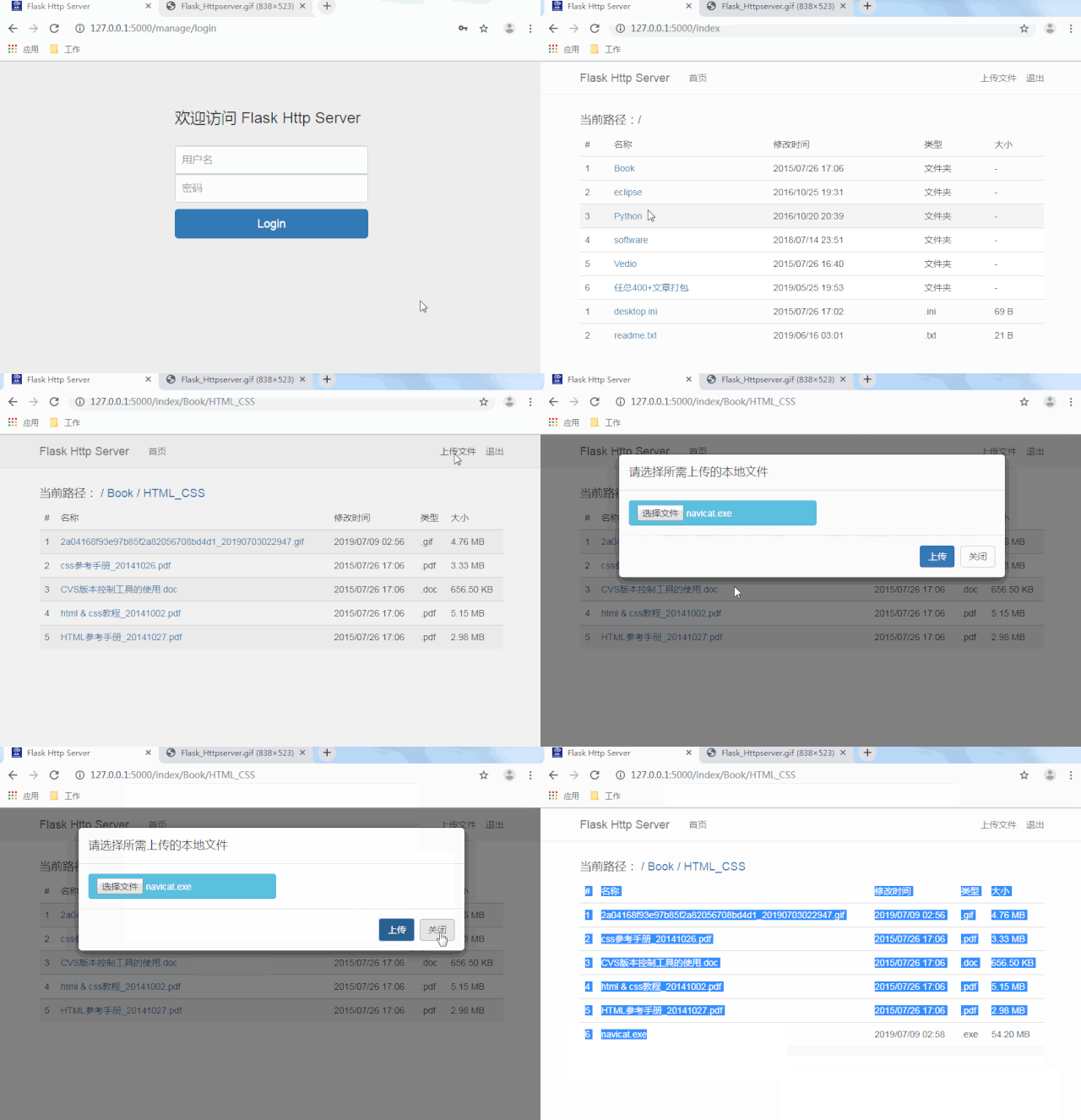
如果大家對(duì)這個(gè)小項(xiàng)目感興趣,歡迎關(guān)注公眾號(hào),后臺(tái)回復(fù)關(guān)鍵字服務(wù)器獲取源碼....
END
覺(jué)得不錯(cuò)就點(diǎn)一下“在看”吧?