
Android實現(xiàn)3D卡片翻動效果
作者 | 被代碼淹沒的小伙子 地址 | https://www.jianshu.com/p/ee8a37ea736d

效果:
實現(xiàn)思路:
1、Viewpager的豎向滑動這里說下我的實現(xiàn)方式:交換觸摸位置的x,y方向,利用PageTransformer的transformPage()方法,在移動過程中通過translation動態(tài)改變頁面方向?qū)崿F(xiàn)豎向移動。
主要代碼:
/*** Swaps the X and Y coordinates of your touch event.*/private MotionEvent swapXY(MotionEvent ev) {float width = getWidth();float height = getHeight();float newX = (ev.getY() / height) * width;float newY = (ev.getX() / width) * height;ev.setLocation(newX, newY);return ev;}@Overridepublic boolean onInterceptTouchEvent(MotionEvent ev) {boolean intercepted = super.onInterceptTouchEvent(swapXY(ev));return intercepted;}
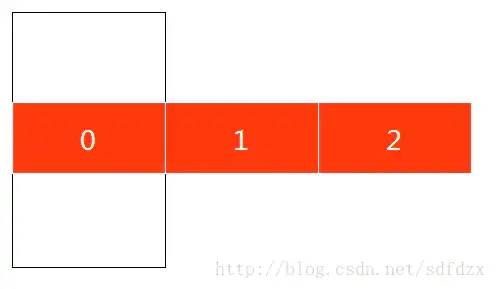
Viewpager的默認布局方式如圖所示,也就是只能觸發(fā)你的橫向事件,豎向的滑動并不會影響Viewpager的滑動。
這里為了使豎向的滑動起效果,可以看到:
newX = (ev.getY() / height) * width當手指移動距離:
ev.getY() = height當手指移動距離:
ev.getX() = widthprivate class VerticalPageTransformer implements ViewPager.PageTransformer {public void transformPage(View view, float position) {if (position <= 0) {view.setAlpha(1);view.setTranslationY((float) (-view.getHeight() * (1 - Math.pow(0.9f, -position))));//設置縮放中點view.setPivotX(view.getWidth() / 2f);view.setPivotY(view.getHeight() / 2f);//設置縮放的比例 此處設置兩個相鄰的卡片的縮放比率為0.9ffloat Scale = (float) Math.pow(0.9f, -position);if (Scale > 0.7f) {view.setScaleX(Scale);view.setScaleY(Scale);} else {view.setAlpha(0);}} else {//(0,++)view.setPivotY(view.getHeight());setCameraDistance(view);view.setRotationX(180 * -position);view.setAlpha(1 - position);}view.setTranslationX(view.getWidth() * -position);}}
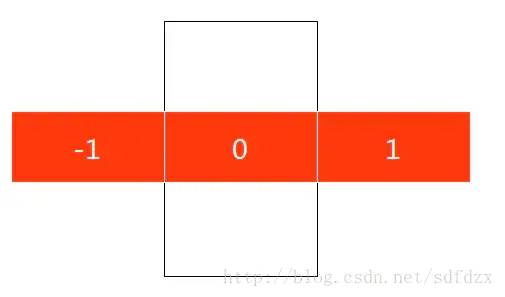
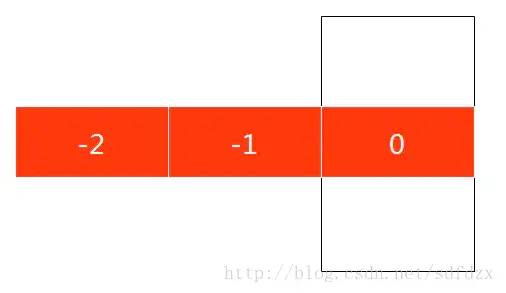
初始時,前三張的position分別為0,1,2。
向左滑動一頁:前三張的position分別為-1,0,1
再向左滑一頁:前三張的position分別為-2,-1,0
所以可以得到position的變化范圍,當前頁顯示的position為0,當前頁左邊的顯示的<0,當前頁右邊的顯示的>0。
這里我將當前頁設置為最后一頁(總量為8),那么顯示的position分別為-7,-6...-2,-1,0
現(xiàn)在來一步一步實現(xiàn)
1.實現(xiàn)X坐標相同

view.setTranslationX(view.getWidth() * -position);
2.實現(xiàn)Y坐標逐減

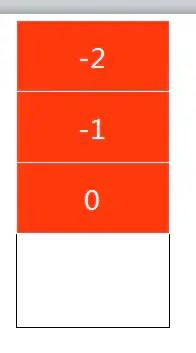
view.setTranslationY((float) (-view.getHeight() * (1 - Math.pow(0.9f, -position))));position=-1:要上移一點,y-height(1-0.9) = y-height0.1
position=-2:再上移一點,y-height(1-0.90.9) = y-height*0.19
...以此類推
3.實現(xiàn)逐層縮小
這塊應該就比較好實現(xiàn)了,現(xiàn)在position=0,-1,-2,-3,...,-7(我是設第一頁顯示末頁,倒著來)
//設置縮放中點view.setPivotX(view.getWidth() / 2f);view.setPivotY(view.getHeight() / 2f);//設置縮放的比例 此處設置兩個相鄰的卡片的縮放比率為0.9ffloat Scale = (float) Math.pow(0.9f, -position);view.setScaleX(Scale);view.setScaleY(Scale);
position=0:對應Scale = 1
position=-1:Scale=0.9
position=-2:Scale=0.9*0.9=0.81
4.實現(xiàn)3D繞軸旋轉(zhuǎn)
view.setPivotY(view.getHeight());setCameraDistance(view);view.setRotationX(180 * -position);/*** 改變視角距離, 貼近屏幕*/private void setCameraDistance(View view) {int distance = 10000;float scale = getResources().getDisplayMetrics().density * distance;view.setCameraDistance(scale);}
view.setPivotY(view.getHeight());這里我們軸確定了好就要確定我們的旋轉(zhuǎn)的角度,根據(jù)效果,我們發(fā)現(xiàn),我們旋轉(zhuǎn)的角度是[0,-180],而position的變化范圍是[0,1],所以代碼就很好理解了
view.setRotationX(180 * -position);
/*** 改變視角距離, 貼近屏幕*/private void setCameraDistance(View view) {int distance = 10000;float scale = getResources().getDisplayMetrics().density * distance;view.setCameraDistance(scale);}
5.透明度變化
(負無窮,0) alpha =1
[0,1] alpha =1-position逐漸透明
[1,正無窮)alpha <=0透明
6.設置顯示頁數(shù)
if (Scale > 0.7f) {view.setScaleX(Scale);view.setScaleY(Scale);} else {view.setAlpha(0);}
評論
圖片
表情