
Hbase集群掛掉的一次驚險(xiǎn)經(jīng)歷
hbase集群異常事故,由于不規(guī)范操作,集群無法啟動(dòng),在騰訊云大佬的幫助下,花了一個(gè)周末才修好,真的是一次難忘的回憶。版本信息
cdh-6.0.1
hadoop-3.0
hbase-2.0.0
問題
hbase釋放一下內(nèi)存,順便修改一下yarn的一些配置,結(jié)果停掉后,hbase起不來了,錯(cuò)誤信息就是hbase:namespace表is not online,master一直初始化,具體錯(cuò)誤信息:15:41:59.313 [ProcExecTimeout] WARN org.apache.hadoop.hbase.master.assignment.AssignmentManager - STUCK Region-In-Transition rit=OPENING, location=node4,16020,1589648302672, table=real_time_data, region=74cac15d22e99800ad0ace14c9ed74d6
15:41:59.313 [ProcExecTimeout] WARN org.apache.hadoop.hbase.master.assignment.AssignmentManager - STUCK Region-In-Transition rit=OPENING, location=node3,16020,1596598630022, table=real_time_data, region=8e68891d5826c09974d81ad5d705c3b6
15:41:59.313 [ProcExecTimeout] WARN org.apache.hadoop.hbase.master.assignment.AssignmentManager - STUCK Region-In-Transition rit=OPENING, location=node3,16020,1596598630022, table=real_time_data, region=75c42d75e2556bf70ff527f2425e8509
15:41:59.313 [ProcExecTimeout] WARN org.apache.hadoop.hbase.master.assignment.AssignmentManager - STUCK Region-In-Transition rit=OPENING, location=node3,16020,1596598630022, table=real_time_data, region=2eee04869ac2c35984d4d22e6e9f2f31
15:42:08.264 [master/node3:16000] INFO org.apache.hadoop.hbase.client.RpcRetryingCallerImpl - Call exception, tries=15, retries=15, started=128887 ms ago, cancelled=false, msg=org.apache.hadoop.hbase.NotServingRegionException: hbase:namespace,,1558205786137.40562c48c9210c06813adce48773cb6a. is not online on node1,16020,1596957741742
at org.apache.hadoop.hbase.regionserver.HRegionServer.getRegionByEncodedName(HRegionServer.java:3273)
at org.apache.hadoop.hbase.regionserver.HRegionServer.getRegion(HRegionServer.java:3250)
at org.apache.hadoop.hbase.regionserver.RSRpcServices.getRegion(RSRpcServices.java:1414)
at org.apache.hadoop.hbase.regionserver.RSRpcServices.get(RSRpcServices.java:2446)
at org.apache.hadoop.hbase.shaded.protobuf.generated.ClientProtos$ClientService$2.callBlockingMethod(ClientProtos.java:41998)
at org.apache.hadoop.hbase.ipc.RpcServer.call(RpcServer.java:409)
at org.apache.hadoop.hbase.ipc.CallRunner.run(CallRunner.java:131)
at org.apache.hadoop.hbase.ipc.RpcExecutor$Handler.run(RpcExecutor.java:324)
at org.apache.hadoop.hbase.ipc.RpcExecutor$Handler.run(RpcExecutor.java:304)
, details=row 'default' on table 'hbase:namespace' at region=hbase:namespace,,1558205786137.40562c48c9210c06813adce48773cb6a., hostname=node1,16020,1589648239142, seqNum=55
... ...
15:44:58.229 [qtp1792826268-435] WARN org.eclipse.jetty.servlet.ServletHandler - /master-status
org.apache.hadoop.hbase.PleaseHoldException: Master is initializing
at org.apache.hadoop.hbase.master.HMaster.isInMaintenanceMode(HMaster.java:2827) ~[hbase-server-2.0.0.3.0.0.0-1634.jar:2.0.0.3.0.0.0-1634]
at org.apache.hadoop.hbase.tmpl.master.MasterStatusTmplImpl.renderNoFlush(MasterStatusTmplImpl.java:271) ~[hbase-server-2.0.0.3.0.0.0-1634.jar:2.0.0.3.0.0.0-1634]
at org.apache.hadoop.hbase.tmpl.master.MasterStatusTmpl.renderNoFlush(MasterStatusTmpl.java:389) ~[hbase-server-2.0.0.3.0.0.0-1634.jar:2.0.0.3.0.0.0-1634]
at org.apache.hadoop.hbase.tmpl.master.MasterStatusTmpl.render(MasterStatusTmpl.java:380) ~[hbase-server-2.0.0.3.0.0.0-1634.jar:2.0.0.3.0.0.0-1634]
at org.apache.hadoop.hbase.master.MasterStatusServlet.doGet(MasterStatusServlet.java:81) ~[hbase-server-2.0.0.3.0.0.0-1634.jar:2.0.0.3.0.0.0-1634]
at javax.servlet.http.HttpServlet.service(HttpServlet.java:687) ~[javax.servlet-api-3.1.0.jar:3.1.0]
at javax.servlet.http.HttpServlet.service(HttpServlet.java:790) ~[javax.servlet-api-3.1.0.jar:3.1.0]
at org.eclipse.jetty.servlet.ServletHolder.handle(ServletHolder.java:848) ~[jetty-servlet-9.3.19.v20170502.jar:9.3.19.v20170502]
at org.eclipse.jetty.servlet.ServletHandler$CachedChain.doFilter(ServletHandler.java:1772) ~[jetty-servlet-9.3.19.v20170502.jar:9.3.19.v20170502]
at org.apache.hadoop.hbase.http.lib.StaticUserWebFilter$StaticUserFilter.doFilter(StaticUserWebFilter.java:112) ~[hbase-http-2.0.0.3.0.0.0-1634.jar:2.0.0.3.0.0.0-1634]
at org.eclipse.jetty.servlet.ServletHandler$CachedChain.doFilter(ServletHandler.java:1759) ~[jetty-servlet-9.3.19.v20170502.jar:9.3.19.v20170502]
at org.apache.hadoop.hbase.http.ClickjackingPreventionFilter.doFilter(ClickjackingPreventionFilter.java:48) ~[hbase-http-2.0.0.3.0.0.0-1634.jar:2.0.0.3.0.0.0-1634]
at org.eclipse.jetty.servlet.ServletHandler$CachedChain.doFilter(ServletHandler.java:1759) ~[jetty-servlet-9.3.19.v20170502.jar:9.3.19.v20170502]
at org.apache.hadoop.hbase.http.HttpServer$QuotingInputFilter.doFilter(HttpServer.java:1374) ~[hbase-http-2.0.0.3.0.0.0-1634.jar:2.0.0.3.0.0.0-1634]
at org.eclipse.jetty.servlet.ServletHandler$CachedChain.doFilter(ServletHandler.java:1759) ~[jetty-servlet-9.3.19.v20170502.jar:9.3.19.v20170502]
at org.apache.hadoop.hbase.http.NoCacheFilter.doFilter(NoCacheFilter.java:49) ~[hbase-http-2.0.0.3.0.0.0-1634.jar:2.0.0.3.0.0.0-1634]
at org.eclipse.jetty.servlet.ServletHandler$CachedChain.doFilter(ServletHandler.java:1759) ~[jetty-servlet-9.3.19.v20170502.jar:9.3.19.v20170502]
at org.apache.hadoop.hbase.http.NoCacheFilter.doFilter(NoCacheFilter.java:49) ~[hbase-http-2.0.0.3.0.0.0-1634.jar:2.0.0.3.0.0.0-1634]
at org.eclipse.jetty.servlet.ServletHandler$CachedChain.doFilter(ServletHandler.java:1759) ~[jetty-servlet-9.3.19.v20170502.jar:9.3.19.v20170502]
at org.eclipse.jetty.servlet.ServletHandler.doHandle(ServletHandler.java:582) [jetty-servlet-9.3.19.v20170502.jar:9.3.19.v20170502]
at org.eclipse.jetty.server.handler.ScopedHandler.handle(ScopedHandler.java:143) [jetty-server-9.3.19.v20170502.jar:9.3.19.v20170502]
at org.eclipse.jetty.security.SecurityHandler.handle(SecurityHandler.java:548) [jetty-security-9.3.19.v20170502.jar:9.3.19.v20170502]
at org.eclipse.jetty.server.session.SessionHandler.doHandle(SessionHandler.java:226) [jetty-server-9.3.19.v20170502.jar:9.3.19.v20170502]
at org.eclipse.jetty.server.handler.ContextHandler.doHandle(ContextHandler.java:1180) [jetty-server-9.3.19.v20170502.jar:9.3.19.v20170502]
at org.eclipse.jetty.servlet.ServletHandler.doScope(ServletHandler.java:512) [jetty-servlet-9.3.19.v20170502.jar:9.3.19.v20170502]
at org.eclipse.jetty.server.session.SessionHandler.doScope(SessionHandler.java:185) [jetty-server-9.3.19.v20170502.jar:9.3.19.v20170502]
at org.eclipse.jetty.server.handler.ContextHandler.doScope(ContextHandler.java:1112) [jetty-server-9.3.19.v20170502.jar:9.3.19.v20170502]
at org.eclipse.jetty.server.handler.ScopedHandler.handle(ScopedHandler.java:141) [jetty-server-9.3.19.v20170502.jar:9.3.19.v20170502]
at org.eclipse.jetty.server.handler.HandlerCollection.handle(HandlerCollection.java:119) [jetty-server-9.3.19.v20170502.jar:9.3.19.v20170502]
at org.eclipse.jetty.server.handler.HandlerWrapper.handle(HandlerWrapper.java:134) [jetty-server-9.3.19.v20170502.jar:9.3.19.v20170502]
at org.eclipse.jetty.server.Server.handle(Server.java:534) [jetty-server-9.3.19.v20170502.jar:9.3.19.v20170502]
at org.eclipse.jetty.server.HttpChannel.handle(HttpChannel.java:320) [jetty-server-9.3.19.v20170502.jar:9.3.19.v20170502]
at org.eclipse.jetty.server.HttpConnection.onFillable(HttpConnection.java:251) [jetty-server-9.3.19.v20170502.jar:9.3.19.v20170502]
at org.eclipse.jetty.io.AbstractConnection$ReadCallback.succeeded(AbstractConnection.java:283) [jetty-io-9.3.19.v20170502.jar:9.3.19.v20170502]
at org.eclipse.jetty.io.FillInterest.fillable(FillInterest.java:108) [jetty-io-9.3.19.v20170502.jar:9.3.19.v20170502]
at org.eclipse.jetty.io.SelectChannelEndPoint$2.run(SelectChannelEndPoint.java:93) [jetty-io-9.3.19.v20170502.jar:9.3.19.v20170502]
at org.eclipse.jetty.util.thread.strategy.ExecuteProduceConsume.executeProduceConsume(ExecuteProduceConsume.java:303) [jetty-util-9.3.19.v20170502.jar:9.3.19.v20170502]
at org.eclipse.jetty.util.thread.strategy.ExecuteProduceConsume.produceConsume(ExecuteProduceConsume.java:148) [jetty-util-9.3.19.v20170502.jar:9.3.19.v20170502]
at org.eclipse.jetty.util.thread.strategy.ExecuteProduceConsume.run(ExecuteProduceConsume.java:136) [jetty-util-9.3.19.v20170502.jar:9.3.19.v20170502]
at org.eclipse.jetty.util.thread.QueuedThreadPool.runJob(QueuedThreadPool.java:671) [jetty-util-9.3.19.v20170502.jar:9.3.19.v20170502]
at org.eclipse.jetty.util.thread.QueuedThreadPool$2.run(QueuedThreadPool.java:589) [jetty-util-9.3.19.v20170502.jar:9.3.19.v20170502]
at java.lang.Thread.run(Thread.java:745) [?:1.8.0_121]
常規(guī)操作
hbase2.0.0版本hbck已經(jīng)廢棄了修復(fù)的命令。-----------------------------------------------------------------------
NOTE: As of HBase version 2.0, the hbck tool is significantly changed.
In general, all Read-Only options are supported and can be be used
safely. Most -fix/ -repair options are NOT supported. Please see usage
below for details on which options are not supported.
-----------------------------------------------------------------------
省略若干...
省略若干...
省略若干...
NOTE: Following options are NOT supported as of HBase version 2.0+.
UNSUPPORTED Metadata Repair options: (expert features, use with caution!)
-fix Try to fix region assignments. This is for backwards compatiblity
-fixAssignments Try to fix region assignments. Replaces the old -fix
-fixMeta Try to fix meta problems. This assumes HDFS region info is good.
-fixHdfsHoles Try to fix region holes in hdfs.
-fixHdfsOrphans Try to fix region dirs with no .regioninfo file in hdfs
-fixTableOrphans Try to fix table dirs with no .tableinfo file in hdfs (online mode only)
-fixHdfsOverlaps Try to fix region overlaps in hdfs.
-maxMerge <n> When fixing region overlaps, allow at most <n> regions to merge. (n=5 by default)
-sidelineBigOverlaps When fixing region overlaps, allow to sideline big overlaps
-maxOverlapsToSideline <n> When fixing region overlaps, allow at most <n> regions to sideline per group. (n=2 by default)
-fixSplitParents Try to force offline split parents to be online.
-removeParents Try to offline and sideline lingering parents and keep daughter regions.
-fixEmptyMetaCells Try to fix hbase:meta entries not referencing any region (empty REGIONINFO_QUALIFIER rows)
UNSUPPORTED Metadata Repair shortcuts
-repair Shortcut for -fixAssignments -fixMeta -fixHdfsHoles -fixHdfsOrphans -fixHdfsOverlaps -fixVersionFile -sidelineBigOverlaps -fixReferenceFiles-fixHFileLinks
-repairHoles Shortcut for -fixAssignments -fixMeta -fixHdfsHoles
===================================================================
HBCK2 Overview
HBCK2 is currently a simple tool that does one thing at a time only.
In hbase-2.x, the Master is the final arbiter of all state, so a general principal for most HBCK2 commands is that it asks the Master to effect all repair. This means a Master must be up before you can run HBCK2 commands.
The HBCK2 implementation approach is to make use of an HbckService hosted on the Master. The Service publishes a few methods for the HBCK2 tool to pull on. Therefore, for HBCK2 commands relying on Master's HbckService facade, first thing HBCK2 does is poke the cluster to ensure the service is available. This will fail if the remote Server does not publish the Service or if the HbckService is lacking the requested method. For the latter case, if you can, update your cluster to obtain more fix facility.
HBCK2 versions should be able to work across multiple hbase-2 releases. It will fail with a complaint if it is unable to run. There is no HbckService in versions of hbase before 2.0.3 and 2.1.1. HBCK2 will not work against these versions.
Next we look first at how you 'find' issues in your running cluster followed by a section on how you 'fix' found problems.
===================================================================
hbase2.0.0 ~ 2.0.2以及hbase2.1.0 ~ 2.1.0是不適用的,既不能使用hbck,也不能使用hbck2,這里出現(xiàn)了斷層。
解決辦法
1. 修復(fù)master,讓集群正常啟動(dòng)
hbase:meta信息有損壞,hbase:namespace表is not online,首先需要讓hbase:namespace表上線,啟動(dòng)hbase集群再說,否則后續(xù)的修復(fù)工作都進(jìn)行不了;然后修復(fù)那些表(此時(shí)內(nèi)心是崩潰的,都準(zhǔn)備重搭建集群了)。查看hbase源碼,發(fā)現(xiàn)hbase元數(shù)據(jù)表
hbase:namespace表如果沒有會(huì)重建,TableNamespaceManager.java:
hbase:namespace表hdfs數(shù)據(jù),刪除hbase:namespace表,啟動(dòng)時(shí)讓其重建,然后將備份的數(shù)據(jù)bulkload進(jìn)新建的hbase:namespace表中去。hbase:meta中hbase:namespace那一行數(shù)據(jù),并且mv走hbase:namespace表對(duì)應(yīng)的hdfs目錄到臨時(shí)目錄備份,這樣相當(dāng)于把hbase:namespace這個(gè)表刪除了。
然后,重啟
hbase集群,namespace表會(huì)被重建,集群終于起來了。此時(shí),hbase:namespace這張表里面保存的namespace只有default這個(gè)默認(rèn)的namespace,我們通過bulkload命令,把臨時(shí)目錄里面的hfile文件移到hbase:namespace這張表里面,這樣就還原了命名空間表。2. 修復(fù)hbase表
hbase集群已經(jīng)起來了,通過web ui發(fā)現(xiàn),此時(shí)里面的表都是空的,無法找到每個(gè)region對(duì)應(yīng)的hdfs數(shù)據(jù)文件。
由于hbase中的
hbase:meta表保存所有表的region分配等信息,現(xiàn)在由于集群異常停止,破壞了hbase:meta表,應(yīng)該是hbase:meta表有損壞,導(dǎo)致hbase:namespace表無法找到對(duì)應(yīng)分配的region。思路:通過
.regioninfo來修復(fù)hbase:meta表,參考博客:https://blog.csdn.net/xyzkenan/article/details/103476160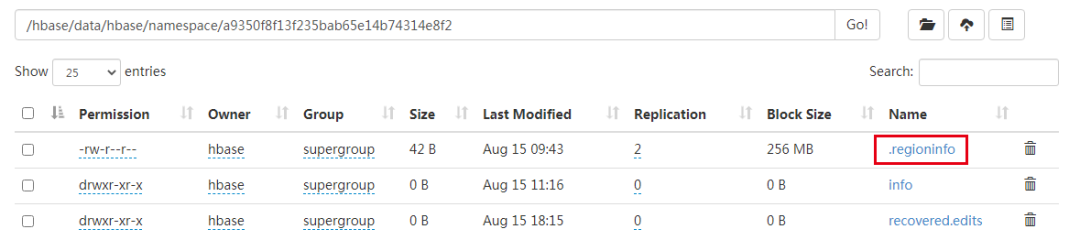
工具地址:https://github.com/DarkPhoenixs/hbase-meta-repair
總結(jié)
namespace region is not online;
Master is initializing;
首先刪除hbase:namespace表,讓hbase啟動(dòng)服務(wù)時(shí)自動(dòng)創(chuàng)建,解決了hbase無法啟動(dòng)問題:
然后,通過.regioninfo文件修復(fù)hbase:meta表。
評(píng)論
圖片
表情