
前端web實現(@、At、艾特)選人或引用數據
前言
在我們日常的網絡社交中,@XXX 功能可以說是一個比較常見的功能了。本文將結合實踐,介紹一種可以快速實現 @ 選人或引用數據的方式。
功能需求
簡單說一下需求:
1、在輸入框中輸入 @ ,彈出浮窗,然后可以選擇浮窗中相關的數據;2、在輸入框中輸入 # ,彈出浮窗,然后可以選擇浮窗中相關的數據;3、@ 和 # 引用的數據要包含名稱和id等,最終要傳給后端;4、刪除 @ 和 # 引用的數據時,需要整體刪除;5、@ 和 # 引用的數據需要被標注成不同的顏色。
大致就是這樣。
技術方案
在網上參考了不少大佬的文章,也大致了解了一些社交平臺的實現方式,有興趣的朋友可以看看文末的參考。
最終因為功能的契合度和時間原因,我選擇了開源庫: tributejs 。這個開源庫有原生,Vue 等例子,就是沒有 React 的例子,但是問題不大,使用方式都是大同小異。
具體實現
本文的 @XXX 功能是 tributejs + React實現的,所以 React 技術棧的同學可以直接參考后面的例子,其他技術棧的同學可以參考 tributejs 官方的實現。
@功能實現
首先當然是要下載 tributejs:
yarn add tributejs
或者
npm install tributejs
然后就是引入 tributejs,對想要的功能進行配置,具體各項配置的意義,可以直接到 tributejs 的 GitHub 上查看。最后可以給編輯器加一些自定義的樣式:
index.tsx
import React, { useEffect, useState, useRef  } from 'react';
import Tribute from "tributejs";
import './index.less';

const AtDemo = () => {
  const [atList, setAtList] = useState([
    {
      key: "1",
      value: "小明",
      position: "前端開發(fā)工程師"
    },
    {
      key: "2",
      value: "小李",
      position: "后端開發(fā)工程師"
    }
  ]);
  const [poundList, setpoundList] = useState([
    { name: "JavaScript", explain: "前端開發(fā)語言" },
    { name: "Java", explain: "后端開發(fā)語言之一" }
  ]);

  useEffect(() => {
    renderEditor(atList, poundList);
  }, [])

  const renderEditor = (_atList: any[], _poundList: any[]) => {
    let tributeMultipleTriggers = new Tribute({
      allowSpaces: true,
      noMatchTemplate: function () { return null; },
      collection: [
        {
          selectTemplate: function(item) {
            if (this.range.isContentEditable(this.current.element)) {
              return (
                `<span contenteditable="false">
                  <span
                    class="at-item"
                    title="${item.original.value}"
                  >
                    @${item.original.value}
                  </span>
                </span>`
              );
            }

            return "@" + item.original?.value;
          },
          values: _atList,
          menuItemTemplate: function (item) {
            return item.original.value;
          },
        },
        {
          trigger: "#",
          selectTemplate: function(item) {
            if (this.range.isContentEditable(this.current.element)) {
              return (
                `<span contenteditable="false">
                  <span
                    class="pound-item"
                  >
                    #${item.original.name}
                  </span>
                </span>`
              );
            }

            return "#" + item.original.name;
          },
          values: _poundList,
          lookup: "name",
          fillAttr: "name"
        }
      ]
    });

    tributeMultipleTriggers.attach(document.getElementById("editorMultiple") as HTMLElement);
  }

  return (
      <div className="at-demo">
          <div
            id="editorMultiple"
            className="tribute-demo-input"
            placeholder="請輸入"
          ></div>
      </div>
  )
}

export default AtDemo;
index.less
.at-demo {
    background-color: #fff;
    padding: 24px;
    .at-item, .pound-item {
        color: #2ba6cb;
    }
}
.tribute-container {
    position: absolute;
    top: 0;
    left: 0;
    height: auto;
    overflow: auto;
    display: block;
    z-index: 999999;
  }
  .tribute-container ul {
    margin: 0;
    margin-top: 2px;
    padding: 0;
    list-style: none;
    background: #fff;
    border: 1px solid #3c98fa;
    border-radius: 4px;
  }
  .tribute-container li {
    padding: 5px 5px;
    cursor: pointer;
    border-radius: 4px;
  }
  .tribute-container li.highlight {
    background: #eee;
  }
  .tribute-container li span {
    font-weight: bold;
  }
  .tribute-container li.no-match {
    cursor: default;
  }
  .tribute-container .menu-highlighted {
    font-weight: bold;
}
.tribute-demo-input {
  outline: none;
  border: 1px solid #d9d9d9;
  padding: 4px 11px;
  border-radius: 2px;
  font-size: 15px;
  min-height: 100px;
  cursor: text;
}
.tribute-demo-input:hover {
  border-color: #3c98fa;
  transition: all 0.3s;
}
.tribute-demo-input:focus {
  border-color: #3c98fa;
}
[contenteditable="true"]:empty:before {
  content: attr(placeholder);
  display: block;
  color: #ccc;
}
#test-autocomplete-container {
  position: relative;
}
#test-autocomplete-textarea-container {
  position: relative;
}
.float-right {
  float: right;
}
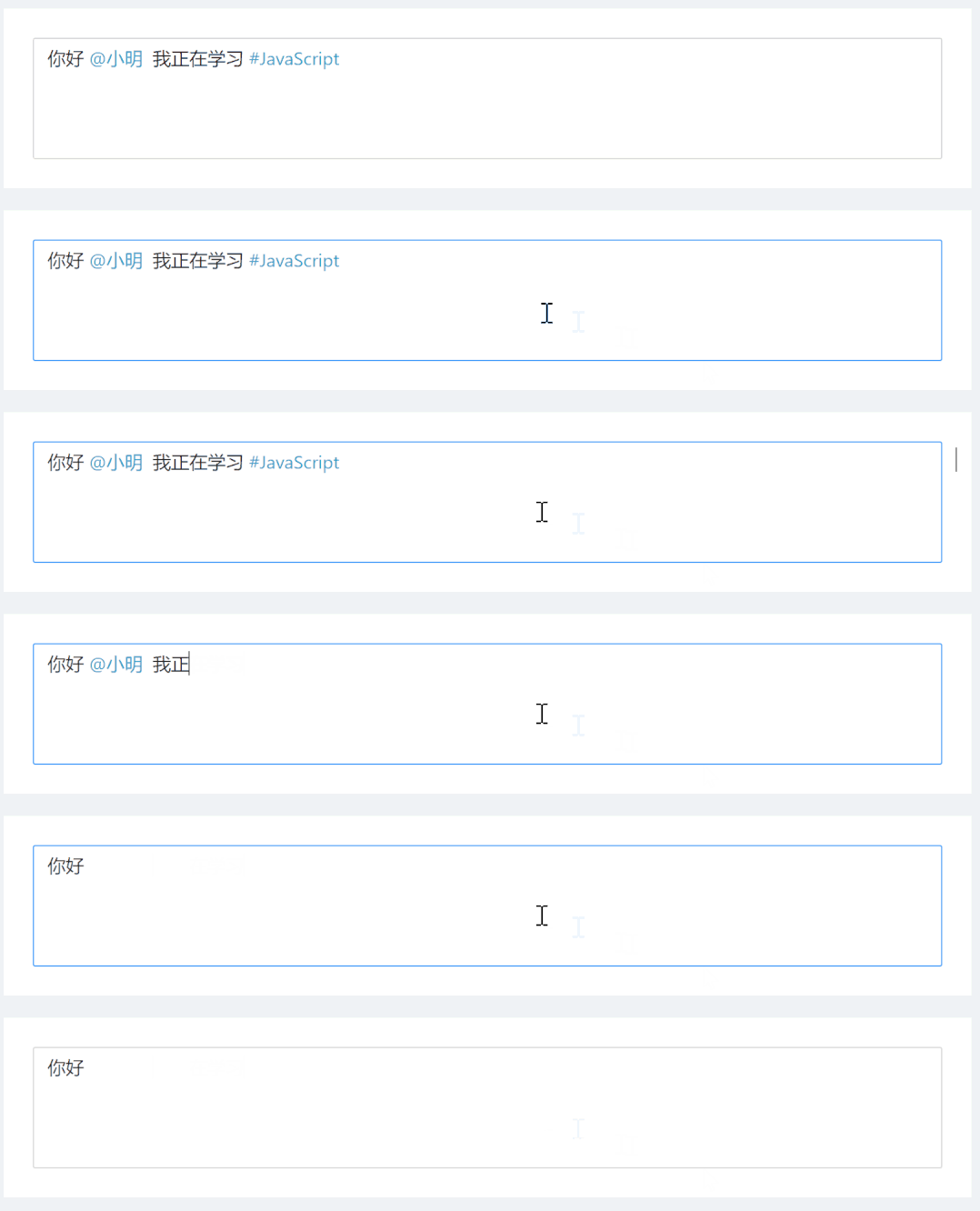
我們可以看看效果,還是很不錯的:

被引用的數據也是被整體刪除的:
獲取編輯器中的數據
我們在編輯器中輸入了我們想要的數據,那最終都是要獲取其中的數據并且傳遞給后端的:
...
import { Button } from 'antd';
// 轉義HTML
const htmlEscape = (html: string) => {
return html.replace(/[<>"&]/g,function(match,pos,originalText){
switch(match){
case "<":
return "<";
case ">":
return ">"
case "&":
return "&";
case "\"":
return """;
default:
return match;
}
});
}
const AtDemo = () => {
...
const getDataOfEditorMultiple = () => {
const childrenData = document.getElementById('editorMultiple')?.innerHTML;
console.log('childrenData', childrenData)
const toServiceData = htmlEscape(childrenData);
console.log('toServiceData', toServiceData)
}
return (
<div className="at-demo">
<div
id="editorMultiple"
className="tribute-demo-input"
placeholder="請輸入"
></div>
<Button onClick={getDataOfEditorMultiple}>獲取輸入框中所有元素</Button>
</div>
)
}
我們可以直接通過 getDataOfEditorMultiple 方法直接獲取編輯器中的數據,并且轉義之后發(fā)送給后端。
實時獲取編輯器中被引用的數據
我們有時候可能需要實時的監(jiān)聽編輯器中所數據的數據,或者是被引用的數據。這時我們可以調用 oninput 這個方法。當然也可以在其他情況調用 onblur 和 onfocus 這兩個方法,顧名思義就是失去焦點時和獲取焦點時。
完整的代碼如下:
import React, { useEffect, useState, useRef } from 'react';
import './index.less';
import Tribute from "tributejs";
import { Button } from 'antd';
const htmlEscape = (html: string) => {
return html.replace(/[<>"&]/g,function(match,pos,originalText){
switch(match){
case "<":
return "<";
case ">":
return ">"
case "&":
return "&";
case "\"":
return """;
default:
return match;
}
});
}
const AtDemo = () => {
const [atList, setAtList] = useState([
{
key: "1",
value: "小明",
position: "前端開發(fā)工程師"
},
{
key: "2",
value: "小李",
position: "后端開發(fā)工程師"
}
]);
const [poundList, setpoundList] = useState([
{ name: "JavaScript", explain: "前端開發(fā)語言" },
{ name: "Java", explain: "后端開發(fā)語言之一" }
]);
useEffect(() => {
renderEditor(atList, poundList);
}, [])
const renderEditor = (_atList: any[], _poundList: any[]) => {
let tributeMultipleTriggers = new Tribute({
allowSpaces: true,
noMatchTemplate: function () { return null; },
collection: [
{
selectTemplate: function(item) {
if (this.range.isContentEditable(this.current.element)) {
return (
`<span contenteditable="false">
<span
class="at-item"
title="${item.original.value}"
data-atkey="${item.original.key}"
data-atvalue="${item.original.value}"
>
@${item.original.value}
</span>
</span>`
);
}
return "@" + item.original?.value;
},
values: _atList,
menuItemTemplate: function (item) {
return item.original.value;
},
},
{
trigger: "#",
selectTemplate: function(item) {
if (this.range.isContentEditable(this.current.element)) {
return (
`<span contenteditable="false">
<span
class="pound-item"
data-poundname="${item.original.name}"
>
#${item.original.name}
</span>
</span>`
);
}
return "#" + item.original.name;
},
values: _poundList,
lookup: "name",
fillAttr: "name"
}
]
});
tributeMultipleTriggers.attach(document.getElementById("editorMultiple") as HTMLElement);
}
const getDataOfEditorMultiple = () => {
const childrenData = document.getElementById('editorMultiple')?.innerHTML || '';
console.log('childrenData', childrenData)
const toServiceData = htmlEscape(childrenData);
console.log('toServiceData', toServiceData)
}
const onInput = () => {
const atItemList = document.getElementsByClassName('at-item');
Array.prototype.forEach.call(atItemList, function(el) {
console.log(el.dataset.atkey);
console.log(el.dataset.atvalue);
});
}
return (
<div className="at-demo">
<div
id="editorMultiple"
className="tribute-demo-input"
placeholder="請輸入"
onInput={onInput}
></div>
<Button onClick={getDataOfEditorMultiple}>獲取輸入框中所有元素</Button>
</div>
)
}
export default AtDemo;
幾個關鍵點的實現
這里提一下幾個關鍵功能點的實現原理。
編輯器的輸入框利用的是普通的 div標簽,然后采用contenteditable="true"這個屬性來實現的;引用數據的浮窗定位可以利用 Selection對象來獲取; 被 @ 或 # 引用的數據,想要被一次性刪除,可以在被 @ 或 #的數據外包含一個 <span contenteditable="false"></span>,表示不可編輯的標簽;把被引用的數據定義為特定的顏色,這個因為我們在輸入框中插入引用數據時,被引用的數據是被HTML標簽包裹著的,所以我們只需要對相關的HTML進行樣式設置就好了; 想要獲取被引用數據中的多個屬性的值,可以和上面的例子一樣,利用HTML5的自定義屬性 data-xxx來保存我們想要的屬性值,然后通過遍歷標簽el.dataset.xxx獲取我們想要的屬性的值。
最后
本文介紹了一種可以在前端快速實現 @xxx 選人或引用數據的功能,在部分情景下也算是比較好的解決方案了。有興趣的同學可以看看文末參考文章中其他大佬們的實現方式。
參考
https://github.com/zurb/tribute https://segmentfault.com/a/1190000037660531 https://segmentfault.com/a/1190000007846897 https://juejin.cn/post/6982251438332182542 https://mp.weixin.qq.com/s/YP6H6CHkUd97ThDtEoXzaw