
我用 Python 自制成語(yǔ)接龍小游戲,刺激!
作者:小小明
原文鏈接:https://blog.csdn.net/as604049322/article/details/118154687
本文為讀者投稿
在 https://github.com/pwxcoo/chinese-xinhua 項(xiàng)目中可以下載到中華成語(yǔ)的語(yǔ)料庫(kù),該項(xiàng)目收錄包括 14032 條歇后語(yǔ),16142 個(gè)漢字,264434 個(gè)詞語(yǔ),31648 個(gè)成語(yǔ)。
結(jié)構(gòu)如下:
chinese-xinhua/
|
+- data/ <-- 數(shù)據(jù)文件夾
|  |
|  +- idiom.json <-- 成語(yǔ)
|  |
|  +- word.json <-- 漢字
|  |
|  +- xiehouyu.json <-- 歇后語(yǔ)
|  |
|  +- ci.json <-- 詞語(yǔ)
可以直接從網(wǎng)絡(luò)讀取該github的json文件:
import pandas as pd

chengyu = pd.read_json(
    "https://github.com/pwxcoo/chinese-xinhua/blob/master/data/idiom.json?raw=true")
不過有可能網(wǎng)絡(luò)不佳導(dǎo)致讀取失敗,下載好之后讀取本地文件更佳:
import pandas as pd
import numpy as np

chengyu = pd.read_json("idiom.json")
chengyu.head(2)
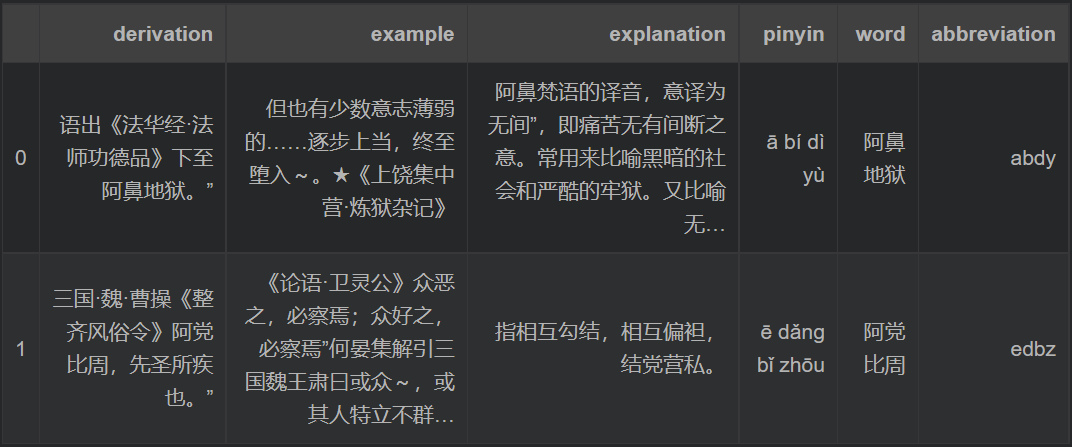
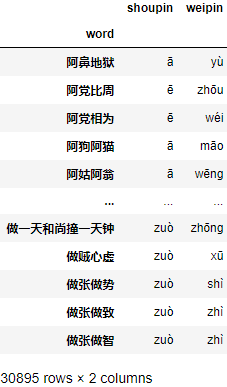
該庫(kù)有很多列,word列是我們需要的成語(yǔ),pinyin列已經(jīng)幫我們轉(zhuǎn)換出了對(duì)應(yīng)的拼音。下面我們整理出我們需要的數(shù)據(jù):
t = chengyu.pinyin.str.split()
chengyu["shoupin"] = t.str[0]
chengyu["weipin"] = t.str[-1]
chengyu = chengyu.set_index("word")[["shoupin", "weipin"]]
chengyu
測(cè)試獲取任意一個(gè)成語(yǔ)的接龍結(jié)果集:
word = "阿黨比周"

words = chengyu.index[chengyu.shoupin == chengyu.loc[word, "weipin"]]
words

Index(['舟車勞頓', '舟水之喻', '舟中敵國(guó)', '謅上抑下', '侜張為幻', '周而不比', '周而復(fù)始', '周公吐哺', '周規(guī)折矩',
       '周急繼乏', '周郎顧曲', '周情孔思', '周窮恤匱', '周游列國(guó)', '诪張變眩', '诪張為幻', '粥少僧多', '粥粥無能'],
      dtype='object', name='word')
然后隨機(jī)任取一個(gè):
np.random.choice(words)
'诪張為幻'
測(cè)試沒有問題,我們可以寫一個(gè)批量接龍程序:
word = input("請(qǐng)輸入一個(gè)成語(yǔ):")
flag = True
if word not in chengyu.index:
    print("你輸入的不是一個(gè)成語(yǔ),程序結(jié)束!")
    flag = False
while flag:
    n = input("接龍的次數(shù)(1-100次的整數(shù),輸入任意字母表示結(jié)束程序)")
    if not n.isdigit():
        print("程序結(jié)束")
        break
    n = int(n)
    if not (0 < n <= 100):
        print("非法數(shù)字,程序結(jié)束")
        break
    for _ in range(n):
        words = chengyu.index[chengyu.shoupin == chengyu.loc[word, "weipin"]]
        if words.shape[0] == 0:
            print("沒有找到可以接龍的成語(yǔ),程序結(jié)束")
            flag = False
            break
        word = np.random.choice(words)
        print(word)
請(qǐng)輸入一個(gè)成語(yǔ):周郎顧曲
接下來程序自動(dòng)接龍的次數(shù)(1-100次的整數(shù),其他情況表示結(jié)束)10
曲盡奇妙
妙趣橫生
聲應(yīng)氣求
求人不如求己
掎挈伺詐
詐癡不顛
顛乾倒坤
昆山之玉
玉葉金枝
織當(dāng)訪婢
接下來程序自動(dòng)接龍的次數(shù)(1-100次的整數(shù),其他情況表示結(jié)束)no
結(jié)束
完整代碼
import pandas as pd
import numpy as np

chengyu = pd.read_json("idiom.json")
t = chengyu.pinyin.str.split()
chengyu["shoupin"] = t.str[0]
chengyu["weipin"] = t.str[-1]
chengyu = chengyu.set_index("word")[["shoupin", "weipin"]]

word = input("請(qǐng)輸入一個(gè)成語(yǔ):")
flag = True
if word not in chengyu.index:
    print("你輸入的不是一個(gè)成語(yǔ),程序結(jié)束!")
    flag = False
while flag:
    n = input("接龍的次數(shù)(1-100次的整數(shù),輸入任意字母表示結(jié)束程序)")
    if not n.isdigit():
        print("程序結(jié)束")
        break
    n = int(n)
    if not (0 < n <= 100):
        print("非法數(shù)字,程序結(jié)束")
        break
    for _ in range(n):
        words = chengyu.index[chengyu.shoupin == chengyu.loc[word, "weipin"]]
        if words.shape[0] == 0:
            print("沒有找到可以接龍的成語(yǔ),程序結(jié)束")
            flag = False
            break
        word = np.random.choice(words)
        print(word)
我們還可以寫一個(gè)與機(jī)器對(duì)戰(zhàn)的成語(yǔ)接龍小游戲:
import pandas as pd
import numpy as np

chengyu = pd.read_json("idiom.json")
t = chengyu.pinyin.str.split()
chengyu["shoupin"] = t.str[0]
chengyu["weipin"] = t.str[-1]
chengyu = chengyu.set_index("word")[["shoupin", "weipin"]]

is_head = input("是否先手(輸入N表示后手,其他表示先手)")
if is_head == "N":
    word2 = np.random.choice(chengyu.index)
    print(word2)
    weipin = chengyu.loc[word2, "weipin"]
else:
    weipin = ''
while True:
    word = input("請(qǐng)輸入一個(gè)成語(yǔ)(認(rèn)輸或離開請(qǐng)按Q):")
    if word == "Q":
        print("你離開了游戲,再見!!!")
        break
    if word not in chengyu.index:
        print("你輸入的不是一個(gè)成語(yǔ),請(qǐng)重新輸入!")
        continue
    if weipin and chengyu.loc[word, 'shoupin'] != weipin:
        print("你輸入的成語(yǔ)并不能與機(jī)器人出的成語(yǔ)接上來,你輸了,游戲結(jié)束!!!")
        break
    words = chengyu.index[chengyu.shoupin == chengyu.loc[word, "weipin"]]
    if words.shape[0] == 0:
        print("恭喜你贏了!成語(yǔ)機(jī)器人已經(jīng)被你打敗!!!")
        break
    word2 = np.random.choice(words)
    print(word2)
    weipin = chengyu.loc[word2, "weipin"]
是否先手(輸入N表示后手,其他表示先手)
請(qǐng)輸入一個(gè)成語(yǔ)(認(rèn)輸或離開請(qǐng)按Q):妙趣橫生
生米煮成熟飯
請(qǐng)輸入一個(gè)成語(yǔ)(認(rèn)輸或離開請(qǐng)按Q):飯來開口
口呆目鈍
請(qǐng)輸入一個(gè)成語(yǔ)(認(rèn)輸或離開請(qǐng)按Q):遁名匿跡
計(jì)功謀利
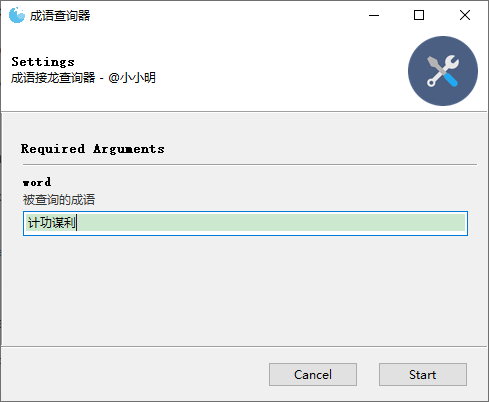
由于成語(yǔ)積累量較少,幾局就已經(jīng)快玩不下去,于是我打算再寫個(gè)成語(yǔ)查詢器方便開掛后再上,而不是瘋狂的百度,代碼如下:
from gooey import Gooey, GooeyParser
import pandas as pd

chengyu = pd.read_json("idiom.json")
t = chengyu.pinyin.str.split()
chengyu["shoupin"] = t.str[0]
chengyu["weipin"] = t.str[-1]
chengyu = chengyu.set_index("word")[["shoupin", "weipin"]]


@Gooey
def main():
    parser = GooeyParser(description="成語(yǔ)接龍查詢器 - @小小明")
    parser.add_argument('word', help="被查詢的成語(yǔ)")
    args = parser.parse_args()
    word = args.word
    if word not in chengyu.index:
        print("你輸入的不是一個(gè)成語(yǔ),請(qǐng)重新輸入!")
    else:
        words = chengyu.index[chengyu.shoupin == chengyu.loc[word, "weipin"]]
        if words.shape[0] > 0:
            print("滿足條件的成語(yǔ)有:")
            print("、".join(words))
        else:
            print("抱歉,沒有找到能夠滿足條件的成語(yǔ)")
        print("-----" * 10)


if __name__ == '__main__':
    main()
這里我使用了Gooey,需要pip安裝:
pip install Gooey
項(xiàng)目地址:https://github.com/chriskiehl/Gooey
體驗(yàn)一把:
點(diǎn)擊start后:
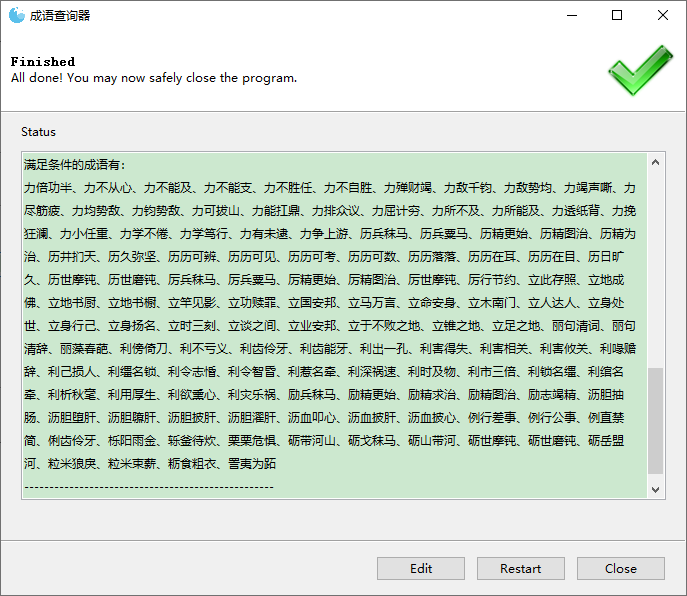
要重新開始查詢只需點(diǎn)擊Edit按鈕即可。Gooey支持的組件還挺多的,可以參考GitHub項(xiàng)目說明。雖然Gooey遠(yuǎn)不如專業(yè)的圖形化框架專業(yè),但對(duì)于簡(jiǎn)單的需求也挺簡(jiǎn)單便捷,能快速把命令行程序轉(zhuǎn)換為圖形化程序。
參考
《文本數(shù)據(jù)挖掘——基于R語(yǔ)言》黃天元
推薦閱讀
分析了汽車銷量數(shù)據(jù)下滑后,我發(fā)現(xiàn)了其中的秘密!
最詳細(xì)的 Python 結(jié)合 RFM 模型實(shí)現(xiàn)用戶分層實(shí)操案例!
太秀了!用Excel也能實(shí)現(xiàn)和Python數(shù)據(jù)分析一樣的功能!
