
手把手帶你爬蟲 | 爬取500px圖片
目標(biāo)
爬取500px網(wǎng)站圖片并保存到本地。
項(xiàng)目準(zhǔn)備
軟件:Pycharm
第三方庫(kù):requests,fake_useragent
網(wǎng)站地址:https://500px.com/popular
網(wǎng)站分析
首先拿到一個(gè)網(wǎng)站,先看一下目標(biāo)網(wǎng)站是靜態(tài)加載還是動(dòng)態(tài)加載的。

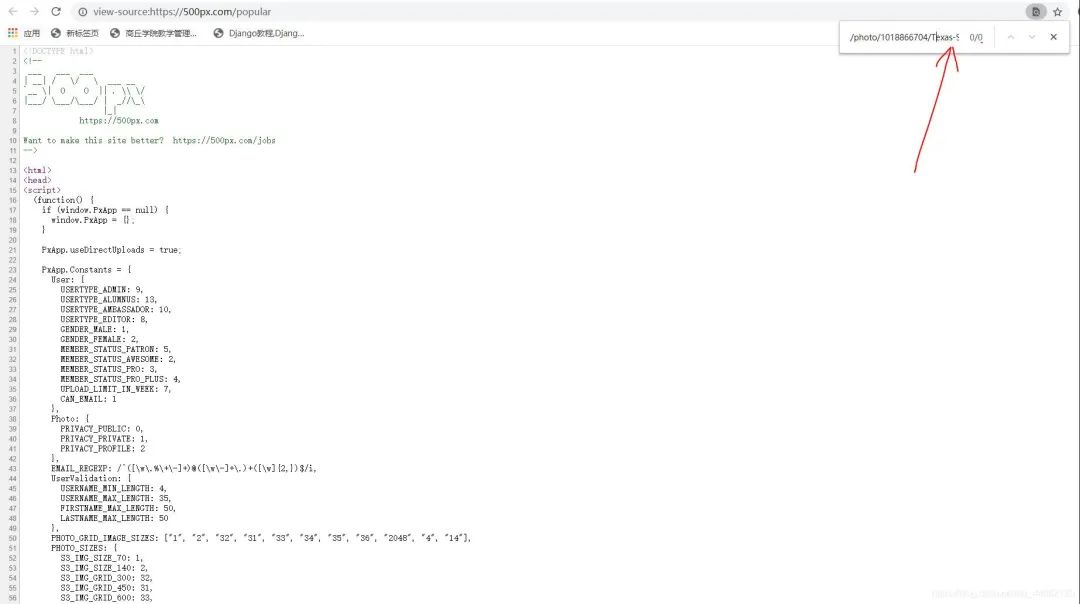
右邊有個(gè)下拉滾動(dòng)條,下拉之后會(huì)發(fā)現(xiàn),它是沒有頁(yè)碼并且會(huì)自動(dòng)加載的,一般這樣就可以初步判斷該網(wǎng)站為動(dòng)態(tài)加載方式,或者還可以打開開發(fā)者模式,復(fù)制其中一個(gè)圖片鏈接,Ctrl+U查看源代碼,Ctrl+f打開搜索框,把鏈接地址粘貼進(jìn)去,會(huì)發(fā)現(xiàn)根本找不到這個(gè)鏈接地址,這樣就可以確定為動(dòng)態(tài)加載。
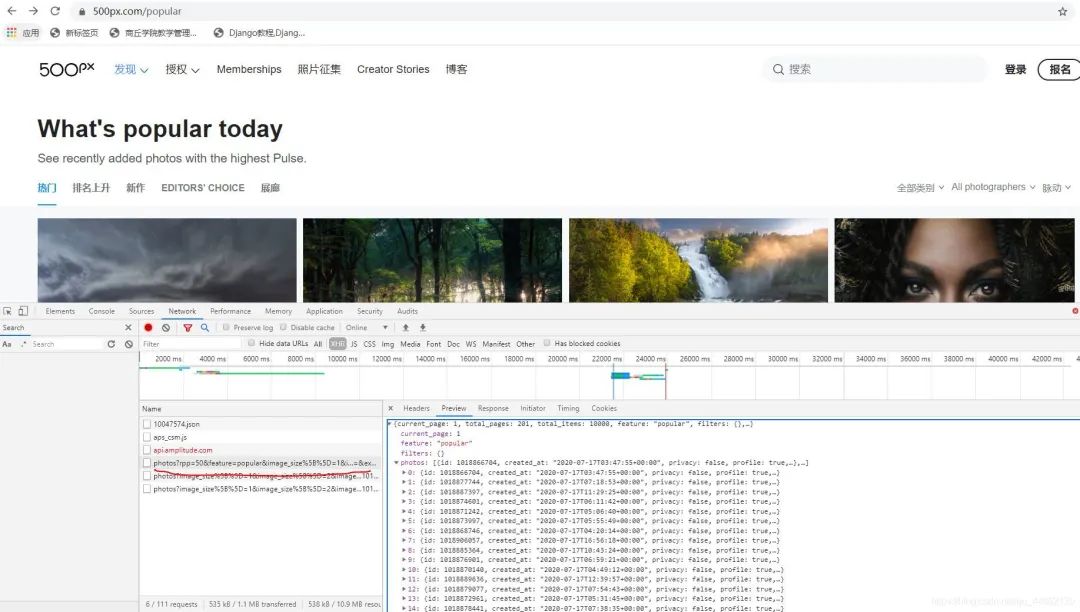
在這里找到了圖片鏈接,向下拉動(dòng)滾動(dòng)條,這里會(huì)再次加載下一頁(yè)的內(nèi)容。
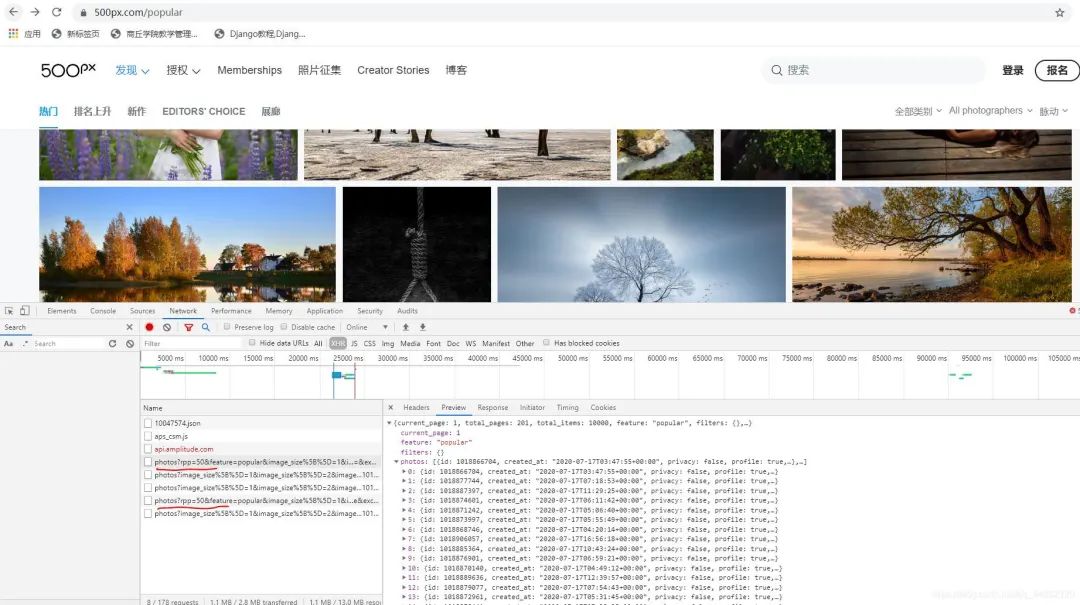
在這里找到了圖片鏈接,向下拉動(dòng)滾動(dòng)條,這里會(huì)再次加載下一頁(yè)的內(nèi)容。
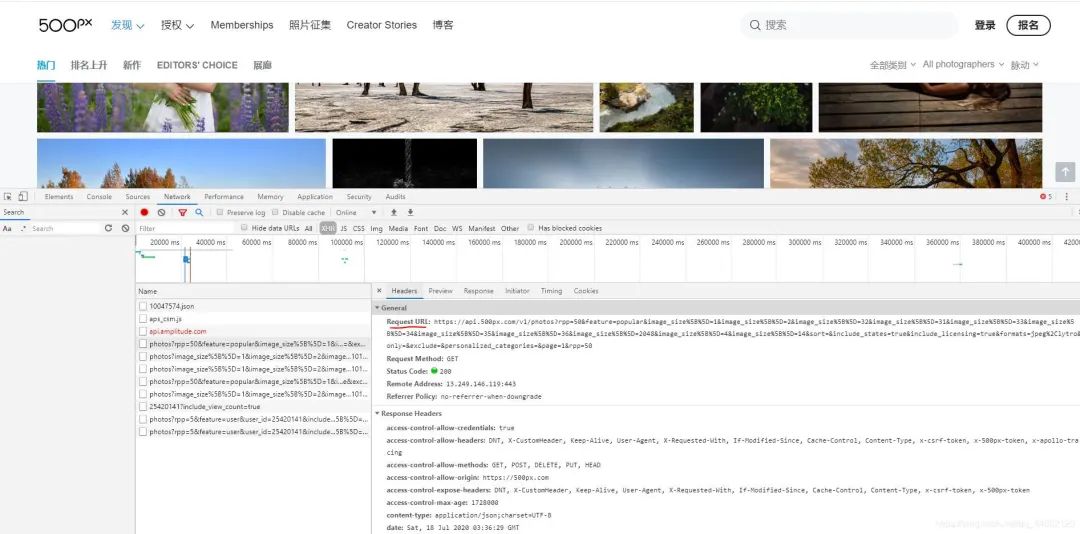
這個(gè)就是網(wǎng)頁(yè)的真實(shí)URL鏈接。
復(fù)制下來這前幾個(gè)地址進(jìn)行分析:
第一個(gè):https://api.500px.com/v1/photos?rpp=50&feature=popular&image_size%5B%5D=1&image_size%5B%5D=2&image_size%5B%5D=32&image_size%5B%5D=31&image_size%5B%5D=33&image_size%5B%5D=34&image_size%5B%5D=35&image_size%5B%5D=36&image_size%5B%5D=2048&image_size%5B%5D=4&image_size%5B%5D=14&sort=&include_states=true&include_licensing=true&formats=jpeg%2Clytro&only=&exclude=&personalized_categories=&page=1&rpp=50
第二個(gè):https://api.500px.com/v1/photos?rpp=50&feature=popular&image_size%5B%5D=1&image_size%5B%5D=2&image_size%5B%5D=32&image_size%5B%5D=31&image_size%5B%5D=33&image_size%5B%5D=34&image_size%5B%5D=35&image_size%5B%5D=36&image_size%5B%5D=2048&image_size%5B%5D=4&image_size%5B%5D=14&sort=&include_states=true&include_licensing=true&formats=jpeg%2Clytro&only=All+photographers%2CPulse&exclude=&personalized_categories=&page=2&rpp=50
會(huì)發(fā)現(xiàn)第一頁(yè)是:page=1,第二頁(yè)是:page=2…但是還有其他地方些許不一樣,但是經(jīng)過驗(yàn)證是沒出問題的,這就發(fā)現(xiàn)了每一頁(yè)的規(guī)律。
反爬分析
同一個(gè)ip地址去多次訪問會(huì)面臨被封掉的風(fēng)險(xiǎn),這里采用fake_useragent,產(chǎn)生隨機(jī)的User-Agent請(qǐng)求頭進(jìn)行訪問。
代碼實(shí)現(xiàn)
1.導(dǎo)入相對(duì)應(yīng)的第三方庫(kù),定義一個(gè)class類繼承object,定義init方法繼承self,主函數(shù)main繼承self。
import??requests
from?fake_useragent?import?UserAgent
filename=0
class?photo_spider(object):
????def?__init__(self):
????????self.url?=?'https://api.500px.com/v1/photos?rpp=50&feature=popular&image_size%5B%5D=1&image_size%5B%5D=2&image_size%5B%5D=32&image_size%5B%5D=31&image_size%5B%5D=33&image_size%5B%5D=34&image_size%5B%5D=35&image_size%5B%5D=36&image_size%5B%5D=2048&image_size%5B%5D=4&image_size%5B%5D=14&sort=&include_states=true&include_licensing=true&formats=jpeg%2Clytro&only=&exclude=&personalized_categories=&page={}&rpp=50'
????????ua?=?UserAgent(verify_ssl=False)
????????#隨機(jī)產(chǎn)生user-agent
????????for?i?in?range(1,?100):
????????????self.headers?=?{
????????????????'User-Agent':?ua.random
????????????}
????def?mian(self):
?????pass
if?__name__?==?'__main__':
????spider?=?photo_spider()
????spider.main()
2.發(fā)送請(qǐng)求,獲取網(wǎng)頁(yè)。
????def?get_html(self,url):
????????response=requests.get(url,headers=self.headers)
????????html=response.json()#動(dòng)態(tài)加載的json數(shù)據(jù)
????????return?html
3.獲取圖片的鏈接地址,保存圖片格式到本地文件夾。
????def?get_imageUrl(self,html):
????????global?filename
????????content_list=html['photos']
????????for?content?in?content_list:
????????????image_url=content['image_url']
????????????#print(image_url[8])
????????????imageUrl=image_url[8]
????????????r=requests.get(imageUrl,headers=self.headers)
????????????with?open('F:/pycharm文件/photo/'+str(filename)+'.jpg','wb')?as?f:
????????????????f.write(r.content)
????????????????filename+=1
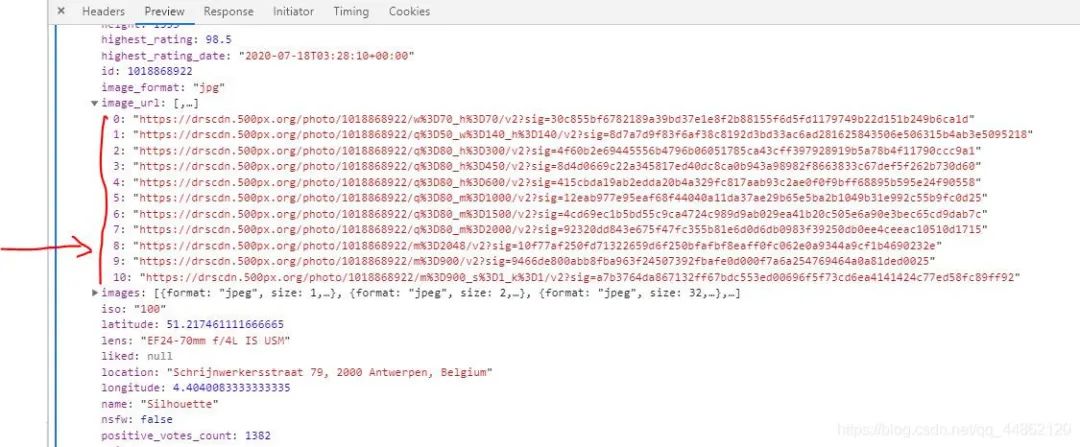
這里說明一下,imageUrl=image_url[8]這里由于有多個(gè)image-url。
4.獲取多頁(yè)及函數(shù)調(diào)用。
????def?main(self):
????????start?=?int(input('輸入開始頁(yè):'))
????????end?=?int(input('輸入結(jié)束頁(yè):'))
????????for?page?in?range(start,?end?+?1):
????????????print('第%s頁(yè)內(nèi)容'?%?page)
????????????url?=?self.url.format(page)#{}傳入page即頁(yè)碼
????????????html=self.get_html(url)
????????????self.get_imageUrl(html)
????????????print('第%s頁(yè)爬取完成'%page)
運(yùn)行結(jié)果
打開本地F:/pycharm文件/photo/

完整代碼
import??requests
from?fake_useragent?import?UserAgent
filename=0
class?photo_spider(object):
????def?__init__(self):
????????self.url?=?'https://api.500px.com/v1/photos?rpp=50&feature=popular&image_size%5B%5D=1&image_size%5B%5D=2&image_size%5B%5D=32&image_size%5B%5D=31&image_size%5B%5D=33&image_size%5B%5D=34&image_size%5B%5D=35&image_size%5B%5D=36&image_size%5B%5D=2048&image_size%5B%5D=4&image_size%5B%5D=14&sort=&include_states=true&include_licensing=true&formats=jpeg%2Clytro&only=&exclude=&personalized_categories=&page={}&rpp=50'
????????ua?=?UserAgent(verify_ssl=False)
????????for?i?in?range(1,?100):
????????????self.headers?=?{
????????????????'User-Agent':?ua.random
????????????}
????def?get_html(self,url):
????????response=requests.get(url,headers=self.headers)
????????html=response.json()
????????return?html
????def?get_imageUrl(self,html):
????????global?filename
????????content_list=html['photos']
????????for?content?in?content_list:
????????????image_url=content['image_url']
????????????#print(image_url[8])
????????????imageUrl=image_url[8]
????????????r=requests.get(imageUrl,headers=self.headers)
????????????with?open('F:/pycharm文件/photo/'+str(filename)+'.jpg','wb')?as?f:
????????????????f.write(r.content)
????????????????filename+=1
????def?main(self):
????????start?=?int(input('輸入開始:'))
????????end?=?int(input('輸入結(jié)束頁(yè):'))
????????for?page?in?range(start,?end?+?1):
????????????print('第%s頁(yè)'?%?page)
????????????url?=?self.url.format(page)
????????????html=self.get_html(url)
????????????self.get_imageUrl(html)
if?__name__?==?'__main__':
????spider?=?photo_spider()
????spider.main()