
Python爬蟲(chóng) 批量爬取某網(wǎng)站圖片

1.需要用到的庫(kù)有:
Requests re os time 如果沒(méi)有安裝的請(qǐng)自己安裝一下,pycharm中打開(kāi)終端輸入命令就可以安裝
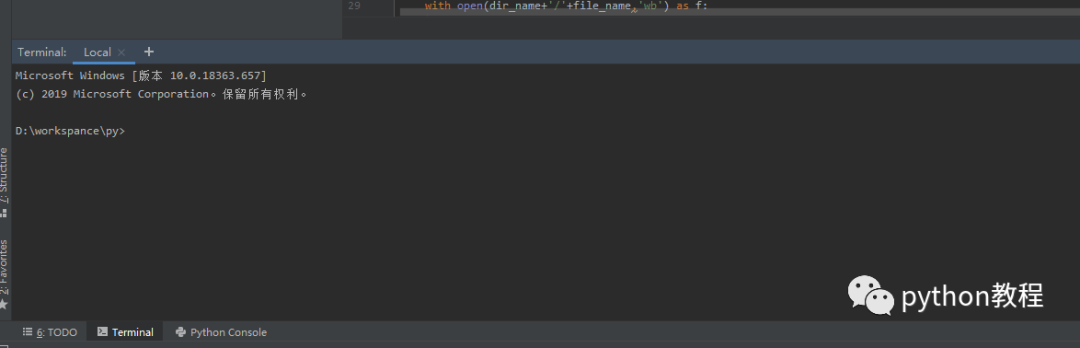
2.IDE : pycharm
3.python 版本: 3.8.1
2.爬取地址:
https://www.vmgirls.com/9384.html
-------------------廢話(huà)不多說(shuō)了,不懂的可以給我留言哦,接下來(lái)我們一步一步來(lái)操作------------------
1.請(qǐng)求網(wǎng)頁(yè)
copy
1 # 請(qǐng)求網(wǎng)頁(yè)2 import requests34 response=requests.get('https://www.vmgirls.com/9384.html')56 print(response.text)
執(zhí)行結(jié)果:
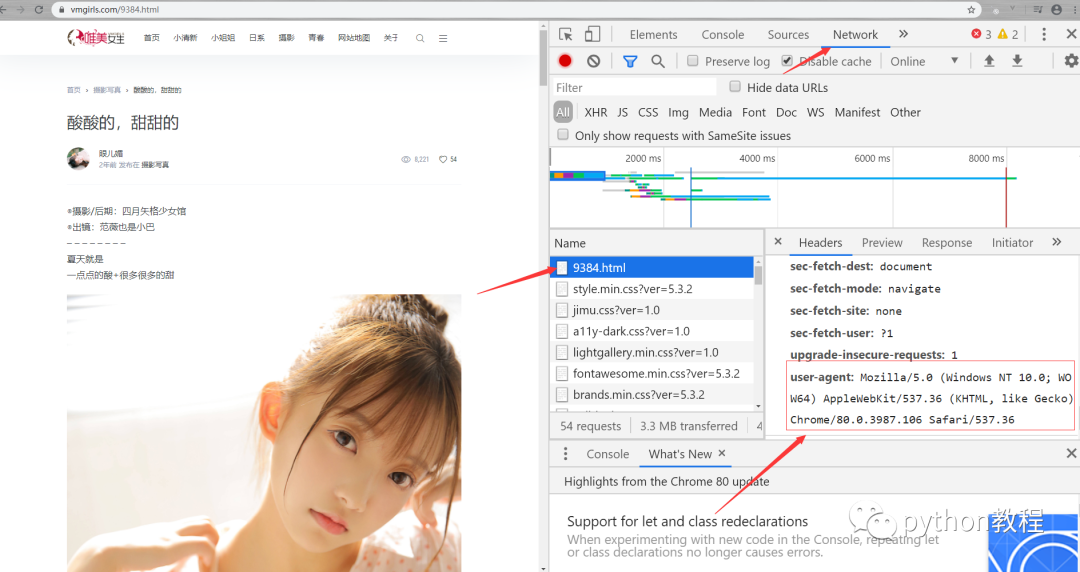
發(fā)現(xiàn)請(qǐng)求到的是403,直接禁止了我們?cè)L問(wèn),requests庫(kù)會(huì)告訴他我們是python過(guò)來(lái)的,他知道我們是一個(gè)python禁止我們反爬
解決:
我們可以偽裝頭,把頭設(shè)置一下
copy
# 請(qǐng)求網(wǎng)頁(yè)import requestsheaders={'user-agent' : 'Mozilla/5.0 (Windows NT 10.0; WOW64) AppleWebKit/537.36 (KHTML, like Gecko) Chrome/80.0.3987.100 Safari/537.36'}response=requests.get('https://www.vmgirls.com/9384.html',headers=headers)print(response.request.headers)
執(zhí)行結(jié)果:
這樣頭就偽裝了
2.解析網(wǎng)頁(yè)
copy
# 請(qǐng)求網(wǎng)頁(yè)import requestsimport reheaders={'user-agent' : 'Mozilla/5.0 (Windows NT 10.0; WOW64) AppleWebKit/537.36 (KHTML, like Gecko) Chrome/80.0.3987.100 Safari/537.36'}response=requests.get('https://www.vmgirls.com/9384.html',headers=headers)# print(response.request.headers)# print(response.text)html=response.text#解析網(wǎng)頁(yè)urls=re.findall('<img alt=".*?" src="data:image/gif;base64,R0lGODlhAQABAIAAAAAAAP///yH5BAEAAAAALAAAAAABAAEAAAIBRAA7" width=".*?" height=".*?" class="alignnone size-full" src="(.*?)" data-nclazyload="true">',html)print(urls);
結(jié)果:
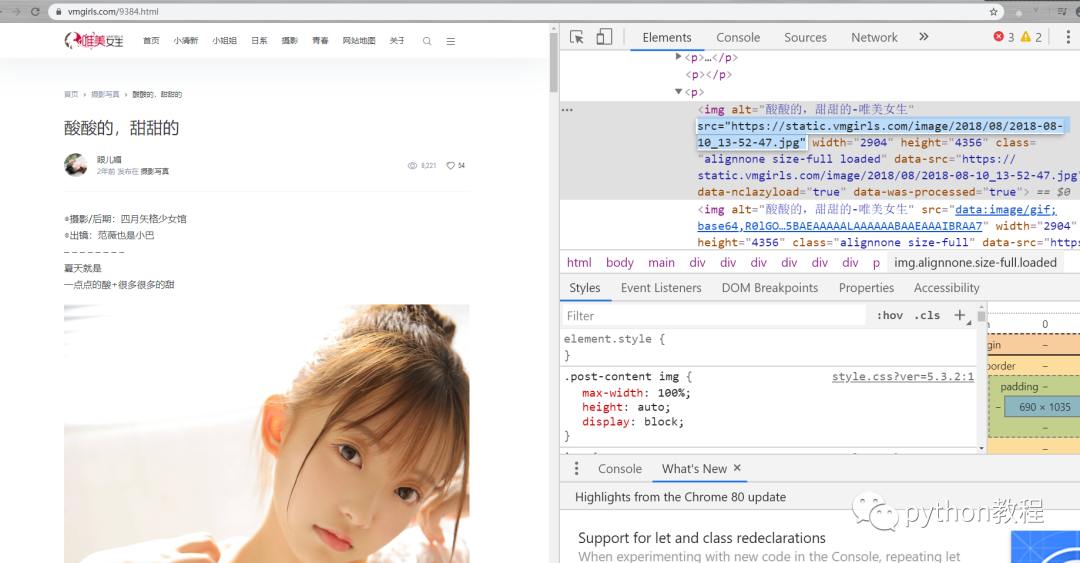
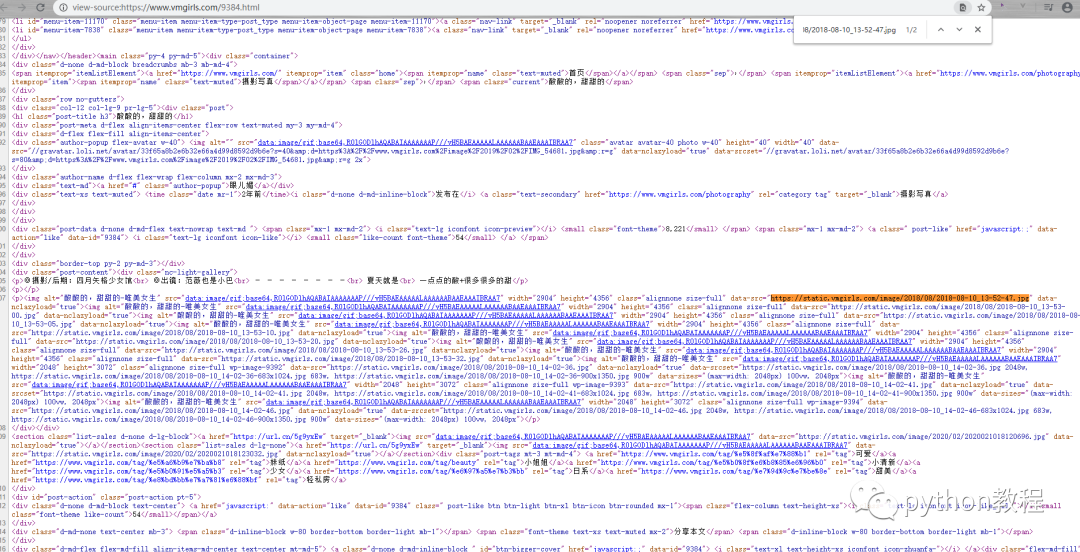
可能對(duì)re.findall后面不太理解怎么來(lái)的,關(guān)鍵就是要找到圖片的dom然后根據(jù)re庫(kù)的一個(gè)匹配規(guī)則來(lái)匹配,要匹配的用(.*?)來(lái)表示,不需要匹配的用.*?來(lái)代替就可以了,
打開(kāi)網(wǎng)址,按f12查看源碼找到圖片的代碼

復(fù)制圖片代碼,打開(kāi)網(wǎng)頁(yè)源碼按 ctrl+f 進(jìn)行搜索,找到圖片源碼的位置
3.保存圖片
具體可以看源碼,我給這些圖片創(chuàng)建了一個(gè)文件夾(需要os庫(kù)),并且命了名,這樣分類(lèi)下次看小姐姐就比較容易找到啦

copy
# 請(qǐng)求網(wǎng)頁(yè)import timeimport requestsimport reimport osheaders={'user-agent' : 'Mozilla/5.0 (Windows NT 10.0; WOW64) AppleWebKit/537.36 (KHTML, like Gecko) Chrome/80.0.3987.100 Safari/537.36'}response=requests.get('https://www.vmgirls.com/9384.html',headers=headers)# print(response.request.headers)# print(response.text)html=response.text# 解析網(wǎng)頁(yè)# 目錄名字dir_name=re.findall('<img alt="(.*?)" src="data:image/gif;base64,R0lGODlhAQABAIAAAAAAAP///yH5BAEAAAAALAAAAAABAAEAAAIBRAA7" width=".*?" height=".*?" class="alignnone size-full" src=".*?" data-nclazyload="true">',html)[-1]if not os.path.exists(dir_name):os.mkdir(dir_name)urls=re.findall('<img alt=".*?" src="data:image/gif;base64,R0lGODlhAQABAIAAAAAAAP///yH5BAEAAAAALAAAAAABAAEAAAIBRAA7" width=".*?" height=".*?" class="alignnone size-full" src="(.*?)" data-nclazyload="true">',html)print(urls);# 保存圖片for url in urls:# 加個(gè)延時(shí),避免給服務(wù)器造成壓力time.sleep(1)# 圖片的名字file_name=url.split('/')[-1]response = requests.get(url, headers=headers)with open(dir_name+'/'+file_name,'wb') as f:f.write(response.content)

搜索下方加老師微信
老師微信號(hào):XTUOL1988【切記備注:學(xué)習(xí)Python】
領(lǐng)取Python web開(kāi)發(fā),Python爬蟲(chóng),Python數(shù)據(jù)分析,人工智能等精品學(xué)習(xí)課程。帶你從零基礎(chǔ)系統(tǒng)性的學(xué)好Python!
*聲明:本文于網(wǎng)絡(luò)整理,版權(quán)歸原作者所有,如來(lái)源信息有誤或侵犯權(quán)益,請(qǐng)聯(lián)系我們刪除或授權(quán)
