
ES 和 Clickhouse 查詢能力對(duì)比,實(shí)踐結(jié)果根本料不到
-
架構(gòu)和設(shè)計(jì)的對(duì)比 -
查詢對(duì)比實(shí)戰(zhàn) -
總結(jié)
Elasticsearch 是一個(gè)實(shí)時(shí)的分布式搜索分析引擎,它的底層是構(gòu)建在Lucene之上的。簡(jiǎn)單來說是通過擴(kuò)展Lucene的搜索能力,使其具有分布式的功能。ES通常會(huì)和其它兩個(gè)開源組件logstash(日志采集)和Kibana(儀表盤)一起提供端到端的日志/搜索分析的功能,常常被簡(jiǎn)稱為ELK。
Clickhouse是俄羅斯搜索巨頭Yandex開發(fā)的面向列式存儲(chǔ)的關(guān)系型數(shù)據(jù)庫(kù)。ClickHouse是過去兩年中OLAP領(lǐng)域中最熱門的,并于2016年開源。
ES是最為流行的大數(shù)據(jù)日志和搜索解決方案,但是近幾年來,它的江湖地位受到了一些挑戰(zhàn),許多公司已經(jīng)開始把自己的日志解決方案從ES遷移到了Clickhouse,這里就包括:攜程,快手等公司。
另外,有需要chatGPT和jb授權(quán)賬號(hào)的小伙伴,可以點(diǎn)擊「原文閱讀」,去我網(wǎng)站購(gòu)買,24h自動(dòng)發(fā)貨。
架構(gòu)和設(shè)計(jì)的對(duì)比
ES的底層是Lucenc,主要是要解決搜索的問題。搜索是大數(shù)據(jù)領(lǐng)域要解決的一個(gè)常見的問題,就是在海量的數(shù)據(jù)量要如何按照條件找到需要的數(shù)據(jù)。搜索的核心技術(shù)是倒排索引和布隆過濾器。ES通過分布式技術(shù),利用分片與副本機(jī)制,直接解決了集群下搜索性能與高可用的問題。
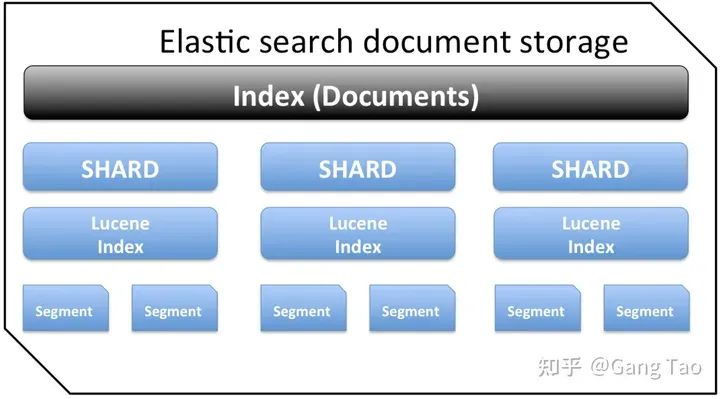
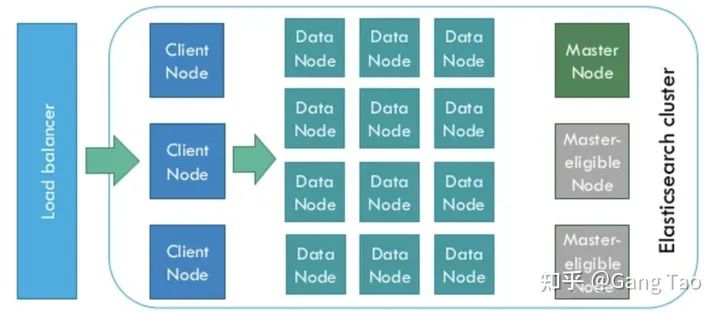
ElasticSearch是為分布式設(shè)計(jì)的,有很好的擴(kuò)展性,在一個(gè)典型的分布式配置中,每一個(gè)節(jié)點(diǎn)(node)可以配制成不同的角色,如下圖所示:
-
Client Node,負(fù)責(zé)API和數(shù)據(jù)的訪問的節(jié)點(diǎn),不存儲(chǔ)/處理數(shù)據(jù) -
Data Node,負(fù)責(zé)數(shù)據(jù)的存儲(chǔ)和索引 -
Master Node, 管理節(jié)點(diǎn),負(fù)責(zé)Cluster中的節(jié)點(diǎn)的協(xié)調(diào),不存儲(chǔ)數(shù)據(jù)。

為了支持搜索,Clickhouse同樣支持布隆過濾器。
查詢對(duì)比實(shí)戰(zhàn)
為了對(duì)比ES和Clickhouse的基本查詢能力的差異,我寫了一些代碼(https://github.com/gangtao/esvsch)來驗(yàn)證。
這個(gè)測(cè)試的架構(gòu)如下:
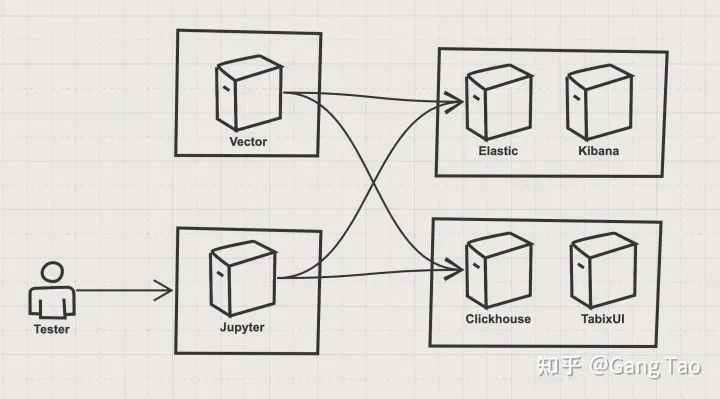
架構(gòu)主要有四個(gè)部分組成:
-
ES stack ES stack有一個(gè)單節(jié)點(diǎn)的Elastic的容器和一個(gè)Kibana容器組成,Elastic是被測(cè)目標(biāo)之一,Kibana作為驗(yàn)證和輔助工具。部署代碼如下:
version: '3.7'

services:
  elasticsearch:
    image: docker.elastic.co/elasticsearch/elasticsearch:7.4.0
    container_name: elasticsearch
    environment:
      - xpack.security.enabled=false
      - discovery.type=single-node
    ulimits:
      memlock:
        soft: -1
        hard: -1
      nofile:
        soft: 65536
        hard: 65536
    cap_add:
      - IPC_LOCK
    volumes:
      - elasticsearch-data:/usr/share/elasticsearch/data
    ports:
      - 9200:9200
      - 9300:9300
    deploy:
      resources:
        limits:
          cpus: '4'
          memory: 4096M
        reservations:
          memory: 4096M

  kibana:
    container_name: kibana
    image: docker.elastic.co/kibana/kibana:7.4.0
    environment:
      - ELASTICSEARCH_HOSTS=http://elasticsearch:9200
    ports:
      - 5601:5601
    depends_on:
      - elasticsearch

volumes:
  elasticsearch-data:
    driver: local
-
Clickhouse stack Clickhouse stack有一個(gè)單節(jié)點(diǎn)的Clickhouse服務(wù)容器和一個(gè)TabixUI作為Clickhouse的客戶端。部署代碼如下:
version: "3.7"
services:
  clickhouse:
    container_name: clickhouse
    image: yandex/clickhouse-server
    volumes:
      - ./data/config:/var/lib/clickhouse
    ports:
      - "8123:8123"
      - "9000:9000"
      - "9009:9009"
      - "9004:9004"
    ulimits:
      nproc: 65535
      nofile:
        soft: 262144
        hard: 262144
    healthcheck:
      test: ["CMD", "wget", "--spider", "-q", "localhost:8123/ping"]
      interval: 30s
      timeout: 5s
      retries: 3
    deploy:
      resources:
        limits:
          cpus: '4'
          memory: 4096M
        reservations:
          memory: 4096M

  tabixui:
    container_name: tabixui
    image: spoonest/clickhouse-tabix-web-client
    environment:
      - CH_NAME=dev
      - CH_HOST=127.0.0.1:8123
      - CH_LOGIN=default
    ports:
      - "18080:80"
    depends_on:
      - clickhouse
    deploy:
      resources:
        limits:
          cpus: '0.1'
          memory: 128M
        reservations:
          memory: 128M
-
數(shù)據(jù)導(dǎo)入 stack 數(shù)據(jù)導(dǎo)入部分使用了Vector.dev開發(fā)的vector,該工具和fluentd類似,都可以實(shí)現(xiàn)數(shù)據(jù)管道式的靈活的數(shù)據(jù)導(dǎo)入。 -
測(cè)試控制 stack 測(cè)試控制我使用了Jupyter,使用了ES和Clickhouse的Python SDK來進(jìn)行查詢的測(cè)試。
用Docker compose啟動(dòng)ES和Clickhouse的stack后,我們需要導(dǎo)入數(shù)據(jù),我們利用Vector的generator功能,生成syslog,并同時(shí)導(dǎo)入ES和Clickhouse,在這之前,我們需要在Clickhouse上創(chuàng)建表。ES的索引沒有固定模式,所以不需要事先創(chuàng)建索引。
創(chuàng)建表的代碼如下:
CREATE TABLE default.syslog(
    application String,
    hostname String,
    message String,
    mid String,
    pid String,
    priority Int16,
    raw String,
    timestamp DateTime('UTC'),
    version Int16
) ENGINE = MergeTree()
    PARTITION BY toYYYYMMDD(timestamp)
    ORDER BY timestamp
    TTL timestamp + toIntervalMonth(1);
創(chuàng)建好表之后,我們就可以啟動(dòng)vector,向兩個(gè)stack寫入數(shù)據(jù)了。vector的數(shù)據(jù)流水線的定義如下:
[sources.in]
  type = "generator"
  format = "syslog"
  interval = 0.01
  count = 100000

[transforms.clone_message]
  type = "add_fields"
  inputs = ["in"]
  fields.raw = "{{ message }}"

[transforms.parser]
  # General
  type = "regex_parser"
  inputs = ["clone_message"]
  field = "message" # optional, default
  patterns = ['^<(?P<priority>\d*)>(?P<version>\d) (?P<timestamp>\d{4}-\d{2}-\d{2}T\d{2}:\d{2}:\d{2}\.\d{3}Z) (?P<hostname>\w+\.\w+) (?P<application>\w+) (?P<pid>\d+) (?P<mid>ID\d+) - (?P<message>.*)$']

[transforms.coercer]
  type = "coercer"
  inputs = ["parser"]
  types.timestamp = "timestamp"
  types.version = "int"
  types.priority = "int"

[sinks.out_console]
  # General
  type = "console"
  inputs = ["coercer"]
  target = "stdout"

  # Encoding
  encoding.codec = "json"


[sinks.out_clickhouse]
  host = "http://host.docker.internal:8123"
  inputs = ["coercer"]
  table = "syslog"
  type = "clickhouse"

  encoding.only_fields = ["application", "hostname", "message", "mid", "pid", "priority", "raw", "timestamp", "version"]
  encoding.timestamp_format = "unix"

[sinks.out_es]
  # General
  type = "elasticsearch"
  inputs = ["coercer"]
  compression = "none"
  endpoint = "http://host.docker.internal:9200"
  index = "syslog-%F"

  # Encoding

  # Healthcheck
  healthcheck.enabled = true
這里簡(jiǎn)單介紹一下這個(gè)流水線:
-
http://source.in 生成syslog的模擬數(shù)據(jù),生成10w條,生成間隔和0.01秒 -
transforms.clone_message 把原始消息復(fù)制一份,這樣抽取的信息同時(shí)可以保留原始消息 -
transforms.parser 使用正則表達(dá)式,按照syslog的定義,抽取出application,hostname,message ,mid ,pid ,priority ,timestamp ,version 這幾個(gè)字段 -
transforms.coercer 數(shù)據(jù)類型轉(zhuǎn)化 -
sinks.out_console 把生成的數(shù)據(jù)打印到控制臺(tái),供開發(fā)調(diào)試 -
sinks.out_clickhouse 把生成的數(shù)據(jù)發(fā)送到Clickhouse -
sinks.out_es 把生成的數(shù)據(jù)發(fā)送到ES
運(yùn)行Docker命令,執(zhí)行該流水線:
docker run \
  -v $(mkfile_path)/vector.toml:/etc/vector/vector.toml:ro \
  -p 18383:8383 \
  timberio/vector:nightly-alpine
數(shù)據(jù)導(dǎo)入后,我們針對(duì)一下的查詢來做一個(gè)對(duì)比。ES使用自己的查詢語言來進(jìn)行查詢,Clickhouse支持SQL,我簡(jiǎn)單測(cè)試了一些常見的查詢,并對(duì)它們的功能和性能做一些比較。
-
返回所有的記錄
# ES
{
  "query":{
    "match_all":{}
  }
}

# Clickhouse
"SELECT * FROM syslog"
-
匹配單個(gè)字段
# ES
{
  "query":{
    "match":{
      "hostname":"for.org"
    }
  }
}

# Clickhouse
"SELECT * FROM syslog WHERE hostname='for.org'"
-
匹配多個(gè)字段
# ES
{
  "query":{
    "multi_match":{
      "query":"up.com ahmadajmi",
        "fields":[
          "hostname",
          "application"
        ]
    }
  }
}

# Clickhouse、
"SELECT * FROM syslog WHERE hostname='for.org' OR application='ahmadajmi'"
-
單詞查找,查找包含特定單詞的字段
# ES
{
  "query":{
    "term":{
      "message":"pretty"
    }
  }
}

# Clickhouse
"SELECT * FROM syslog WHERE lowerUTF8(raw) LIKE '%pretty%'"
-
范圍查詢, 查找版本大于2的記錄
# ES
{
  "query":{
    "range":{
      "version":{
        "gte":2
      }
    }
  }
}

# Clickhouse
"SELECT * FROM syslog WHERE version >= 2"
-
查找到存在某字段的記錄 ES是文檔類型的數(shù)據(jù)庫(kù),每一個(gè)文檔的模式不固定,所以會(huì)存在某字段不存在的情況;而Clickhouse對(duì)應(yīng)為字段為空值
# ES
{
  "query":{
    "exists":{
      "field":"application"
    }
  }
}

# Clickhouse
"SELECT * FROM syslog WHERE application is not NULL"
-
正則表達(dá)式查詢,查詢匹配某個(gè)正則表達(dá)式的數(shù)據(jù)
# ES
{
  "query":{
    "regexp":{
      "hostname":{
        "value":"up.*",
          "flags":"ALL",
            "max_determinized_states":10000,
              "rewrite":"constant_score"
      }
    }
  }
}

# Clickhouse
"SELECT * FROM syslog WHERE match(hostname, 'up.*')"
-
聚合計(jì)數(shù),統(tǒng)計(jì)某個(gè)字段出現(xiàn)的次數(shù)
# ES
{
  "aggs":{
    "version_count":{
      "value_count":{
        "field":"version"
      }
    }
  }
}

# Clickhouse
"SELECT count(version) FROM syslog"
-
聚合不重復(fù)的值,查找所有不重復(fù)的字段的個(gè)數(shù)
# ES
{
  "aggs":{
    "my-agg-name":{
      "cardinality":{
        "field":"priority"
      }
    }
  }
}

# Clickhouse
"SELECT count(distinct(priority)) FROM syslog "
我用Python的SDK,對(duì)上述的查詢?cè)趦蓚€(gè)Stack上各跑10次,然后統(tǒng)計(jì)查詢的性能結(jié)果。
我們畫出出所有的查詢的響應(yīng)時(shí)間的分布:
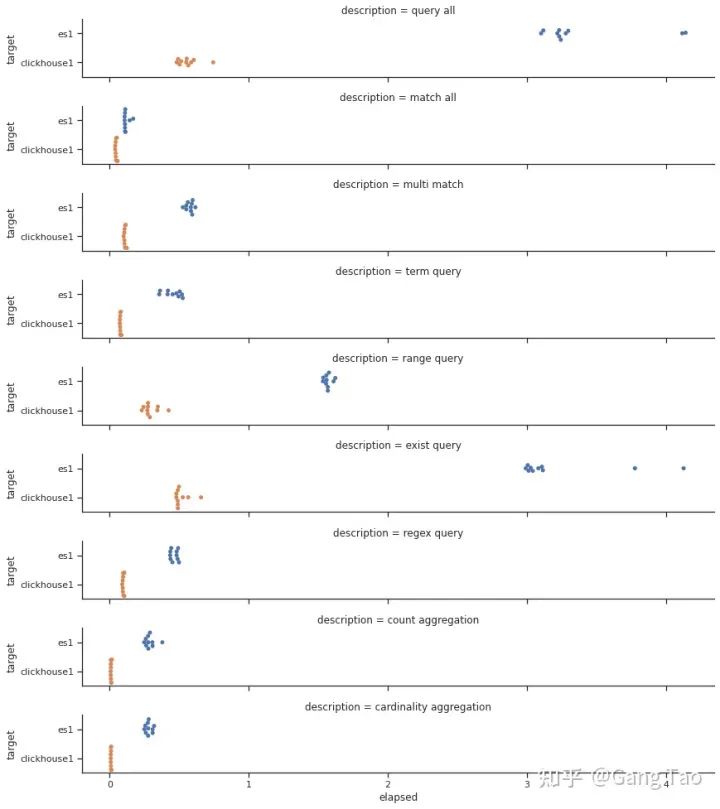
總查詢時(shí)間的對(duì)比如下:
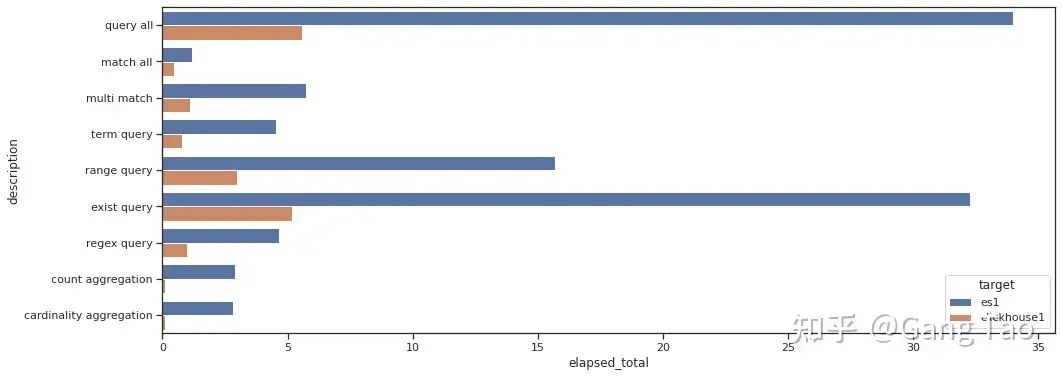
通過測(cè)試數(shù)據(jù)我們可以看出Clickhouse在大部分的查詢的性能上都明顯要優(yōu)于Elastic。在正則查詢(Regex query)和單詞查詢(Term query)等搜索常見的場(chǎng)景下,也并不遜色。
在聚合場(chǎng)景下,Clickhouse表現(xiàn)異常優(yōu)秀,充分發(fā)揮了列村引擎的優(yōu)勢(shì)。
注意,我的測(cè)試并沒有任何優(yōu)化,對(duì)于Clickhouse也沒有打開布隆過濾器。可見Clickhouse確實(shí)是一款非常優(yōu)秀的數(shù)據(jù)庫(kù),可以用于某些搜索的場(chǎng)景。當(dāng)然ES還支持非常豐富的查詢功能,這里只有一些非常基本的查詢,有些查詢可能存在無法用SQL表達(dá)的情況。
另外,有需要chatGPT和jb授權(quán)賬號(hào)的小伙伴,可以點(diǎn)擊「原文閱讀」,去我網(wǎng)站購(gòu)買,24h自動(dòng)發(fā)貨。
總結(jié)
本文通過對(duì)于一些基本查詢的測(cè)試,對(duì)比了Clickhouse 和Elasticsearch的功能和性能,測(cè)試結(jié)果表明,Clickhouse在這些基本場(chǎng)景表現(xiàn)非常優(yōu)秀,性能優(yōu)于ES,這也解釋了為什么用很多的公司應(yīng)從ES切換到Clickhouse之上。
來源:zhuanlan.zhihu.com/p/353296392