
基于Pyhton的圖像隱寫術(shù)--如何隱藏圖像中的數(shù)據(jù)
點(diǎn)擊上方“小白學(xué)視覺”,選擇加"星標(biāo)"或“置頂”
重磅干貨,第一時(shí)間送達(dá)
隱秘術(shù)是在任何文件中隱藏秘密數(shù)據(jù)的藝術(shù)。秘密數(shù)據(jù)可以是任何格式的數(shù)據(jù),例如文本,甚至是文件。簡(jiǎn)而言之,隱寫術(shù)的主要目的是在任何文件(通常是圖像,音頻或視頻)中隱藏預(yù)期的信息,而無(wú)需實(shí)際更改文件的外觀,即,其外觀應(yīng)與以前相同。
本期我們將一起學(xué)習(xí)基于圖像的隱寫術(shù),即在圖像中隱藏秘密數(shù)據(jù)。
但是在深入研究之前,讓我們先看看圖像的組成。
1. 像素是圖像的基礎(chǔ)。
2. 每個(gè)像素包含三個(gè)值:(紅色,綠色,藍(lán)色)也稱為RGB值。
3. 每個(gè)RGB值的范圍是0到255。
現(xiàn)在,讓我們看看如何將數(shù)據(jù)編碼和解碼為圖像形式。
01.編碼方式
有很多算法可將數(shù)據(jù)編碼到圖像中,實(shí)際上,大家也可以自己制作。我們將使用的一個(gè)簡(jiǎn)單易于理解和實(shí)施的算法。具體步驟如下:
1. 對(duì)于數(shù)據(jù)中的每個(gè)字符,均采用其ASCII值并將其轉(zhuǎn)換為8位二進(jìn)制[1]。
2. 一次讀取三個(gè)像素,總共具有3 * 3 = 9 RGB值。前八個(gè)RGB值用于存儲(chǔ)一個(gè)字符,該字符將轉(zhuǎn)換為8位二進(jìn)制數(shù)。
3. 比較相應(yīng)的RGB值和二進(jìn)制數(shù)據(jù)。如果二進(jìn)制數(shù)字為1,則RGB值將轉(zhuǎn)換為奇數(shù),否則將轉(zhuǎn)換為偶數(shù)。
4. 第九個(gè)值確定是否應(yīng)讀取更多像素。如果還有更多數(shù)據(jù)要讀取(即編碼或解碼),則第九個(gè)像素變?yōu)榕紨?shù)。否則,如果我們想停止進(jìn)一步讀取像素,則將其設(shè)為奇數(shù)。
重復(fù)此過程,直到所有數(shù)據(jù)都編碼到圖像中。
02.應(yīng)用實(shí)例
假設(shè)要隱藏的消息是‘Hii’。
該消息為三個(gè)字節(jié),因此,對(duì)數(shù)據(jù)進(jìn)行編碼所需的像素為3 x 3 =9。請(qǐng)考慮一個(gè)4 x 3的圖像,總共12個(gè)像素,足以對(duì)給定的數(shù)據(jù)進(jìn)行編碼。
[(27,64,164),(248,244,194),(174,246,250),(149,95,232),
(188,156,169),(71,167,127),( 132、173、97),(113、69、206),
(255、29、213),(53、153、220),(246、225、229),(142、82、175)]
第一步
的ASCII值為H72,其二進(jìn)制等效值為01001000。
第二步
讀取前三個(gè)像素。
(27,64,164),(248,244,194),(174,246,250)
第三步
現(xiàn)在,將像素值更改為1的奇數(shù),甚至更改為0的奇數(shù),如數(shù)據(jù)的二進(jìn)制等價(jià)形式。
例如,第一個(gè)二進(jìn)制數(shù)為0,第一個(gè)RGB值為27,則需要將其轉(zhuǎn)換為偶數(shù)26。
類似地,由于下一個(gè)二進(jìn)制數(shù)是,因此64被轉(zhuǎn)換63為,1因此RGB值應(yīng)設(shè)為奇數(shù)。
因此,修改后的像素為:
(26,63,164),(248,243,194),(174,246,250)
第四步
由于我們必須編碼更多的數(shù)據(jù),因此最后一個(gè)值應(yīng)該是偶數(shù)。同樣,i可以在此圖像中進(jìn)行編碼。
通過+1或-1使像素值奇/偶時(shí),應(yīng)注意二進(jìn)制條件。即,像素值應(yīng)大于或等于0且小于或等于255。
新圖像將如下所示:
[(26,63,164),(248,243,194),(174,246,250),(148,95,231),
(188,155,168),(70,167,126),( 132、173、97),(112、69、206),
(254、29、213),(53、153、220),(246、225、229),(142、82、175)]
03.解碼
對(duì)于解碼,我們將嘗試找到如何逆轉(zhuǎn)以前用于編碼數(shù)據(jù)的算法。
1. 同樣,一次讀取三個(gè)像素。前8個(gè)RGB值向我們提供有關(guān)機(jī)密數(shù)據(jù)的信息,第9個(gè)值告訴我們是否繼續(xù)前進(jìn)。
2. 對(duì)于前八個(gè)值,如果該值為奇數(shù),則二進(jìn)制位為1,否則為0。
3. 這些位被連接成一個(gè)字符串,每三個(gè)像素,我們得到一個(gè)字節(jié)的秘密數(shù)據(jù),這意味著一個(gè)字符。
4. 現(xiàn)在,如果第九個(gè)值是偶數(shù),那么我們將一次讀取三個(gè)像素,否則我們將停止。
讓我們開始一次讀取三個(gè)像素。考慮我們以前編碼的圖像。
[(26,63,164),(248,243,194),(174,246,250),(148,95,231),
(188,155,168),(70,167,126),( 132、173、97),(112、69、206),
(254、29、213),(53、153、220),(246、225、229),(142、82、175)]
第1步
我們首先閱讀三個(gè)像素:
[(26,63,164),(248,243,194),(174,246,250)
第2步
讀取第一個(gè)值:26,它是偶數(shù),因此二進(jìn)制位是0。同樣,對(duì)63,二進(jìn)制位1和164它0。該過程一直持續(xù)到八個(gè)RGB值為止。
第三步
我們最終得到二進(jìn)制值:01001000將所有單個(gè)二進(jìn)制值連接在一起之后。最終的二進(jìn)制數(shù)據(jù)對(duì)應(yīng)于十進(jìn)制值72,并以ASCII表示字符H。
第4步
由于第九個(gè)值是偶數(shù),因此我們重復(fù)上述步驟。當(dāng)遇到的第九個(gè)值是奇數(shù)時(shí),我們停止。
結(jié)果,我們得到的原始消息是Hii。
用于上述算法的Python程序如下:
# Python program implementing Image Steganography# PIL module is used to extract# pixels of image and modify itfrom PIL import Image# Convert encoding data into 8-bit binary# form using ASCII value of charactersdef genData(data):# list of binary codes# of given datanewd = []for i in data:newd.append(format(ord(i), '08b'))return newd# Pixels are modified according to the# 8-bit binary data and finally returneddef modPix(pix, data):datalist = genData(data)lendata = len(datalist)imdata = iter(pix)for i in range(lendata):# Extracting 3 pixels at a timepix = [value for value in imdata.__next__()[:3] +imdata.__next__()[:3] +imdata.__next__()[:3]]# Pixel value should be made# odd for 1 and even for 0for j in range(0, 8):if (datalist[i][j] == '0' and pix[j]% 2 != 0):pix[j] -= 1elif (datalist[i][j] == '1' and pix[j] % 2 == 0):if(pix[j] != 0):pix[j] -= 1else:pix[j] += 1# pix[j] -= 1# Eighth pixel of every set tells# whether to stop ot read further.# 0 means keep reading; 1 means thec# message is over.if (i == lendata - 1):if (pix[-1] % 2 == 0):if(pix[-1] != 0):pix[-1] -= 1else:pix[-1] += 1else:if (pix[-1] % 2 != 0):pix[-1] -= 1pix = tuple(pix)yield pix[0:3]yield pix[3:6]yield pix[6:9]def encode_enc(newimg, data):w = newimg.size[0](x, y) = (0, 0)for pixel in modPix(newimg.getdata(), data):# Putting modified pixels in the new imagenewimg.putpixel((x, y), pixel)if (x == w - 1):x = 0y += 1else:x += 1# Encode data into imagedef encode():img = input("Enter image name(with extension) : ")image = Image.open(img, 'r')data = input("Enter data to be encoded : ")if (len(data) == 0):raise ValueError('Data is empty')newimg = image.copy()encode_enc(newimg, data)new_img_name = input("Enter the name of new image(with extension) : ")newimg.save(new_img_name, str(new_img_name.split(".")[1].upper()))# Decode the data in the imagedef decode():img = input("Enter image name(with extension) : ")image = Image.open(img, 'r')data = ''imgdata = iter(image.getdata())while (True):pixels = [value for value in imgdata.__next__()[:3] +imgdata.__next__()[:3] +imgdata.__next__()[:3]]# string of binary databinstr = ''for i in pixels[:8]:if (i % 2 == 0):binstr += '0'else:binstr += '1'data += chr(int(binstr, 2))if (pixels[-1] % 2 != 0):return data# Main Functiondef main():a = int(input(":: Welcome to Steganography ::\n""1. Encode\n2. Decode\n"))if (a == 1):encode()elif (a == 2):print("Decoded Word : " + decode())else:raise Exception("Enter correct input")# Driver Codeif __name__ == '__main__' :# Calling main functionmain()
該程序中使用的模塊是PIL?,代表Python Imaging Library。它使我們能夠在Python中對(duì)圖像執(zhí)行操作。
04.程序示例
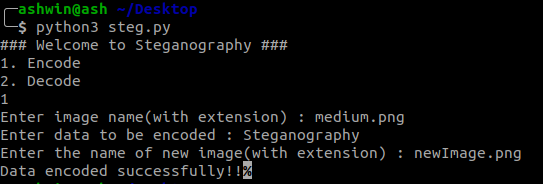
數(shù)據(jù)編碼
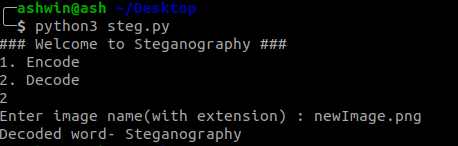
數(shù)據(jù)解碼
輸入圖像

medium.png
輸出圖像
newImage.png
05.局限性
對(duì)于JPEG?圖像,此程序可能無(wú)法正常工作,因?yàn)镴PEG使用有損壓縮,這意味著修改了像素以壓縮圖像并降低質(zhì)量,因此發(fā)生數(shù)據(jù)丟失。
參考文獻(xiàn)
https://www.geeksforgeeks.org/program-decimal-binary-conversion/
https://www.geeksforgeeks.org/working-images-python/
https://dev.to/erikwhiting88/let-s-hide-a-secret-message-in-an-image-with-python-and-opencv-1jf5
A GUI version of the program can be found here:?https://github.com/goelashwin36/image-steganography
交流群
歡迎加入公眾號(hào)讀者群一起和同行交流,目前有SLAM、三維視覺、傳感器、自動(dòng)駕駛、計(jì)算攝影、檢測(cè)、分割、識(shí)別、醫(yī)學(xué)影像、GAN、算法競(jìng)賽等微信群(以后會(huì)逐漸細(xì)分),請(qǐng)掃描下面微信號(hào)加群,備注:”昵稱+學(xué)校/公司+研究方向“,例如:”張三?+?上海交大?+?視覺SLAM“。請(qǐng)按照格式備注,否則不予通過。添加成功后會(huì)根據(jù)研究方向邀請(qǐng)進(jìn)入相關(guān)微信群。請(qǐng)勿在群內(nèi)發(fā)送廣告,否則會(huì)請(qǐng)出群,謝謝理解~