
Android實(shí)現(xiàn)隨意拖動(dòng)View效果
項(xiàng)目過(guò)程中需要實(shí)現(xiàn)View能在頁(yè)面中隨意的拖動(dòng),剛開(kāi)始實(shí)現(xiàn)是用懸浮球的形式進(jìn)行實(shí)現(xiàn),因?yàn)橹绊?xiàng)目中用過(guò),實(shí)現(xiàn)后發(fā)現(xiàn)用戶每次安裝后,都有權(quán)限的限制,甚至有些用戶關(guān)閉懸浮球權(quán)限之后,不知道怎么在手機(jī)上打開(kāi)懸浮球的權(quán)限,這樣的話用戶體驗(yàn)很不好,所以自己重新自定義實(shí)現(xiàn)在頁(yè)面中拖動(dòng),不需要請(qǐng)求權(quán)限。
1、先來(lái)看看效果圖:
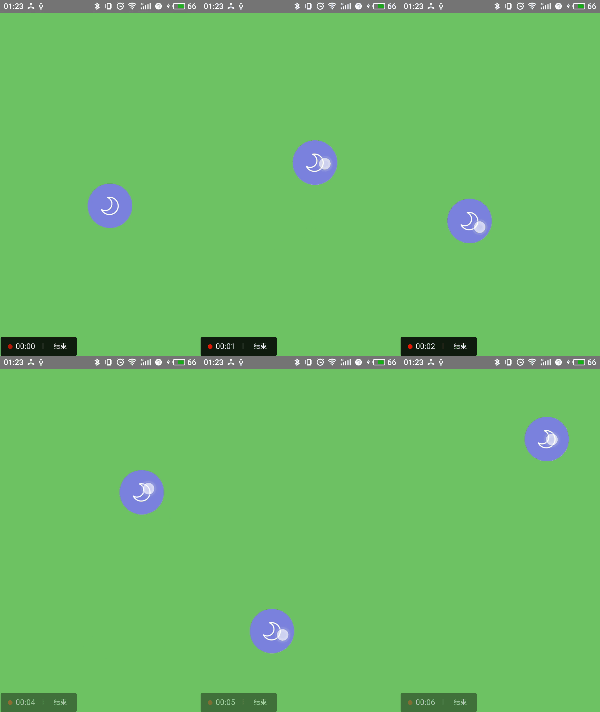
2、自定義隨意拖動(dòng)View:
package com.dragdemo;import android.annotation.SuppressLint;import android.content.Context;import android.util.AttributeSet;import android.util.Log;import android.view.MotionEvent;import android.widget.ImageView;/*** 隨意拖動(dòng)的view*/("AppCompatCustomView")public class DragView extends ImageView {private int width;private int height;private int screenWidth;private int screenHeight;private Context context;//是否拖動(dòng)private boolean isDrag = false;public boolean isDrag() {return isDrag;}public DragView(Context context, AttributeSet attrs) {super(context, attrs);this.context = context;}protected void onMeasure(int widthMeasureSpec, int heightMeasureSpec) {super.onMeasure(widthMeasureSpec, heightMeasureSpec);width = getMeasuredWidth();height = getMeasuredHeight();screenWidth = ScreenUtil.getScreenWidth(context);screenHeight = ScreenUtil.getScreenHeight(context) - getStatusBarHeight();}public int getStatusBarHeight() {int resourceId = getResources().getIdentifier("status_bar_height", "dimen", "android");return getResources().getDimensionPixelSize(resourceId);}private float downX;private float downY;public boolean onTouchEvent(MotionEvent event) {super.onTouchEvent(event);if (this.isEnabled()) {switch (event.getAction()) {case MotionEvent.ACTION_DOWN:isDrag = false;downX = event.getX();downY = event.getY();break;case MotionEvent.ACTION_MOVE:Log.e("kid", "ACTION_MOVE");final float xDistance = event.getX() - downX;final float yDistance = event.getY() - downY;int l, r, t, b;//當(dāng)水平或者垂直滑動(dòng)距離大于10,才算拖動(dòng)事件if (Math.abs(xDistance) > 10 || Math.abs(yDistance) > 10) {Log.e("kid", "Drag");isDrag = true;l = (int) (getLeft() + xDistance);r = l + width;t = (int) (getTop() + yDistance);b = t + height;//不劃出邊界判斷,此處應(yīng)按照項(xiàng)目實(shí)際情況,因?yàn)楸卷?xiàng)目需求移動(dòng)的位置是手機(jī)全屏,// 所以才能這么寫,如果是固定區(qū)域,要得到父控件的寬高位置后再做處理if (l < 0) {l = 0;r = l + width;} else if (r > screenWidth) {r = screenWidth;l = r - width;}if (t < 0) {t = 0;b = t + height;} else if (b > screenHeight) {b = screenHeight;t = b - height;}this.layout(l, t, r, b);}break;case MotionEvent.ACTION_UP:setPressed(false);break;case MotionEvent.ACTION_CANCEL:setPressed(false);break;}return true;}return false;}}
3、用到的工具類:
package com.dragdemo;import android.content.Context;import android.util.DisplayMetrics;import android.view.Display;import android.view.View;import android.view.WindowManager;public class ScreenUtil {private static int width = 0;private static int height = 0;private static int showHeight = 0;private static int statusHeight = 0;private static float density = 0;public static int getScreenWidth(Context context) {if (width == 0) {WindowManager manager = (WindowManager) context.getSystemService(Context.WINDOW_SERVICE);Display display = manager.getDefaultDisplay();width = display.getWidth();}return width;}public static int getScreenHeight(Context context) {if (height == 0) {WindowManager manager = (WindowManager) context.getSystemService(Context.WINDOW_SERVICE);Display display = manager.getDefaultDisplay();height = display.getHeight();}return height;}public static int getScreenShowHeight(Context context) {if (showHeight == 0) {showHeight = getScreenHeight(context) - getStatusBarHeight(context);}return showHeight;}public static int getStatusBarHeight(Context context) {if (statusHeight > 0) {return statusHeight;}Class<?> c = null;Object obj = null;java.lang.reflect.Field field = null;int x = 0;try {c = Class.forName("com.android.internal.R$dimen");obj = c.newInstance();field = c.getField("status_bar_height");x = Integer.parseInt(field.get(obj).toString());statusHeight = context.getResources().getDimensionPixelSize(x);return statusHeight;} catch (Throwable e) {e.printStackTrace();}return statusHeight;}public static float getScreenDensity(Context context) {if (density == 0) {try {DisplayMetrics dm = new DisplayMetrics();WindowManager manager = (WindowManager) context.getSystemService(Context.WINDOW_SERVICE);manager.getDefaultDisplay().getMetrics(dm);density = dm.density;} catch (Exception ex) {ex.printStackTrace();density = 1.0f;}}return density;}public static float getScreentMinLength(Context context) {return getScreenHeight(context) > getScreenWidth(context) ? getScreenWidth(context): getScreenHeight(context);}/*** 根據(jù)指定k的系數(shù)獲取屏幕在max范圍內(nèi)的最大長(zhǎng)寬,默認(rèn)寬比較小** @param context* @param k* @return*/public static DrawWrap getCutWrap(Context context, float k, float max) {float tWidth = getScreenWidth(context);float tHeight = getScreenHeight(context);if (tWidth * max * k > tHeight) {return new DrawWrap(tHeight * max / k, tHeight * max);} else {return new DrawWrap(tWidth * max, tWidth * max * k);}}public static class DrawWrap {public float width;public float height;public DrawWrap(float width, float height) {this.width = width;this.height = height;}}public static int dip2px(Context context, float dipValue) {return (int) (dipValue * getScreenDensity(context) + 0.5f);}/*** 將sp值轉(zhuǎn)換為px值,保證文字大小不變** @param context* @param spValue (DisplayMetrics類中屬性scaledDensity)* @return*/public static int sp2px(Context context, float spValue) {final float fontScale = context.getResources().getDisplayMetrics().scaledDensity;return (int) (spValue * fontScale + 0.5f);}/*** 根據(jù)手機(jī)的分辨率從 px(像素) 的單位 轉(zhuǎn)成為 dp*/public static int px2dip(Context context, float pxValue) {final float scale = context.getResources().getDisplayMetrics().density;return (int) (pxValue / scale + 0.5f);}/*** 獲取屏幕中控件頂部位置的高度--即控件頂部的Y點(diǎn)** @return*/public static int getScreenViewTopHeight(View view) {return view.getTop();}/*** 獲取屏幕中控件底部位置的高度--即控件底部的Y點(diǎn)** @return*/public static int getScreenViewBottomHeight(View view) {return view.getBottom();}/*** 獲取屏幕中控件左側(cè)的位置--即控件左側(cè)的X點(diǎn)** @return*/public static int getScreenViewLeftHeight(View view) {return view.getLeft();}/*** 獲取屏幕中控件右側(cè)的位置--即控件右側(cè)的X點(diǎn)** @return*/public static int getScreenViewRightHeight(View view) {return view.getRight();}/** 獲取控件寬*/public static int getWidth(View view) {int w = View.MeasureSpec.makeMeasureSpec(0,View.MeasureSpec.UNSPECIFIED);int h = View.MeasureSpec.makeMeasureSpec(0,View.MeasureSpec.UNSPECIFIED);view.measure(w, h);return (view.getMeasuredWidth());}/** 獲取控件高*/public static int getHeight(View view) {int w = View.MeasureSpec.makeMeasureSpec(0,View.MeasureSpec.UNSPECIFIED);int h = View.MeasureSpec.makeMeasureSpec(0,View.MeasureSpec.UNSPECIFIED);view.measure(w, h);return (view.getMeasuredHeight());}}
4、XML文件:
<com.dragdemo.DragViewandroid:id="@+id/iv_drag"android:layout_width="80dp"android:layout_height="80dp"android:layout_gravity="center"android:src="@drawable/function_night_open" />
5、MainActivity代碼邏輯
package com.dragdemo;import android.support.v7.app.AppCompatActivity;import android.os.Bundle;import android.view.View;import android.widget.Toast;public class MainActivity extends AppCompatActivity {DragView iv_drag;protected void onCreate(Bundle savedInstanceState) {super.onCreate(savedInstanceState);setContentView(R.layout.activity_main);iv_drag = (DragView) findViewById(R.id.iv_drag);iv_drag.setOnClickListener(new View.OnClickListener() {public void onClick(View v) {if (!iv_drag.isDrag()) {Toast.makeText(MainActivity.this, "響應(yīng)點(diǎn)擊", Toast.LENGTH_SHORT).show();}}});}}
需要源碼的童鞋可以在公眾號(hào)【龍旋】對(duì)話框發(fā)送關(guān)鍵字【隨意拖動(dòng)View】即可獲取哦!
評(píng)論
圖片
表情