
Flink實時計算topN熱榜
topN的常見應(yīng)用場景,最熱商品購買量,最高人氣作者的閱讀量等等。
1. 用到的知識點
Flink創(chuàng)建kafka數(shù)據(jù)源;
基于 EventTime 處理,如何指定 Watermark;
Flink中的Window,滾動(tumbling)窗口與滑動(sliding)窗口;
State狀態(tài)的使用;
ProcessFunction 實現(xiàn) TopN 功能;
2. 案例介紹
通過用戶訪問日志,計算最近一段時間平臺最活躍的幾位用戶topN。
創(chuàng)建kafka生產(chǎn)者,發(fā)送測試數(shù)據(jù)到kafka;
消費kafka數(shù)據(jù),使用滑動(sliding)窗口,每隔一段時間更新一次排名;
3. 數(shù)據(jù)源
這里使用kafka api發(fā)送測試數(shù)據(jù)到kafka,代碼如下:
@Data
@NoArgsConstructor
@AllArgsConstructor
@ToString
public class User {

    private long id;
    private String username;
    private String password;
    private long timestamp;
}

Map<String, String> config = Configuration.initConfig("commons.xml");

@Test
public void sendData() throws InterruptedException {
    int cnt = 0;

    while (cnt < 200){
        User user = new User();
        user.setId(cnt);
        user.setUsername("username" + new Random().nextInt((cnt % 5) + 2));
        user.setPassword("password" + cnt);
        user.setTimestamp(System.currentTimeMillis());
        Future<RecordMetadata> future = KafkaUtil.sendDataToKafka(config.get("kafka-topic"), String.valueOf(cnt), JSON.toJSONString(user));
        while (!future.isDone()){
            Thread.sleep(100);
        }
        try {
            RecordMetadata recordMetadata = future.get();
            System.out.println(recordMetadata.offset());
        } catch (InterruptedException e) {
            e.printStackTrace();
        } catch (ExecutionException e) {
            e.printStackTrace();
        }
        System.out.println("發(fā)送消息:" + cnt + "******" + user.toString());
        cnt = cnt + 1;
    }
}
這里通過隨機數(shù)來擾亂username,便于使用戶名大小不一,讓結(jié)果更加明顯。KafkaUtil是自己寫的一個kafka工具類,代碼很簡單,主要是平時做測試方便。
4. 主要程序
創(chuàng)建一個main程序,開始編寫代碼。
創(chuàng)建flink環(huán)境,關(guān)聯(lián)kafka數(shù)據(jù)源。
Map<String, String> config = Configuration.initConfig("commons.xml");

Properties kafkaProps = new Properties();
kafkaProps.setProperty("zookeeper.connect", config.get("kafka-zookeeper"));
kafkaProps.setProperty("bootstrap.servers", config.get("kafka-ipport"));
kafkaProps.setProperty("group.id", config.get("kafka-groupid"));

StreamExecutionEnvironment senv = StreamExecutionEnvironment.getExecutionEnvironment();
EventTime 與 Watermark
senv.setStreamTimeCharacteristic(TimeCharacteristic.EventTime);
設(shè)置屬性senv.setStreamTimeCharacteristic(TimeCharacteristic.EventTime),表示按照數(shù)據(jù)時間字段來處理,默認(rèn)是TimeCharacteristic.ProcessingTime
/** The time characteristic that is used if none other is set. */
private static final TimeCharacteristic DEFAULT_TIME_CHARACTERISTIC = TimeCharacteristic.ProcessingTime;
這個屬性必須設(shè)置,否則后面,可能窗口結(jié)束無法觸發(fā),導(dǎo)致結(jié)果無法輸出。取值有三種:
ProcessingTime:事件被處理的時間。也就是由flink集群機器的系統(tǒng)時間來決定。
EventTime:事件發(fā)生的時間。一般就是數(shù)據(jù)本身攜帶的時間。
IngestionTime:攝入時間,數(shù)據(jù)進(jìn)入flink流的時間,跟ProcessingTime還是有區(qū)別的;
指定好使用數(shù)據(jù)的實際時間來處理,接下來需要指定flink程序如何get到數(shù)據(jù)的時間字段,這里使用調(diào)用DataStream的assignTimestampsAndWatermarks方法,抽取時間和設(shè)置watermark。
senv.addSource(
        new FlinkKafkaConsumer010<>(
                config.get("kafka-topic"),
                new SimpleStringSchema(),
                kafkaProps
        )
).map(x ->{
    return JSON.parseObject(x, User.class);
}).assignTimestampsAndWatermarks(new BoundedOutOfOrdernessTimestampExtractor<User>(Time.milliseconds(1000)) {
    @Override
    public long extractTimestamp(User element) {
        return element.getTimestamp();
    }
})
前面給出的代碼中可以看出,由于發(fā)送到kafka的時候,將User對象轉(zhuǎn)換為json字符串了,這里使用的是fastjson,接收過來可以轉(zhuǎn)化為JsonObject來處理,我這里還是將其轉(zhuǎn)化為User對象JSON.parseObject(x, User.class),便于處理。
這里考慮到數(shù)據(jù)可能亂序,使用了可以處理亂序的抽象類BoundedOutOfOrdernessTimestampExtractor,并且實現(xiàn)了唯一的一個沒有實現(xiàn)的方法extractTimestamp,亂序數(shù)據(jù),會導(dǎo)致數(shù)據(jù)延遲,在構(gòu)造方法中傳入了一個Time.milliseconds(1000),表明數(shù)據(jù)可以延遲一秒鐘。比如說,如果窗口長度是10s,0~10s的數(shù)據(jù)會在11s的時候計算,此時watermark是10,才會觸發(fā)計算,也就是說引入watermark處理亂序數(shù)據(jù),最多可以容忍0~t這個窗口的數(shù)據(jù),最晚在t+1時刻到來。

具體關(guān)于watermark的講解可以參考這篇文章
https://blog.csdn.net/qq_39657909/article/details/106081543
窗口統(tǒng)計
業(yè)務(wù)需求上,通常可能是一個小時,或者過去15分鐘的數(shù)據(jù),5分鐘更新一次排名,這里為了演示效果,窗口長度取10s,每次滑動(slide)5s,即5秒鐘更新一次過去10s的排名數(shù)據(jù)。
.keyBy("username")
.timeWindow(Time.seconds(10), Time.seconds(5))
.aggregate(new CountAgg(), new WindowResultFunction())
我們使用.keyBy("username")對用戶進(jìn)行分組,使用.timeWindow(Time size, Time slide)對每個用戶做滑動窗口(10s窗口,5s滑動一次)。然后我們使用 .aggregate(AggregateFunction af, WindowFunction wf) 做增量的聚合操作,它能使用AggregateFunction提前聚合掉數(shù)據(jù),減少 state 的存儲壓力。較之.apply(WindowFunction wf)會將窗口中的數(shù)據(jù)都存儲下來,最后一起計算要高效地多。aggregate()方法的第一個參數(shù)用于
這里的CountAgg實現(xiàn)了AggregateFunction接口,功能是統(tǒng)計窗口中的條數(shù),即遇到一條數(shù)據(jù)就加一。
public class CountAgg implements AggregateFunction<User, Long, Long>{
    @Override
    public Long createAccumulator() {
        return 0L;
    }

    @Override
    public Long add(User value, Long accumulator) {
        return accumulator + 1;
    }

    @Override
    public Long getResult(Long accumulator) {
        return accumulator;
    }

    @Override
    public Long merge(Long a, Long b) {
        return a + b;
    }
}
.aggregate(AggregateFunction af, WindowFunction wf) 的第二個參數(shù)WindowFunction將每個 key每個窗口聚合后的結(jié)果帶上其他信息進(jìn)行輸出。我們這里實現(xiàn)的WindowResultFunction將用戶名,窗口,訪問量封裝成了UserViewCount進(jìn)行輸出。
private static class WindowResultFunction implements WindowFunction<Long, UserViewCount, Tuple, TimeWindow> {


    @Override
    public void apply(Tuple key, TimeWindow window, Iterable<Long> input, Collector<UserViewCount> out) throws Exception {
        Long count = input.iterator().next();
        out.collect(new UserViewCount(((Tuple1<String>)key).f0, window.getEnd(), count));
    }
}

@Data
@NoArgsConstructor
@AllArgsConstructor
@ToString
public static class UserViewCount {
    private String userName;
    private long windowEnd;
    private long viewCount;

}
TopN計算最活躍用戶
為了統(tǒng)計每個窗口下活躍的用戶,我們需要再次按窗口進(jìn)行分組,這里根據(jù)UserViewCount中的windowEnd進(jìn)行keyBy()操作。然后使用 ProcessFunction 實現(xiàn)一個自定義的 TopN 函數(shù) TopNHotItems 來計算點擊量排名前3名的用戶,并將排名結(jié)果格式化成字符串,便于后續(xù)輸出。
.keyBy("windowEnd")
.process(new TopNHotUsers(3))
.print();
ProcessFunction 是 Flink 提供的一個 low-level API,用于實現(xiàn)更高級的功能。它主要提供了定時器 timer 的功能(支持EventTime或ProcessingTime)。本案例中我們將利用 timer 來判斷何時收齊了某個 window 下所有用戶的訪問數(shù)據(jù)。由于 Watermark 的進(jìn)度是全局的,在 processElement 方法中,每當(dāng)收到一條數(shù)據(jù)(ItemViewCount),我們就注冊一個 windowEnd+1 的定時器(Flink 框架會自動忽略同一時間的重復(fù)注冊)。windowEnd+1 的定時器被觸發(fā)時,意味著收到了windowEnd+1的 Watermark,即收齊了該windowEnd下的所有用戶窗口統(tǒng)計值。我們在 onTimer() 中處理將收集的所有商品及點擊量進(jìn)行排序,選出 TopN,并將排名信息格式化成字符串后進(jìn)行輸出。
這里我們還使用了 ListState<ItemViewCount> 來存儲收到的每條 UserViewCount 消息,保證在發(fā)生故障時,狀態(tài)數(shù)據(jù)的不丟失和一致性。ListState 是 Flink 提供的類似 Java List 接口的 State API,它集成了框架的 checkpoint 機制,自動做到了 exactly-once 的語義保證。
private static class TopNHotUsers extends KeyedProcessFunction<Tuple, UserViewCount, String> {

    private int topSize;
    private ListState<UserViewCount> userViewCountListState;

    public TopNHotUsers(int topSize) {
        this.topSize = topSize;
    }

    @Override
    public void onTimer(long timestamp, OnTimerContext ctx, Collector<String> out) throws Exception {
        super.onTimer(timestamp, ctx, out);
        List<UserViewCount> userViewCounts = new ArrayList<>();
        for(UserViewCount userViewCount : userViewCountListState.get()) {
            userViewCounts.add(userViewCount);
        }

        userViewCountListState.clear();

        userViewCounts.sort(new Comparator<UserViewCount>() {
            @Override
            public int compare(UserViewCount o1, UserViewCount o2) {
                return (int)(o2.viewCount - o1.viewCount);
            }
        });

        // 將排名信息格式化成 String, 便于打印
        StringBuilder result = new StringBuilder();
        result.append("====================================\n");
        result.append("時間: ").append(new Timestamp(timestamp-1)).append("\n");
        for (int i = 0; i < topSize; i++) {
            UserViewCount currentItem = userViewCounts.get(i);
            // No1:  商品ID=12224  瀏覽量=2413
            result.append("No").append(i).append(":")
                    .append("  用戶名=").append(currentItem.userName)
                    .append("  瀏覽量=").append(currentItem.viewCount)
                    .append("\n");
        }
        result.append("====================================\n\n");

        Thread.sleep(1000);

        out.collect(result.toString());

    }

    @Override
    public void open(org.apache.flink.configuration.Configuration parameters) throws Exception {
        super.open(parameters);
        ListStateDescriptor<UserViewCount> userViewCountListStateDescriptor = new ListStateDescriptor<>(
                "user-state",
                UserViewCount.class
        );
        userViewCountListState = getRuntimeContext().getListState(userViewCountListStateDescriptor);

    }

    @Override
    public void processElement(UserViewCount value, Context ctx, Collector<String> out) throws Exception {
        userViewCountListState.add(value);
        ctx.timerService().registerEventTimeTimer(value.windowEnd + 1000);
    }
}
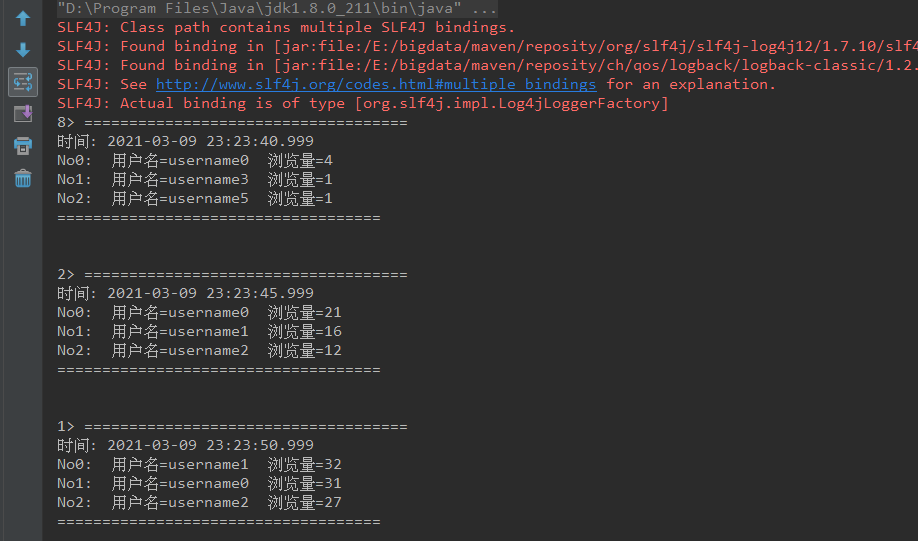
結(jié)果輸出
可以看到,每隔5秒鐘更新輸出一次數(shù)據(jù)。
參考
http://wuchong.me/blog/2018/11/07/use-flink-calculate-hot-items/