
干貨!10分鐘,用Python生成圖文并茂的PDF報(bào)告!
來源:印象python
reportlab是Python的一個標(biāo)準(zhǔn)庫,可以畫圖、畫表格、編輯文字,最后可以輸出PDF格式。它的邏輯和編輯一個word文檔或者PPT很像。有兩種方法:
1)建立一個空白文檔,然后在上面寫文字、畫圖等;
2)建立一個空白list,以填充表格的形式插入各種文本框、圖片等,最后生成PDF文檔。
因?yàn)樾枰a(chǎn)生一份給用戶看的報(bào)告,里面需要插入圖片、表格等,所以采用的是第二種方法。
安裝第三方庫
reportlab輸入Python的第三方庫,使用前需要先安裝:pip install reportlab
模塊導(dǎo)入
提前導(dǎo)入相關(guān)內(nèi)容,并且注冊字體。(注冊字體前需要先準(zhǔn)備好字體文件)
from reportlab.pdfbase import pdfmetrics   # 注冊字體
from reportlab.pdfbase.ttfonts import TTFont # 字體類
from reportlab.platypus import Table, SimpleDocTemplate, Paragraph, Image  # 報(bào)告內(nèi)容相關(guān)類
from reportlab.lib.pagesizes import letter  # 頁面的標(biāo)志尺寸(8.5*inch, 11*inch)
from reportlab.lib.styles import getSampleStyleSheet  # 文本樣式
from reportlab.lib import colors  # 顏色模塊
from reportlab.graphics.charts.barcharts import VerticalBarChart  # 圖表類
from reportlab.graphics.charts.legends import Legend  # 圖例類
from reportlab.graphics.shapes import Drawing  # 繪圖工具
from reportlab.lib.units import cm  # 單位:cm

# 注冊字體(提前準(zhǔn)備好字體文件, 如果同一個文件需要多種字體可以注冊多個)
pdfmetrics.registerFont(TTFont('SimSun', 'SimSun.ttf'))
封裝不同內(nèi)容對應(yīng)的函數(shù)
創(chuàng)建一個Graphs類,通過不同的靜態(tài)方法提供不同的報(bào)告內(nèi)容,包括:標(biāo)題、普通段落、圖片、表格和圖表。函數(shù)中的相關(guān)數(shù)據(jù)目前絕大多數(shù)都是固定值,可以根據(jù)情況自行設(shè)置成相關(guān)參數(shù)。
class Graphs:
    # 繪制標(biāo)題
    @staticmethod
    def draw_title(title: str):
        # 獲取所有樣式表
        style = getSampleStyleSheet()
        # 拿到標(biāo)題樣式
        ct = style['Heading1']
        # 單獨(dú)設(shè)置樣式相關(guān)屬性
        ct.fontName = 'SimSun'      # 字體名
        ct.fontSize = 18            # 字體大小
        ct.leading = 50             # 行間距
        ct.textColor = colors.green     # 字體顏色
        ct.alignment = 1    # 居中
        ct.bold = True
        # 創(chuàng)建標(biāo)題對應(yīng)的段落,并且返回
        return Paragraph(title, ct)

  # 繪制小標(biāo)題
    @staticmethod
    def draw_little_title(title: str):
        # 獲取所有樣式表
        style = getSampleStyleSheet()
        # 拿到標(biāo)題樣式
        ct = style['Normal']
        # 單獨(dú)設(shè)置樣式相關(guān)屬性
        ct.fontName = 'SimSun'  # 字體名
        ct.fontSize = 15  # 字體大小
        ct.leading = 30  # 行間距
        ct.textColor = colors.red  # 字體顏色
        # 創(chuàng)建標(biāo)題對應(yīng)的段落,并且返回
        return Paragraph(title, ct)

    # 繪制普通段落內(nèi)容
    @staticmethod
    def draw_text(text: str):
        # 獲取所有樣式表
        style = getSampleStyleSheet()
        # 獲取普通樣式
        ct = style['Normal']
        ct.fontName = 'SimSun'
        ct.fontSize = 12
        ct.wordWrap = 'CJK'     # 設(shè)置自動換行
        ct.alignment = 0        # 左對齊
        ct.firstLineIndent = 32     # 第一行開頭空格
        ct.leading = 25
        return Paragraph(text, ct)

    # 繪制表格
    @staticmethod
    def draw_table(*args):
        # 列寬度
        col_width = 120
        style = [
            ('FONTNAME', (0, 0), (-1, -1), 'SimSun'),  # 字體
            ('FONTSIZE', (0, 0), (-1, 0), 12),  # 第一行的字體大小
            ('FONTSIZE', (0, 1), (-1, -1), 10),  # 第二行到最后一行的字體大小
            ('BACKGROUND', (0, 0), (-1, 0), '#d5dae6'),  # 設(shè)置第一行背景顏色
            ('ALIGN', (0, 0), (-1, -1), 'CENTER'),  # 第一行水平居中
            ('ALIGN', (0, 1), (-1, -1), 'LEFT'),  # 第二行到最后一行左右左對齊
            ('VALIGN', (0, 0), (-1, -1), 'MIDDLE'),  # 所有表格上下居中對齊
            ('TEXTCOLOR', (0, 0), (-1, -1), colors.darkslategray),  # 設(shè)置表格內(nèi)文字顏色
            ('GRID', (0, 0), (-1, -1), 0.5, colors.grey),  # 設(shè)置表格框線為grey色,線寬為0.5
            # ('SPAN', (0, 1), (0, 2)),  # 合并第一列二三行
            # ('SPAN', (0, 3), (0, 4)),  # 合并第一列三四行
            # ('SPAN', (0, 5), (0, 6)),  # 合并第一列五六行
            # ('SPAN', (0, 7), (0, 8)),  # 合并第一列五六行
        ]
        table = Table(args, colWidths=col_width, style=style)
        return table

    # 創(chuàng)建圖表
    @staticmethod
    def draw_bar(bar_data: list, ax: list, items: list):
        drawing = Drawing(500, 250)
        bc = VerticalBarChart()
        bc.x = 45       # 整個圖表的x坐標(biāo)
        bc.y = 45      # 整個圖表的y坐標(biāo)
        bc.height = 200     # 圖表的高度
        bc.width = 350      # 圖表的寬度
        bc.data = bar_data
        bc.strokeColor = colors.black       # 頂部和右邊軸線的顏色
        bc.valueAxis.valueMin = 5000           # 設(shè)置y坐標(biāo)的最小值
        bc.valueAxis.valueMax = 26000         # 設(shè)置y坐標(biāo)的最大值
        bc.valueAxis.valueStep = 2000         # 設(shè)置y坐標(biāo)的步長
        bc.categoryAxis.labels.dx = 2
        bc.categoryAxis.labels.dy = -8
        bc.categoryAxis.labels.angle = 20
        bc.categoryAxis.categoryNames = ax

        # 圖示
        leg = Legend()
        leg.fontName = 'SimSun'
        leg.alignment = 'right'
        leg.boxAnchor = 'ne'
        leg.x = 475         # 圖例的x坐標(biāo)
        leg.y = 240
        leg.dxTextSpace = 10
        leg.columnMaximum = 3
        leg.colorNamePairs = items
        drawing.add(leg)
        drawing.add(bc)
        return drawing

    # 繪制圖片
    @staticmethod
    def draw_img(path):
        img = Image(path)       # 讀取指定路徑下的圖片
        img.drawWidth = 5*cm        # 設(shè)置圖片的寬度
        img.drawHeight = 8*cm       # 設(shè)置圖片的高度
        return img
生成報(bào)告
if __name__ == '__main__':
    # 創(chuàng)建內(nèi)容對應(yīng)的空列表
    content = list()

    # 添加標(biāo)題
    content.append(Graphs.draw_title('數(shù)據(jù)分析就業(yè)薪資'))

    # 添加圖片
    content.append(Graphs.draw_img('抗疫必勝.png'))

    # 添加段落文字
    content.append(Graphs.draw_text('眾所周知,大數(shù)據(jù)分析師崗位是香餑餑,近幾年數(shù)據(jù)分析熱席卷了整個互聯(lián)網(wǎng)行業(yè),與數(shù)據(jù)分析的相關(guān)的崗位招聘、培訓(xùn)數(shù)不勝數(shù)。很多人前赴后繼,想要參與到這波紅利當(dāng)中。那么數(shù)據(jù)分析師就業(yè)前景到底怎么樣呢?'))
    # 添加小標(biāo)題
    content.append(Graphs.draw_title(''))
    content.append(Graphs.draw_little_title('不同級別的平均薪資'))
    # 添加表格
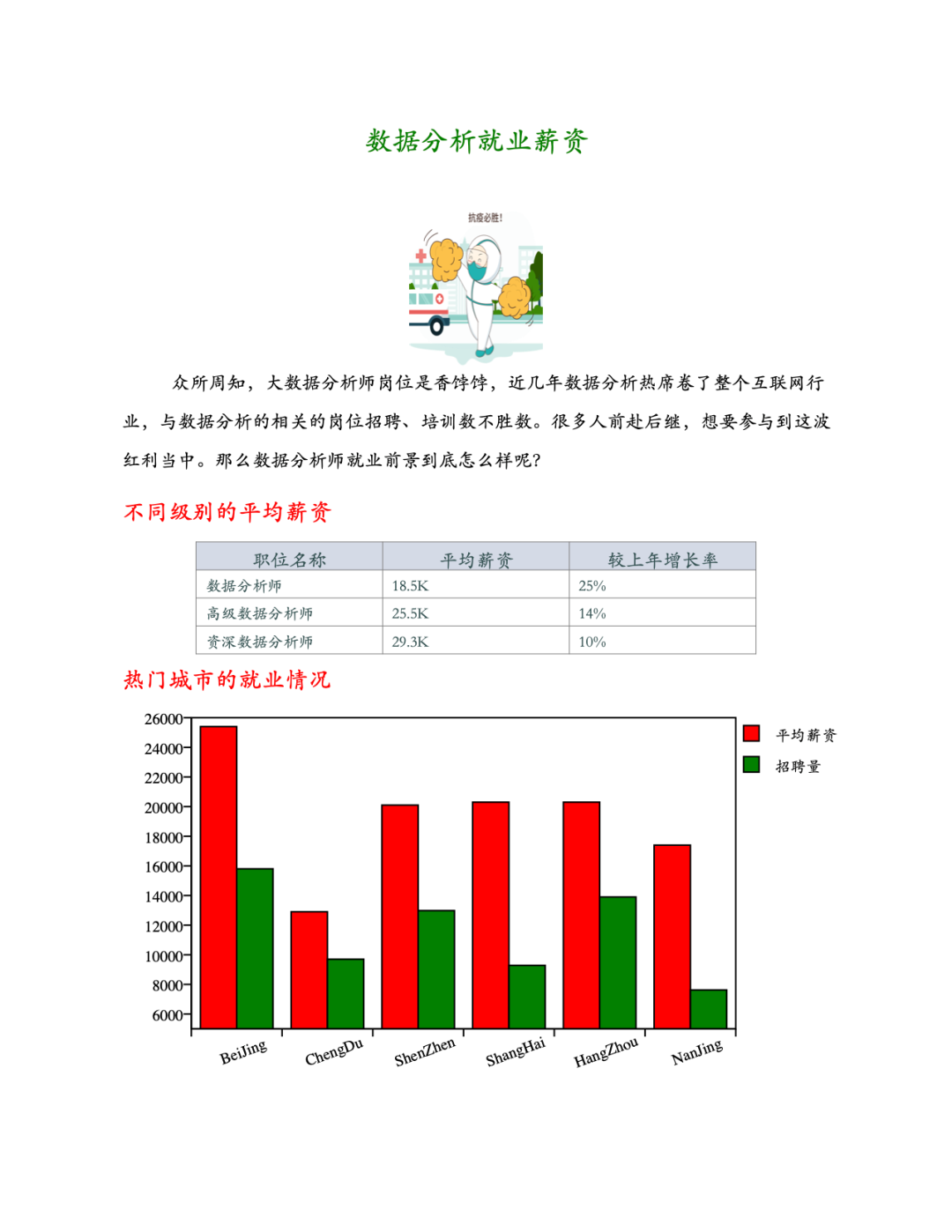
    data = [
        ('職位名稱', '平均薪資', '較上年增長率'),
        ('數(shù)據(jù)分析師', '18.5K', '25%'),
        ('高級數(shù)據(jù)分析師', '25.5K', '14%'),
        ('資深數(shù)據(jù)分析師', '29.3K', '10%')
    ]
    content.append(Graphs.draw_table(*data))

    # 生成圖表
    content.append(Graphs.draw_title(''))
    content.append(Graphs.draw_little_title('熱門城市的就業(yè)情況'))
    b_data = [(25400, 12900, 20100, 20300, 20300, 17400), (15800, 9700, 12982, 9283, 13900, 7623)]
    ax_data = ['BeiJing', 'ChengDu', 'ShenZhen', 'ShangHai', 'HangZhou', 'NanJing']
    leg_items = [(colors.red, '平均薪資'), (colors.green, '招聘量')]
    content.append(Graphs.draw_bar(b_data, ax_data, leg_items))

    # 生成pdf文件
    doc = SimpleDocTemplate('report.pdf', pagesize=letter)
    doc.build(content)
生成報(bào)告的結(jié)果如下:
推薦閱讀:
入門: 最全的零基礎(chǔ)學(xué)Python的問題 | 零基礎(chǔ)學(xué)了8個月的Python | 實(shí)戰(zhàn)項(xiàng)目 |學(xué)Python就是這條捷徑
干貨:爬取豆瓣短評,電影《后來的我們》 | 38年NBA最佳球員分析 | 從萬眾期待到口碑撲街!唐探3令人失望 | 笑看新倚天屠龍記 | 燈謎答題王 |用Python做個海量小姐姐素描圖 |碟中諜這么火,我用機(jī)器學(xué)習(xí)做個迷你推薦系統(tǒng)電影
趣味:彈球游戲 | 九宮格 | 漂亮的花 | 兩百行Python《天天酷跑》游戲!
AI: 會做詩的機(jī)器人 | 給圖片上色 | 預(yù)測收入 | 碟中諜這么火,我用機(jī)器學(xué)習(xí)做個迷你推薦系統(tǒng)電影
小工具: Pdf轉(zhuǎn)Word,輕松搞定表格和水印! | 一鍵把html網(wǎng)頁保存為pdf!| 再見PDF提取收費(fèi)! | 用90行代碼打造最強(qiáng)PDF轉(zhuǎn)換器,word、PPT、excel、markdown、html一鍵轉(zhuǎn)換 | 制作一款釘釘?shù)蛢r(jià)機(jī)票提示器! |60行代碼做了一個語音壁紙切換器天天看小姐姐!|