
SpringBoot 集成積木報表
一個努力中的公眾號
長的好看的人都關(guān)注了

前言
積木報表是jeecg的一款開源但代碼不開源的一款自定義報表,可以基于網(wǎng)頁靈活調(diào)整報表的布局、樣式等內(nèi)容,無需編程,專為企業(yè)數(shù)據(jù)分析、報表制作而設計;降低管理人員匯總制作報表的門檻,解決各類日常管理和匯報的難題。但是因為代碼不開源所以,很多公司商用時會因為積木報表logo、tilte、路由等陷入尷尬局面,本文基于SpringBoot實現(xiàn)整合積木報表,實現(xiàn)自有化報表項目集成。
文章末尾附帶源碼。因為有代碼展示,所以建議PC端打開瀏覽。
干貨
搭建SpringBoot項目
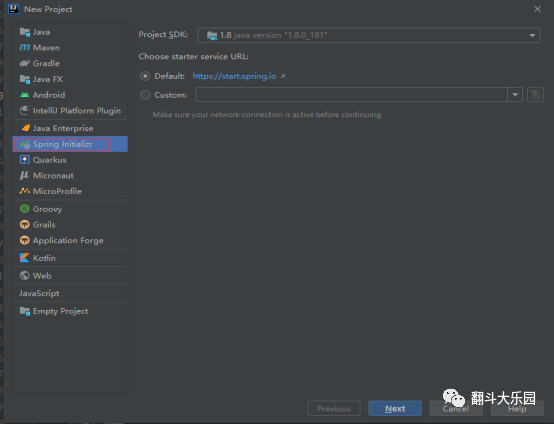
idea中選擇File-New-Project
選擇Spring Initializr、選擇對應的JDK版本、點擊Next
輸入項目名稱,包名等 點擊Next

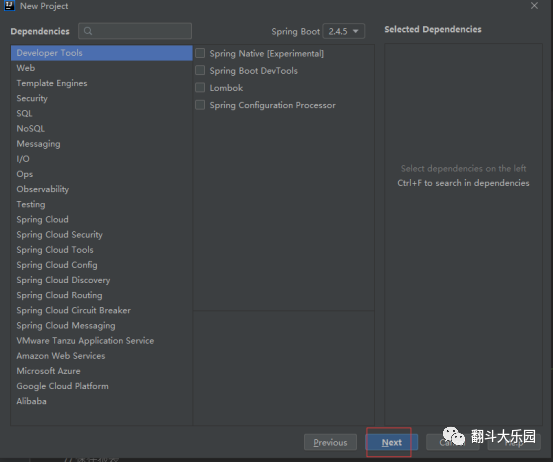
跳過選擇默認依賴這一步,直接Next
選擇項目存放路徑,然后點擊Finish 至此SpringBoot項目創(chuàng)建結(jié)束。

2. 配置Maven依賴 刪除多余配置依賴,只保留項目配置依賴
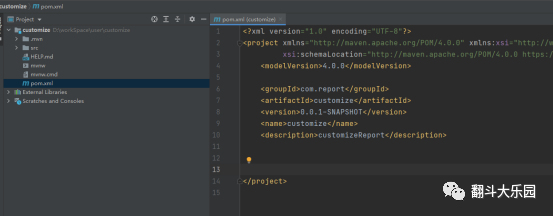
添加報表所需配置依賴
<parent>
<groupId>
org.springframework.boot
</groupId>
<artifactId>
spring-boot-starter-parent
</artifactId>
<version>
2.4.5
</version><relativePath/>
</parent>
<!-- lookup parent from repository -->
<properties>
<java.version>
1.8
</java.version>
<!-- DB驅(qū)動 -->
<postgresql.version>
42.2.6
</postgresql.version>
<ojdbc6.version>
11.2.0.3
</ojdbc6.version>
<sqljdbc4.version>
4.0
</sqljdbc4.version>
<mysql-connector-java.version>
8.0.20
</mysql-connector-java.version>
<minio.version>
8.0.3
</minio.version>
</properties>
<dependencies>
<!-- JimuReport -->
<dependency>
<groupId>
org.jeecgframework.jimureport
</groupId>
<artifactId>
spring-boot-starter-jimureport
</artifactId>
<version>
1.3.1-beta4
</version>
</dependency>
<!-- SpringBoot-->
<dependency>
<groupId>
org.springframework.boot
</groupId>
<artifactId>
spring-boot-starter-web
</artifactId>
</dependency>
<dependency>
<groupId>
org.springframework.boot
</groupId>
<artifactId>
spring-boot-starter-freemarker
</artifactId>
</dependency>
<!-- minio oss-->
<dependency>
<groupId>
io.minio
</groupId>
<artifactId>
minio
</artifactId>
<version>
${minio.version}
</version>
<optional>
true
</optional>
</dependency>
<!-- 數(shù)據(jù)庫驅(qū)動 -->
<!--mysql-->
<dependency>
<groupId>
mysql
</groupId>
<artifactId>
mysql-connector-java
</artifactId>
<version>
${mysql-connector-java.version}
</version>
<scope>
runtime
</scope>
</dependency>
<!--Spring-Data-JPA依賴-->
<dependency>
<groupId>
org.springframework.boot
</groupId>
<artifactId>
spring-boot-starter-data-jpa
</artifactId>
</dependency>
</dependencies>
<build>
<plugins>
<plugin>
<groupId>
org.springframework.boot
</groupId>
<artifactId>
spring-boot-maven-plugin
</artifactId>
</plugin>
</plugins>
</build>
3. 配置yml文件
server:
port: 9999
spring:
#配置靜態(tài)資源
mvc:
static-path-pattern: /**
resource:
static-locations: classpath:/static/
#數(shù)據(jù)庫連接
datasource:
username: root
password: 1234
driver-class-name: com.mysql.cj.jdbc.Driverurl: jdbc:mysql://${MYSQL-HOST:ip}
:${MYSQL-PORT:port}
/${MYSQL-DB:custom_report}
?serverTimezone=UTC&useUnicode=true&characterEncoding
#JimuReport[minidao配置]
=utf-8&allowPublicKeyRetrieval=true
minidao :base-package:
db-type: mysql
org.jeecg.modules.jmreport.desreport.dao*
#JimuReport[上傳配置]
jeecg :
# local|minio|alioss
uploadType: local
# local
path :
#文件路徑
upload: /opt/upload
# alioss
oss:
endpoint: oss-cn-beijing.aliyuncs.com
accessKey: ??
secretKey: ??
staticDomain: ??
bucketName: ??
# minio
minio:
minio_url: http://minio.jeecg.com
minio_name: ??
minio_pass: ??
bucketName: ??
#輸出sql日志
logging:
level:
org.jeecg.modules.jmreport : debug
4. 啟動類添加掃包注解
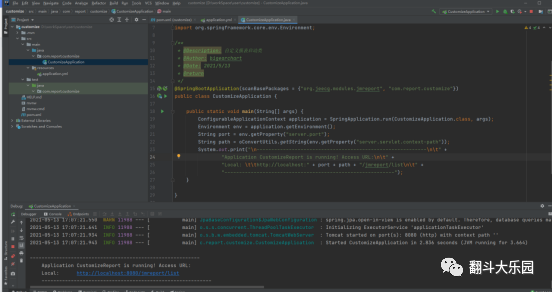
@SpringBootApplication(scanBasePackages = {"org.jeecg.modules.jmreport", "com.report.customize"})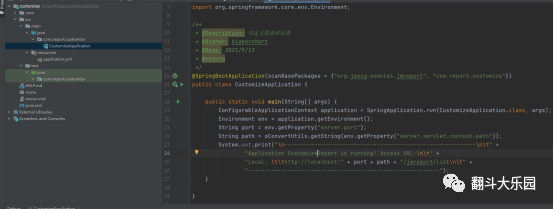
5. 啟動項目 訪問打印的鏈接,即可訪問報表設計頁面

6. 報表設計器自定義修改
打開本地Maven倉庫
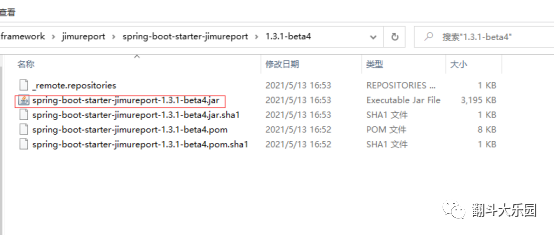
找到
org\jeecgframework\jimureport\spring-boot-starter-jimureport\1.3.1-beta4
積木jar包
使用2345好壓打開jar
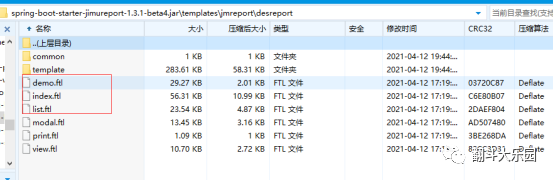
打開templates目錄下jmreport目錄下desreport
編輯demo、index、list 三個ftl文件(右鍵內(nèi)部編輯器打開)
替換原積木title為需要的title名稱(例如:XXX報表設計器)
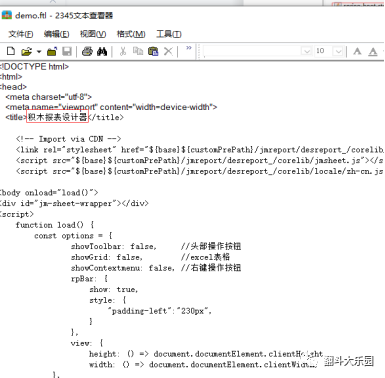
編輯后保存,關(guān)閉內(nèi)部編輯器 壓縮軟件提示修改保存,點擊確定,保存修改,后續(xù)操作同 理

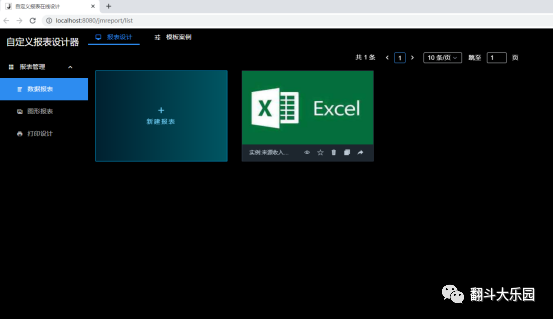
三個文件(共4處)都修改好以后,返回idea重啟項目,再次訪問列表頁,即發(fā)現(xiàn)title已修改為自定義。
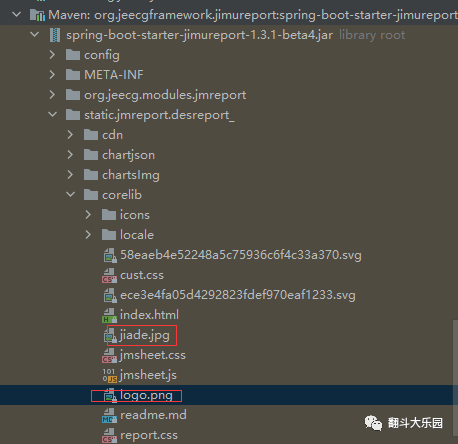
tile的logo與報表icon資源在 static目錄下jmreport目錄下desreport_目錄下的corelib目錄中
jiade.jpg 是報表icon、logo.png為title的logo
有需求可以自己替換
打開static目錄下jmreport目錄下desreport_目錄下js目錄下core目錄
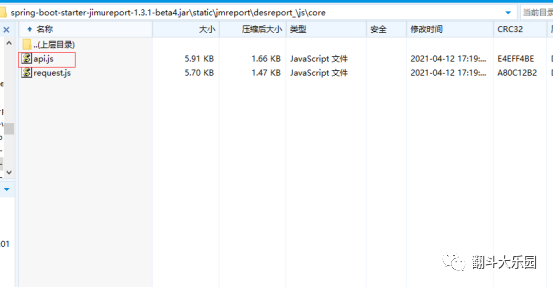
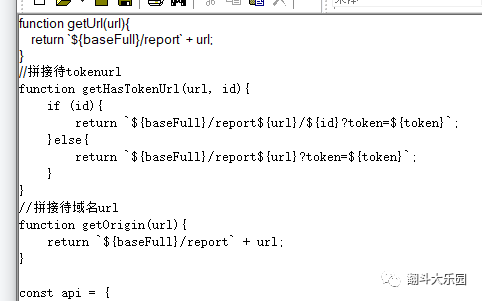
打開api.js
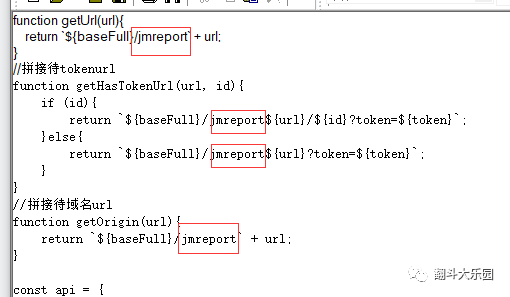
將對應的jmreport改為你需要展示的路由名稱(例如:report)
7. nginx配置代理
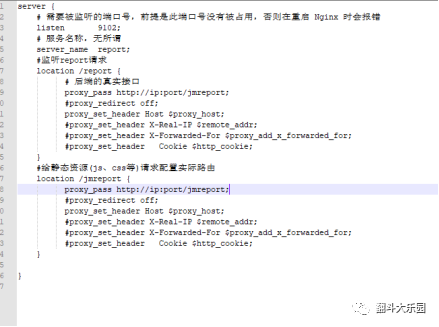
server {# 需要被監(jiān)聽的端口號,前提是此端口號沒有被占用
listen 8080;
# 否則在重啟 Nginx 時會報錯
# 服務名稱,無所謂
server_name report;
#監(jiān)聽report請求
location /report {
# 后端的真實接口
proxy_pass http://ip:port/jmreport;
#proxy_redirect off;
proxy_set_header Host $proxy_host;#proxy_set_header
#X-Real-IP $remote_addr;
#proxy_set_header
#X-Forwarded-For
#$proxy_add_x_forwarded_for;
#proxy_set_header
#Cookie $http_cookie;
#proxy_set_header
#proxy_set_header Cookie $http_cookie;
#X-Forwarded-For
#$proxy_add_x_forwarded_for;
}
#給靜態(tài)資源(js、css等)請求配置實際路由
location /jmreport {
proxy_pass http://ip:port/jmreport;
#proxy_redirect off;
proxy_set_header Host $proxy_host;#proxy_set_header
#X-Real-IP $remote_addr;
#proxy_set_header#X-Forwarded-For
#$proxy_add_x_forwarded_for;
#proxy_set_header
#Cookie $http_cookie;
#proxy_set_header
#X-Forwarded-For
#$proxy_add_x_forwarded_for;#proxy_set_header
}
#Cookie $http_cookie;
}
訪問nginx配置的端口與路由,即可自動轉(zhuǎn)發(fā)自定義報表內(nèi)容
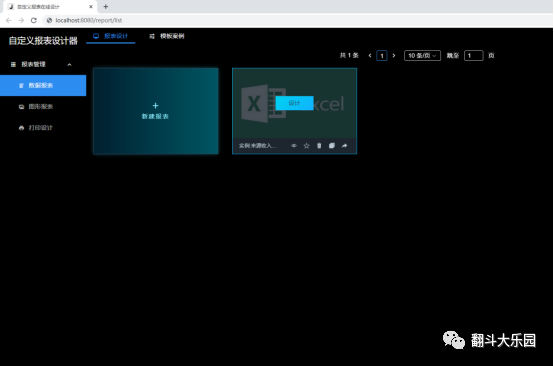
至此自定義報表修改配置工作結(jié)束,就可以愉快的使用了
本次的學習到這里就結(jié)束了,會根據(jù)實際使用更新文章。
本文項目源代碼:
https://gitee.com/bigearchart_admin/customize.git
如果對您有幫助 請點個關(guān)注,萬分感謝
(QQ招聘群 710566091
微信招聘群 請加圖圖微信)