
PyTorch消除訓練瓶頸 提速技巧
本文將搜集到的資源進行匯總,由于目前筆者訓練的GPU利用率已經(jīng)很高,所以并沒有實際實驗,可以在參考文獻中看一下其他作者做的實驗。
1. 硬件層面
CPU的話盡量看主頻比較高的,緩存比較大的,核心數(shù)也是比較重要的參數(shù)。
顯卡盡可能選現(xiàn)存比較大的,這樣才能滿足大batch訓練,多卡當讓更好。
內(nèi)存要求64G,4根16G的內(nèi)存條插滿絕對夠用了。
主板性能也要跟上,否則裝再好的CPU也很難發(fā)揮出全部性能。
電源供電要充足,GPU運行的時候會對功率有一定要求,全力運行的時候如果電源供電不足對性能影響還是比較大的。
存儲如果有條件,盡量使用SSD存放數(shù)據(jù),SSD和機械硬盤的在訓練的時候的讀取速度不是一個量級。筆者試驗過,相同的代碼,將數(shù)據(jù)移動到SSD上要比在機械硬盤上快10倍。
操作系統(tǒng)盡量用Ubuntu就可以(實驗室用)
如何實時查看Ubuntu下各個資源利用情況呢?
GPU使用 watch -n 1 nvidia-smi 來動態(tài)監(jiān)控 IO情況,使用iostat命令來監(jiān)控 CPU情況,使用htop命令來監(jiān)控
筆者對硬件了解很有限,歡迎補充,如有問題輕噴。
2. 如何測試訓練過程的瓶頸
如果現(xiàn)在程序運行速度很慢,那應該如何判斷瓶頸在哪里呢?PyTorch中提供了工具,非常方便的可以查看設計的代碼在各個部分運行所消耗的時間。
瓶頸測試:https://pytorch.org/docs/stable/bottleneck.html
可以使用PyTorch中bottleneck工具,具體使用方法如下:
python?-m?torch.utils.bottleneck?/path/to/source/script.py?[args]
詳細內(nèi)容可以看上面給出的鏈接。
當然,也可用cProfile這樣的工具來測試瓶頸所在,先運行以下命令。
python?-m?cProfile?-o?100_percent_gpu_utilization.prof?train.py
這樣就得到了文件100_percent_gpu_utilization.prof
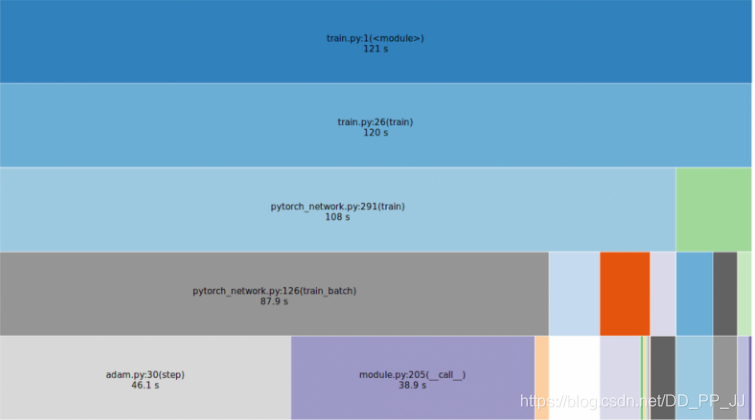
對其進行可視化(用到了snakeviz包,pip install snakeviz即可)
snakeviz?100_percent_gpu_utilization.prof
可視化的結(jié)果如下圖所示:
其他方法:
#?Profile?CPU?bottlenecks
python?-m?cProfile?training_script.py?--profiling
#?Profile?GPU?bottlenecks
nvprof?--print-gpu-trace?python?train_mnist.py
#?Profile?system?calls?bottlenecks
strace?-fcT?python?training_script.py?-e?trace=open,close,read
還可以用以下代碼分析:
def?test_loss_profiling():
????loss?=?nn.BCEWithLogitsLoss()
????with?torch.autograd.profiler.profile(use_cuda=True)?as?prof:
????????input?=?torch.randn((8,?1,?128,?128)).cuda()
????????input.requires_grad?=?True

????????target?=?torch.randint(1,?(8,?1,?128,?128)).cuda().float()

????????for?i?in?range(10):
????????????l?=?loss(input,?target)
????????????l.backward()
????print(prof.key_averages().table(sort_by="self_cpu_time_total"))
3. 圖片解碼
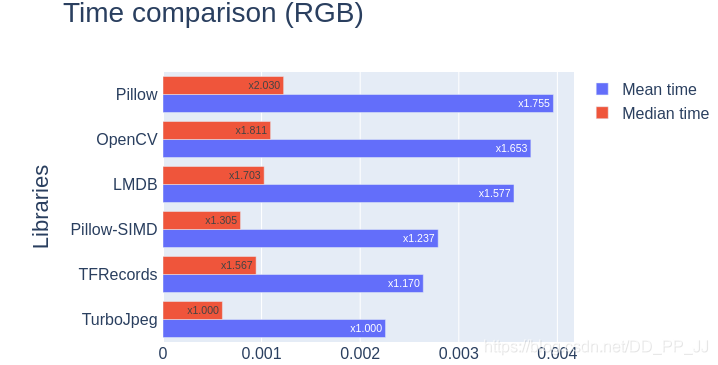
PyTorch中默認使用的是Pillow進行圖像的解碼,但是其效率要比Opencv差一些,如果圖片全部是JPEG格式,可以考慮使用TurboJpeg庫解碼。具體速度對比如下圖所示:
對于jpeg讀取也可以考慮使用jpeg4py庫(pip install jpeg4py),重寫一個loader即可。
存bmp圖也可以降低解碼耗時,其他方案還有recordIO,hdf5,pth,n5,lmdb等格式
4. 數(shù)據(jù)增強加速
在PyTorch中,通常使用transformer做圖片分類任務的數(shù)據(jù)增強,而其調(diào)用的是CPU做一些Crop、Flip、Jitter等操作。
如果你通過觀察發(fā)現(xiàn)你的CPU利用率非常高,GPU利用率比較低,那說明瓶頸在于CPU預處理,可以使用Nvidia提供的DALI庫在GPU端完成這部分數(shù)據(jù)增強操作。
Dali鏈接:https://github.com/NVIDIA/DALI
文檔也非常詳細:
Dali文檔:https://docs.nvidia.com/deeplearning/sdk/dali-developer-guide/index.html
當然,Dali提供的操作比較有限,僅僅實現(xiàn)了常用的方法,有些新的方法比如cutout需要自己搞。
具體實現(xiàn)可以參考這一篇:https://zhuanlan.zhihu.com/p/77633542
5. data Prefetch
Nvidia Apex中提供的解決方案
參考來源:https://zhuanlan.zhihu.com/p/66145913
Apex提供的策略就是預讀取下一次迭代需要的數(shù)據(jù)。
class?data_prefetcher():
????def?__init__(self,?loader):
????????self.loader?=?iter(loader)
????????self.stream?=?torch.cuda.Stream()
????????self.mean?=?torch.tensor([0.485?*?255,?0.456?*?255,?0.406?*?255]).cuda().view(1,3,1,1)
????????self.std?=?torch.tensor([0.229?*?255,?0.224?*?255,?0.225?*?255]).cuda().view(1,3,1,1)
????????#?With?Amp,?it?isn't?necessary?to?manually?convert?data?to?half.
????????#?if?args.fp16:
????????#?????self.mean?=?self.mean.half()
????????#?????self.std?=?self.std.half()
????????self.preload()

????def?preload(self):
????????try:
????????????self.next_input,?self.next_target?=?next(self.loader)
????????except?StopIteration:
????????????self.next_input?=?None
????????????self.next_target?=?None
????????????return
????????with?torch.cuda.stream(self.stream):
????????????self.next_input?=?self.next_input.cuda(non_blocking=True)
????????????self.next_target?=?self.next_target.cuda(non_blocking=True)
????????????#?With?Amp,?it?isn't?necessary?to?manually?convert?data?to?half.
????????????#?if?args.fp16:
????????????#?????self.next_input?=?self.next_input.half()
????????????#?else:
????????????self.next_input?=?self.next_input.float()
????????????self.next_input?=?self.next_input.sub_(self.mean).div_(self.std)
在訓練函數(shù)中進行如下修改:
原先是:
training_data_loader?=?DataLoader(
????dataset=train_dataset,
????num_workers=opts.threads,
????batch_size=opts.batchSize,
????pin_memory=True,
????shuffle=True,
)
for?iteration,?batch?in?enumerate(training_data_loader,?1):
????#?訓練代碼
修改以后:
data,?label?=?prefetcher.next()
iteration?=?0
while?data?is?not?None:
????iteration?+=?1
????#?訓練代碼
????data,?label?=?prefetcher.next()
用prefetch庫實現(xiàn)
https://zhuanlan.zhihu.com/p/97190313
安裝:
pip?install?prefetch_generator
使用:
from?torch.utils.data?import?DataLoader
from?prefetch_generator?import?BackgroundGenerator

class?DataLoaderX(DataLoader):

????def?__iter__(self):
????????return?BackgroundGenerator(super().__iter__())
然后用DataLoaderX替換原本的DataLoader
cuda.Steam加速拷貝過程
https://zhuanlan.zhihu.com/p/97190313
實現(xiàn):
class?DataPrefetcher():
????def?__init__(self,?loader,?opt):
????????self.loader?=?iter(loader)
????????self.opt?=?opt
????????self.stream?=?torch.cuda.Stream()
????????#?With?Amp,?it?isn't?necessary?to?manually?convert?data?to?half.
????????#?if?args.fp16:
????????#?????self.mean?=?self.mean.half()
????????#?????self.std?=?self.std.half()
????????self.preload()

????def?preload(self):
????????try:
????????????self.batch?=?next(self.loader)
????????except?StopIteration:
????????????self.batch?=?None
????????????return
????????with?torch.cuda.stream(self.stream):
????????????for?k?in?self.batch:
????????????????if?k?!=?'meta':
????????????????????self.batch[k]?=?self.batch[k].to(device=self.opt.device,?non_blocking=True)

????????????#?With?Amp,?it?isn't?necessary?to?manually?convert?data?to?half.
????????????#?if?args.fp16:
????????????#?????self.next_input?=?self.next_input.half()
????????????#?else:
????????????#?????self.next_input?=?self.next_input.float()

????def?next(self):
????????torch.cuda.current_stream().wait_stream(self.stream)
????????batch?=?self.batch
????????self.preload()
????????return?batch
調(diào)用:
#?----改造前----
for?iter_id,?batch?in?enumerate(data_loader):
????if?iter_id?>=?num_iters:
????????break
????for?k?in?batch:
????????if?k?!=?'meta':
????????????batch[k]?=?batch[k].to(device=opt.device,?non_blocking=True)
????run_step()
????
#?----改造后----
prefetcher?=?DataPrefetcher(data_loader,?opt)
batch?=?prefetcher.next()
iter_id?=?0
while?batch?is?not?None:
????iter_id?+=?1
????if?iter_id?>=?num_iters:
????????break
????run_step()
????batch?=?prefetcher.next()
國外大佬實現(xiàn)
數(shù)據(jù)加載部分
import?threading
import?numpy?as?np
import?cv2
import?random?

class?threadsafe_iter:
??"""Takes?an?iterator/generator?and?makes?it?thread-safe?by
??serializing?call?to?the?`next`?method?of?given?iterator/generator.
??"""
??def?__init__(self,?it):
????self.it?=?it
????self.lock?=?threading.Lock()

??def?__iter__(self):
????return?self

??def?next(self):
????with?self.lock:
??????return?self.it.next()

def?get_path_i(paths_count):
??"""Cyclic?generator?of?paths?indice
??"""
??current_path_id?=?0
??while?True:
????yield?current_path_id
????current_path_id????=?(current_path_id?+?1)?%?paths_count

class?InputGen:
??def?__init__(self,?paths,?batch_size):
????self.paths?=?paths
????self.index?=?0
????self.batch_size?=?batch_size
????self.init_count?=?0
????self.lock?=?threading.Lock()?#mutex?for?input?path
????self.yield_lock?=?threading.Lock()?#mutex?for?generator?yielding?of?batch
????self.path_id_generator?=?threadsafe_iter(get_path_i(len(self.paths)))?
????self.images?=?[]
????self.labels?=?[]
????
??def?get_samples_count(self):
????"""?Returns?the?total?number?of?images?needed?to?train?an?epoch?"""
????return?len(self.paths)

??def?get_batches_count(self):
????"""?Returns?the?total?number?of?batches?needed?to?train?an?epoch?"""
????return?int(self.get_samples_count()?/?self.batch_size)

??def?pre_process_input(self,?im,lb):
????"""?Do?your?pre-processing?here
????????????????Need?to?be?thread-safe?function"""
????return?im,?lb

??def?next(self):
????return?self.__iter__()

??def?__iter__(self):
????while?True:
??????#In?the?start?of?each?epoch?we?shuffle?the?data?paths????????????
??????with?self.lock:?
????????if?(self.init_count?==?0):
??????????random.shuffle(self.paths)
??????????self.images,?self.labels,?self.batch_paths?=?[],?[],?[]
??????????self.init_count?=?1
??????#Iterates?through?the?input?paths?in?a?thread-safe?manner
??????for?path_id?in?self.path_id_generator:?
????????img,?label?=?self.paths[path_id]
????????img?=?cv2.imread(img,?1)
????????label_img?=?cv2.imread(label,1)
????????img,?label?=?self.pre_process_input(img,label_img)
????????#Concurrent?access?by?multiple?threads?to?the?lists?below
????????with?self.yield_lock:?
??????????if?(len(self.images))?????????????self.images.append(img)
????????????self.labels.append(label)
??????????if?len(self.images)?%?self.batch_size?==?0:????????????????????
????????????yield?np.float32(self.images),?np.float32(self.labels)
????????????self.images,?self.labels?=?[],?[]
??????#At?the?end?of?an?epoch?we?re-init?data-structures
??????with?self.lock:?
????????self.init_count?=?0
??def?__call__(self):
????return?self.__iter__()
使用方法:
class?thread_killer(object):
??"""Boolean?object?for?signaling?a?worker?thread?to?terminate
??"""
??def?__init__(self):
????self.to_kill?=?False
??
??def?__call__(self):
????return?self.to_kill
??
??def?set_tokill(self,tokill):
????self.to_kill?=?tokill
??
def?threaded_batches_feeder(tokill,?batches_queue,?dataset_generator):
??"""Threaded?worker?for?pre-processing?input?data.
??tokill?is?a?thread_killer?object?that?indicates?whether?a?thread?should?be?terminated
??dataset_generator?is?the?training/validation?dataset?generator
??batches_queue?is?a?limited?size?thread-safe?Queue?instance.
??"""
??while?tokill()?==?False:
????for?batch,?(batch_images,?batch_labels)?\
??????in?enumerate(dataset_generator):
????????#We?fill?the?queue?with?new?fetched?batch?until?we?reach?the?max???????size.
????????batches_queue.put((batch,?(batch_images,?batch_labels))\
????????????????,?block=True)
????????if?tokill()?==?True:
??????????return

def?threaded_cuda_batches(tokill,cuda_batches_queue,batches_queue):
??"""Thread?worker?for?transferring?pytorch?tensors?into
??GPU.?batches_queue?is?the?queue?that?fetches?numpy?cpu?tensors.
??cuda_batches_queue?receives?numpy?cpu?tensors?and?transfers?them?to?GPU?space.
??"""
??while?tokill()?==?False:
????batch,?(batch_images,?batch_labels)?=?batches_queue.get(block=True)
????batch_images_np?=?np.transpose(batch_images,?(0,?3,?1,?2))
????batch_images?=?torch.from_numpy(batch_images_np)
????batch_labels?=?torch.from_numpy(batch_labels)

????batch_images?=?Variable(batch_images).cuda()
????batch_labels?=?Variable(batch_labels).cuda()
????cuda_batches_queue.put((batch,?(batch_images,?batch_labels)),?block=True)
????if?tokill()?==?True:
??????return

if?__name__?=='__main__':
??import?time
??import?Thread
??import?sys
??from?Queue?import?Empty,Full,Queue
??
??num_epoches=1000
??#model?is?some?Pytorch?CNN?model
??model.cuda()
??model.train()
??batches_per_epoch?=?64
??#Training?set?list?suppose?to?be?a?list?of?full-paths?for?all
??#the?training?images.
??training_set_list?=?None
??#Our?train?batches?queue?can?hold?at?max?12?batches?at?any?given?time.
??#Once?the?queue?is?filled?the?queue?is?locked.
??train_batches_queue?=?Queue(maxsize=12)
??#Our?numpy?batches?cuda?transferer?queue.
??#Once?the?queue?is?filled?the?queue?is?locked
??#We?set?maxsize?to?3?due?to?GPU?memory?size?limitations
??cuda_batches_queue?=?Queue(maxsize=3)


??training_set_generator?=?InputGen(training_set_list,batches_per_epoch)
??train_thread_killer?=?thread_killer()
??train_thread_killer.set_tokill(False)
??preprocess_workers?=?4


??#We?launch?4?threads?to?do?load?&&?pre-process?the?input?images
??for?_?in?range(preprocess_workers):
????t?=?Thread(target=threaded_batches_feeder,?\
???????????args=(train_thread_killer,?train_batches_queue,?training_set_generator))
????t.start()
??cuda_transfers_thread_killer?=?thread_killer()
??cuda_transfers_thread_killer.set_tokill(False)
??cudathread?=?Thread(target=threaded_cuda_batches,?\
???????????args=(cuda_transfers_thread_killer,?cuda_batches_queue,?train_batches_queue))
??cudathread.start()

??
??#We?let?queue?to?get?filled?before?we?start?the?training
??time.sleep(8)
??for?epoch?in?range(num_epoches):
????for?batch?in?range(batches_per_epoch):
??????
??????#We?fetch?a?GPU?batch?in?0's?due?to?the?queue?mechanism
??????_,?(batch_images,?batch_labels)?=?cuda_batches_queue.get(block=True)
????????????
??????#train?batch?is?the?method?for?your?training?step.
??????#no?need?to?pin_memory?due?to?diminished?cuda?transfers?using?queues.
??????loss,?accuracy?=?train_batch(batch_images,?batch_labels)

??train_thread_killer.set_tokill(True)
??cuda_transfers_thread_killer.set_tokill(True)????
??for?_?in?range(preprocess_workers):
????try:
??????#Enforcing?thread?shutdown
??????train_batches_queue.get(block=True,timeout=1)
??????????????????cuda_batches_queue.get(block=True,timeout=1)????
????except?Empty:
??????pass
??print?"Training?done"
6. 多GPU并行處理
PyTorch中提供了分布式訓練API, nn.DistributedDataParallel, 推理的時候也可以使用nn.DataParallel或者nn.DistributedDataParallel。
推薦一個庫,里面實現(xiàn)了多種分布式訓練的demo: https://github.com/tczhangzhi/pytorch-distributed 其中包括:
nn.DataParallel torch.distributed torch.multiprocessing apex再加速 horovod實現(xiàn) slurm GPU集群分布式
7. 混合精度訓練
mixed precision yyds,之前分享過mixed precision論文閱讀,實現(xiàn)起來非常簡單。在PyTorch中,可以使用Apex庫。如果用的是最新版本的PyTorch,其自身已經(jīng)支持了混合精度訓練,非常nice。
簡單來說,混合精度能夠讓你在精度不掉的情況下,batch提升一倍。其原理就是將原先float point32精度的數(shù)據(jù)變?yōu)閒loat point16的數(shù)據(jù),不管是數(shù)據(jù)傳輸還是訓練過程,都極大提升了訓練速度,煉丹必備。
8. 其他細節(jié)
batch_images?=?batch_images.pin_memory()?
Batch_labels?=?Variable(batch_labels).cuda(non_blocking=True)?
PyTorch的DataLoader有一個參數(shù)pin_memory,使用固定內(nèi)存,并使用non_blocking=True來并行處理數(shù)據(jù)傳輸。
torch.backends.cudnn.benchmark=True
及時釋放掉不需要的顯存、內(nèi)存。
如果數(shù)據(jù)集比較小,直接將數(shù)據(jù)復制到內(nèi)存中,從內(nèi)存中讀取可以極大加快數(shù)據(jù)讀取的速度。
調(diào)整workers數(shù)量,過少的線程讀取數(shù)據(jù)會導致速度非常慢,過多線程讀取數(shù)據(jù)可能會由于阻塞也導致速度非常慢。所以需要根據(jù)自己機器的情況,嘗試不同數(shù)量的workers,選擇最合適的數(shù)量。一般設置為 cpu 核心數(shù)或gpu數(shù)量
編碼的時候要注意盡可能減少CPU和GPU之間的數(shù)據(jù)傳輸,使用類似numpy的編碼方式,通過并行的方式來處理,可以提高性能。
使用
TFRecord或者LMDB等,減少小文件的讀寫
9. 參考文獻
【1】https://zhuanlan.zhihu.com/p/66145913
【2】https://pytorch.org/docs/stable/bottleneck.html
【3】https://blog.csdn.net/dancer__sky/article/details/78631577
【4】https://sagivtech.com/2017/09/19/optimizing-pytorch-training-code/
【5】https://zhuanlan.zhihu.com/p/77633542
【6】https://github.com/NVIDIA/DALI
【7】https://zhuanlan.zhihu.com/p/147723652
【8】https://www.zhihu.com/question/356829360/answer/907832358
歡迎加入GiantPandaCV微信交流群,可以添加筆者微信入群交流。