
基于多數(shù)據(jù)源零代碼生成多個(gè)數(shù)據(jù)庫CRUD增刪改查RESTful API接口
回顧
通過前面文章的介紹,目前已經(jīng)支持主流數(shù)據(jù)庫,包括MySql,PostgreSql,Oracle,Microsoft SQL Server等,通過配置零代碼實(shí)現(xiàn)了CRUD增刪改查RESTful API。采用抽象工廠設(shè)計(jì)模式,可以無縫切換不同類型的數(shù)據(jù)庫。但是如果需要同時(shí)支持不同類型的數(shù)據(jù)庫,如何通過配置進(jìn)行管理呢?這時(shí)候引入多數(shù)據(jù)源功能就很有必要了。
簡(jiǎn)介
利用spring boot多數(shù)據(jù)源功能,可以同時(shí)支持不同類型數(shù)據(jù)庫mysql,oracle,postsql,sql server等,以及相同類型數(shù)據(jù)庫不同的schema。零代碼同時(shí)生成不同類型數(shù)據(jù)庫增刪改查RESTful api,且支持同一接口中跨庫數(shù)據(jù)訪問二次開發(fā)。
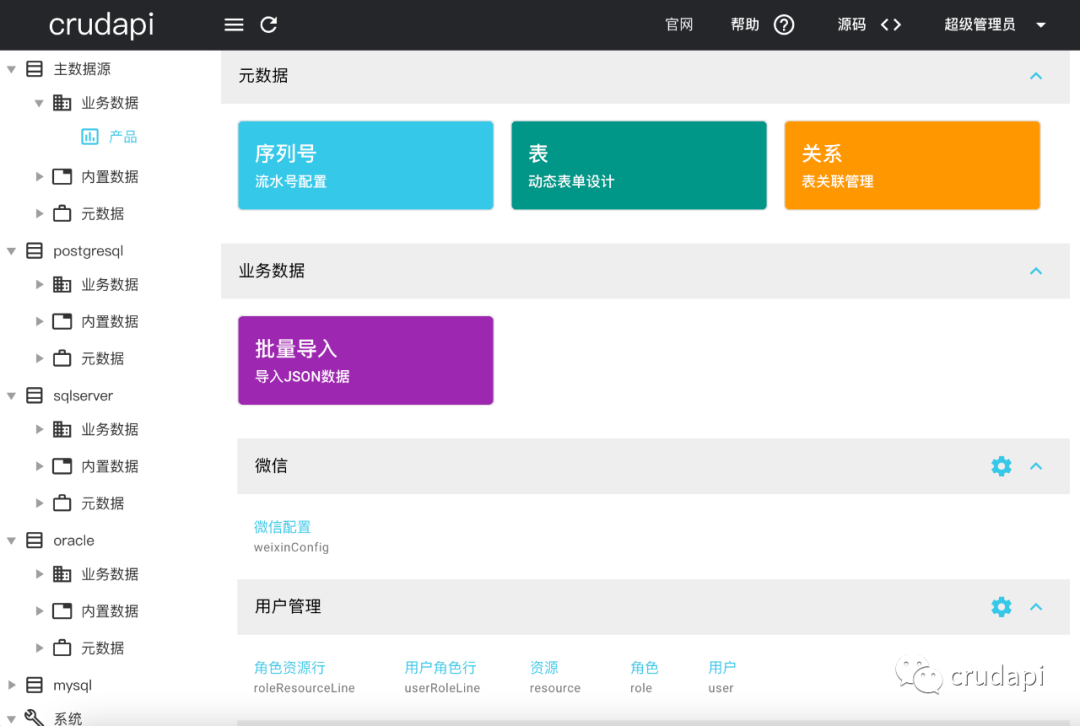
UI界面
配置一個(gè)數(shù)據(jù)源,多個(gè)從數(shù)據(jù)源,每一個(gè)數(shù)據(jù)源相互獨(dú)立配置和訪問。
核心原理
配置數(shù)據(jù)庫連接串
配置application.properties,spring.datasource為默認(rèn)主數(shù)據(jù)源,spring.datasource.hikari.data-sources[]數(shù)組為從數(shù)據(jù)源
#primaryspring.datasource.driverClassName=com.mysql.cj.jdbc.Driverspring.datasource.url=jdbc:mysql://localhost:3306/crudapi?serverTimezone=Asia/Shanghai&useUnicode=true&characterEncoding=utf8&useSSL=false&allowPublicKeyRetrieval=truespring.datasource.username=rootspring.datasource.password=root#postgresqlspring.datasource.hikari.data-sources[0].postgresql.driverClassName=org.postgresql.Driverspring.datasource.hikari.data-sources[0].postgresql.url=jdbc:postgresql://localhost:5432/crudapispring.datasource.hikari.data-sources[0].postgresql.username=postgresspring.datasource.hikari.data-sources[0].postgresql.password=postgres#sqlserverspring.datasource.hikari.data-sources[1].sqlserver.driverClassName=com.microsoft.sqlserver.jdbc.SQLServerDriverspring.datasource.hikari.data-sources[1].sqlserver.url=jdbc:sqlserver://localhost:1433;SelectMethod=cursor;DatabaseName=crudapispring.datasource.hikari.data-sources[1].sqlserver.username=saspring.datasource.hikari.data-sources[1].sqlserver.password=Mssql1433#oraclespring.datasource.hikari.data-sources[2].oracle.url=jdbc:oracle:thin:@//localhost:1521/XEPDB1spring.datasource.hikari.data-sources[2].oracle.driverClassName=oracle.jdbc.OracleDriverspring.datasource.hikari.data-sources[2].oracle.username=crudapispring.datasource.hikari.data-sources[2].oracle.password=crudapi#mysqlspring.datasource.hikari.data-sources[3].mysql.driverClassName=com.mysql.cj.jdbc.Driverspring.datasource.hikari.data-sources[3].mysql.url=jdbc:mysql://localhost:3306/crudapi2?serverTimezone=Asia/Shanghai&useUnicode=true&characterEncoding=utf8&useSSL=false&allowPublicKeyRetrieval=truespring.datasource.hikari.data-sources[3].mysql.username=rootspring.datasource.hikari.data-sources[3].mysql.password=root
動(dòng)態(tài)數(shù)據(jù)源——DynamicDataSource
Spring boot提供了抽象類AbstractRoutingDataSource,復(fù)寫接口determineCurrentLookupKey, 可以在執(zhí)行查詢之前,設(shè)置使用的數(shù)據(jù)源,從而實(shí)現(xiàn)動(dòng)態(tài)切換數(shù)據(jù)源。
public class DynamicDataSource extends AbstractRoutingDataSource {protected Object determineCurrentLookupKey() {return DataSourceContextHolder.getDataSource();}}
數(shù)據(jù)源Context——DataSourceContextHolder
默認(rèn)主數(shù)據(jù)源名稱為datasource,從數(shù)據(jù)源名稱保存在ThreadLocal變量CONTEXT_HOLDER里面,ThreadLocal叫做線程變量, 意思是ThreadLocal中填充的變量屬于當(dāng)前線程, 該變量對(duì)其他線程而言是隔離的, 也就是說該變量是當(dāng)前線程獨(dú)有的變量。
在RestController里面根據(jù)需要提前設(shè)置好當(dāng)前需要訪問的數(shù)據(jù)源key,即調(diào)用setDataSource方法,訪問數(shù)據(jù)的時(shí)候調(diào)用getDataSource方法獲取到數(shù)據(jù)源key,最終傳遞給DynamicDataSource。
public class DataSourceContextHolder {//默認(rèn)數(shù)據(jù)源primary=dataSourceprivate static final String DEFAULT_DATASOURCE = "dataSource";//保存線程連接的數(shù)據(jù)源private static final ThreadLocal<String> CONTEXT_HOLDER = new ThreadLocal<>();private static final ThreadLocal<String> HEADER_HOLDER = new ThreadLocal<>();public static String getDataSource() {String dataSoure = CONTEXT_HOLDER.get();if (dataSoure != null) {return dataSoure;} else {return DEFAULT_DATASOURCE;}}public static void setDataSource(String key) {if ("primary".equals(key)) {key = DEFAULT_DATASOURCE;}CONTEXT_HOLDER.set(key);}public static void cleanDataSource() {CONTEXT_HOLDER.remove();}public static void setHeaderDataSource(String key) {HEADER_HOLDER.set(key);}public static String getHeaderDataSource() {String dataSoure = HEADER_HOLDER.get();if (dataSoure != null) {return dataSoure;} else {return DEFAULT_DATASOURCE;}}}
動(dòng)態(tài)數(shù)據(jù)庫提供者——DynamicDataSourceProvider
程序啟動(dòng)時(shí)候,讀取配置文件application.properties中數(shù)據(jù)源信息,構(gòu)建DataSource并通過接口setTargetDataSources設(shè)置從數(shù)據(jù)源。數(shù)據(jù)源的key和DataSourceContextHolder中key一一對(duì)應(yīng)
(DataSourceProperties.class)(prefix = "spring.datasource.hikari")public class DynamicDataSourceProvider implements DataSourceProvider {private DynamicDataSource dynamicDataSource;private List<Map<String, DataSourceProperties>> dataSources;private Map<Object,Object> targetDataSourcesMap;private DataSourceProperties dataSourceProperties;private DataSource buildDataSource(DataSourceProperties prop) {DataSourceBuilder<?> builder = DataSourceBuilder.create();builder.driverClassName(prop.getDriverClassName());builder.username(prop.getUsername());builder.password(prop.getPassword());builder.url(prop.getUrl());return builder.build();}public List<DataSource> provide() {Map<Object,Object> targetDataSourcesMap = new HashMap<>();List<DataSource> res = new ArrayList<>();if (dataSources != null) {dataSources.forEach(map -> {Set<String> keys = map.keySet();keys.forEach(key -> {DataSourceProperties properties = map.get(key);DataSource dataSource = buildDataSource(properties);targetDataSourcesMap.put(key, dataSource);});});//更新dynamicDataSourcethis.targetDataSourcesMap = targetDataSourcesMap;dynamicDataSource.setTargetDataSources(targetDataSourcesMap);dynamicDataSource.afterPropertiesSet();}return res;}public void init() {provide();}public List<Map<String, DataSourceProperties>> getDataSources() {return dataSources;}public void setDataSources(List<Map<String, DataSourceProperties>> dataSources) {this.dataSources = dataSources;}public List<Map<String, String>> getDataSourceNames() {List<Map<String, String>> dataSourceNames = new ArrayList<Map<String, String>>();Map<String, String> dataSourceNameMap = new HashMap<String, String>();dataSourceNameMap.put("name", "primary");dataSourceNameMap.put("caption", "主數(shù)據(jù)源");dataSourceNameMap.put("database", parseDatabaseName(dataSourceProperties));dataSourceNames.add(dataSourceNameMap);if (dataSources != null) {dataSources.forEach(map -> {Set<Map.Entry<String, DataSourceProperties>> entrySet = map.entrySet();for (Map.Entry<String, DataSourceProperties> entry : entrySet) {Map<String, String> t = new HashMap<String, String>();t.put("name", entry.getKey());t.put("caption", entry.getKey());DataSourceProperties p = entry.getValue();t.put("database", parseDatabaseName(p));dataSourceNames.add(t);}});}return dataSourceNames;}public String getDatabaseName() {List<Map<String, String>> dataSourceNames = this.getDataSourceNames();String dataSource = DataSourceContextHolder.getDataSource();Optional<Map<String, String>> op = dataSourceNames.stream().filter(t -> t.get("name").toString().equals(dataSource)).findFirst();if (op.isPresent()) {return op.get().get("database");} else {return dataSourceNames.stream().filter(t -> t.get("name").toString().equals("primary")).findFirst().get().get("database");}}private String parseDatabaseName(DataSourceProperties p) {String url = p.getUrl();String databaseName = "";if (url.toLowerCase().indexOf("databasename") >= 0) {String[] urlArr = p.getUrl().split(";");for (String u : urlArr) {if (u.toLowerCase().indexOf("databasename") >= 0) {String[] uArr = u.split("=");databaseName = uArr[uArr.length - 1];}}} else {String[] urlArr = p.getUrl().split("\\?")[0].split("/");databaseName = urlArr[urlArr.length - 1];}return databaseName;}public Map<Object,Object> getTargetDataSourcesMap() {return targetDataSourcesMap;}}
動(dòng)態(tài)數(shù)據(jù)源配置——DynamicDataSourceConfig
首先取消系統(tǒng)自動(dòng)數(shù)據(jù)庫配置,設(shè)置exclude = { DataSourceAutoConfiguration.class }
(exclude = { DataSourceAutoConfiguration.class })public class ServiceApplication {public static void main(String[] args) {SpringApplication.run(ServiceApplication.class, args);}}
然后自定義Bean,分別定義主數(shù)據(jù)源dataSource和動(dòng)態(tài)數(shù)據(jù)源dynamicDataSource,并且注入到JdbcTemplate,NamedParameterJdbcTemplate,和DataSourceTransactionManager中,在訪問數(shù)據(jù)時(shí)候自動(dòng)識(shí)別對(duì)應(yīng)的數(shù)據(jù)源。
//數(shù)據(jù)源配置類@Configuration@EnableConfigurationProperties(DataSourceProperties.class)public class DynamicDataSourceConfig {private static final Logger log = LoggerFactory.getLogger(DynamicDataSourceConfig.class);private DataSourceProperties dataSourceProperties;(name = "dataSource")public DataSource getDataSource(){DataSourceBuilder<?> builder = DataSourceBuilder.create();builder.driverClassName(dataSourceProperties.getDriverClassName());builder.username(dataSourceProperties.getUsername());builder.password(dataSourceProperties.getPassword());builder.url(dataSourceProperties.getUrl());return builder.build();}//當(dāng)相同類型的實(shí)現(xiàn)類存在時(shí),選擇該注解標(biāo)記的類("dynamicDataSource")public DynamicDataSource dynamicDataSource(){DynamicDataSource dynamicDataSource = new DynamicDataSource();//默認(rèn)數(shù)據(jù)源dynamicDataSource.setDefaultTargetDataSource(getDataSource());Map<Object,Object> targetDataSourcesMap = new HashMap<>();dynamicDataSource.setTargetDataSources(targetDataSourcesMap);return dynamicDataSource;}//事務(wù)管理器DataSourceTransactionManager構(gòu)造參數(shù)需要DataSource//這里可以看到我們給的是dynamicDS這個(gè)beanpublic PlatformTransactionManager transactionManager(){return new DataSourceTransactionManager(dynamicDataSource());}//這里的JdbcTemplate構(gòu)造參數(shù)同樣需要一個(gè)DataSource,為了實(shí)現(xiàn)數(shù)據(jù)源切換查詢,//這里使用的也是dynamicDS這個(gè)bean(name = "jdbcTemplate")public JdbcTemplate getJdbc(){return new JdbcTemplate(dynamicDataSource());}//這里的JdbcTemplate構(gòu)造參數(shù)同樣需要一個(gè)DataSource,為了實(shí)現(xiàn)數(shù)據(jù)源切換查詢,//這里使用的也是dynamicDS這個(gè)bean(name = "namedParameterJdbcTemplate")public NamedParameterJdbcTemplate getNamedJdbc(){return new NamedParameterJdbcTemplate(dynamicDataSource());}}
請(qǐng)求頭過濾器——HeadFilter
攔截所有http請(qǐng)求,從header里面解析出當(dāng)前需要訪問的數(shù)據(jù)源,然后設(shè)置到線程變量HEADER_HOLDER中。
(filterName = "headFilter", urlPatterns = "/*")public class HeadFilter extends OncePerRequestFilter {private static final Logger log = LoggerFactory.getLogger(HeadFilter.class);protected void doFilterInternal(HttpServletRequest request, HttpServletResponse response, FilterChain filterChain) throws ServletException, IOException {if (!"/api/auth/login".equals(request.getRequestURI())&& !"/api/auth/jwt/login".equals(request.getRequestURI())&& !"/api/auth/logout".equals(request.getRequestURI())&& !"/api/metadata/dataSources".equals(request.getRequestURI())) {String dataSource = request.getParameter("dataSource");HeadRequestWrapper headRequestWrapper = new HeadRequestWrapper(request);if (StringUtils.isEmpty(dataSource)) {dataSource = headRequestWrapper.getHeader("dataSource");if (StringUtils.isEmpty(dataSource)) {dataSource = "primary";headRequestWrapper.addHead("dataSource", dataSource);}}DataSourceContextHolder.setHeaderDataSource(dataSource);// finishfilterChain.doFilter(headRequestWrapper, response);} else {filterChain.doFilter(request, response);}}}
實(shí)際應(yīng)用
前面動(dòng)態(tài)數(shù)據(jù)源配置準(zhǔn)備工作已經(jīng)完成,最后我們定義切面DataSourceAspect
class DataSourceAspect {private static final Logger log = LoggerFactory.getLogger(DataSourceAspect.class);("within(cn.crudapi.api.controller..*)")public void applicationPackagePointcut() {}("applicationPackagePointcut()")public Object dataSourceAround(ProceedingJoinPoint joinPoint) throws Throwable {String dataSource = DataSourceContextHolder.getHeaderDataSource();DataSourceContextHolder.setDataSource(dataSource);try {return joinPoint.proceed();} finally {DataSourceContextHolder.cleanDataSource();}}}
在API對(duì)應(yīng)的controller中攔截,獲取當(dāng)前的請(qǐng)求頭數(shù)據(jù)源key,然后執(zhí)行joinPoint.proceed(),最后再恢復(fù)數(shù)據(jù)源。當(dāng)然在service內(nèi)部還可以多次切換數(shù)據(jù)源,只需要調(diào)用DataSourceContextHolder.setDataSource()即可。比如可以從mysql數(shù)據(jù)庫讀取數(shù)據(jù),然后保存到oracle數(shù)據(jù)庫中。
前端集成
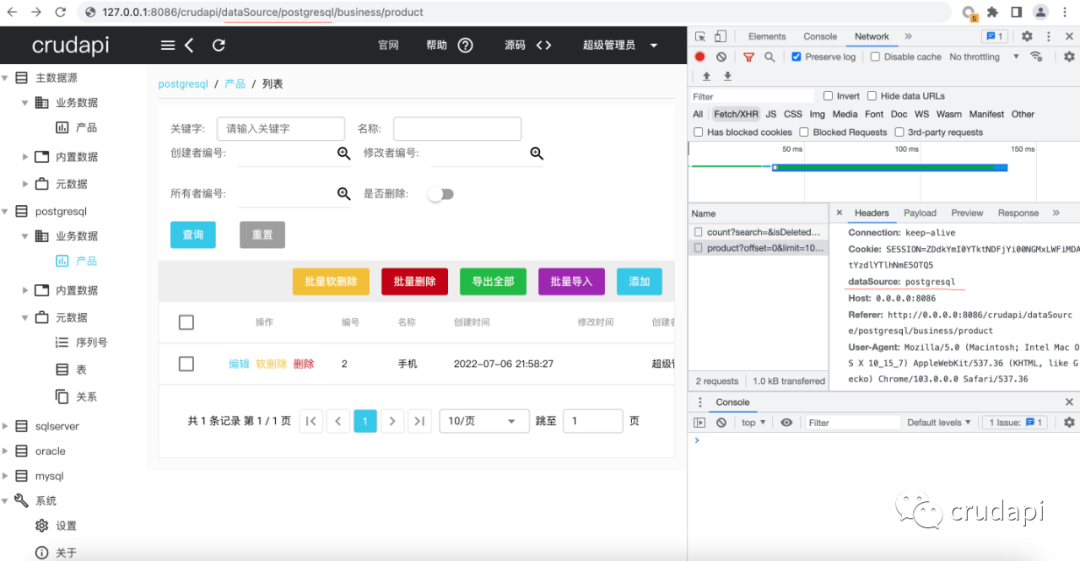
在請(qǐng)求頭里面設(shè)置dataSource為對(duì)應(yīng)的數(shù)據(jù)源,比如primary表示主數(shù)據(jù)源,postgresql表示從數(shù)據(jù)源postgresql,具體可以名稱和application.properties配置保持一致。
首先調(diào)用的地方配置dataSource
const table = {list: function(dataSource, tableName, page, rowsPerPage, search, query, filter) {return axiosInstance.get("/api/business/" + tableName,{params: {offset: (page - 1) * rowsPerPage,limit: rowsPerPage,search: search,...query,filter: filter },dataSource: dataSource });},}
然后在axios里面統(tǒng)一攔截配置
axiosInstance.interceptors.request.use(function(config) {if (config.dataSource) {console.log("config.dataSource = " + config.dataSource);config.headers["dataSource"] = config.dataSource;}return config;},function(error) {return Promise.reject(error);});
效果如下?
小結(jié)
本文主要介紹了多數(shù)據(jù)源功能,在同一個(gè)Java程序中,通過多數(shù)據(jù)源功能,不需要一行代碼,我們就可以得到不同數(shù)據(jù)庫的基本crud功能,包括API和UI。
關(guān)注公眾號(hào)回復(fù):crudapi,即可獲得源碼和SDK下載地址!