
如何在 ASP.NET Core 中實(shí)現(xiàn)全局異常攔截
異常是一種運(yùn)行時(shí)錯(cuò)誤,當(dāng)異常沒有得到適當(dāng)?shù)奶幚恚芸赡軙?huì)導(dǎo)致你的程序意外終止,這篇就來討論一下如何在 ASP.Net Core MVC 中實(shí)現(xiàn)全局異常處理,我會(huì)用一些 樣例代碼 和 截圖 來說明這些概念。
全局異常處理
其實(shí)在 ASP.Net Core MVC 框架中已經(jīng)有了全局異常處理的機(jī)制,你可以在一個(gè)中心化的地方使用 全局異常處理中間件 來進(jìn)行異常攔截,如果不用這種中心化方式的話,你就只能在 Controller 或者 Action 作用域上單獨(dú)處理,這會(huì)導(dǎo)致異常處理代碼零散在項(xiàng)目各處,不好維護(hù)也特別麻煩,不是嗎?
第二種處理 全局異常 的做法就是使用 exception filter,在本篇中,我準(zhǔn)備跟大家聊一聊 全局異常處理中間件 和 UseExceptionHandler 方法來管控異常。
使用 UseExceptionHandler 擴(kuò)展方法
UseExceptionHandler 擴(kuò)展方法能夠?qū)?ExceptionHandler 中間件注冊(cè)到 Asp.net Core 的 請(qǐng)求處理管道 中,然后在 IExceptionHandlerFeature 接口的實(shí)例中獲取 異常對(duì)象,下面的代碼片段展示了如何使用 UseExceptionHandler 方法來截獲全局異常。
????????public?void?Configure(IApplicationBuilder?app,?IWebHostEnvironment?env)
????????{
????????????app.UseExceptionHandler(builder?=>
?????????????{
?????????????????builder.Run(async?context?=>
????????????????{
????????????????????context.Response.StatusCode?=?(int)HttpStatusCode.InternalServerError;
????????????????????context.Response.ContentType?=?"application/json";

????????????????????var?exception?=?context.Features.Get();
????????????????????if?(exception?!=?null)
????????????????????{
????????????????????????var?error?=?new?ErrorMessage()
????????????????????????{
????????????????????????????Stacktrace?=?exception.Error.StackTrace,
????????????????????????????Message?=?exception.Error.Message
????????????????????????};
????????????????????????var?errObj?=?JsonConvert.SerializeObject(error);

????????????????????????await?context.Response.WriteAsync(errObj).ConfigureAwait(false);
????????????????????}
????????????????});
?????????????}
?????????);


????????????app.UseStaticFiles();
????????????app.UseRouting();
????????????app.UseAuthorization();

????????????app.UseEndpoints(endpoints?=>
????????????{
????????????????endpoints.MapControllerRoute(
????????????????????name:?"default",
????????????????????pattern:?"{controller=Home}/{action=Index}/{id?}");
????????????});
????????}
下面是代碼中引用的 ErrorMessage 類的定義。
????public?class?ErrorMessage
????{
????????public?string?Message?{?get;?set;?}
????????public?string?Stacktrace?{?get;?set;?}
????}
配置 全局異常中間件
大家都知道,ASP.Net Core MVC 項(xiàng)目中都會(huì)有一個(gè) Startup.cs 文件,可以在 Configure 方法下配置 全局異常攔截中間件 代碼,如下所示:
????public?void?Configure(IApplicationBuilder?app,?IHostingEnvironment?env)
????????{
????????????if?(env.IsDevelopment())
????????????{
????????????????app.UseDeveloperExceptionPage();
????????????}
????????????else
????????????{
????????????????app.UseExceptionHandler("/Error");
????????????}
????????????app.UseStaticFiles();
????????????app.UseCookiePolicy();
????????????app.UseMvc(routes?=>
????????????{
????????????????routes.MapRoute(
????????????????????name:?"default",
????????????????????template:
????????????????????"{controller=Home}/{action=Index}/{id?}");
????????????});
????????}
可以著重看一下上面的 app.UseExceptionHandler("/Error");,這里的 UseExceptionHandler 實(shí)現(xiàn)了 pipeline 注冊(cè),一旦應(yīng)用程序出現(xiàn)了未處理異常,那么會(huì)自動(dòng)將 用戶 導(dǎo)向 /Error 頁(yè)面。
你可以用 UseStatusCodePagesWithReExecute 擴(kuò)展方法給 pipeline 添加一些狀態(tài)碼頁(yè)面,這是什么意思呢?其實(shí)也就是 http 500 導(dǎo)向 500 頁(yè)面, http 404 導(dǎo)向 404 頁(yè)面,下面的代碼片段展示了修改后的 Configure 方法代碼。
???public?void?Configure(IApplicationBuilder?app,?IHostingEnvironment?env)
???{
????????????if?(env.IsDevelopment())
????????????{
????????????????app.UseDeveloperExceptionPage();
????????????}
????????????else
????????????{
????????????????app.UseExceptionHandler("/Error");
????????????????app.UseStatusCodePagesWithReExecute("/Error/NotFound/{0}");
????????????}
????????????
????????????//Other?code
???}
使用 ErrorController
在 HomeController 下有一個(gè)專門處理錯(cuò)誤的 action 方法,這里我們不使用這個(gè) action,你可以把它刪掉,接下來我準(zhǔn)備定義一個(gè)專門的 ErrorController,里面包含了一個(gè)路由為 /Error 的 action 方法。
????public?class?ErrorController?:?Controller
????{
????????[HttpGet("/Error")]
????????public?IActionResult?Index()
????????{
????????????IExceptionHandlerPathFeature?iExceptionHandlerFeature?=?HttpContext.Features.Get();

????????????if?(iExceptionHandlerFeature?!=?null)
????????????{
????????????????string?path?=?iExceptionHandlerFeature.Path;
????????????????Exception?exception?=?iExceptionHandlerFeature.Error;

????????????????//Write?code?here?to?log?the?exception?details
????????????????return?View("Error",iExceptionHandlerFeature);
????????????}????????????????
????????????return?View();
????????}

????????[HttpGet("/Error/NotFound/{statusCode}")]
????????public?IActionResult?NotFound(int?statusCode)
????????{
????????????var?iStatusCodeReExecuteFeature?=HttpContext.Features.Get();
????????????return?View("NotFound",iStatusCodeReExecuteFeature.OriginalPath);
????????}
????}
你可以用 IExceptionHandlerPathFeature 來獲取異常相關(guān)信息,也可以用 IStatusCodeReExecuteFeature 來獲取 http 404 異常時(shí)當(dāng)時(shí)的請(qǐng)求路徑,對(duì)了,要想用上 IExceptionHandlerPathFeature 和 IStatusCodeReExecuteFeature,要記得在 nuget 上安裝了 Microsoft.AspNetCore.Diagnostics 包,下面的代碼展示了如何獲取異常發(fā)生時(shí)刻的路由地址。
string?route?=?iExceptionHandlerFeature.Path;
如果想獲取異常的詳細(xì)信息,可以使用如下語(yǔ)句。
var?exception?=?HttpContext.Features.Get();
一旦獲取了這個(gè)路由地址和異常的詳細(xì)信息,就可以將它記錄到你的日志文件中,可供后續(xù)仔細(xì)分析。
使用 View 展示錯(cuò)誤信息
可以創(chuàng)建一個(gè) View 來展示出現(xiàn)的錯(cuò)誤信息,下面時(shí) Error ViewPage 的詳細(xì)代碼。
@model?Microsoft.AspNetCore.Diagnostics.IExceptionHandlerFeature
@{
????ViewData["Title"]?=?"Index";
????Layout?=?"~/Views/Shared/_Layout.cshtml";
}
<div?class="row">
????<div?class="text-danger">
????????<h3>Error:[email protected]h3>
????div>
div>
<div?class="row">
????<div?class="col-12">
????????<p>@Model.Error.StackTracep>
????????<p>@Model.Error.InnerExceptionp>
????div>
div>
下面是 NotFound 頁(yè)面的 代碼
@model?string
@{
????ViewData["Title"]?=?"NotFound";
????Layout?=?"~/Views/Shared/_Layout.cshtml";
}
????<h1?class="text-danger">
????Error:?The?requested?URL?@Model?was?not?found!h1>
<hr?/>
現(xiàn)在可以把程序跑起來了,你會(huì)看到如下的錯(cuò)誤信息。
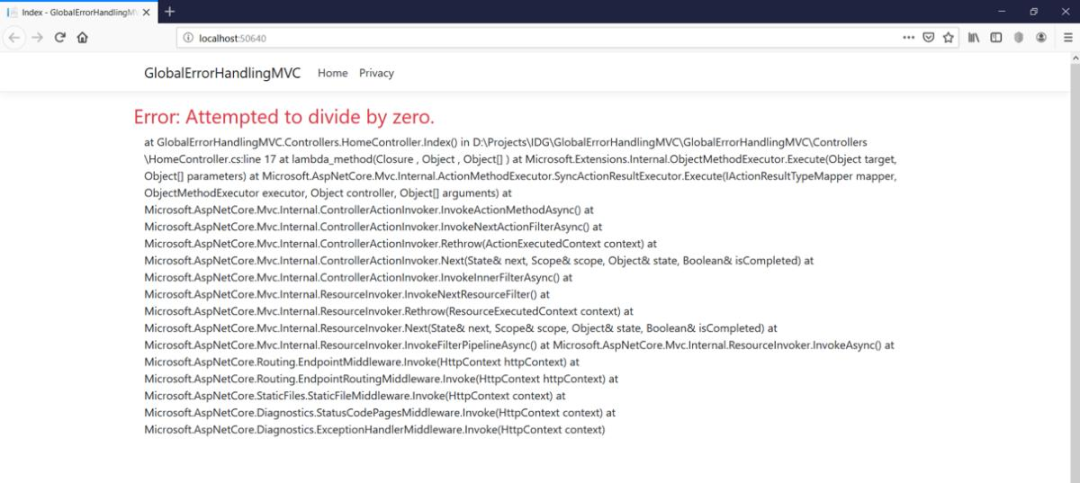
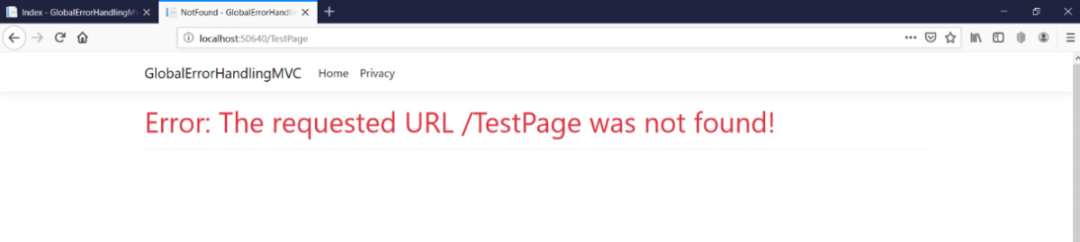
如果你嘗試打開一個(gè)不存在的頁(yè)面, 會(huì)自動(dòng)跳轉(zhuǎn)到 ErrorController.NotFound 所包裝的 404 描述信息。
ASP.NET Core 中內(nèi)置了 全局異常處理,你可以利用這項(xiàng)技術(shù)在一個(gè)集中化的地方去截獲你應(yīng)用程序中的所有異常信息,當(dāng)然你也可以基于環(huán)境的不同采取不用的異常處理措施,比如說:開發(fā)環(huán)境,測(cè)試環(huán)境,生產(chǎn)環(huán)境 等等。
譯文鏈接:https://www.infoworld.com/article/3435771/how-to-implement-global-exception-handling-in-aspnet-core-mvc.html