
<kbd id="afajh"><form id="afajh"></form></kbd>
<strong id="afajh"><dl id="afajh"></dl></strong>
    <del id="afajh"><form id="afajh"></form></del>
        1. <th id="afajh"><progress id="afajh"></progress></th>
          <b id="afajh"><abbr id="afajh"></abbr></b>
          <th id="afajh"><progress id="afajh"></progress></th>

          如何實現(xiàn)Vuex的熱更新

          共 2321字,需瀏覽 5分鐘

           ·

          2021-08-03 09:06

          前言

          我們在使用Vuex的時候,會時不時的更改Vuex內(nèi)的數(shù)據(jù),但是頁面不會隨之更新,如果數(shù)據(jù)量大,一個數(shù)據(jù)依賴另一個數(shù)據(jù)的話,這樣我們要是再刷新頁面的話會把以前依賴的數(shù)據(jù)清空,效率特別低。所以,今天我總結(jié)了怎么實現(xiàn)Vuex熱更替的功能。

          實現(xiàn)

          首先,我們這里使用了Vue CLI3。在根目錄下的src目錄下我們有一個存放Vuex的文件夾叫做store文件夾。首先我們分割成幾個模塊。
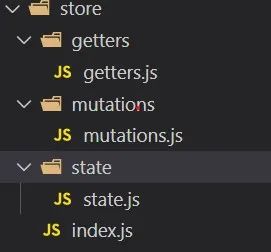
          下面我們把它們分別引入,這里沒有分割actions,不過與其他屬性同理,這里有不做介紹。下面我們在index.js編輯下面代碼:

          import Vuex from 'vuex'
          // 引入分割的模塊
          import state from './state/state'
          import mutations from './mutations/mutations'
          import getters from './getters/getters'

          export default ()=>{
          // 這里需要賦給一個store變量
           const store = new Vuex.Store({
              state:state,
              mutations:mutations,
              getters:getters
            })
            // 熱更新模塊
            if(module.hot){
            // 跟上面一樣,寫入對應的分割模塊路徑
              module.hot.accept([
                './state/state',
                './mutations/mutations',
                './getters/getters'
              ],()=>{
              // 開啟熱更替
                const newState = require('./state/state').default
                const newMutations = require('./mutations/mutations').default
                const newGetters = require('./getters/getters').default
                store.hotUpdate({
                  state:newState,
                  mutations:newMutations,
                  getters:newGetters
                })
              })
            }
            
            return store
          }

          我們還需要在main.js修改:

          import Vue from 'vue'
          import App from './App.vue'
          import Vuex from 'vuex'
          import createStore from './store/index.js'

          Vue.config.productionTip = false

          Vue.use(Vuex)
          const store=createStore();

          new Vue({
            store,
            renderh => h(App)
          }).$mount('#app')

          結(jié)語

          以上,就完成了Vuex的熱更替功能。需要注意的是,直接在state中更改是看不到效果的哦!謝謝閱讀。


          瀏覽 46
          點贊
          評論
          收藏
          分享

          手機掃一掃分享

          分享
          舉報
          評論
          圖片
          表情
          推薦
          點贊
          評論
          收藏
          分享

          手機掃一掃分享

          分享
          舉報
          <kbd id="afajh"><form id="afajh"></form></kbd>
          <strong id="afajh"><dl id="afajh"></dl></strong>
            <del id="afajh"><form id="afajh"></form></del>
                1. <th id="afajh"><progress id="afajh"></progress></th>
                  <b id="afajh"><abbr id="afajh"></abbr></b>
                  <th id="afajh"><progress id="afajh"></progress></th>
                  亚洲久久人妻 | 日韩国产精品一区 | 色姑娘伊人| wwwwwww黄色片 | 俺来也www久久婷婷 |