Spring Boot 健康檢查、度量指標(biāo)、監(jiān)控,一文搞定!
點(diǎn)擊關(guān)注公眾號(hào),Java干貨及時(shí)送達(dá)
作者:Richard_Yi
原文:https://juejin.im/post/6844904050056495111
前言
去年我們項(xiàng)目做了微服務(wù)1.0的架構(gòu)轉(zhuǎn)型,但是服務(wù)監(jiān)控這塊卻沒有跟上。這不,最近我就被分配了要將我們核心的微服務(wù)應(yīng)用全部監(jiān)控起來的任務(wù)。我們的微服務(wù)應(yīng)用都是SpringBoot 應(yīng)用,因此就自然而然的想到了借助Spring Boot 的Actuator 模塊。(沒吃過豬肉總聽過豬叫見過豬跑吧??)。
本篇是我在完成這個(gè)工單之后,對(duì)Spring Boot Actuator模塊 學(xué)習(xí)應(yīng)用的總結(jié)。在本篇文章中,你可以學(xué)習(xí)到:
Spring Boot Actuator 的快速使用入門 Spring Boot Actuator 的一些重要的endpoints的介紹 如何通過Actuator 模塊實(shí)時(shí)查看當(dāng)前應(yīng)用的線程 dump信息 如何通過Actuator 模塊實(shí)時(shí)查看當(dāng)前應(yīng)用的堆信息 如何通過Actuator 模塊實(shí)時(shí)修改當(dāng)前應(yīng)用的日志打印等級(jí) ...
之后我還會(huì)介紹:
TODO:SpringBoot 微服務(wù)應(yīng)用集成Prometheus + Grafana實(shí)現(xiàn)監(jiān)控告警
一、什么是 Spring Boot Actuator
Spring Boot Actuator 模塊提供了生產(chǎn)級(jí)別的功能,比如健康檢查,審計(jì),指標(biāo)收集,HTTP 跟蹤等,幫助我們監(jiān)控和管理Spring Boot 應(yīng)用。這個(gè)模塊是一個(gè)采集應(yīng)用內(nèi)部信息暴露給外部的模塊,上述的功能都可以通過HTTP 和 JMX 訪問。
因?yàn)楸┞秲?nèi)部信息的特性,Actuator 也可以和一些外部的應(yīng)用監(jiān)控系統(tǒng)整合(Prometheus, Graphite, DataDog, Influx, Wavefront, New Relic等)。這些監(jiān)控系統(tǒng)提供了出色的儀表板,圖形,分析和警報(bào),可幫助你通過一個(gè)統(tǒng)一友好的界面,監(jiān)視和管理你的應(yīng)用程序。
Actuator使用Micrometer與這些外部應(yīng)用程序監(jiān)視系統(tǒng)集成。這樣一來,只需很少的配置即可輕松集成外部的監(jiān)控系統(tǒng)。
Micrometer 為 Java 平臺(tái)上的性能數(shù)據(jù)收集提供了一個(gè)通用的 API,應(yīng)用程序只需要使用 Micrometer 的通用 API 來收集性能指標(biāo)即可。
Micrometer 會(huì)負(fù)責(zé)完成與不同監(jiān)控系統(tǒng)的適配工作。這就使得切換監(jiān)控系統(tǒng)變得很容易。
對(duì)比 Slf4j 之于 Java Logger 中的定位。
二、快速開始,創(chuàng)建一個(gè)Spring Boot Actuator Demo
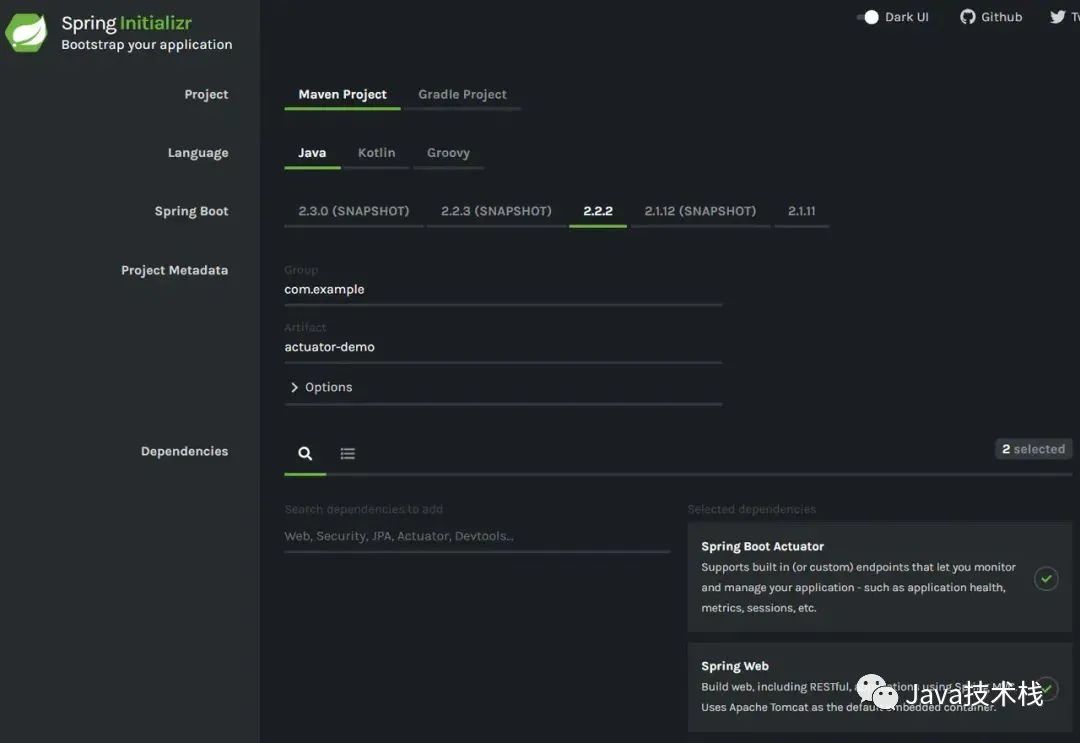
我們先創(chuàng)建一個(gè)demo應(yīng)用。
Spring Boot 基礎(chǔ)就不介紹了,推薦下這個(gè)實(shí)戰(zhàn)教程:https://github.com/javastacks/spring-boot-best-practice
spring init -d=web,actuator -n=actuator-demo actuator-demo
復(fù)制代碼
<dependencies>
    ...
<dependency>
<groupId>org.springframework.boot</groupId>
<artifactId>spring-boot-starter-actuator</artifactId>
</dependency>
    ...
</dependencies>
dependencies {
compile("org.springframework.boot:spring-boot-starter-actuator")
}
三、Endpoints 介紹
Spring Boot 提供了所謂的 endpoints (下文翻譯為端點(diǎn))給外部來與應(yīng)用程序進(jìn)行訪問和交互。
打比方來說,/health 端點(diǎn) 提供了關(guān)于應(yīng)用健康情況的一些基礎(chǔ)信息。metrics 端點(diǎn)提供了一些有用的應(yīng)用程序指標(biāo)(JVM 內(nèi)存使用、系統(tǒng)CPU使用等)。
這些 Actuator 模塊本來就有的端點(diǎn)我們稱之為原生端點(diǎn)。根據(jù)端點(diǎn)的作用的話,我們大概可以分為三大類:
應(yīng)用配置類:獲取應(yīng)用程序中加載的應(yīng)用配置、環(huán)境變量、自動(dòng)化配置報(bào)告等與Spring Boot應(yīng)用密切相關(guān)的配置類信息。 度量指標(biāo)類:獲取應(yīng)用程序運(yùn)行過程中用于監(jiān)控的度量指標(biāo),比如:內(nèi)存信息、線程池信息、HTTP請(qǐng)求統(tǒng)計(jì)等。 操作控制類:提供了對(duì)應(yīng)用的關(guān)閉等操作類功能。
詳細(xì)的原生端點(diǎn)介紹,請(qǐng)以官網(wǎng)為準(zhǔn),這里就不贅述徒增篇幅。
需要注意的就是:
每一個(gè)端點(diǎn)都可以通過配置來單獨(dú)禁用或者啟動(dòng) 不同于Actuator 1.x,Actuator 2.x 的大多數(shù)端點(diǎn)默認(rèn)被禁掉。Actuator 2.x 中的默認(rèn)端點(diǎn)增加了 /actuator前綴。默認(rèn)暴露的兩個(gè)端點(diǎn)為/actuator/health和/actuator/info
四、端點(diǎn)暴露配置
我們可以通過以下配置,來配置通過JMX 和 HTTP 暴露的端點(diǎn)。
| Property | Default |
|---|---|
management.endpoints.jmx.exposure.exclude | |
management.endpoints.jmx.exposure.include | * |
management.endpoints.web.exposure.exclude | |
management.endpoints.web.exposure.include | info, healt |
可以打開所有的監(jiān)控點(diǎn)
management.endpoints.web.exposure.include=*
也可以選擇打開部分,"*" 代表暴露所有的端點(diǎn),如果指定多個(gè)端點(diǎn),用","分開
management.endpoints.web.exposure.exclude=beans,trace
Actuator 默認(rèn)所有的監(jiān)控點(diǎn)路徑都在/actuator/*,當(dāng)然如果有需要這個(gè)路徑也支持定制。
management.endpoints.web.base-path=/minitor
設(shè)置完重啟后,再次訪問地址就會(huì)變成/minitor/*。
現(xiàn)在我們按照如下配置:
# "*" 代表暴露所有的端點(diǎn) 如果指定多個(gè)端點(diǎn),用","分開
management.endpoints.web.exposure.include=*
# 賦值規(guī)則同上
management.endpoints.web.exposure.exclude=
啟動(dòng)DEMO程序,訪問http://localhost:8080/actuator,查看暴露出來的端點(diǎn):
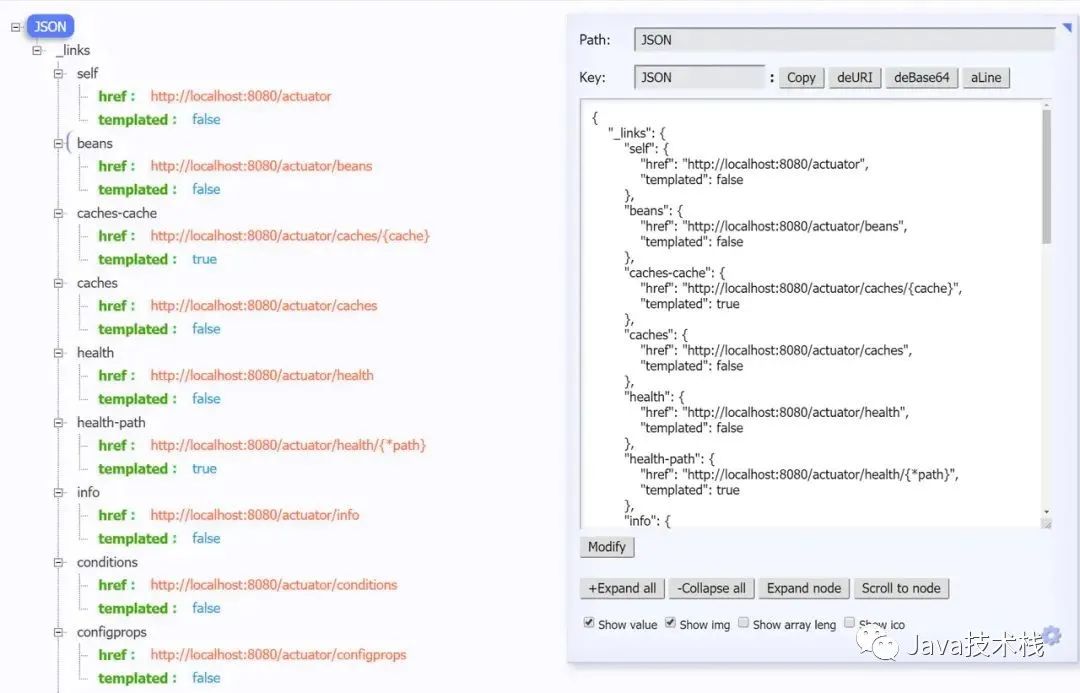
上面這樣顯示是因?yàn)閏hrome 瀏覽器安裝了 JSON-handle 插件,實(shí)際上就是返回一大段json
下面,我會(huì)著重介紹幾個(gè)比較重要的端點(diǎn)。
五、重要端點(diǎn)解析
5.1 /health端點(diǎn)
/health端點(diǎn)會(huì)聚合你程序的健康指標(biāo),來檢查程序的健康情況。端點(diǎn)公開的應(yīng)用健康信息取決于:
management.endpoint.health.show-details=always
該屬性可以使用以下值之一進(jìn)行配置:
| Name | Description |
|---|---|
never | 不展示詳細(xì)信息,up或者down的狀態(tài),默認(rèn)配置 |
when-authorized | 詳細(xì)信息將會(huì)展示給通過認(rèn)證的用戶。授權(quán)的角色可以通過management.endpoint.health.roles配置 |
always | 對(duì)所有用戶暴露詳細(xì)信息 |
按照上述配置,配置成always之后,我們啟動(dòng)項(xiàng)目,訪問http://localhost:8080/actuator/health端口,可以看到這樣的信息:
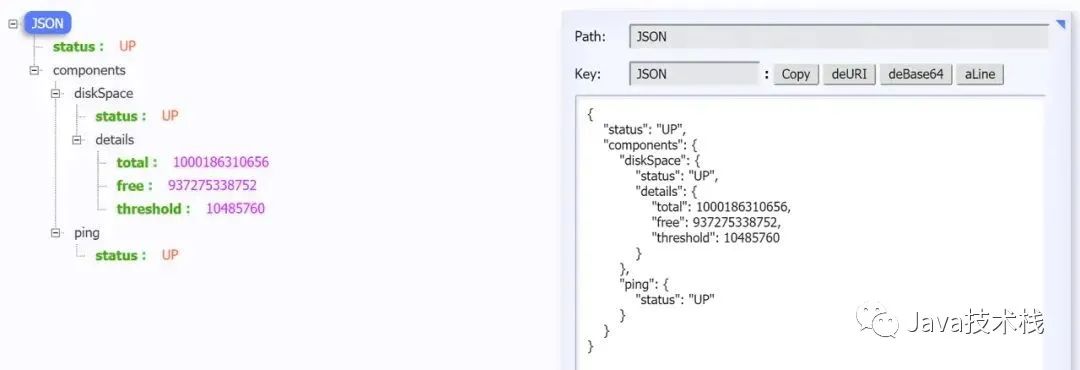
是不是感覺好像健康信息有點(diǎn)少?先別急,那是因?yàn)槲覀儎?chuàng)建的是一個(gè)最基礎(chǔ)的Demo項(xiàng)目,沒有依賴很多的組件。Spring Boot 學(xué)習(xí)筆記分享給你看下。
/health端點(diǎn)有很多自動(dòng)配置的健康指示器:如redis、rabbitmq、db等組件。當(dāng)你的項(xiàng)目有依賴對(duì)應(yīng)組件的時(shí)候,這些健康指示器就會(huì)被自動(dòng)裝配,繼而采集對(duì)應(yīng)的信息。如上面的 diskSpace 節(jié)點(diǎn)信息就是DiskSpaceHealthIndicator 在起作用。
上述截圖取自官方文檔
這是我另一個(gè)項(xiàng)目的/health端點(diǎn)信息。
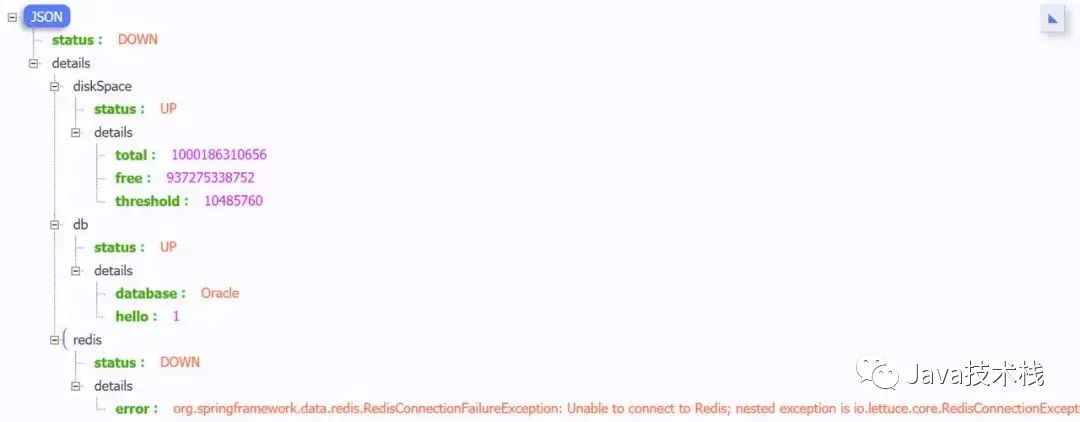
當(dāng)如上的組件有一個(gè)狀態(tài)異常,應(yīng)用服務(wù)的整體狀態(tài)即為down。我們也可以通過配置禁用某個(gè)組件的健康監(jiān)測。另外,Spring Boot 系列面試題和答案全部整理好了,微信搜索Java技術(shù)棧,在后臺(tái)發(fā)送:面試,可以在線閱讀。
management.health.mongo.enabled: false
或者禁用所有自動(dòng)配置的健康指示器:
management.health.defaults.enabled: false
?自定義 Health Indicator
當(dāng)然你也可以自定義一個(gè)Health Indicator,只需要實(shí)現(xiàn)HealthIndicator 接口或者繼承AbstractHealthIndicator類。
/** * @author Richard_yyf * @version 1.0 2020/1/16 */@Componentpublic class CustomHealthIndicator extends AbstractHealthIndicator { @Override protected void doHealthCheck(Health.Builder builder) throws Exception { // 使用 builder 來創(chuàng)建健康狀態(tài)信息 // 如果你throw 了一個(gè) exception,那么status 就會(huì)被置為DOWN,異常信息會(huì)被記錄下來 builder.up() .withDetail("app", "這個(gè)項(xiàng)目很健康") .withDetail("error", "Nothing, I'm very good"); }}
最終效果:
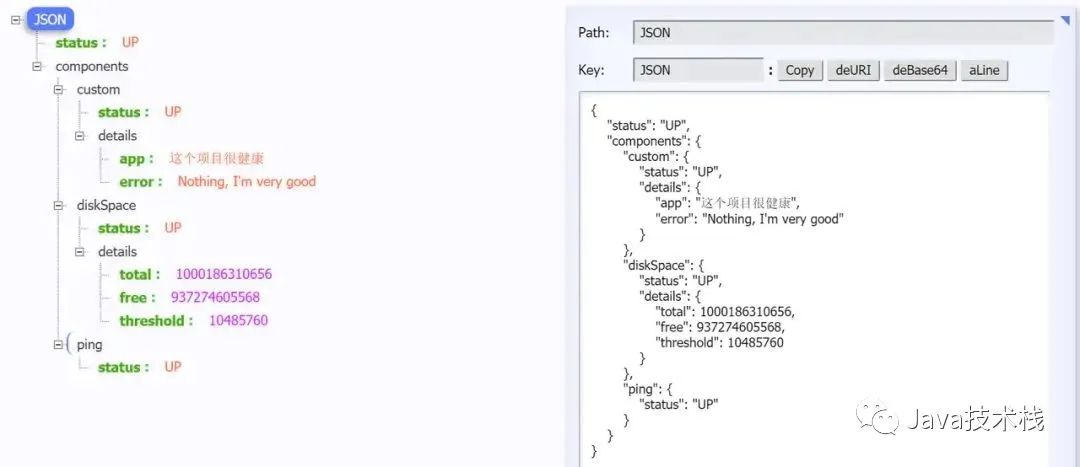
5.2 /metrics端點(diǎn)
/metrics端點(diǎn)用來返回當(dāng)前應(yīng)用的各類重要度量指標(biāo),比如:內(nèi)存信息、線程信息、垃圾回收信息、tomcat、數(shù)據(jù)庫連接池等。
點(diǎn)擊關(guān)注公眾號(hào),Java干貨及時(shí)送達(dá)
{ "names": [ "tomcat.threads.busy", "jvm.threads.states", "jdbc.connections.active", "jvm.gc.memory.promoted", "http.server.requests", "hikaricp.connections.max", "hikaricp.connections.min", "jvm.memory.used", "jvm.gc.max.data.size", "jdbc.connections.max", .... ]}
不同于1.x,Actuator在這個(gè)界面看不到具體的指標(biāo)信息,只是展示了一個(gè)指標(biāo)列表。為了獲取到某個(gè)指標(biāo)的詳細(xì)信息,我們可以請(qǐng)求具體的指標(biāo)信息,像這樣:
http://localhost:8080/actuator/metrics/{MetricName}
比如我訪問/actuator/metrics/jvm.memory.max,返回信息如下:
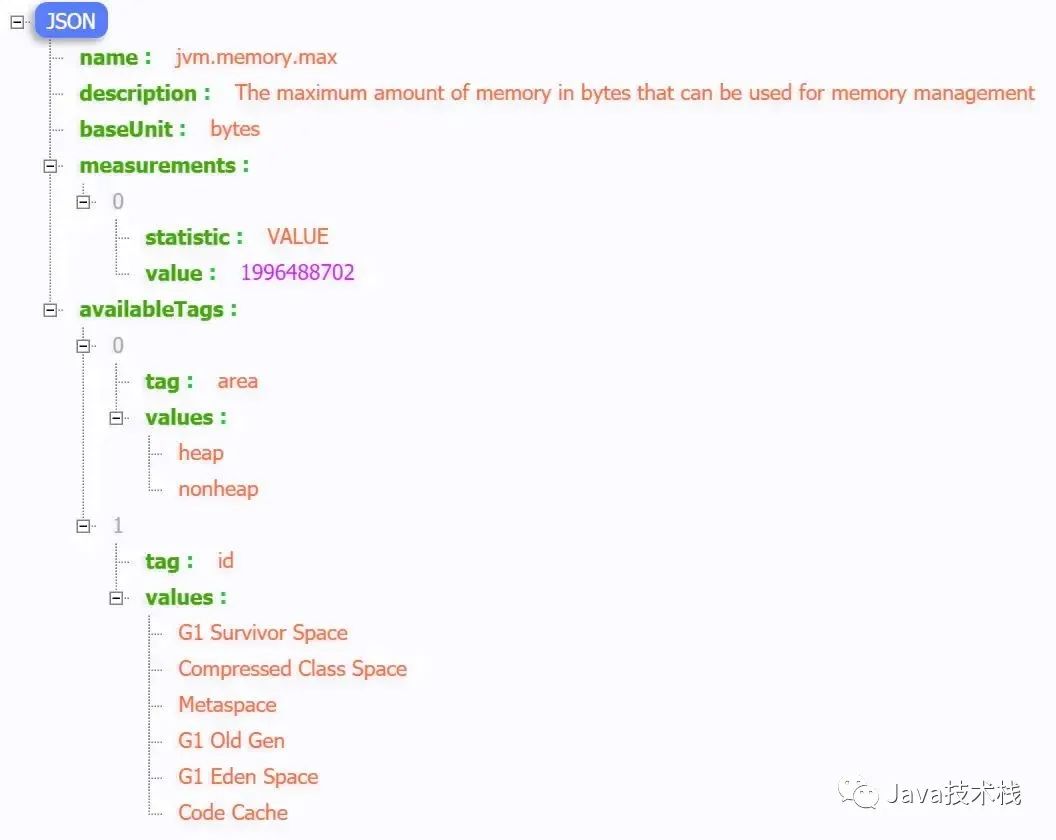
你也可以用query param的方式查看單獨(dú)的一塊區(qū)域。比如你可以訪問/actuator/metrics/jvm.memory.max?tag=id:Metaspace。結(jié)果就是:
5.3/loggers端點(diǎn)
/loggers 端點(diǎn)暴露了我們程序內(nèi)部配置的所有l(wèi)ogger的信息。我們?cè)L問/actuator/loggers可以看到,
你也可以通過下述方式訪問單獨(dú)一個(gè)logger,
http://localhost:8080/actuator/loggers/{name}
比如我現(xiàn)在訪問 root logger,http://localhost:8080/actuator/loggers/root
{ "configuredLevel": "INFO", "effectiveLevel": "INFO"}
?改變運(yùn)行時(shí)的日志等級(jí)
/loggers端點(diǎn)我最想提的就是這個(gè)功能,能夠動(dòng)態(tài)修改你的日志等級(jí)。
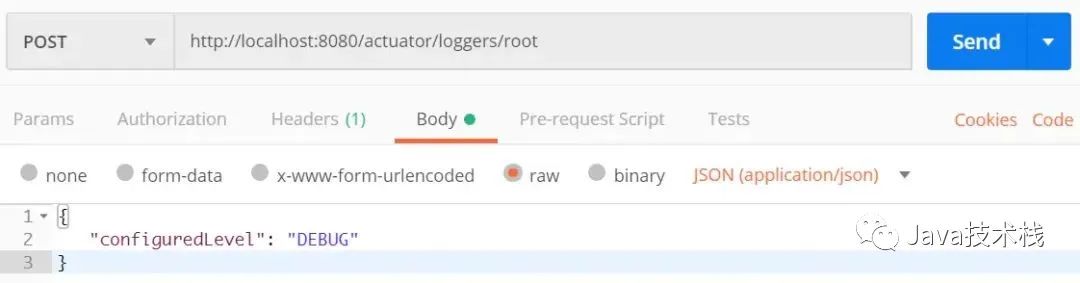
比如,我們可以通過下述方式來修改 root logger的日志等級(jí)。我們只需要發(fā)起一個(gè)URL 為http://localhost:8080/actuator/loggers/root的POST請(qǐng)求,POST報(bào)文如下:
{ "configuredLevel": "DEBUG"}
仔細(xì)想想,這個(gè)功能是不是非常有用。如果在生產(chǎn)環(huán)境中,你想要你的應(yīng)用輸出一些Debug信息以便于你診斷一些異常情況,你你只需要按照上述方式就可以修改,而不需要重啟應(yīng)用。
如果想重置成默認(rèn)值,把value 改成
null
5.4 /info端點(diǎn)
/info端點(diǎn)可以用來展示你程序的信息。我理解過來就是一些程序的基礎(chǔ)信息。并且你可以按照自己的需求在配置文件application.properties中個(gè)性化配置(默認(rèn)情況下,該端點(diǎn)只會(huì)返回一個(gè)空的json內(nèi)容。):
info.app.name=actuator-test-demoinfo.app.encoding=UTF-8info.app.java.source=1.8info.app.java.target=1.8# 在 maven 項(xiàng)目中你可以直接用下列方式引用 maven properties的值# [email protected]@# [email protected]@# [email protected]@
啟動(dòng)項(xiàng)目,訪問http://localhost:8080/actuator/info:
{ "app": { "encoding": "UTF-8", "java": { "source": "1.8.0_131", "target": "1.8.0_131" }, "name": "actuator-test-demo" }}
5.5 /beans端點(diǎn)
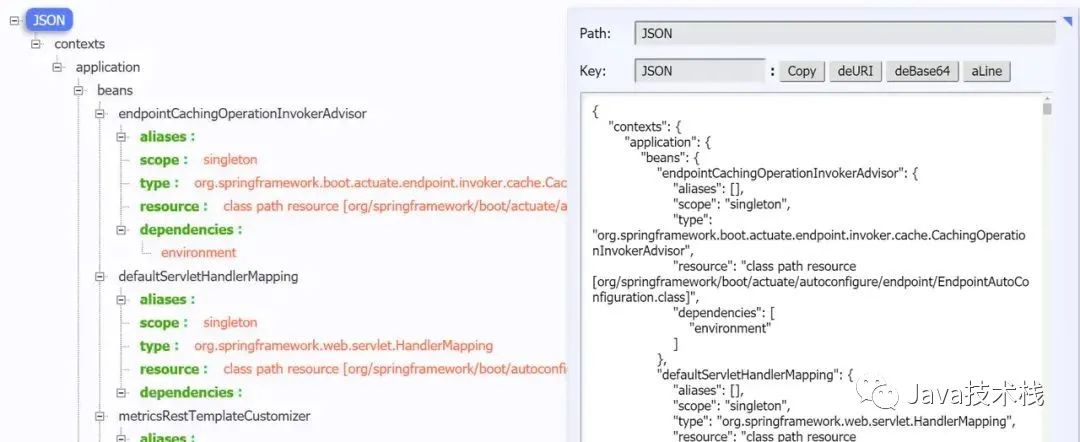
/beans端點(diǎn)會(huì)返回Spring 容器中所有bean的別名、類型、是否單例、依賴等信息。
訪問http://localhost:8080/actuator/beans,返回如下:
5.6 /heapdump 端點(diǎn)
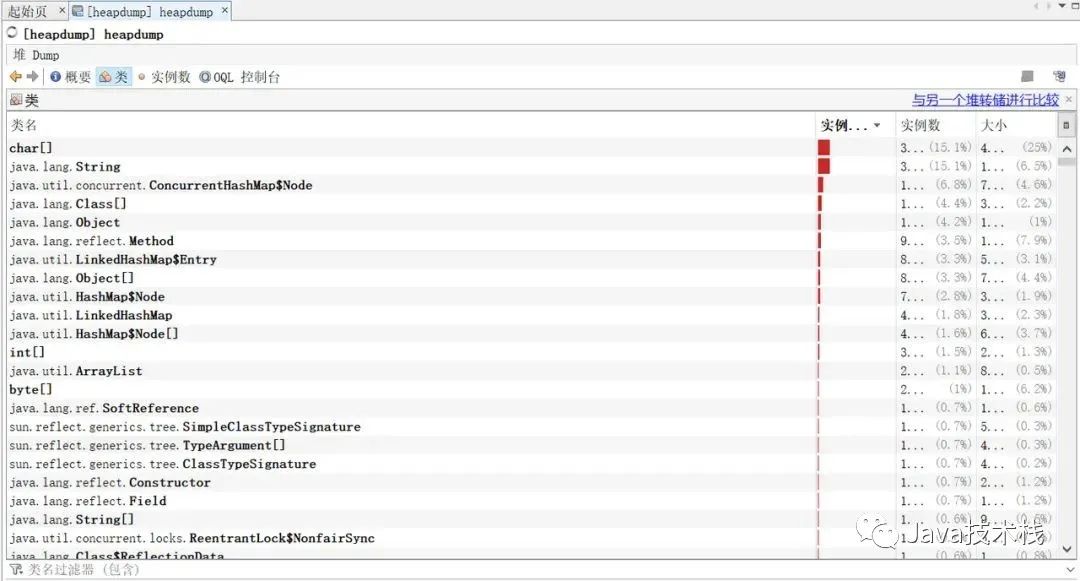
訪問:http://localhost:8080/actuator/heapdump會(huì)自動(dòng)生成一個(gè) Jvm 的堆文件 heapdump。我們可以使用 JDK 自帶的 Jvm 監(jiān)控工具 VisualVM 打開此文件查看內(nèi)存快照。46 張 PPT 弄懂 JVM 性能調(diào)優(yōu)推薦看下。
5.7 /threaddump 端點(diǎn)
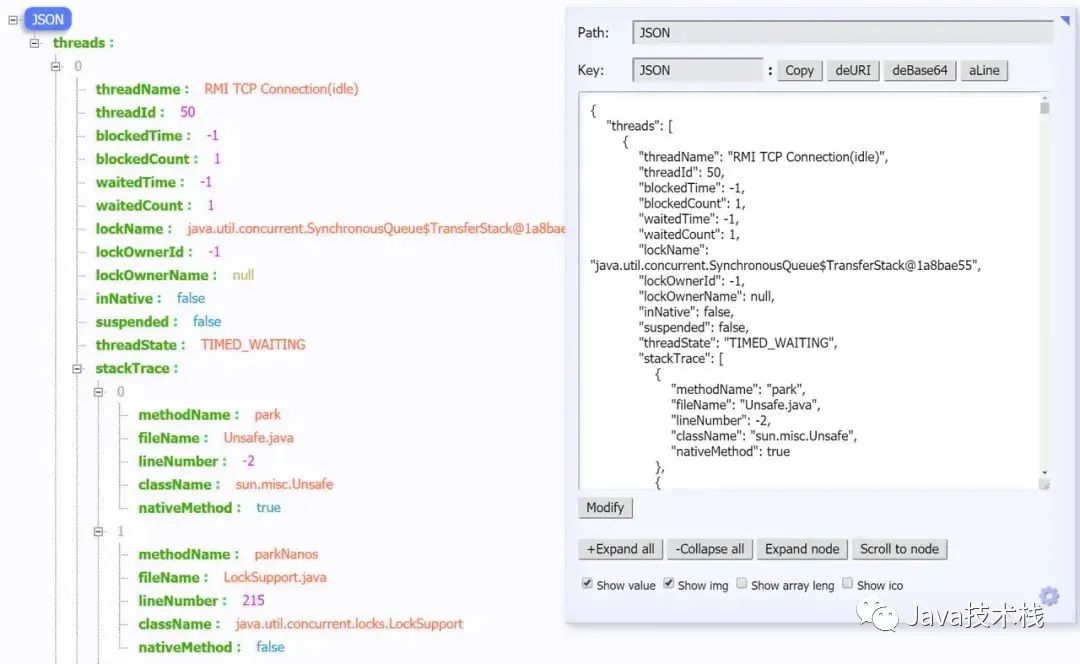
這個(gè)端點(diǎn)我個(gè)人覺得特別有用,方便我們?cè)谌粘6ㄎ粏栴}的時(shí)候查看線程的情況。主要展示了線程名、線程ID、線程的狀態(tài)、是否等待鎖資源、線程堆棧等信息。就是可能查看起來不太直觀。訪問http://localhost:8080/actuator/threaddump返回如下:
5.8 /shutdown端點(diǎn)
這個(gè)端點(diǎn)屬于操作控制類端點(diǎn),可以優(yōu)雅關(guān)閉 Spring Boot 應(yīng)用。要使用這個(gè)功能首先需要在配置文件中開啟:
management.endpoint.shutdown.enabled=true
由于 shutdown 接口默認(rèn)只支持 POST 請(qǐng)求,我們啟動(dòng)Demo項(xiàng)目,向http://localhost:8080/actuator/shutdown發(fā)起POST請(qǐng)求。返回信息:
{ "message": "Shutting down, bye..."}
然后應(yīng)用程序被關(guān)閉。
由于開放關(guān)閉應(yīng)用的操作本身是一件非常危險(xiǎn)的事,所以真正在線上使用的時(shí)候,我們需要對(duì)其加入一定的保護(hù)機(jī)制,比如:定制Actuator的端點(diǎn)路徑、整合Spring Security進(jìn)行安全校驗(yàn)等。(不是特別必要的話,這個(gè)端點(diǎn)不用開)
六、整合Spring Security 對(duì)端點(diǎn)進(jìn)行安全校驗(yàn)
<dependency>
   <groupId>org.springframework.boot</groupId>
   <artifactId>spring-boot-starter-security</artifactId>
</dependency>
添加之后,我們需要定義安全校驗(yàn)規(guī)則,來覆蓋Spring Security 的默認(rèn)配置。
import org.springframework.boot.actuate.autoconfigure.security.servlet.EndpointRequest;
import org.springframework.boot.actuate.context.ShutdownEndpoint;
import org.springframework.boot.autoconfigure.security.servlet.PathRequest;
import org.springframework.context.annotation.Configuration;
import org.springframework.security.config.annotation.web.builders.HttpSecurity;
import org.springframework.security.config.annotation.web.configuration.WebSecurityConfigurerAdapter;

/**
 * @author Richard_yyf
 */
@Configuration
public class ActuatorSecurityConfig extends WebSecurityConfigurerAdapter {

    /*
     * version1:
     * 1. 限制 '/shutdown'端點(diǎn)的訪問,只允許ACTUATOR_ADMIN訪問
     * 2. 允許外部訪問其他的端點(diǎn)
     * 3. 允許外部訪問靜態(tài)資源
     * 4. 允許外部訪問 '/'
     * 5. 其他的訪問需要被校驗(yàn)
     * version2:
     * 1. 限制所有端點(diǎn)的訪問,只允許ACTUATOR_ADMIN訪問
     * 2. 允許外部訪問靜態(tài)資源
     * 3. 允許外部訪問 '/'
     * 4. 其他的訪問需要被校驗(yàn)
     */

    @Override
    protected void configure(HttpSecurity http) throws Exception {
        // version1
//        http
//                .authorizeRequests()
//                    .requestMatchers(EndpointRequest.to(ShutdownEndpoint.class))
//                        .hasRole("ACTUATOR_ADMIN")
//                .requestMatchers(EndpointRequest.toAnyEndpoint())
//                    .permitAll()
//                .requestMatchers(PathRequest.toStaticResources().atCommonLocations())
//                    .permitAll()
//                .antMatchers("/")
//                    .permitAll()
//                .antMatchers("/**")
//                    .authenticated()
//                .and()
//                .httpBasic();

        // version2
        http
                .authorizeRequests()
                .requestMatchers(EndpointRequest.toAnyEndpoint())
                    .hasRole("ACTUATOR_ADMIN")
                .requestMatchers(PathRequest.toStaticResources().atCommonLocations())
                    .permitAll()
                .antMatchers("/")
                    .permitAll()
                .antMatchers("/**")
                    .authenticated()
                .and()
                .httpBasic();
    }
}
application.properties的相關(guān)配置如下:
# Spring Security Default user name and password
spring.security.user.name=actuator
spring.security.user.password=actuator
spring.security.user.roles=ACTUATOR_ADMIN
結(jié)語
本篇文章內(nèi)容就到這里。
對(duì)應(yīng)的源碼可以Github上看到。(https://github.com/Richard-yyf/springboot-actuator-prometheus-test)
如果本文有幫助到你,希望能點(diǎn)個(gè)贊,這是對(duì)我的最大動(dòng)力????????。
參考:







關(guān)注Java技術(shù)棧看更多干貨