
妙啊!這款 Python 數(shù)據(jù)可視化工具強的很!
Altair 是 Python 的一個非常棒的統(tǒng)計可視化庫。它非常簡單、友好,并基于強大的Vega-Lite JSON規(guī)范構(gòu)建,我們只需要簡短的代碼即可生成美觀、有效的可視化效果。
使用 Altair ,你可以將更多時間專注于數(shù)據(jù)及其含義,下面我將詳細介紹:
示例
這是一個在 JupyterLab 中使用 Altair 快速可視化和顯示數(shù)據(jù)集的示例:
import?altair?as?alt
#?load?a?simple?dataset?as?a?pandas?DataFrame
from?vega_datasets?import?data
cars?=?data.cars()

alt.Chart(cars).mark_point().encode(
????x='Horsepower',
????y='Miles_per_Gallon',
????color='Origin',
)
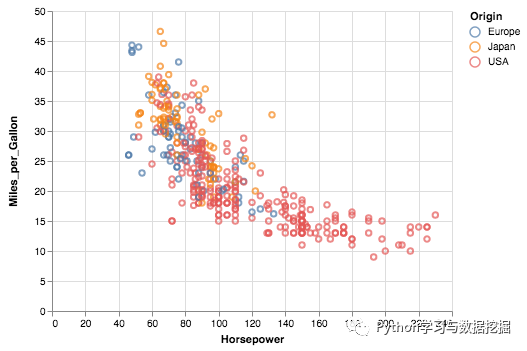
源自 Vega-Lite 的 Altair 的獨特功能之一是聲明性語法,它不僅具有可視化功能,還具有交互性。通過對上面的示例進行一些修改,我們可以創(chuàng)建一個鏈接的直方圖,該直方圖根據(jù)散點圖的選擇進行過濾。
import?altair?as?alt
from?vega_datasets?import?data

source?=?data.cars()

brush?=?alt.selection(type='interval')

points?=?alt.Chart(source).mark_point().encode(
????x='Horsepower',
????y='Miles_per_Gallon',
????color=alt.condition(brush,?'Origin',?alt.value('lightgray'))
).add_selection(
????brush
)

bars?=?alt.Chart(source).mark_bar().encode(
????y='Origin',
????color='Origin',
????x='count(Origin)'
).transform_filter(
????brush
)

points?&?bars
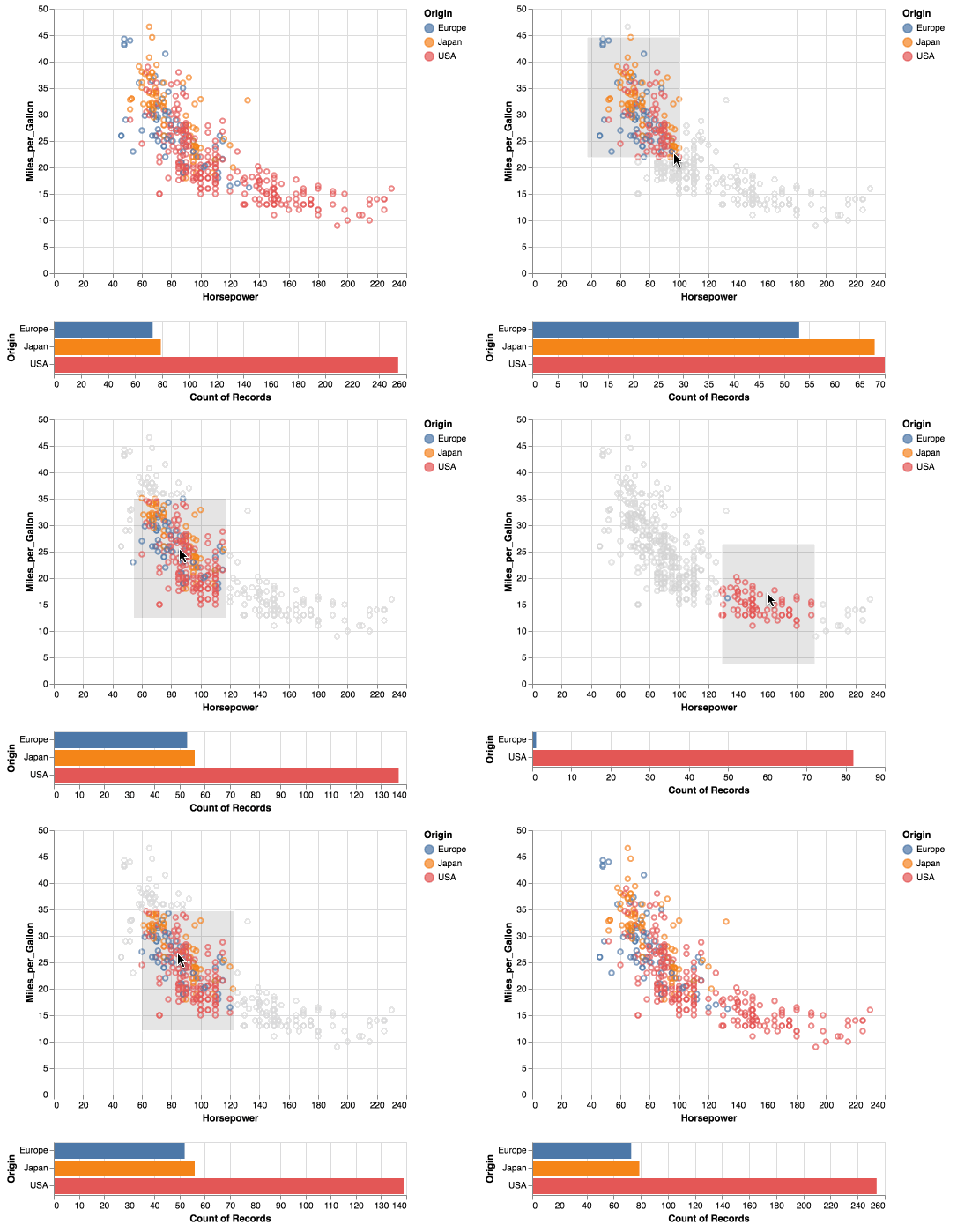
安裝方法
Altair需要以下依賴項:
pandas traitlets IPython
如果已克隆存儲庫,請從存儲庫的根目錄運行以下命令:
pip?install?-e?.[dev]
如果你不想克隆存儲庫,則可以使用以下命令進行安裝:
pip?install?git+https://github.com/altair-viz/altair
更多內(nèi)容詳情,可以查看github鏈接
https://github.com/altair-viz/altair
三大操作
接下來,我將詳細地介紹 Altair 如何創(chuàng)建過濾、分組和合并操作的可視化對象,可以將其用作探索性數(shù)據(jù)分析過程的一部分。
我們構(gòu)建兩個數(shù)據(jù)幀的模擬數(shù)據(jù)。第一個是餐廳訂單,第二個是餐廳訂單中的商品價格。
#?import?libraries
import?numpy?as?np
import?pandas?as?pd
import?altair?as?alt
import?random
#?mock?data
orders?=?pd.DataFrame({
???"order_id":?np.arange(1,101),
???"item":?np.random.randint(1,?50,?size=100),
???"qty":?np.random.randint(1,?10,?size=100),
???"tip":?(np.random.random(100)?*?10).round(2)
})
prices?=?pd.DataFrame({
???"item":?np.arange(1,51),
???"price":?(np.random.random(50)?*?50).round(2)
})
order_type?=?["lunch",?"dinner"]?*?50
random.shuffle(order_type)
orders["order_type"]?=?order_type
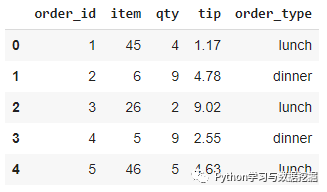
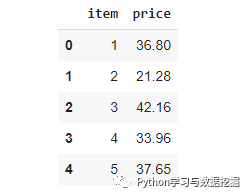
首先,我們創(chuàng)建一個簡單的圖來 Altair 語法結(jié)構(gòu)。
alt.Chart(orders).mark_circle(size=50).encode(
???x="qty",?y="tip",?color="order_type"
).properties(
???title?=?"Tip?vs?Quantity"
)
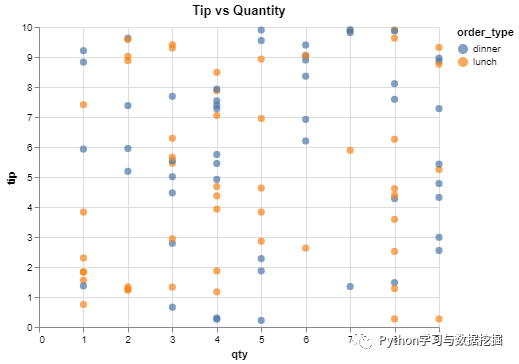
Altair 基本語法四步曲:
將數(shù)據(jù)傳遞到 Chart 對象,數(shù)據(jù)可以采用Pandas數(shù)據(jù)框或指向json或csv文件的URL字符串的形式。 選擇可視化的類型(例如 mark_circle,mark_line 等)。 encode 編碼函數(shù)指定在給定數(shù)據(jù)幀中要繪制的內(nèi)容。因此,我們在編碼函數(shù)中編寫的任何內(nèi)容都必須鏈接到數(shù)據(jù)幀。 使用properties函數(shù)指定圖的某些屬性。
考慮這樣一種情況,我們需要創(chuàng)建 pirce 和 tip 值的散點圖,它們位于不同的數(shù)據(jù)幀中。一種選擇是合并兩個數(shù)據(jù)幀,并在散點圖中使用這兩列。
Altair提供了一種更實用的方法,它允許在其他數(shù)據(jù)框中查找列, 類似 Pandas 的 merge 函數(shù)功能相同。
alt.Chart(orders).mark_circle(size=50).encode(
???x="tip",?y="price:Q",?color="order_type"
).transform_lookup(
???lookup="item",
???from_=alt.LookupData(data=prices,?key="item",?fields=["price"])
).properties(
???title?=?"Price?vs?Tip"
)
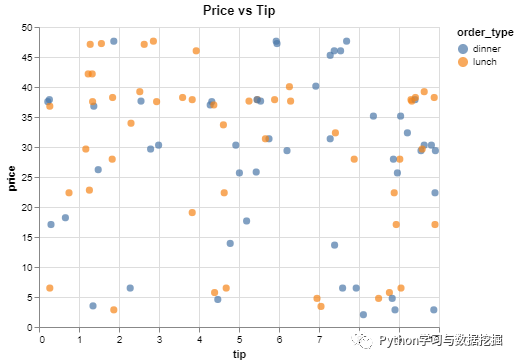
transform_lookup 函數(shù)類似于 Pandas 的 merge 函數(shù)。用于匹配觀察值的列(即行)將傳遞給lookup參數(shù)。fields參數(shù)用于從另一個數(shù)據(jù)幀中選擇所需的列。
我們還可以把過濾組件集成到繪圖中,讓我們繪制價格超過10美元的數(shù)據(jù)點。
alt.Chart(orders).mark_circle(size=50).encode(
???x="tip",?y="price:Q",?color="order_type"
).transform_lookup(
???lookup="item",
???from_=alt.LookupData(data=prices,?key="item",?fields=["price"])
).transform_filter(
???alt.FieldGTPredicate(field='price',?gt=10)
).properties(
???title?=?"Price?vs?Tip"
)
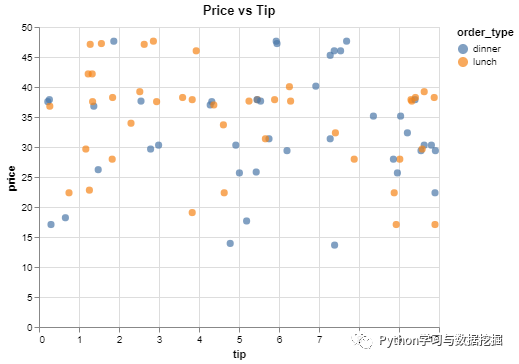
transform_filter 函數(shù)用于過濾。FieldGTPredicate處理"大于"的條件。
除了過濾和合并外,Altair 還允許在繪圖之前對數(shù)據(jù)點進行分組。例如,我們可以創(chuàng)建一個條形圖來顯示每種訂單類型的商品平均價格。此外,我們可以對價格低于20美元的商品執(zhí)行此操作。
alt.Chart(orders).mark_bar().encode(
???y="order_type",?x="avg_price:Q"
).transform_lookup(
???lookup="item",
???from_=alt.LookupData(data=prices,?key="item",?fields=["price"])
).transform_filter(
???alt.FieldLTPredicate(field='price',?lt=20)
).transform_aggregate(
???avg_price?=?"mean(price)",?groupby?=?["order_type"]
).properties(
???height=200,?width=300
)
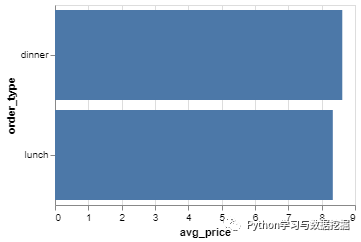
讓我們詳細說明每個步驟:
transform_lookup:從價格數(shù)據(jù)框中查找價格。 transform_filter:過濾價格低于20美元的價格。 transform_aggregate:按訂單類型對價格進行分組并計算均值。
結(jié)論
Altair 與其他常見的可視化庫的不同之處在于,它可以無縫地將數(shù)據(jù)分析組件集成到可視化中,是一款非常實用的數(shù)據(jù)探索工具。
篩選、合并和分組對于探索性數(shù)據(jù)分析過程至關(guān)重要。Altair 允許在創(chuàng)建數(shù)據(jù)可視化時執(zhí)行所有這些操作。從這個意義上講,Altair也可以視為數(shù)據(jù)分析工具。如果你感興趣,趕快嘗試一下吧
我們的文章到此就結(jié)束啦~記得點贊
如何找到我: