
Python爬取貝殼房源數(shù)據(jù)的實戰(zhàn)教程

隨著人工智能的不斷發(fā)展,機器學習這門技術也越來越重要,很多人都開啟了學習機器學習,本文就介紹了機器學習的基礎內容,了解python爬蟲,本文給大家分享Python爬取貝殼房源數(shù)據(jù)的實戰(zhàn)教程,感興趣的朋友一起學習吧
一、爬蟲是什么?
在進行大數(shù)據(jù)分析或者進行數(shù)據(jù)挖掘的時候,數(shù)據(jù)源可以從某些提供數(shù)據(jù)統(tǒng)計的網(wǎng)站獲得,也可以從某些文獻或內部資料中獲得,但是這些獲得數(shù)據(jù)的方式,有時很難滿足我們對數(shù)據(jù)的需求,而手動從互聯(lián)網(wǎng)中去尋找這些數(shù)據(jù),則耗費的精力過大。此時就可以利用爬蟲技術,自動地從互聯(lián)網(wǎng)中獲取我們感興趣的數(shù)據(jù)內容,并將這些數(shù)據(jù)內容爬取回來,作為我們的數(shù)據(jù)源,從而進行更深層次的數(shù)據(jù)分析,并獲得更多有價值的信息。在使用爬蟲前首先要了解爬蟲所需的庫(requests)或者( urllib.request ),該庫是為了爬取數(shù)據(jù)任務而創(chuàng)建的。
二、使用步驟
1.引入庫
代碼如下(示例):
import osimport urllib.requestimport randomimport timeclass BeikeSpider:def __init__(self, save_path="./beike"):"""貝殼爬蟲構造函數(shù):param save_path: 網(wǎng)頁保存目錄"""
2.讀入數(shù)據(jù)
代碼如下 :
# 網(wǎng)址模式self.url_mode = "http://{}.fang.ke.com/loupan/pg{}/"# 需爬取的城市self.cities = ["cd", "sh", "bj"]# 每個城市爬取的頁數(shù)self.total_pages = 20# 讓爬蟲程序隨機休眠5-10秒self.sleep = (5, 10)# 網(wǎng)頁下載保存根目錄self.save_path = save_path# 設置用戶代理,是爬蟲程序偽裝成瀏覽器self.headers = {"User-Agent": "Mozilla/5.0 (Windows NT 10.0; Win64; x64) AppleWebKit/537.36 (KHTML, like Gecko) Chrome/89.0.4389.114 Safari/537.36"}# 代理IP的信息self.proxies = [{"https": "123.163.67.50:8118"},{"https": "58.56.149.198:53281"},{"https": "14.115.186.161:8118"}]# 創(chuàng)建保存目錄if not os.path.exists(self.save_path):os.makedirs(self.save_path)def crawl(self):"""執(zhí)行爬取任務:return: None"""
該處使用的url網(wǎng)絡請求的數(shù)據(jù)。
3.隨機選擇一個ip地址構建代理服務器
for city in self.cities:print("正在爬取的城市:", city)# 每個城市的網(wǎng)頁用單獨的目錄存放path = os.path.join(self.save_path, city)if not os.path.exists(path):os.makedirs(path)for page in range(1, self.total_pages+1):# 構建完整的urlurl = self.url_mode.format(city, page)# 構建Request對象, 將url和請求頭放入對象中request = urllib.request.Request(url, headers=self.headers)# 隨機選擇一個代理IPproxy = random.choice(self.proxies)# 構建代理服務器處理器proxy_handler = urllib.request.ProxyHandler(proxy)# 構建openeropener = urllib.request.build_opener(proxy_handler)# 使用構建的opener打開網(wǎng)頁response = opener.open(request)html = response.read().decode("utf-8")# 網(wǎng)頁保存文件名(包含路徑)filename = os.path.join(path, str(page)+".html")# 保存網(wǎng)頁self.save(html, filename)print("第%d頁保存成功!" % page)# 隨機休眠sleep_time = random.randint(self.sleep[0], self.sleep[1])time.sleep(sleep_time)
該處除隨機選擇ip地址以外還會限制爬取數(shù)據(jù)的速度,避免暴力爬取。
4.運行代碼
def save(self, html, filename):"""保存下載的網(wǎng)頁:param html: 網(wǎng)頁內容:param filename: 保存的文件名:return:"""f = open(filename, 'w', encoding="utf-8")f.write(html)f.close()def parse(self):"""解析網(wǎng)頁數(shù)據(jù):return:"""passif __name__ == "__main__":spider = BeikeSpider()spider.crawl()
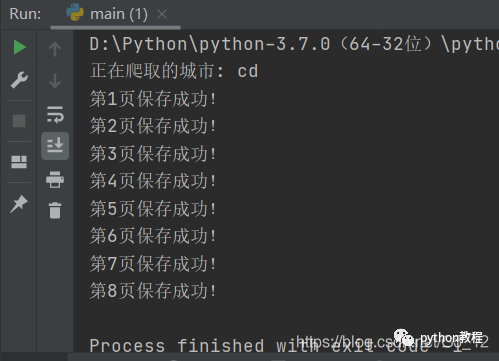
運行結果就會這樣,會保存在你的文件夾中。
總結
這里對文章進行總結:今天分析這波代碼目的是為了讓大家清晰明亮的了解python爬蟲的運作,和大家一起學習
以上就是今天要講的內容,本文僅僅簡單介紹了pandas的使用,而urllib.request提供了大量能使我們快速便捷地爬取數(shù)據(jù)。

搜索下方加老師微信
老師微信號:XTUOL1988【切記備注:學習Python】
領取Python web開發(fā),Python爬蟲,Python數(shù)據(jù)分析,人工智能等精品學習課程。帶你從零基礎系統(tǒng)性的學好Python!
*聲明:本文于網(wǎng)絡整理,版權歸原作者所有,如來源信息有誤或侵犯權益,請聯(lián)系我們刪除或授權
