
數(shù)據(jù)分析之AB testing實戰(zhàn)(附Python代碼)

編輯 | JackTian
微信公眾號 | 杰哥的IT之旅(ID:Jake_Internet)
作者介紹:
大家可以叫我黃同學(博客名:Huang Supreme),一個應(yīng)用統(tǒng)計碩士,愛好寫一些技術(shù)博客,志在用通俗易懂的寫作風格,幫助大家學到知識,學好知識!
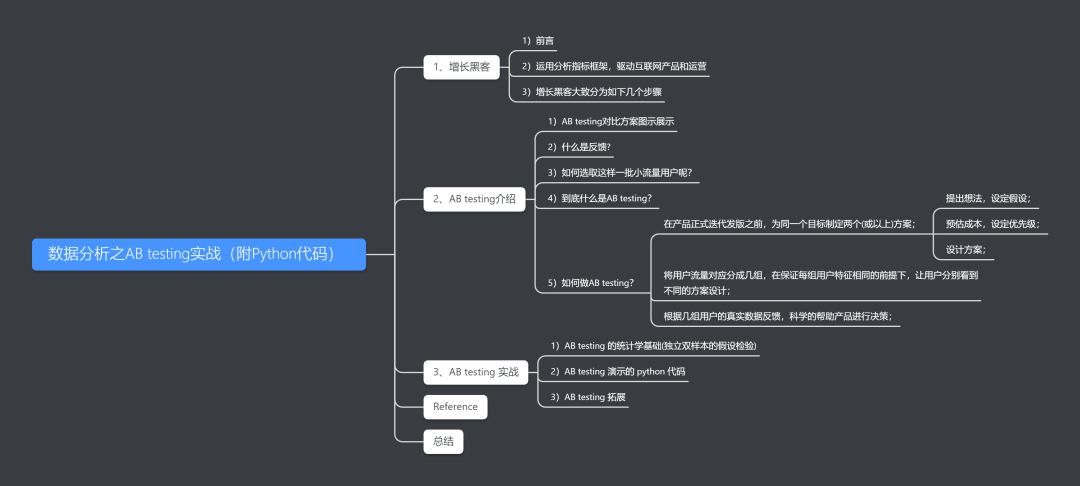
目錄
后臺回復(fù):AB testing實戰(zhàn),獲取完整代碼
1、增長黑客
1)前言

2)運用分析指標框架,驅(qū)動互聯(lián)網(wǎng)產(chǎn)品和運營
現(xiàn)在分享一個鏈接,供大家了解:
http://www.woshipm.com/data-analysis/439849.html
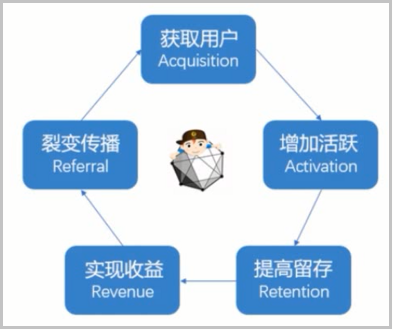
這樣上述幾個部分就形成了一個良好的閉環(huán),不斷地去良性的發(fā)展。
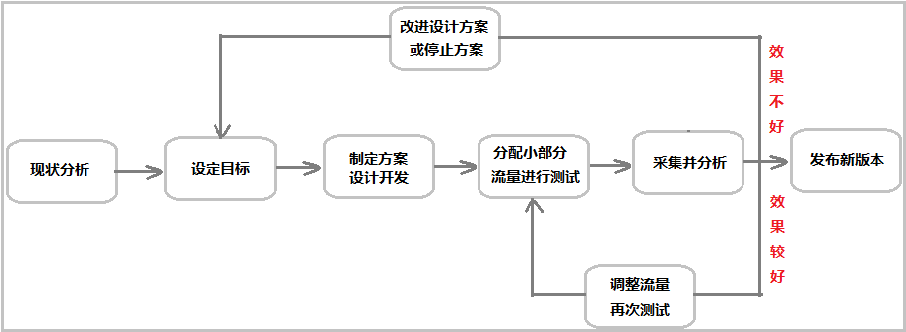
3)增長黑客大致分為如下幾個步驟
2、AB testing介紹
1)AB testing對比方案圖示展示
圖示一:天貓兩個網(wǎng)頁的改版

圖示二:微信兩個版本的改版

2)什么是反饋呢?
3)如何選取這樣一批小流量用戶呢?
4)到底什么是AB testing?
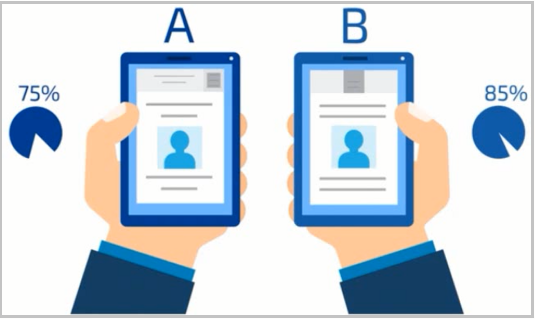
5)如何做AB testing?
提出想法,設(shè)定假設(shè);
預(yù)估成本,設(shè)定優(yōu)先級;
設(shè)計方案;

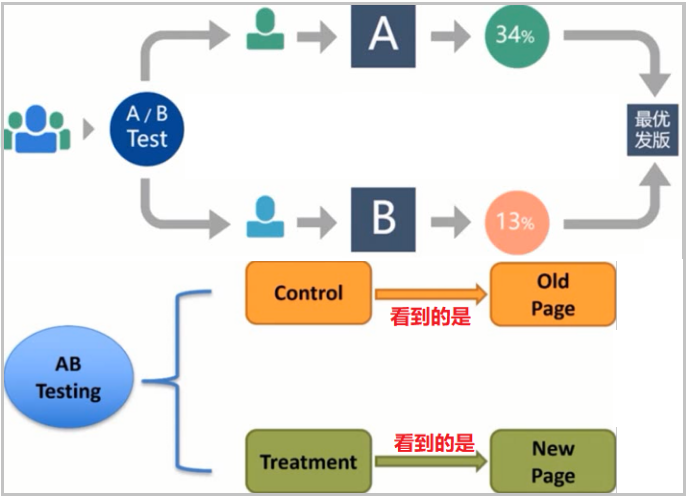
根據(jù)幾組用戶的真實數(shù)據(jù)反饋,科學的幫助產(chǎn)品進行決策;
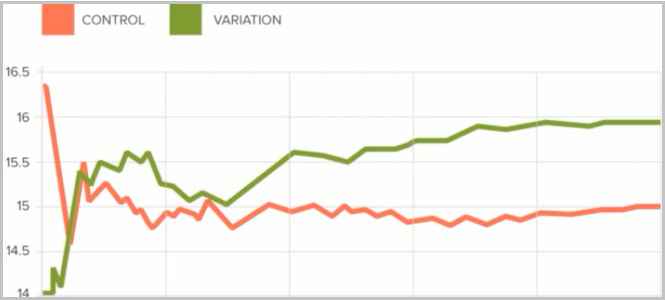
3、AB testing 實戰(zhàn)
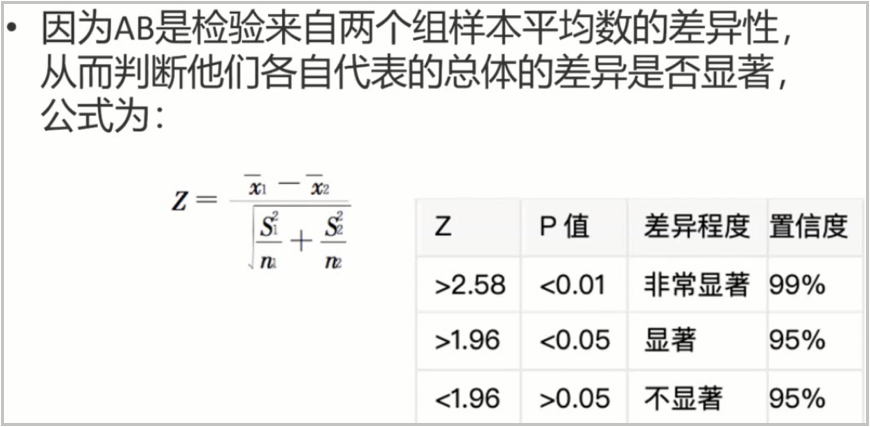
1)AB testing 的統(tǒng)計學基礎(chǔ)(獨立雙樣本的假設(shè)檢驗)
大家如果感興趣,可以看一下這篇文章:https://blog.csdn.net/weixin_41261833/article/details/104623377
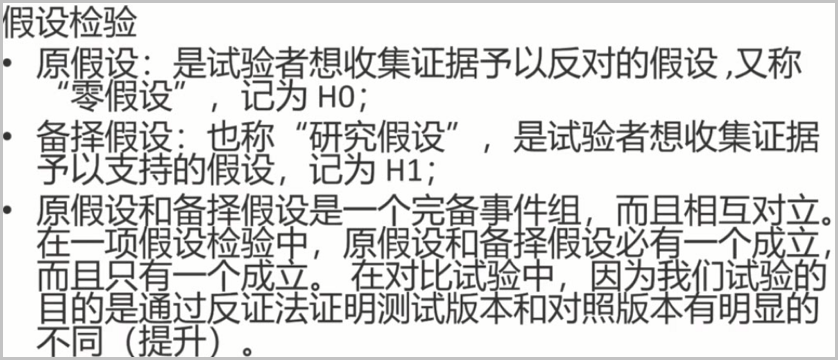
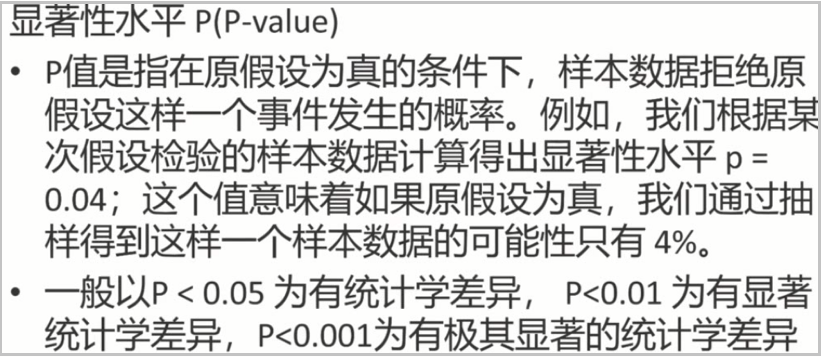
2)AB testing 演示的 python 代碼
import pandas as pd
---------------------------------------------------------
# 讀取數(shù)據(jù),查看前5行
df = pd.read_csv("ab_test.csv")
df.head()
---------------------------------------------------------
# 數(shù)據(jù)預(yù)覽,查看數(shù)據(jù)有多少行、多少列
df.shape
---------------------------------------------------------
# 查看數(shù)據(jù)中是否有空值
df.isnull().any()
df.info()
---------------------------------------------------------
# 查看數(shù)據(jù)中的錯誤行
print((True) != (True))
print((True) != (False))
print((False) != (True))
print((False) != (False))
"""
true  != true   fasle    treatment  new_page
true  != false  true     treatment  old_page
false != true   true     control    new_page
false != false  false    control    old_page
"""
# 下面這句代碼,展示的就是group=treatment且landing_page=old_page和group=control且landing_page=new_page,這樣的錯誤行;
num_error = df[((df.group == "treatment")!=(df.landing_page == "new_page"))].shape[0]
num_error
---------------------------------------------------------
# 去掉錯誤行后,再次查看是否還存在錯誤行
print("沒有刪除錯誤行之前的記錄數(shù):", df.shape[0])
df2 = df[~((df.landing_page == "new_page")&(df.group == "control"))]
df3 = df2[~((df2.landing_page == "old_page")&(df2.group == "treatment"))]
print("刪除錯誤行之后的記錄數(shù):", df3.shape[0])
print("錯誤行共有",str(df.shape[0]-df3.shape[0]),"條記錄")
num_error2 = df3[((df3.group == "treatment")!=(df3.landing_page == "new_page"))].shape[0]
num_error2
---------------------------------------------------------
# 查看是否有重復(fù)行
print("數(shù)據(jù)的記錄數(shù)為:", df3.user_id.shape[0])
print("將user_id去重計數(shù)后的記錄數(shù)為:", df3.user_id.nunique())
"""
通過上述分析,可以看出:user_id中有一條記錄數(shù)是重復(fù)的。接下來,我們可以找出這條重復(fù)的記錄,并去重。
"""
---------------------------------------------------------
# 查看重復(fù)的行
df3[df3.user_id.duplicated(keep=False)]
#  去除重復(fù)的行
df4 = df3.drop_duplicates(subset=["user_id"],keep="first")
df4.shape[0]
---------------------------------------------------------
# 我們來看一下control組的轉(zhuǎn)化率
control_converted = df4.query('group=="control"').converted.mean()
control_converted
# 再來看一下treatment組的轉(zhuǎn)化率
treatment_converted = df4.query('group=="treatment"').converted.mean()
treatment_converted
"""
自己下去思考一下:根據(jù)上述結(jié)果,老頁面的轉(zhuǎn)化率比新頁面的轉(zhuǎn)換率好,是不是就可以說明老頁面好呢?
"""
---------------------------------------------------------
# 進行獨立兩樣本的假設(shè)檢驗
import statsmodels.stats.proportion as ssp

converted_old = df4[df4.landing_page == "old_page"].converted.sum()
converted_new = df4[df4.landing_page == "new_page"].converted.sum()
n_old = len(df4[df4.landing_page == "old_page"])
n_new = len(df4[df4.landing_page == "new_page"])
data = pd.DataFrame({"converted":[converted_old, converted_new],
                     "total":[n_old ,n_new]})
display(data)
z_score, p_value = ssp.proportions_ztest(count=data.converted, nobs=data.total, alternative="smaller")
print("Z值為:", z_score)
print("P值為:", p_value)
---------------------------------------------------------
結(jié)果如下:
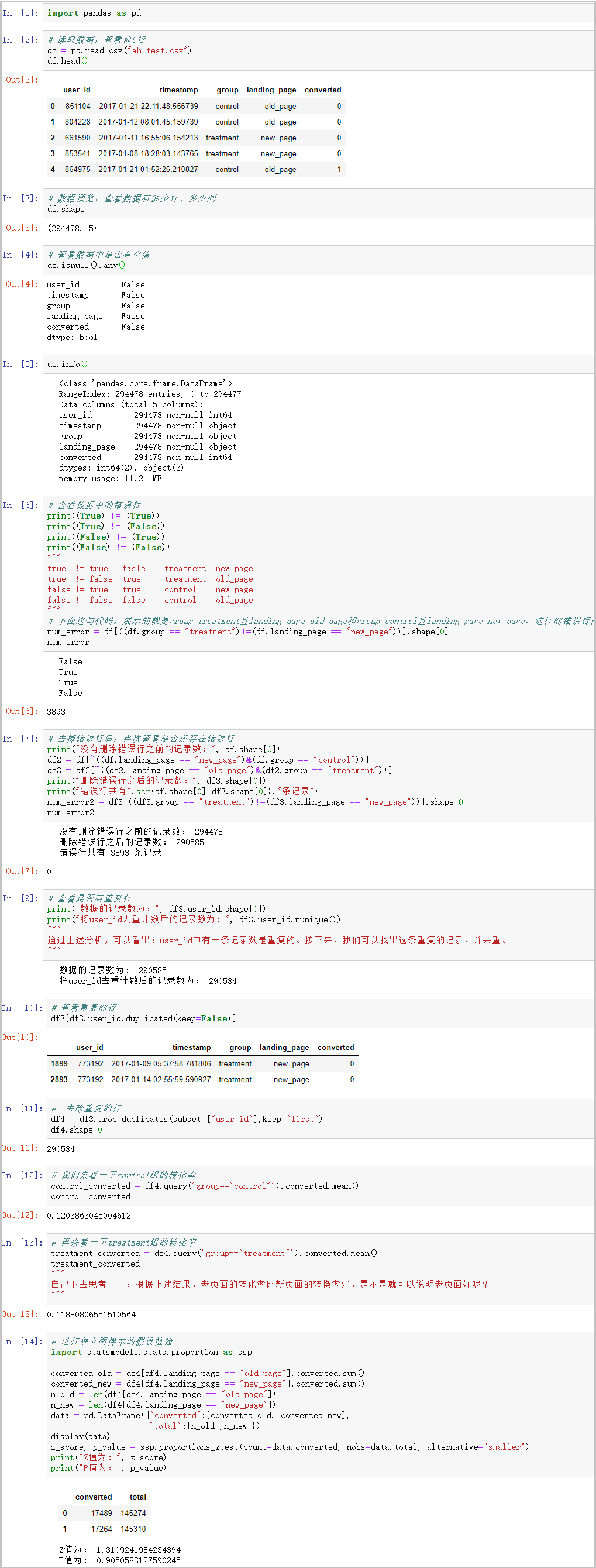
結(jié)果分析:
3)AB testing 拓展
Reference
http://www.woshipm.com/data-analysis/439849.html
https://blog.csdn.net/weixin_41261833/article/details/104623377
http://m.blog.itpub.net/31555699/viewspace-2653832/
https://www.jianshu.com/p/61e6c34d0704
m」獲取!
          作者往期精彩文章:


                      1、精心整理的 52 頁 Python 操作 excel、word、pdf 文件【附獲取方式】

2、520情人節(jié),不懂送女朋友什么牌子的口紅?沒關(guān)系!Python 數(shù)據(jù)分析告訴你。

3、“羅永浩抖音首秀”銷售數(shù)據(jù)的可視化大屏是怎么做出來的呢?

4、利用 Python 進行多 Sheet 表合并、多工作簿合并、一表按列拆分

5、Python 自動化辦公之"你還在手動操作“文件”或“文件夾”嗎?"


           關(guān)注微信公眾號『杰哥的IT之旅』,后臺回復(fù)“1024”查看更多內(nèi)容,回復(fù)“微信”添加我微信。


                    好文和朋友一起看~
評論
圖片
表情