
大模型LLM微調(diào)經(jīng)驗(yàn)總結(jié)&項(xiàng)目更新
寫在前面
大家好,我是劉聰NLP。
為了慶祝首篇千贊文章,首個(gè)千Star項(xiàng)目,周末對(duì)大模型微調(diào)項(xiàng)目代碼進(jìn)行了重構(gòu),支持ChatGLM和ChatGLM2模型微調(diào)的切換,增加了代碼的可讀性,并且支持Freeze方法、Lora方法、P-Tuning方法、「全量參數(shù)方法」微調(diào)。
PS:在對(duì)Chat類模型進(jìn)行SFT時(shí),一定要遵循模型原始的系統(tǒng)指令,否則會(huì)出現(xiàn)嚴(yán)重的遺忘或微調(diào)效果不明顯現(xiàn)象。
GitHub: https://github.com/liucongg/ChatGLM-Finetuning

大模型微調(diào)經(jīng)驗(yàn)分享&總結(jié):https://zhuanlan.zhihu.com/p/620885226

更新說明
為什么要更新?
其實(shí)一開始這個(gè)項(xiàng)目是ChatGLM剛剛出來,筆者進(jìn)行單卡微調(diào)的代碼(寫的會(huì)比較隨意),主要是為了幫助大家跑通整個(gè)SFT的流程,更加理解代碼。沒想到獲得了這么多關(guān)注,并且ChatGLM2也出了,很多網(wǎng)友都提問是否支持,因此做了項(xiàng)目的更新,代碼的重構(gòu)。(后面可能會(huì)支持更多模型吧)
相比于V0.1版本,目前版本做了如下更新:
-
項(xiàng)目仍然采用非Trainer的寫法,雖然Trainer代碼簡(jiǎn)單,但不易修改,大模型時(shí)代算法工程師本就成為了數(shù)據(jù)工程師,因此更需了解訓(xùn)練流程及步驟。 -
不僅支持單卡訓(xùn)練,也支持多卡訓(xùn)練。 -
代碼中關(guān)鍵內(nèi)容增加了中文注釋。 -
數(shù)據(jù)格式已經(jīng)更新為廣泛使用的{"instruction": instruction, "input": input, "output": output}格式。 -
不僅支持微量參數(shù)訓(xùn)練,也支持全量參數(shù)訓(xùn)練(至少兩塊A40) -
由于ChatGLM官方代碼和模型之前一直在更新,目前代碼和模型使用的是最新版本(20230806)。 -
訓(xùn)練數(shù)據(jù)構(gòu)建過程,與ChatGLM、ChatGLM2推理一致,見utils.py文件內(nèi)容,并且在采用單指令集方式,使得模型并沒有出現(xiàn)嚴(yán)重的災(zāi)難性遺忘。 -
統(tǒng)計(jì)了不同方法顯存占用情況。
微調(diào)方法
模型微調(diào)時(shí),如果遇到顯存不夠的情況,可以開啟gradient_checkpointing、zero3、offload等參數(shù)來節(jié)省顯存。
本文章對(duì)gradient_checkpointing、zero3、offload暫時(shí)不做過多介紹,后面會(huì)進(jìn)行專項(xiàng)介紹,或者大家可以自行搜索其原理。
Freeze方法
Freeze方法,即參數(shù)凍結(jié),對(duì)原始模型部分參數(shù)進(jìn)行凍結(jié)操作,僅訓(xùn)練部分參數(shù),以達(dá)到在單卡或多卡,不進(jìn)行TP或PP操作就可以對(duì)大模型進(jìn)行訓(xùn)練。
微調(diào)代碼,見train.py,核心部分如下:
freeze_module_name = args.freeze_module_name.split(",")
for name, param in model.named_parameters():
	if not any(nd in name for nd in freeze_module_name):
		param.requires_grad = False
針對(duì)模型不同層進(jìn)行修改,可以自行修改freeze_module_name參數(shù)配置,例如"layers.27.,layers.26.,layers.25.,layers.24."。訓(xùn)練代碼均采用DeepSpeed進(jìn)行訓(xùn)練,可設(shè)置參數(shù)包含train_path、model_name_or_path、mode、train_type、freeze_module_name、ds_file、num_train_epochs、per_device_train_batch_size、gradient_accumulation_steps、output_dir等, 可根據(jù)自己的任務(wù)配置。
ChatGLM單卡訓(xùn)練
CUDA_VISIBLE_DEVICES=0 deepspeed --master_port 520 train.py \
                --train_path data/spo_0.json \
                --model_name_or_path ChatGLM-6B/ \
                --per_device_train_batch_size 1 \
                --max_len 1560 \
                --max_src_len 1024 \
                --learning_rate 1e-4 \
                --weight_decay 0.1 \
                --num_train_epochs 2 \
                --gradient_accumulation_steps 4 \
                --warmup_ratio 0.1 \
                --mode glm \
                --train_type freeze \
                --freeze_module_name "layers.27.,layers.26.,layers.25.,layers.24." \
                --seed 1234 \
                --ds_file ds_zero2_no_offload.json \
                --gradient_checkpointing \
                --show_loss_step 10 \
                --output_dir ./output-glm
ChatGLM四卡訓(xùn)練,通過CUDA_VISIBLE_DEVICES控制具體哪幾塊卡進(jìn)行訓(xùn)練,如果不加該參數(shù),表示使用運(yùn)行機(jī)器上所有卡進(jìn)行訓(xùn)練
CUDA_VISIBLE_DEVICES=0,1,2,3 deepspeed --master_port 520 train.py \
                --train_path data/spo_0.json \
                --model_name_or_path ChatGLM-6B/ \
                --per_device_train_batch_size 1 \
                --max_len 1560 \
                --max_src_len 1024 \
                --learning_rate 1e-4 \
                --weight_decay 0.1 \
                --num_train_epochs 2 \
                --gradient_accumulation_steps 4 \
                --warmup_ratio 0.1 \
                --mode glm \
                --train_type freeze \
                --freeze_module_name "layers.27.,layers.26.,layers.25.,layers.24." \
                --seed 1234 \
                --ds_file ds_zero2_no_offload.json \
                --gradient_checkpointing \
                --show_loss_step 10 \
                --output_dir ./output-glm
ChatGLM2單卡訓(xùn)練
CUDA_VISIBLE_DEVICES=0 deepspeed --master_port 520 train.py \
                --train_path data/spo_0.json \
                --model_name_or_path ChatGLM2-6B/ \
                --per_device_train_batch_size 1 \
                --max_len 1560 \
                --max_src_len 1024 \
                --learning_rate 1e-4 \
                --weight_decay 0.1 \
                --num_train_epochs 2 \
                --gradient_accumulation_steps 4 \
                --warmup_ratio 0.1 \
                --mode glm2 \
                --train_type freeze \
                --freeze_module_name "layers.27.,layers.26.,layers.25.,layers.24." \
                --seed 1234 \
                --ds_file ds_zero2_no_offload.json \
                --gradient_checkpointing \
                --show_loss_step 10 \
                --output_dir ./output-glm2
ChatGLM2四卡訓(xùn)練,通過CUDA_VISIBLE_DEVICES控制具體哪幾塊卡進(jìn)行訓(xùn)練,如果不加該參數(shù),表示使用運(yùn)行機(jī)器上所有卡進(jìn)行訓(xùn)練
CUDA_VISIBLE_DEVICES=0,1,2,3 deepspeed --master_port 520 train.py \
                --train_path data/spo_0.json \
                --model_name_or_path ChatGLM2-6B/ \
                --per_device_train_batch_size 1 \
                --max_len 1560 \
                --max_src_len 1024 \
                --learning_rate 1e-4 \
                --weight_decay 0.1 \
                --num_train_epochs 2 \
                --gradient_accumulation_steps 4 \
                --warmup_ratio 0.1 \
                --mode glm2 \
                --train_type freeze \
                --freeze_module_name "layers.27.,layers.26.,layers.25.,layers.24." \
                --seed 1234 \
                --ds_file ds_zero2_no_offload.json \
                --gradient_checkpointing \
                --show_loss_step 10 \
                --output_dir ./output-glm2
PS:ChatGLM微調(diào)時(shí)所用顯存要比ChatGLM2多,詳細(xì)顯存占比如下: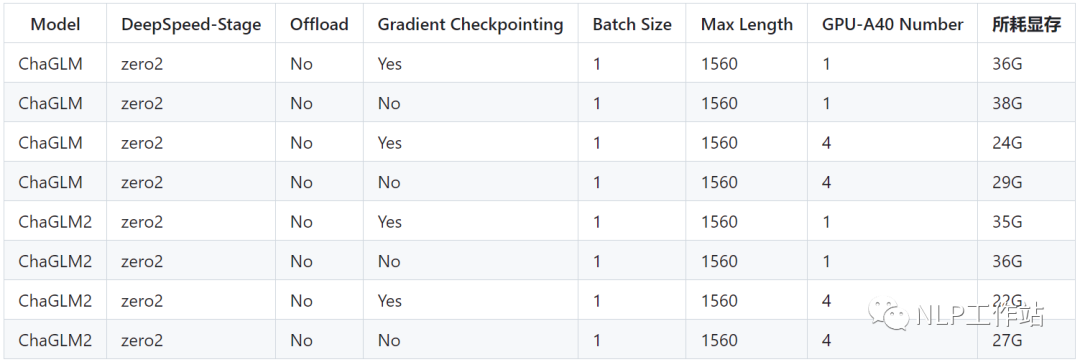
PT方法
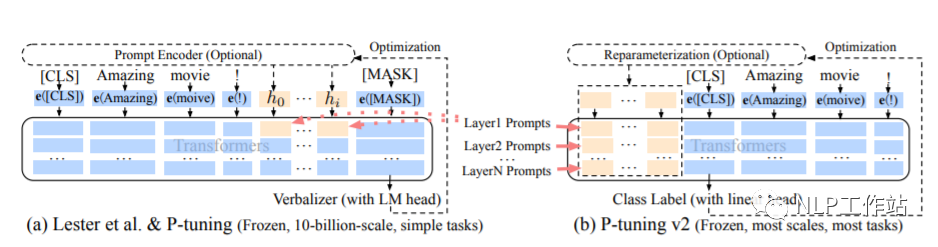
PT方法,即P-Tuning方法,參考ChatGLM官方代碼 ,是一種針對(duì)于大模型的soft-prompt方法。
-
P-Tuning僅對(duì)大模型的Embedding加入新的參數(shù)。 -
P-Tuning-V2,將大模型的Embedding和每一層前都加上新的參數(shù)。
P-Tuning: https://arxiv.org/abs/2103.10385
P-Tuning-V2: https://arxiv.org/abs/2110.07602
微調(diào)代碼,見train.py,核心部分如下:
config = MODE[args.mode]["config"].from_pretrained(args.model_name_or_path)
config.pre_seq_len = args.pre_seq_len
config.prefix_projection = args.prefix_projection
model = MODE[args.mode]["model"].from_pretrained(args.model_name_or_path, config=config)
for name, param in model.named_parameters():
	if not any(nd in name for nd in ["prefix_encoder"]):
		param.requires_grad = False
當(dāng)prefix_projection為True時(shí),為P-Tuning-V2方法,在大模型的Embedding和每一層前都加上新的參數(shù);為False時(shí),為P-Tuning方法,僅在大模型的Embedding上新的參數(shù)。
訓(xùn)練代碼均采用DeepSpeed進(jìn)行訓(xùn)練,可設(shè)置參數(shù)包含train_path、model_name_or_path、mode、train_type、pre_seq_len、prefix_projection、ds_file、num_train_epochs、per_device_train_batch_size、gradient_accumulation_steps、output_dir等, 可根據(jù)自己的任務(wù)配置。
ChatGLM單卡訓(xùn)練
CUDA_VISIBLE_DEVICES=0 deepspeed --master_port 520 train.py \
                --train_path data/spo_0.json \
                --model_name_or_path ChatGLM-6B \
                --per_device_train_batch_size 1 \
                --max_len 768 \
                --max_src_len 512 \
                --learning_rate 1e-4 \
                --weight_decay 0.1 \
                --num_train_epochs 2 \
                --gradient_accumulation_steps 4 \
                --warmup_ratio 0.1 \
                --mode glm \
                --train_type ptuning \
                --seed 1234 \
                --ds_file ds_zero2_no_offload.json \
                --gradient_checkpointing \
                --show_loss_step 10 \
                --pre_seq_len 16 \
                --prefix_projection True \
                --output_dir ./output-glm
ChatGLM四卡訓(xùn)練,通過CUDA_VISIBLE_DEVICES控制具體哪幾塊卡進(jìn)行訓(xùn)練,如果不加該參數(shù),表示使用運(yùn)行機(jī)器上所有卡進(jìn)行訓(xùn)練
CUDA_VISIBLE_DEVICES=0,1,2,3 deepspeed --master_port 520 train.py \
                --train_path data/spo_0.json \
                --model_name_or_path ChatGLM-6B \
                --per_device_train_batch_size 1 \
                --max_len 1560 \
                --max_src_len 1024 \
                --learning_rate 1e-4 \
                --weight_decay 0.1 \
                --num_train_epochs 2 \
                --gradient_accumulation_steps 4 \
                --warmup_ratio 0.1 \
                --mode glm \
                --train_type ptuning \
                --seed 1234 \
                --ds_file ds_zero2_no_offload.json \
                --gradient_checkpointing \
                --show_loss_step 10 \
                --pre_seq_len 16 \
                --prefix_projection True \
                --output_dir ./output-glm
ChatGLM2單卡訓(xùn)練
CUDA_VISIBLE_DEVICES=0 deepspeed --master_port 520 train.py \
                --train_path data/spo_0.json \
                --model_name_or_path ChatGLM2-6B \
                --per_device_train_batch_size 1 \
                --max_len 1560 \
                --max_src_len 1024 \
                --learning_rate 1e-4 \
                --weight_decay 0.1 \
                --num_train_epochs 2 \
                --gradient_accumulation_steps 4 \
                --warmup_ratio 0.1 \
                --mode glm2 \
                --train_type ptuning \
                --seed 1234 \
                --ds_file ds_zero2_no_offload.json \
                --gradient_checkpointing \
                --show_loss_step 10 \
                --pre_seq_len 16 \
                --prefix_projection True \
                --output_dir ./output-glm2
ChatGLM2四卡訓(xùn)練,通過CUDA_VISIBLE_DEVICES控制具體哪幾塊卡進(jìn)行訓(xùn)練,如果不加該參數(shù),表示使用運(yùn)行機(jī)器上所有卡進(jìn)行訓(xùn)練
CUDA_VISIBLE_DEVICES=0,1,2,3 deepspeed --master_port 520 train.py \
                --train_path data/spo_0.json \
                --model_name_or_path ChatGLM2-6B \
                --per_device_train_batch_size 1 \
                --max_len 1560 \
                --max_src_len 1024 \
                --learning_rate 1e-4 \
                --weight_decay 0.1 \
                --num_train_epochs 2 \
                --gradient_accumulation_steps 4 \
                --warmup_ratio 0.1 \
                --mode glm2 \
                --train_type ptuning \
                --seed 1234 \
                --ds_file ds_zero2_no_offload.json \
                --gradient_checkpointing \
                --show_loss_step 10 \
                --pre_seq_len 16 \
                --prefix_projection True \
                --output_dir ./output-glm2
PS:ChatGLM微調(diào)時(shí)所用顯存要比ChatGLM2多,詳細(xì)顯存占比如下: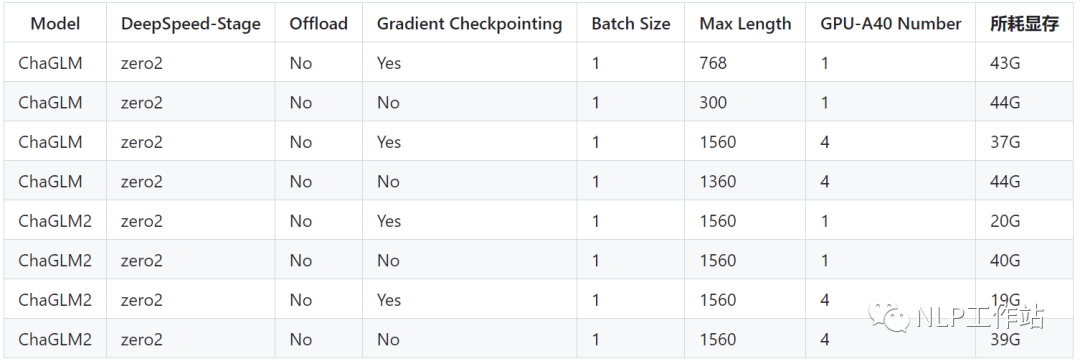
Lora方法
Lora方法,即在大型語言模型上對(duì)指定參數(shù)(權(quán)重矩陣)并行增加額外的低秩矩陣,并在模型訓(xùn)練過程中,僅訓(xùn)練額外增加的并行低秩矩陣的參數(shù)。當(dāng)“秩值”遠(yuǎn)小于原始參數(shù)維度時(shí),新增的低秩矩陣參數(shù)量也就很小。在下游任務(wù)tuning時(shí),僅須訓(xùn)練很小的參數(shù),但能獲取較好的表現(xiàn)結(jié)果。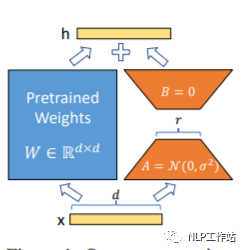
Paper: https://arxiv.org/abs/2106.09685
Github: https://github.com/microsoft/LoRA
HuggingFace封裝的peft庫(kù): https://github.com/huggingface/peft
微調(diào)代碼,見train.py,核心部分如下:
model = MODE[args.mode]["model"].from_pretrained(args.model_name_or_path)
lora_module_name = args.lora_module_name.split(",")
config = LoraConfig(r=args.lora_dim,
					lora_alpha=args.lora_alpha,
					target_modules=lora_module_name,
					lora_dropout=args.lora_dropout,
					bias="none",
					task_type="CAUSAL_LM",
					inference_mode=False,
					)
model = get_peft_model(model, config)
model.config.torch_dtype = torch.float32
訓(xùn)練代碼均采用DeepSpeed進(jìn)行訓(xùn)練,可設(shè)置參數(shù)包含train_path、model_name_or_path、mode、train_type、lora_dim、lora_alpha、lora_dropout、lora_module_name、ds_file、num_train_epochs、per_device_train_batch_size、gradient_accumulation_steps、output_dir等, 可根據(jù)自己的任務(wù)配置。
ChatGLM單卡訓(xùn)練
CUDA_VISIBLE_DEVICES=0 deepspeed --master_port 520 train.py \
              --train_path data/spo_0.json \
              --model_name_or_path ChatGLM-6B \
              --per_device_train_batch_size 1 \
              --max_len 1560 \
              --max_src_len 1024 \
              --learning_rate 1e-4 \
              --weight_decay 0.1 \
              --num_train_epochs 2 \
              --gradient_accumulation_steps 4 \
              --warmup_ratio 0.1 \
              --mode glm \
              --train_type lora \
              --lora_dim 16 \
              --lora_alpha 64 \
              --lora_dropout 0.1 \
              --lora_module_name "query_key_value" \
              --seed 1234 \
              --ds_file ds_zero2_no_offload.json \
              --gradient_checkpointing \
              --show_loss_step 10 \
              --output_dir ./output-glm
ChatGLM四卡訓(xùn)練,通過CUDA_VISIBLE_DEVICES控制具體哪幾塊卡進(jìn)行訓(xùn)練,如果不加該參數(shù),表示使用運(yùn)行機(jī)器上所有卡進(jìn)行訓(xùn)練
CUDA_VISIBLE_DEVICES=0,1,2,3 deepspeed --master_port 520 train.py \
              --train_path data/spo_0.json \
              --model_name_or_path ChatGLM-6B \
              --per_device_train_batch_size 1 \
              --max_len 1560 \
              --max_src_len 1024 \
              --learning_rate 1e-4 \
              --weight_decay 0.1 \
              --num_train_epochs 2 \
              --gradient_accumulation_steps 4 \
              --warmup_ratio 0.1 \
              --mode glm \
              --train_type lora \
              --lora_dim 16 \
              --lora_alpha 64 \
              --lora_dropout 0.1 \
              --lora_module_name "query_key_value" \
              --seed 1234 \
              --ds_file ds_zero2_no_offload.json \
              --gradient_checkpointing \
              --show_loss_step 10 \
              --output_dir ./output-glm
ChatGLM2單卡訓(xùn)練
CUDA_VISIBLE_DEVICES=0 deepspeed --master_port 520 train.py \
              --train_path data/spo_0.json \
              --model_name_or_path ChatGLM2-6B \
              --per_device_train_batch_size 1 \
              --max_len 1560 \
              --max_src_len 1024 \
              --learning_rate 1e-4 \
              --weight_decay 0.1 \
              --num_train_epochs 2 \
              --gradient_accumulation_steps 4 \
              --warmup_ratio 0.1 \
              --mode glm2 \
              --train_type lora \
              --lora_dim 16 \
              --lora_alpha 64 \
              --lora_dropout 0.1 \
              --lora_module_name "query_key_value,dense_h_to_4h,dense_4h_to_h,dense" \
              --seed 1234 \
              --ds_file ds_zero2_no_offload.json \
              --gradient_checkpointing \
              --show_loss_step 10 \
              --output_dir ./output-glm2
ChatGLM2四卡訓(xùn)練,通過CUDA_VISIBLE_DEVICES控制具體哪幾塊卡進(jìn)行訓(xùn)練,如果不加該參數(shù),表示使用運(yùn)行機(jī)器上所有卡進(jìn)行訓(xùn)練
CUDA_VISIBLE_DEVICES=0,1,2,3 deepspeed --master_port 520 train.py \
              --train_path data/spo_0.json \
              --model_name_or_path ChatGLM2-6B \
              --per_device_train_batch_size 1 \
              --max_len 1560 \
              --max_src_len 1024 \
              --learning_rate 1e-4 \
              --weight_decay 0.1 \
              --num_train_epochs 2 \
              --gradient_accumulation_steps 4 \
              --warmup_ratio 0.1 \
              --mode glm2 \
              --train_type lora \
              --lora_dim 16 \
              --lora_alpha 64 \
              --lora_dropout 0.1 \
              --lora_module_name "query_key_value,dense_h_to_4h,dense_4h_to_h,dense" \
              --seed 1234 \
              --ds_file ds_zero2_no_offload.json \
              --gradient_checkpointing \
              --show_loss_step 10 \
              --output_dir ./output-glm2
PS:ChatGLM微調(diào)時(shí)所用顯存要比ChatGLM2多,詳細(xì)顯存占比如下:
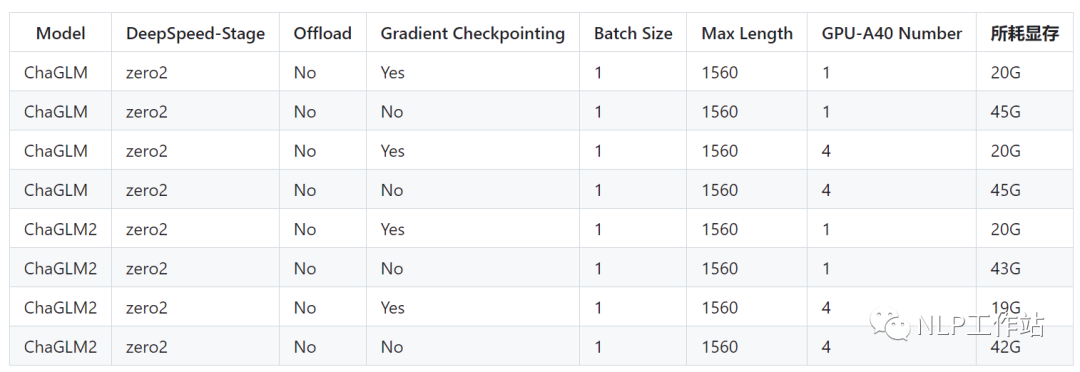
注意:Lora方法在模型保存時(shí)僅保存了Lora訓(xùn)練參數(shù),因此在模型預(yù)測(cè)時(shí)需要將模型參數(shù)進(jìn)行合并,具體參考merge_lora.py。
全參方法
全參方法,對(duì)大模型進(jìn)行全量參數(shù)訓(xùn)練,主要借助DeepSpeed-Zero3方法,對(duì)模型參數(shù)進(jìn)行多卡分割,并借助Offload方法,將優(yōu)化器參數(shù)卸載到CPU上以解決顯卡不足問題。
微調(diào)代碼,見train.py,核心部分如下:
model = MODE[args.mode]["model"].from_pretrained(args.model_name_or_path)
訓(xùn)練代碼均采用DeepSpeed進(jìn)行訓(xùn)練,可設(shè)置參數(shù)包含train_path、model_name_or_path、mode、train_type、ds_file、num_train_epochs、per_device_train_batch_size、gradient_accumulation_steps、output_dir等, 可根據(jù)自己的任務(wù)配置。
ChatGLM四卡訓(xùn)練,通過CUDA_VISIBLE_DEVICES控制具體哪幾塊卡進(jìn)行訓(xùn)練,如果不加該參數(shù),表示使用運(yùn)行機(jī)器上所有卡進(jìn)行訓(xùn)練
CUDA_VISIBLE_DEVICES=0,1,2,3 deepspeed --master_port 520 train.py \
              --train_path data/spo_0.json \
              --model_name_or_path ChatGLM-6B \
              --per_device_train_batch_size 1 \
              --max_len 1560 \
              --max_src_len 1024 \
              --learning_rate 1e-4 \
              --weight_decay 0.1 \
              --num_train_epochs 2 \
              --gradient_accumulation_steps 4 \
              --warmup_ratio 0.1 \
              --mode glm \
              --train_type all \
              --seed 1234 \
              --ds_file ds_zero3_offload.json \
              --gradient_checkpointing \
              --show_loss_step 10 \
              --output_dir ./output-glm
ChatGLM2四卡訓(xùn)練,通過CUDA_VISIBLE_DEVICES控制具體哪幾塊卡進(jìn)行訓(xùn)練,如果不加該參數(shù),表示使用運(yùn)行機(jī)器上所有卡進(jìn)行訓(xùn)練
CUDA_VISIBLE_DEVICES=0,1,2,3 deepspeed --master_port 520 train.py \
              --train_path data/spo_0.json \
              --model_name_or_path ChatGLM2-6B \
              --per_device_train_batch_size 1 \
              --max_len 1560 \
              --max_src_len 1024 \
              --learning_rate 1e-4 \
              --weight_decay 0.1 \
              --num_train_epochs 2 \
              --gradient_accumulation_steps 4 \
              --warmup_ratio 0.1 \
              --mode glm2 \
              --train_type all \
              --seed 1234 \
              --ds_file ds_zero3_no_offload.json \
              --gradient_checkpointing \
              --show_loss_step 10 \
              --output_dir ./output-glm2
PS:ChatGLM微調(diào)時(shí)所用顯存要比ChatGLM2多,詳細(xì)顯存占比如下: 后面補(bǔ)充DeepSpeed的Zero-Stage的相關(guān)內(nèi)容說明。
運(yùn)行環(huán)境
cpm_kernels==1.0.11
deepspeed==0.9.0
numpy==1.24.2
peft==0.3.0
sentencepiece==0.1.96
tensorboard==2.11.0
tensorflow==2.13.0
torch==1.13.1+cu116
tqdm==4.64.1
transformers==4.27.1
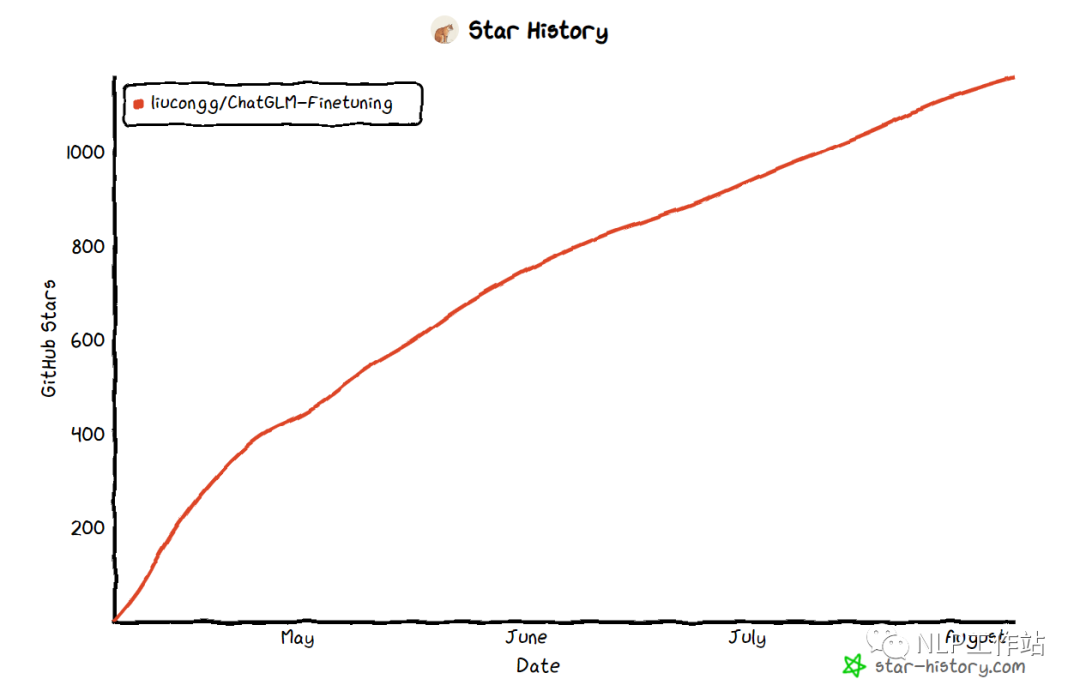
Star History
總結(jié)
希望該項(xiàng)目可以幫助大家更好地微調(diào)大模型,愿大家以后可以實(shí)現(xiàn)“大模型”自由。
請(qǐng)多多關(guān)注知乎「劉聰NLP」,有問題的朋友也歡迎加我微信「logCong」私聊,交個(gè)朋友吧,一起學(xué)習(xí),一起進(jìn)步。我們的口號(hào)是“生命不止,學(xué)習(xí)不停”。PS:交流2群已經(jīng)成立,歡迎加入。
往期推薦: