
Android實(shí)現(xiàn)翻轉(zhuǎn)及延遲動畫效果
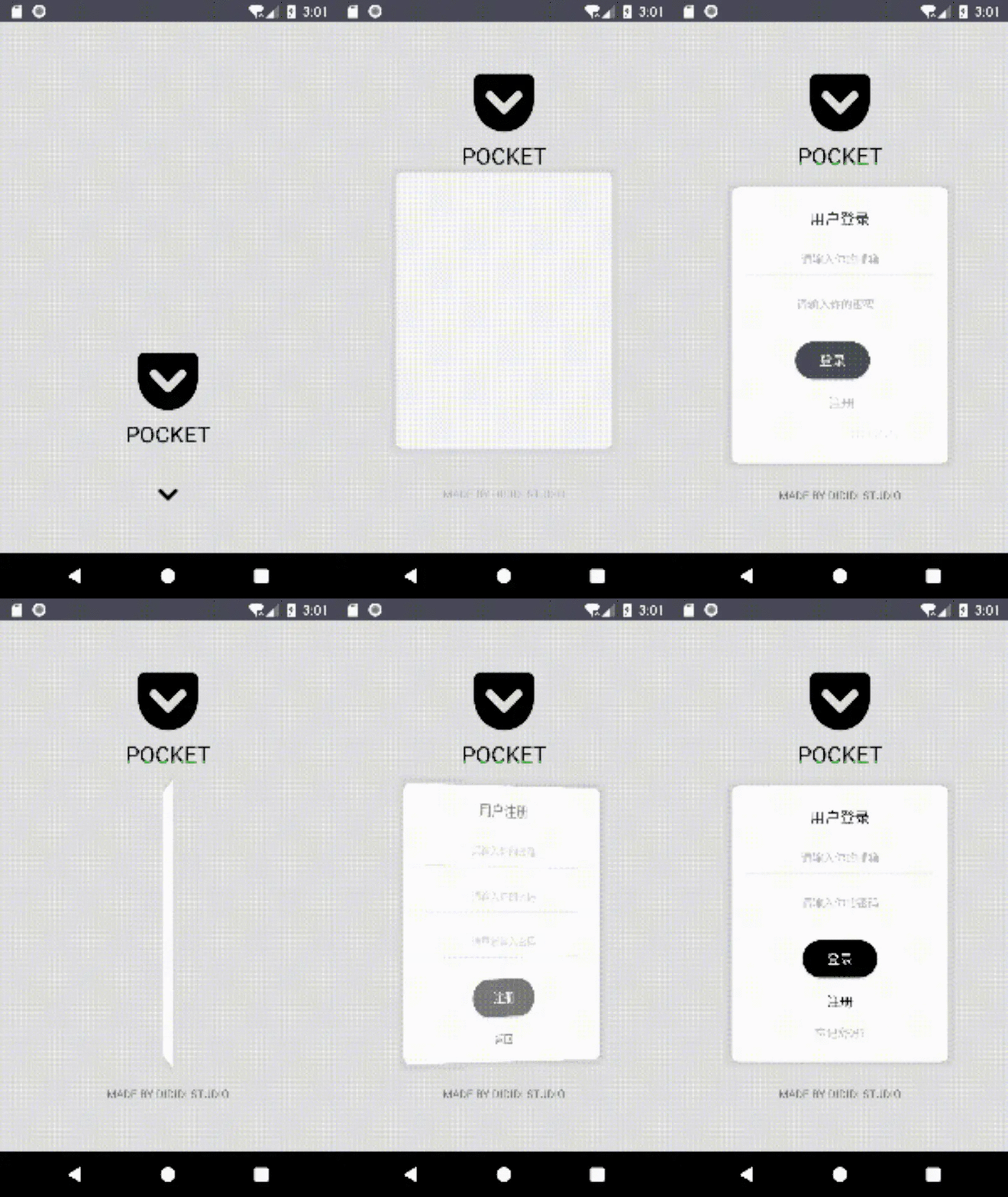
只需要翻轉(zhuǎn)背景FrameLayout180度(注意:此時(shí)整個(gè)頁面是反轉(zhuǎn)的),
然后把當(dāng)前的RelativeLayout也翻轉(zhuǎn)180度(當(dāng)前的頁面被翻轉(zhuǎn)成正確的方向了),
最后把要顯示的RelativeLayout逆向翻轉(zhuǎn)180度(要顯示的頁面也被翻轉(zhuǎn)成正確的方向了)。
/*** 翻轉(zhuǎn)動畫** @param context 當(dāng)前上下文,提供給setCameraDistance()使用* @param backgroundView 背景View* @param frontView 當(dāng)前處于前面的View* @param behindView 想要翻轉(zhuǎn)顯示的View*/public static void setFlipAnimation(Context context, View backgroundView,View frontView, View behindView) {setCameraDistance(context, backgroundView, backgroundView);setCameraDistance(context, frontView, behindView);setAlphaAnimation(frontView, 1, 0, 0, 500, false);//必須讓backgroundView和frontView同時(shí)翻轉(zhuǎn) 否則會出現(xiàn)異常setRotateAnimation(backgroundView, ROTATION_Y, 0,180, 0, 1000, false);setRotateAnimation(frontView, ROTATION_Y, 0, 180,0, 1000, false);setRotateAnimation(behindView, ROTATION_Y, 0, -180,0, 1000, false);setAlphaAnimation(behindView, 0, 1,500, 500, true);}
/*** 調(diào)整相機(jī)距離,避免旋轉(zhuǎn)的時(shí)候高度差變化引起視覺效果差** @param context 當(dāng)前上下文* @param frontView 正面的view* @param behindView 背面的view*/private static void setCameraDistance(Context context, View frontView, View behindView) {int distance = 16000;float scale = context.getResources().getDisplayMetrics().density * distance;frontView.setCameraDistance(scale);behindView.setCameraDistance(scale);}
/*** 透明動畫* 最后一個(gè)isVisible是為了防止alpha為0時(shí)控件依然可被點(diǎn)擊*/public static void setAlphaAnimation(final View view, float startAlpha,float endAlpha, long delayMills,long duration, boolean isVisible) {ObjectAnimator animator;animator = ObjectAnimator.ofFloat(view, "alpha", startAlpha, endAlpha);animator.setDuration(duration).setStartDelay(delayMills);animator.start();//透明度動畫伴隨著頁面是否可見,否則前一個(gè)頁面仍然有點(diǎn)擊事件//如果為true,即要顯示的頁面,如果為false,即要隱藏的頁面if (isVisible) {animator.addListener(new Animator.AnimatorListener() {@Overridepublic void onAnimationStart(Animator animation) {view.setVisibility(View.VISIBLE);}@Overridepublic void onAnimationEnd(Animator animation) {}@Overridepublic void onAnimationCancel(Animator animation) {}@Overridepublic void onAnimationRepeat(Animator animation) {}});} else {animator.addListener(new Animator.AnimatorListener() {@Overridepublic void onAnimationStart(Animator animation) {}@Overridepublic void onAnimationEnd(Animator animation) {view.setVisibility(View.INVISIBLE);}@Overridepublic void onAnimationCancel(Animator animation) {}@Overridepublic void onAnimationRepeat(Animator animation) {}});}}
/*** 平移動畫* translationDistance指的是應(yīng)該平移多少距離*/public static void setTranslationAnimation(View view, String translation,float startTranslation, float translationDistance,long delayMills, long duration,boolean isOvershoot) {ObjectAnimator animator;animator = ObjectAnimator.ofFloat(view, translation, startTranslation,translationDistance).setDuration(duration);animator.setStartDelay(delayMills);if (isOvershoot){animator.setInterpolator(new OvershootInterpolator(1.5f));}animator.start();}/*** 旋轉(zhuǎn)動畫,其中isOvershoot代表是否有回彈效果*/public static void setRotateAnimation(View view, String rotate, float startAngle,float endAngle, long delayMills,long duration, boolean isOvershoot) {ObjectAnimator animator;if (ROTATION_X.equals(rotate)) {animator = ObjectAnimator.ofFloat(view, ROTATION_X, startAngle, endAngle);} else if (ROTATION_Y.equals(rotate)) {animator = ObjectAnimator.ofFloat(view, ROTATION_Y, startAngle, endAngle);} else {throw new RuntimeException("rotate can not be else string," +" except 'rotationY,rotationX'");}if (isOvershoot) {animator.setInterpolator(new OvershootInterpolator(1.5f));}animator.setDuration(duration).setStartDelay(delayMills);animator.start();}
/*** 設(shè)置移動延遲動畫,類似于每個(gè)控件依次入場或退場動畫** @param isVisible 控件是否可見 參考setAlphaAnimation解釋* @param eachDelay 每一個(gè)控件進(jìn)場或退場的延遲時(shí)間* @param eachDuration 每一個(gè)控件的duration* @param views 控件可變長參數(shù),按順序輸入依次進(jìn)場或退場*/public static void setMoveDelayAnimation(String translation,float startTranslation, float endTranslation,float startAlpha, float endAlpha, boolean isVisible,long firstDelay, long eachDelay, long eachDuration,@NonNull View... views) {int i = 0;for (View view : views) {if (i == 0) {setTranslationAnimation(view, translation,startTranslation, endTranslation, firstDelay, eachDuration,true);setAlphaAnimation(view, startAlpha, endAlpha, firstDelay, eachDuration, isVisible);} else {long delayMills = eachDelay * i + firstDelay;setTranslationAnimation(view, translation,startTranslation, endTranslation, delayMills, eachDuration,true);setAlphaAnimation(view, startAlpha, endAlpha, delayMills, eachDuration, isVisible);}i++;}}
在使用時(shí)僅需:
//登錄信息頁面依次從右往左出現(xiàn)PocketAnimation.setMoveDelayAnimation(PocketAnimation.TRANSLATION_X,SizeUtils.dp2px(100), 0, 1, true,1000, 100, 500,mSignInLayoutLogin, mSignInLayoutAccount, mSignInLayoutPassword,mSignInLayoutSignIn, mSignInLayoutSignUp, mSignInLayoutForgetPassword);
嗯。這樣動畫就easy完成了!
源碼地址:
https://github.com/512DIDIDI/Pocket
評論
圖片
表情