
Android實(shí)現(xiàn)登錄背景動(dòng)畫(huà)效果
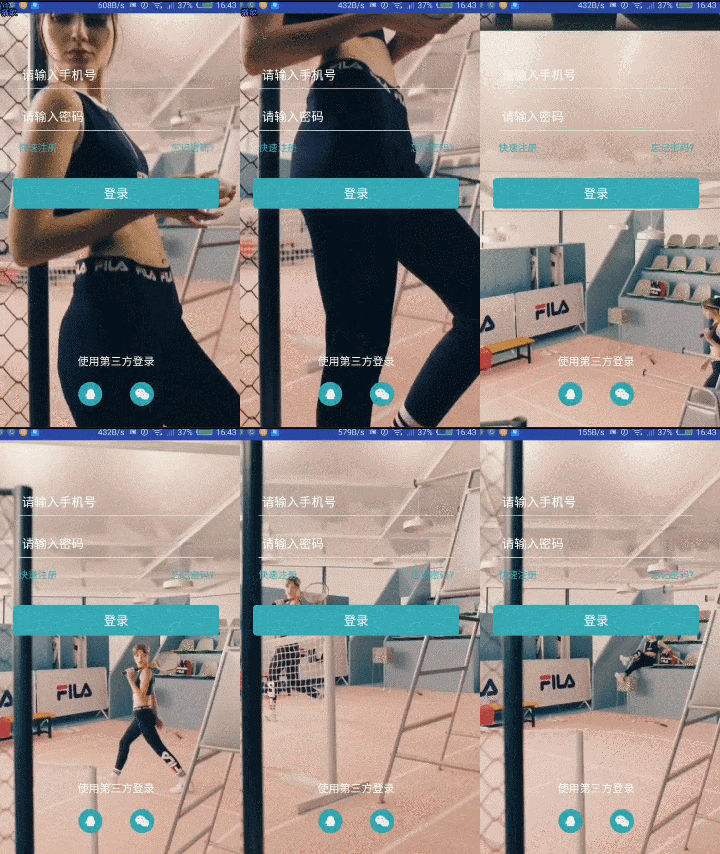
登錄QQ的時(shí)候,我們會(huì)看到在登錄界面的背景不是靜態(tài)的,而是一段動(dòng)畫(huà)效果,剛開(kāi)始覺(jué)得蠻好奇的,現(xiàn)在我們也來(lái)實(shí)現(xiàn)一下這種效果,實(shí)現(xiàn)起來(lái)還是挺簡(jiǎn)單的。
效果圖:
實(shí)現(xiàn)步驟:
1、自定義CustomVideoView類(lèi)繼承VideoView
2、實(shí)現(xiàn)xml布局文件
3、將視頻文件放入raw目錄
4、代碼實(shí)現(xiàn)動(dòng)畫(huà)效果
實(shí)現(xiàn)過(guò)程:
1、自定義CustomVideoView類(lèi)繼承VideoView
package com.example.viewdemo;import android.content.Context;import android.media.MediaPlayer;import android.util.AttributeSet;import android.view.KeyEvent;import android.widget.VideoView;public class CustomVideoView extends VideoView {public CustomVideoView(Context context) {super(context);}public CustomVideoView(Context context, AttributeSet attrs) {super(context, attrs);}public CustomVideoView(Context context, AttributeSet attrs, int defStyle) {super(context, attrs, defStyle);}protected void onMeasure(int widthMeasureSpec, int heightMeasureSpec) {//我們重新計(jì)算高度int width = getDefaultSize(0, widthMeasureSpec);int height = getDefaultSize(0, heightMeasureSpec);setMeasuredDimension(width, height);}public void setOnPreparedListener(MediaPlayer.OnPreparedListener l) {super.setOnPreparedListener(l);}public boolean onKeyDown(int keyCode, KeyEvent event) {return super.onKeyDown(keyCode, event);}}
2、實(shí)現(xiàn)xml布局文件
<com.example.viewdemo.CustomVideoViewandroid:id="@+id/videoview"android:layout_width="match_parent"android:layout_height="match_parent" />
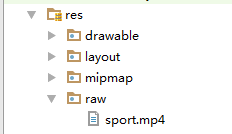
3、將視頻文件放入raw目錄
4、代碼實(shí)現(xiàn)動(dòng)畫(huà)效果
//找VideoView控件customVideoView = (CustomVideoView) findViewById(R.id.videoview);//加載視頻文件customVideoView.setVideoURI(Uri.parse("android.resource://" + getPackageName() + "/" + R.raw.sport));//播放customVideoView.start();//循環(huán)播放customVideoView.setOnCompletionListener(newMediaPlayer.OnCompletionListener() {publicvoid onCompletion (MediaPlayer mediaPlayer){customVideoView.start();}});
需要源碼的童鞋在公眾號(hào)【龍旋】對(duì)話框回復(fù)關(guān)鍵字【背景動(dòng)畫(huà)】即可獲取哦.
到這里就結(jié)束啦.
評(píng)論
圖片
表情