<kbd id="afajh"><form id="afajh"></form></kbd>
<strong id="afajh"><dl id="afajh"></dl></strong>
    <del id="afajh"><form id="afajh"></form></del>
        1. <th id="afajh"><progress id="afajh"></progress></th>
          <b id="afajh"><abbr id="afajh"></abbr></b>
          <th id="afajh"><progress id="afajh"></progress></th>

          太方便了!告別復(fù)制粘貼,Python 輕松實(shí)現(xiàn) PDF 轉(zhuǎn)文本!

          共 5231字,需瀏覽 11分鐘

           ·

          2021-10-03 17:24

          對(duì)很多人來(lái)說(shuō),將 PDF 轉(zhuǎn)換為可編輯的文本是個(gè)剛需,卻苦于沒(méi)有簡(jiǎn)單方法。在本文介紹的項(xiàng)目中,來(lái)自 K1 Digital 的高級(jí)機(jī)器學(xué)習(xí)工程師 Lucas Soares,嘗試使用 OCR(光學(xué)字符識(shí)別)自動(dòng)轉(zhuǎn)錄 pdf 幻燈片,轉(zhuǎn)錄效果還不錯(cuò)。

          傳統(tǒng)的講座通常伴隨著一組 pdf 幻燈片。一般來(lái)說(shuō),想要對(duì)此類講座做筆記,需要從 pdf 復(fù)制、粘貼很多內(nèi)容。

          最近,來(lái)自 K1 Digital 的高級(jí)機(jī)器學(xué)習(xí)工程師 Lucas Soares 一直在嘗試通過(guò)使用 OCR(光學(xué)字符識(shí)別)自動(dòng)轉(zhuǎn)錄 pdf 幻燈片,以便直接在 markdown 文件中操作它們的內(nèi)容,從而避免手動(dòng)復(fù)制和粘貼 pdf 內(nèi)容,實(shí)現(xiàn)這一過(guò)程的自動(dòng)化。

          左為項(xiàng)目作者 Lucas Soares。

          項(xiàng)目地址: https://github.com/EnkrateiaLucca/ocr_for_transcribing_pdf_slides

          為什么不使用傳統(tǒng)的 pdf 轉(zhuǎn)文本工具呢?

          Lucas Soares 發(fā)現(xiàn)傳統(tǒng)工具往往會(huì)帶來(lái)更多的問(wèn)題,需要花時(shí)間解決。他曾經(jīng)嘗試使用傳統(tǒng)的 Python 軟件包,但是遇到了很多問(wèn)題(例如必須使用復(fù)雜的正則表達(dá)式模式解析最終輸出等),因此決定嘗試使用目標(biāo)檢測(cè)和 OCR 來(lái)解決。

          基本過(guò)程可分為以下步驟:

          • 將 pdf 轉(zhuǎn)換為圖片;
          • 檢測(cè)和識(shí)別圖像中的文本;
          • 展示示例輸出。

          基于深度學(xué)習(xí)的 OCR 將 pdf 轉(zhuǎn)錄為文本
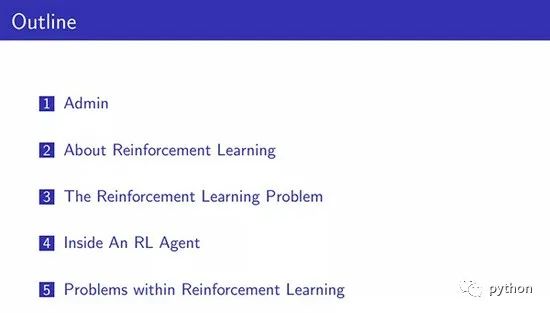
          將 pdf 轉(zhuǎn)換為圖像

          Soares 使用的 pdf 幻燈片來(lái)自于 David Silver 的增強(qiáng)學(xué)習(xí)(參見(jiàn)以下 pdf 幻燈片地址)。使用「pdf2image」包將每張幻燈片轉(zhuǎn)換為 png 圖像格式。

          pdf 幻燈片示例。地址: https://www.davidsilver.uk/wp-content/uploads/2020/03/intro_RL.pdf

          代碼如下:

          from pdf2image import convert_from_path  
          from pdf2image.exceptions import (  
           PDFInfoNotInstalledError,  
           PDFPageCountError,  
           PDFSyntaxError  
          )  
          pdf_path = "path/to/file/intro_RL_Lecture1.pdf"  
          images = convert_from_path(pdf_path)  
          for i, image in enumerate(images):  
              fname = "image" + str(i) + ".png"  
              image.save(fname, "PNG"

          經(jīng)過(guò)處理后,所有的 pdf 幻燈片都轉(zhuǎn)換成 png 格式的圖像:

          檢測(cè)和識(shí)別圖像中的文本

          為了檢測(cè)和識(shí)別 png 圖像中的文本,Soares 使用 ocr.pytorch 庫(kù)中的文本檢測(cè)器。按照說(shuō)明下載模型并將模型保存在 checkpoints 文件夾中。

          ocr.pytorch 庫(kù)地址: https://github.com/courao/ocr.pytorch

          代碼如下:

          # adapted from this source: https://github.com/courao/ocr.pytorch  
          %load_ext autoreload  
          %autoreload 2  
          import os  
          from ocr import ocr 
          import time  
          import shutil  
          import numpy as np  
          import pathlib  
          from PIL import Image  
          from glob import glob  
          import matplotlib.pyplot as plt  
          import seaborn as sns  
          sns.set()  
          import pytesseract  
          def single_pic_proc(image_file):  
              image = np.array(Image.open(image_file).convert('RGB'))  
              result, image_framed = ocr(image)  
              return result,image_framed  
          image_files = glob('./input_images/*.*')  
          result_dir = './output_images_with_boxes/'  
          # If the output folder exists we will remove it and redo it.  
          if os.path.exists(result_dir):  
              shutil.rmtree(result_dir)  
          os.mkdir(result_dir) 
          for image_file in sorted(image_files):  
              result, image_framed = single_pic_proc(image_file) # detecting and recognizing the text  
              filename = pathlib.Path(image_file).name 
              output_file = os.path.join(result_dir, image_file.split('/')[-1])  
              txt_file = os.path.join(result_dir, image_file.split('/')[-1].split('.')[0]+'.txt')  
              txt_f = open(txt_file, 'w')  
              Image.fromarray(image_framed).save(output_file)  
              for key in result:  
                  txt_f.write(result[key][1]+'\n')  
              txt_f.close() 

          設(shè)置輸入和輸出文件夾,接著遍歷所有輸入圖像(轉(zhuǎn)換后的 pdf 幻燈片),然后通過(guò) single_pic_proc() 函數(shù)運(yùn)行 OCR 模塊中的檢測(cè)和識(shí)別模型,最后將輸出保存到輸出文件夾。

          其中檢測(cè)繼承(inherit)了 Pytorch CTPN 模型,識(shí)別繼承了 Pytorch CRNN 模型,兩者都存在于 OCR 模塊中。

          示例輸出

          代碼如下:

          import cv2 as cv  
          output_dir = pathlib.Path("./output_images_with_boxes")  
          # image = cv.imread(str(np.random.choice(list(output_dir.iterdir()),1)[0]))  
          image = cv.imread(f"{output_dir}/image7.png")  
          size_reshaped = (int(image.shape[1]),int(image.shape[0]))  
          image = cv.resize(image, size_reshaped) 
          cv.imshow("image", image)  
          cv.waitKey(0)  
          cv.destroyAllWindows() 
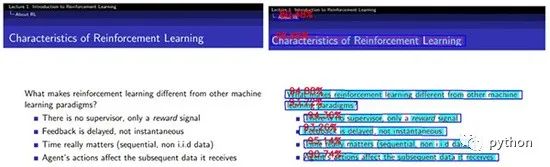
          下圖左為原始 pdf 幻燈片,圖右為轉(zhuǎn)錄后的輸出文本,轉(zhuǎn)錄后的準(zhǔn)確率非常高。

          文本識(shí)別輸出如下:

          filename = f"{output_dir}/image7.txt"  
          with open(filename, "r"as text:  
              for line in text.readlines():  
                  print(line.strip("\n")) 

          通過(guò)上述方法,最終你可以得到一個(gè)非常強(qiáng)大的工具來(lái)轉(zhuǎn)錄各種文檔,從檢測(cè)和識(shí)別手寫(xiě)筆記到檢測(cè)和識(shí)別照片中的隨機(jī)文本。擁有自己的 OCR 工具來(lái)處理一些文本內(nèi)容,這比依賴外部軟件來(lái)轉(zhuǎn)錄文檔要好的多。

          搜索下方加老師微信

          老師微信號(hào):XTUOL1988切記備注學(xué)習(xí)Python

          領(lǐng)取Python web開(kāi)發(fā),Python爬蟲(chóng),Python數(shù)據(jù)分析,人工智能等精品學(xué)習(xí)課程。帶你從零基礎(chǔ)系統(tǒng)性的學(xué)好Python!

          *聲明:本文于網(wǎng)絡(luò)整理,版權(quán)歸原作者所有,如來(lái)源信息有誤或侵犯權(quán)益,請(qǐng)聯(lián)系我們刪除或授權(quán)


          瀏覽 53
          點(diǎn)贊
          評(píng)論
          收藏
          分享

          手機(jī)掃一掃分享

          分享
          舉報(bào)
          評(píng)論
          圖片
          表情
          推薦
          點(diǎn)贊
          評(píng)論
          收藏
          分享

          手機(jī)掃一掃分享

          分享
          舉報(bào)
          <kbd id="afajh"><form id="afajh"></form></kbd>
          <strong id="afajh"><dl id="afajh"></dl></strong>
            <del id="afajh"><form id="afajh"></form></del>
                1. <th id="afajh"><progress id="afajh"></progress></th>
                  <b id="afajh"><abbr id="afajh"></abbr></b>
                  <th id="afajh"><progress id="afajh"></progress></th>
                  激情五月天色青五月天 | 亚洲三级先锋影音 | 亚洲一级二级 | 好看一区二区三区 | 欧美性爱国产 |