
OpenCV卡爾曼濾波介紹與代碼演示
卡爾曼濾波原理
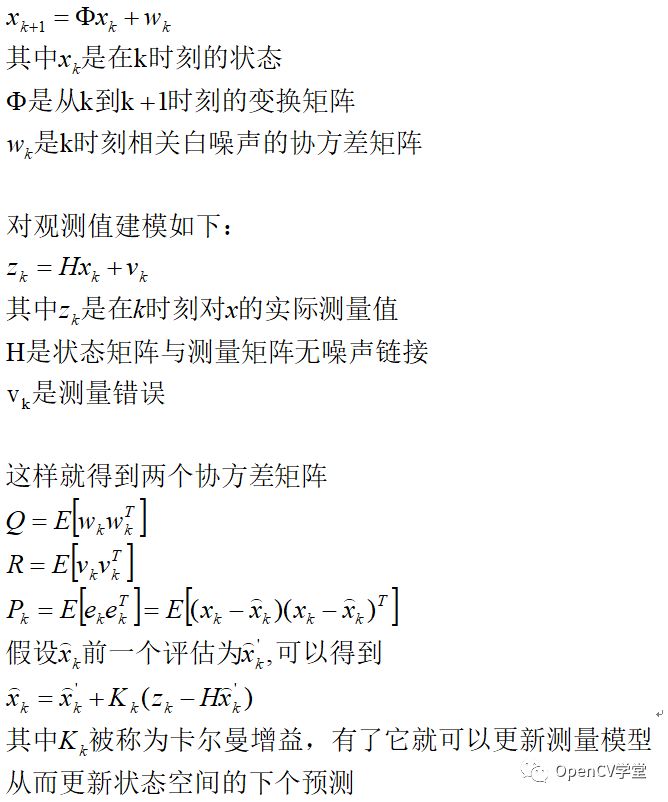
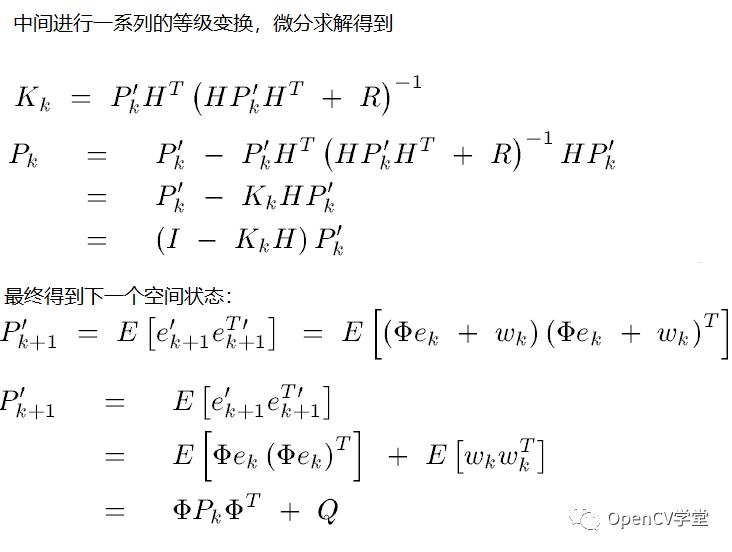
卡爾曼濾波最早可以追溯到Wiener濾波,不同的是卡爾曼采用狀態(tài)空間來描述它的濾波器,卡爾曼濾波器同時具有模糊/平滑與預(yù)測功能,特別是后者在視頻分析與對象跟蹤應(yīng)用場景中被發(fā)揚(yáng)光大,在離散空間(圖像或者視頻幀)使用卡爾曼濾波器相對簡單。假設(shè)我們根據(jù)一個處理想知道一個變量值如下:
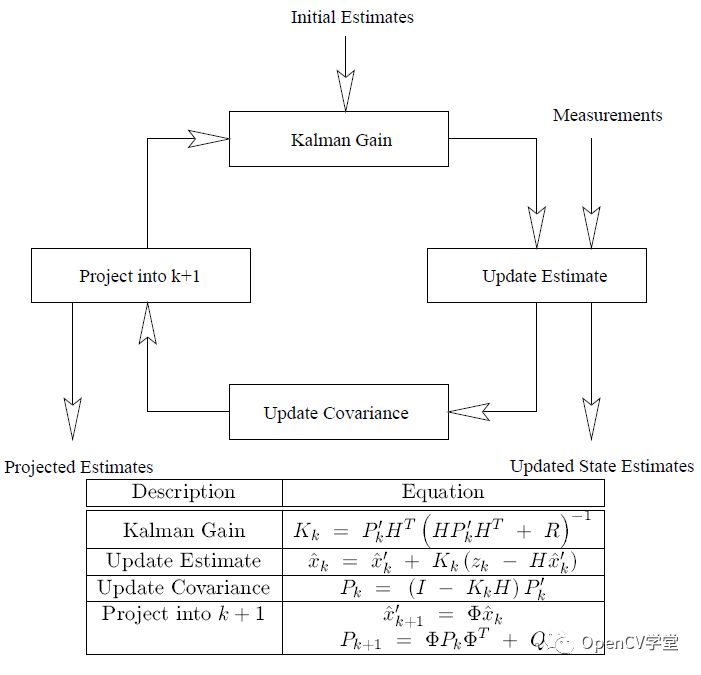
最終卡爾曼濾波完整的評估與空間預(yù)測模型工作流程如下:
OpenCV API
cv::KalmanFilter::KalmanFilter(
????int?dynamParams,?
????int?measureParams,
????int?controlParams?=?0,
????int?type?=?CV_32F?
)
#?dynamParams表示state的維度
#?measureParams表示測量維度
#?controlParams表示控制向量
#?type表示創(chuàng)建的matrices代碼演示
import?cv2
from?math?import?cos,?sin,?sqrt
import?numpy?as?np
if?__name__?==?"__main__":
????img_height?=?500
????img_width?=?500
????kalman?=?cv2.KalmanFilter(2,?1,?0)
????cv2.namedWindow("Kalman",?cv2.WINDOW_AUTOSIZE)
????while?True:
????????state?=?0.1?*?np.random.randn(2,?1)
????????#?初始化
????????kalman.transitionMatrix?=?np.array([[1.,?1.],?[0.,?1.]])
????????kalman.measurementMatrix?=?1.?*?np.ones((1,?2))
????????kalman.processNoiseCov?=?1e-5?*?np.eye(2)
????????kalman.measurementNoiseCov?=?1e-1?*?np.ones((1,?1))
????????kalman.errorCovPost?=?1.?*?np.ones((2,?2))
????????kalman.statePost?=?0.1?*?np.random.randn(2,?1)
????????while?True:
????????????def?calc_point(angle):
????????????????return?(np.around(img_width/2?+?img_width/3*cos(angle),?0).astype(int),
????????????????????????np.around(img_height/2?-?img_width/3*sin(angle),?1).astype(int))
????????????state_angle?=?state[0,?0]
????????????state_pt?=?calc_point(state_angle)
????????????#?預(yù)測
????????????prediction?=?kalman.predict()
????????????predict_angle?=?prediction[0,?0]
????????????predict_pt?=?calc_point(predict_angle)
????????????measurement?=?kalman.measurementNoiseCov?*?np.random.randn(1,?1)
????????????#?生成測量
????????????measurement?=?np.dot(kalman.measurementMatrix,?state)?+?measurement
????????????measurement_angle?=?measurement[0,?0]
????????????measurement_pt?=?calc_point(measurement_angle)
????????????#?plot?points
????????????def?draw_cross(center,?color,?d):
????????????????cv2.line(img,
?????????????????????????(center[0]?-?d,?center[1]?-?d),?(center[0]?+?d,?center[1]?+?d),
?????????????????????????color,?1,?cv2.LINE_AA,?0)
????????????????cv2.line(img,
?????????????????????????(center[0]?+?d,?center[1]?-?d),?(center[0]?-?d,?center[1]?+?d),
?????????????????????????color,?1,?cv2.LINE_AA,?0)
????????????img?=?np.zeros((img_height,?img_width,?3),?np.uint8)
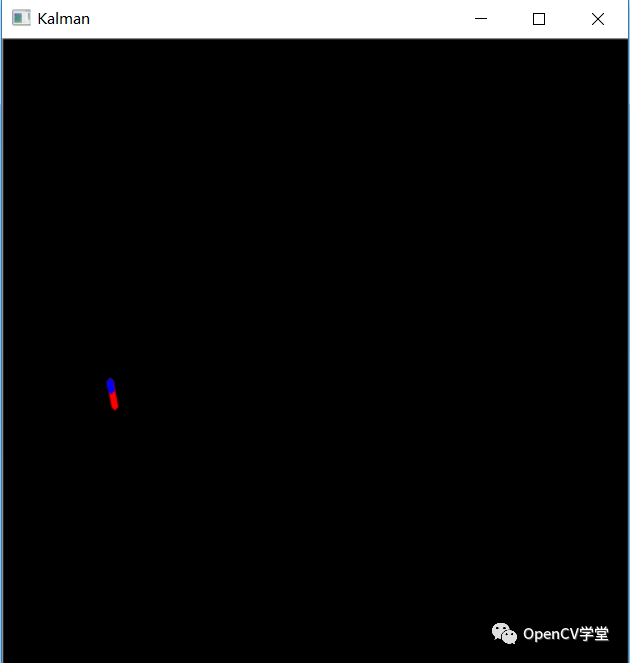
????????????cv2.line(img,?state_pt,?measurement_pt,?(0,?0,?255),?3,?cv2.LINE_AA,?0)
????????????cv2.line(img,?state_pt,?predict_pt,?(255,?0,?0),?3,?cv2.LINE_AA,?0)
????????????#?校正預(yù)測與測量值差異
????????????kalman.correct(measurement)
????????????#?更新noise矩陣與狀態(tài)
????????????process_noise?=?sqrt(kalman.processNoiseCov[0,0])?*?np.random.randn(2,?1)
????????????state?=?np.dot(kalman.transitionMatrix,?state)?+?process_noise
????????????cv2.imshow("Kalman",?img)
????????????code?=?cv2.waitKey(100)
????????????if?code?!=?-1:
????????????????break
????????if?code?in?[27,?ord('q'),?ord('Q')]:
????????????break
????cv2.destroyWindow("Kalman")
——The ?End——
分享
收藏
點(diǎn)贊
在看


評論
圖片
表情