
項目實踐 | 行人跟蹤與摔倒檢測報警(文末獲取完整源碼)
1、簡介
本項目的目的是為了給大家提供跟多的實戰(zhàn)思路,拋磚引玉為大家提供一個案例,也希望讀者可以根據該方法實現更多的思想與想法,也希望讀者可以改進該項目種提到的方法,比如改進其中的行人檢測器、跟蹤方法、行為識別算法等等。
本項目主要檢測識別的行為有7類:Standing, Walking, Sitting, Lying Down, Stand up, Sit down, Fall Down。
2、項目方法簡介
本文涉及的方法與算法包括:YOLO V3 Tiny、Deepsort、ST-GCN方法,其中YOLO V3 Tiny用于行人檢測、DeepSort用于跟蹤、而ST-GCN則是用于行為檢測。
這里由于YOLO與DeepSort大家都已經比較了解,因此這里只簡單說明一下ST-GCN 的流程,這里ST-GCN 的方法結構圖如下:
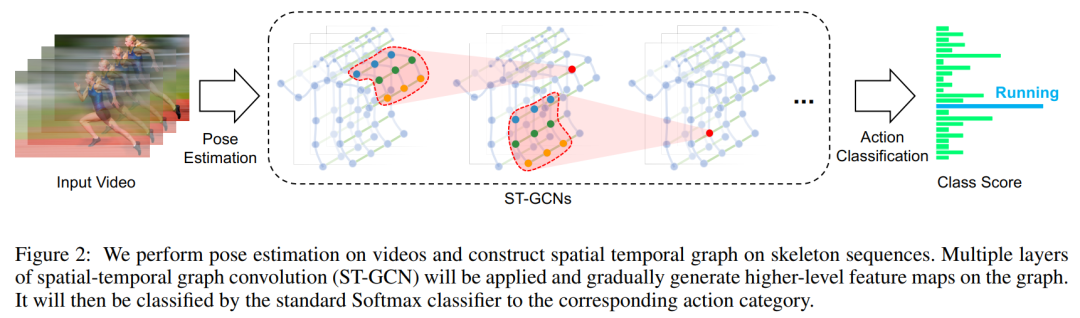
給出一個動作視頻的骨架序列信息,首先構造出表示該骨架序列信息的圖結構,ST-GCN的輸入就是圖節(jié)點上的關節(jié)坐標向量,然后是一系列時空圖卷積操作來提取高層的特征,最后用SofMax分類器得到對應的動作分類。整個過程實現了端到端的訓練。
GCN 幫助我們學習了到空間中相鄰關節(jié)的局部特征。在此基礎上,我們需要學習時間中關節(jié)變化的局部特征。如何為 Graph 疊加時序特征,是圖卷積網絡面臨的問題之一。這方面的研究主要有兩個思路:時間卷積(TCN)和序列模型(LSTM)。
ST-GCN 使用的是 TCN,由于形狀固定,可以使用傳統(tǒng)的卷積層完成時間卷積操作。為了便于理解,可以類比圖像的卷積操作。st-gcn 的 feature map 最后三個維度的形狀為(C,V,T),與圖像 feature map 的形狀(C,W,H)相對應。
圖像的通道數C對應關節(jié)的特征數C。
圖像的寬W對應關鍵幀數V。
圖像的高H對應關節(jié)數T。
在圖像卷積中,卷積核的大小為『w』×『1』,則每次完成w行像素,1列像素的卷積。『stride』為s,則每次移動s像素,完成1行后進行下1行像素的卷積。
在時間卷積中,卷積核的大小為『temporal_kernel_size』×『1』,則每次完成1個節(jié)點,temporal_kernel_size 個關鍵幀的卷積。『stride』為1,則每次移動1幀,完成1個節(jié)點后進行下1個節(jié)點的卷積。
訓練如下:
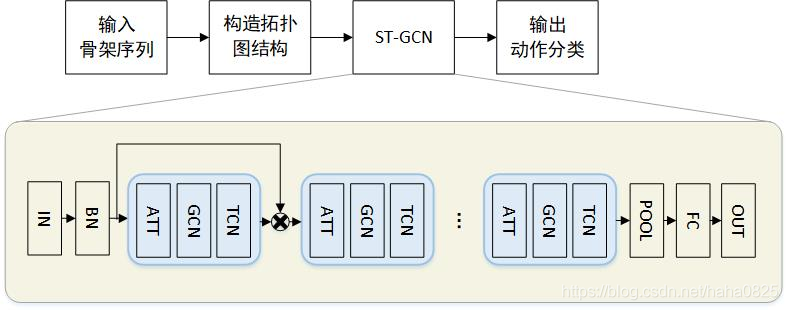
輸入的數據首先進行batch normalization,然后在經過9個ST-GCN單元,接著是一個global pooling得到每個序列的256維特征向量,最后用SoftMax函數進行分類,得到最后的標簽。
每一個ST-GCN采用Resnet的結構,前三層的輸出有64個通道,中間三層有128個通道,最后三層有256個通道,在每次經過ST-CGN結構后,以0.5的概率隨機將特征dropout,第4和第7個時域卷積層的strides設置為2。用SGD訓練,學習率為0.01,每10個epochs學習率下降0.1。
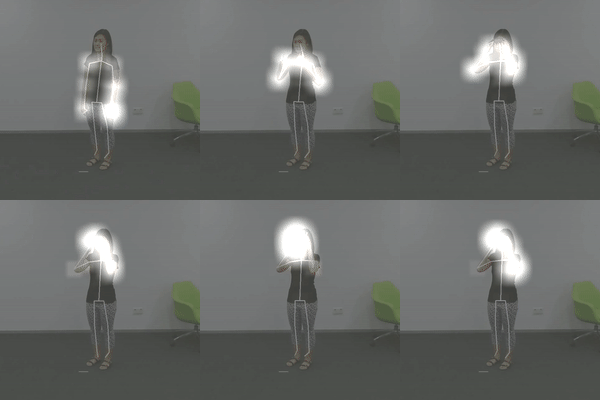
ST-GCN 最末卷積層的響應可視化結果圖如下:
本文項目主函數代碼如下:
import os
import cv2
import time
import torch
import argparse
import numpy as np

from Detection.Utils import ResizePadding
from CameraLoader import CamLoader, CamLoader_Q
from DetectorLoader import TinyYOLOv3_onecls

from PoseEstimateLoader import SPPE_FastPose
from fn import draw_single

from Track.Tracker import Detection, Tracker
from ActionsEstLoader import TSSTG

# source = '../Data/test_video/test7.mp4'
# source = '../Data/falldata/Home/Videos/video (2).avi'  # hard detect
source = './output/test3.mp4'
# source = 2
def preproc(image):
    """preprocess function for CameraLoader.
    """
    image = resize_fn(image)
    image = cv2.cvtColor(image, cv2.COLOR_BGR2RGB)
    return image


def kpt2bbox(kpt, ex=20):
    """Get bbox that hold on all of the keypoints (x,y)
    kpt: array of shape `(N, 2)`,
    ex: (int) expand bounding box,
    """
    return np.array((kpt[:, 0].min() - ex, kpt[:, 1].min() - ex,
                     kpt[:, 0].max() + ex, kpt[:, 1].max() + ex))


if __name__ == '__main__':
    par = argparse.ArgumentParser(description='Human Fall Detection Demo.')
    par.add_argument('-C', '--camera', default=source,  # required=True,  # default=2,
                     help='Source of camera or video file path.')
    par.add_argument('--detection_input_size', type=int, default=384,
                     help='Size of input in detection model in square must be divisible by 32 (int).')
    par.add_argument('--pose_input_size', type=str, default='224x160',
                     help='Size of input in pose model must be divisible by 32 (h, w)')
    par.add_argument('--pose_backbone', type=str, default='resnet50', help='Backbone model for SPPE FastPose model.')
    par.add_argument('--show_detected', default=False, action='store_true', help='Show all bounding box from detection.')
    par.add_argument('--show_skeleton', default=True, action='store_true', help='Show skeleton pose.')
    par.add_argument('--save_out', type=str, default='./output/output3.mp4', help='Save display to video file.')
    par.add_argument('--device', type=str, default='cuda', help='Device to run model on cpu or cuda.')
    args = par.parse_args()

    device = args.device

    # DETECTION MODEL.
    inp_dets = args.detection_input_size
    detect_model = TinyYOLOv3_onecls(inp_dets, device=device)

    # POSE MODEL.
    inp_pose = args.pose_input_size.split('x')
    inp_pose = (int(inp_pose[0]), int(inp_pose[1]))
    pose_model = SPPE_FastPose(args.pose_backbone, inp_pose[0], inp_pose[1], device=device)

    # Tracker.
    max_age = 30
    tracker = Tracker(max_age=max_age, n_init=3)

    # Actions Estimate.
    action_model = TSSTG()

    resize_fn = ResizePadding(inp_dets, inp_dets)

    cam_source = args.camera
    if type(cam_source) is str and os.path.isfile(cam_source):
        # Use loader thread with Q for video file.
        cam = CamLoader_Q(cam_source, queue_size=1000, preprocess=preproc).start()
    else:
        # Use normal thread loader for webcam.
        cam = CamLoader(int(cam_source) if cam_source.isdigit() else cam_source,
                        preprocess=preproc).start()

    # frame_size = cam.frame_size
    # scf = torch.min(inp_size / torch.FloatTensor([frame_size]), 1)[0]
    outvid = False
    if args.save_out != '':
        outvid = True
        codec = cv2.VideoWriter_fourcc(*'mp4v')
        print((inp_dets * 2, inp_dets * 2))
        writer = cv2.VideoWriter(args.save_out, codec, 25, (inp_dets * 2, inp_dets * 2))

    fps_time = 0
    f = 0
    while cam.grabbed():
        f += 1
        frame = cam.getitem()
        image = frame.copy()

        # Detect humans bbox in the frame with detector model.
        detected = detect_model.detect(frame, need_resize=False, expand_bb=10)

        # Predict each tracks bbox of current frame from previous frames information with Kalman filter.
        tracker.predict()
        # Merge two source of predicted bbox together.
        for track in tracker.tracks:
            det = torch.tensor([track.to_tlbr().tolist() + [0.5, 1.0, 0.0]], dtype=torch.float32)
            detected = torch.cat([detected, det], dim=0) if detected is not None else det

        detections = []  # List of Detections object for tracking.
        if detected is not None:
            # detected = non_max_suppression(detected[None, :], 0.45, 0.2)[0]
            # Predict skeleton pose of each bboxs.
            poses = pose_model.predict(frame, detected[:, 0:4], detected[:, 4])

            # Create Detections object.
            detections = [Detection(kpt2bbox(ps['keypoints'].numpy()),
                                    np.concatenate((ps['keypoints'].numpy(),
                                                    ps['kp_score'].numpy()), axis=1),
                                    ps['kp_score'].mean().numpy()) for ps in poses]

            # VISUALIZE.
            if args.show_detected:
                for bb in detected[:, 0:5]:
                    frame = cv2.rectangle(frame, (bb[0], bb[1]), (bb[2], bb[3]), (0, 0, 255), 1)

        # Update tracks by matching each track information of current and previous frame or
        # create a new track if no matched.
        tracker.update(detections)

        # Predict Actions of each track.
        for i, track in enumerate(tracker.tracks):
            if not track.is_confirmed():
                continue
            track_id = track.track_id
            bbox = track.to_tlbr().astype(int)
            center = track.get_center().astype(int)

            action = 'pending..'
            clr = (0, 255, 0)
            # Use 30 frames time-steps to prediction.
            if len(track.keypoints_list) == 30:
                pts = np.array(track.keypoints_list, dtype=np.float32)
                out = action_model.predict(pts, frame.shape[:2])
                action_name = action_model.class_names[out[0].argmax()]
                action = '{}: {:.2f}%'.format(action_name, out[0].max() * 100)
                if action_name == 'Fall Down':
                    clr = (255, 0, 0)
                elif action_name == 'Lying Down':
                    clr = (255, 200, 0)

            # VISUALIZE.
            if track.time_since_update == 0:
                if args.show_skeleton:
                    frame = draw_single(frame, track.keypoints_list[-1])
                frame = cv2.rectangle(frame, (bbox[0], bbox[1]), (bbox[2], bbox[3]), (0, 255, 0), 1)
                frame = cv2.putText(frame, str(track_id), (center[0], center[1]), cv2.FONT_HERSHEY_COMPLEX, 0.4, (255, 0, 0), 2)
                frame = cv2.putText(frame, action, (bbox[0] + 5, bbox[1] + 15), cv2.FONT_HERSHEY_COMPLEX, 0.4, clr, 1)

        # Show Frame.
        frame = cv2.resize(frame, (0, 0), fx=2., fy=2.)
        frame = cv2.putText(frame, '%d, FPS: %f' % (f, 1.0 / (time.time() - fps_time)), (10, 20), cv2.FONT_HERSHEY_SIMPLEX, 0.5, (0, 255, 0), 1)
        frame = frame[:, :, ::-1]
        fps_time = time.time()

        if outvid:
            writer.write(frame)

        cv2.imshow('frame', frame)
        if cv2.waitKey(1) & 0xFF == ord('q'):
            break
    # Clear resource.
    cam.stop()
    if outvid:
        writer.release()
    cv2.destroyAllWindows()
參考
[1].https://arxiv.org/abs/1801.07455
[2].https://blog.csdn.net/haha0825/article/details/107192773/
[3].https://github.com/yysijie/st-gcn
原文獲取方式,掃描下方二維碼
回復【行人摔倒檢測與跟蹤】即可獲取論文與源碼
聲明:轉載請說明出處
掃描下方二維碼關注【AI人工智能初學者】公眾號,獲取更多實踐項目源碼和論文解讀,非常期待你我的相遇,讓我們以夢為馬,砥礪前行!!!
點“在看”給我一朵小黃花唄