Hive實(shí)操學(xué)習(xí)全集
學(xué)習(xí)完hive的遠(yuǎn)程配置,接下來(lái)就該學(xué)習(xí)hive的實(shí)操了,這個(gè)才是我們?cè)谄髽I(yè)中進(jìn)行數(shù)據(jù)分析的主要工作內(nèi)容。
DDL建表
我們通過(guò)閱讀官方文檔,就可以找到所有的DDL操作。
hive官方文檔
https://cwiki.apache.org/confluence/display/Hive/LanguageManual+DDL
建表語(yǔ)句
不同于mysql和oracle,hive可以直接存儲(chǔ)數(shù)組類(lèi)型數(shù)據(jù),鍵值對(duì)類(lèi)型數(shù)據(jù)。同時(shí)還可以指定分隔符。因?yàn)樽罱K數(shù)據(jù)是存儲(chǔ)在hdfs的文件中的。通過(guò)分隔符來(lái)標(biāo)識(shí)每個(gè)數(shù)據(jù)對(duì)應(yīng)hive表中的哪個(gè)字段。
Create Table
CREATE [TEMPORARY] [EXTERNAL] TABLE [IF NOT EXISTS] [db_name.]table_name    -- (Note: TEMPORARY available in Hive 0.14.0 and later)
[(col_name data_type [column_constraint_specification] [COMMENT col_comment], ... [constraint_specification])]
[COMMENT table_comment]
[PARTITIONED BY (col_name data_type [COMMENT col_comment], ...)]
[CLUSTERED BY (col_name, col_name, ...) [SORTED BY (col_name [ASC|DESC], ...)] INTO num_buckets BUCKETS]
[SKEWED BY (col_name, col_name, ...)                  -- (Note: Available in Hive 0.10.0 and later)]
ON ((col_value, col_value, ...), (col_value, col_value, ...), ...)
[STORED AS DIRECTORIES]
[
[ROW FORMAT row_format]
[STORED AS file_format]
| STORED BY 'storage.handler.class.name' [WITH SERDEPROPERTIES (...)]  -- (Note: Available in Hive 0.6.0 and later)
]
[LOCATION hdfs_path]
[TBLPROPERTIES (property_name=property_value, ...)]   -- (Note: Available in Hive 0.6.0 and later)
[AS select_statement];   -- (Note: Available in Hive 0.5.0 and later; not supported for external tables)

CREATE [TEMPORARY] [EXTERNAL] TABLE [IF NOT EXISTS] [db_name.]table_name
LIKE existing_table_or_view_name
[LOCATION hdfs_path];

data_type
: primitive_type
| array_type
| map_type
| struct_type
| union_type  -- (Note: Available in Hive 0.7.0 and later)

primitive_type
: TINYINT
| SMALLINT
| INT
| BIGINT
| BOOLEAN
| FLOAT
| DOUBLE
| DOUBLE PRECISION -- (Note: Available in Hive 2.2.0 and later)
| STRING
| BINARY      -- (Note: Available in Hive 0.8.0 and later)
| TIMESTAMP   -- (Note: Available in Hive 0.8.0 and later)
| DECIMAL     -- (Note: Available in Hive 0.11.0 and later)
| DECIMAL(precision, scale)  -- (Note: Available in Hive 0.13.0 and later)
| DATE        -- (Note: Available in Hive 0.12.0 and later)
| VARCHAR     -- (Note: Available in Hive 0.12.0 and later)
| CHAR        -- (Note: Available in Hive 0.13.0 and later)

array_type
: ARRAY < data_type >

map_type
: MAP < primitive_type, data_type >

struct_type
: STRUCT < col_name : data_type [COMMENT col_comment], ...>

union_type
: UNIONTYPE < data_type, data_type, ... >  -- (Note: Available in Hive 0.7.0 and later)

row_format
: DELIMITED [FIELDS TERMINATED BY char [ESCAPED BY char]] [COLLECTION ITEMS TERMINATED BY char]
[MAP KEYS TERMINATED BY char] [LINES TERMINATED BY char]
[NULL DEFINED AS char]   -- (Note: Available in Hive 0.13 and later)
| SERDE serde_name [WITH SERDEPROPERTIES (property_name=property_value, property_name=property_value, ...)]

file_format:
: SEQUENCEFILE
| TEXTFILE    -- (Default, depending on hive.default.fileformat configuration)
| RCFILE      -- (Note: Available in Hive 0.6.0 and later)
| ORC         -- (Note: Available in Hive 0.11.0 and later)
| PARQUET     -- (Note: Available in Hive 0.13.0 and later)
| AVRO        -- (Note: Available in Hive 0.14.0 and later)
| JSONFILE    -- (Note: Available in Hive 4.0.0 and later)
| INPUTFORMAT input_format_classname OUTPUTFORMAT output_format_classname

column_constraint_specification:
: [ PRIMARY KEY|UNIQUE|NOT NULL|DEFAULT [default_value]|CHECK  [check_expression] ENABLE|DISABLE NOVALIDATE RELY/NORELY ]

default_value:
: [ LITERAL|CURRENT_USER()|CURRENT_DATE()|CURRENT_TIMESTAMP()|NULL ]

constraint_specification:
: [, PRIMARY KEY (col_name, ...) DISABLE NOVALIDATE RELY/NORELY ]
[, PRIMARY KEY (col_name, ...) DISABLE NOVALIDATE RELY/NORELY ]
[, CONSTRAINT constraint_name FOREIGN KEY (col_name, ...) REFERENCES table_name(col_name, ...) DISABLE NOVALIDATE
[, CONSTRAINT constraint_name UNIQUE (col_name, ...) DISABLE NOVALIDATE RELY/NORELY ]
[, CONSTRAINT constraint_name CHECK [check_expression] ENABLE|DISABLE NOVALIDATE RELY/NORELY ]
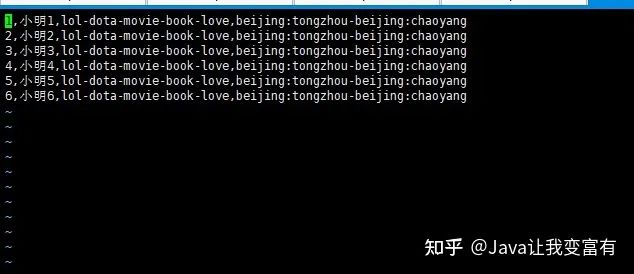
根據(jù)如下數(shù)據(jù)建表
人員表
id,姓名,愛(ài)好,住址
1,小明1,lol-dota-movie-book-love,beijing:tongzhou-beijing:chaoyang
2,小明2,lol-dota-movie-book-love,beijing:tongzhou-beijing:chaoyang
3,小明3,lol-dota-movie-book-love,beijing:tongzhou-beijing:chaoyang
4,小明4,lol-dota-movie-book-love,beijing:tongzhou-beijing:chaoyang
5,小明5,lol-dota-movie-book-love,beijing:tongzhou-beijing:chaoyang
6,小明6,lol-dota-movie-book-love,beijing:tongzhou-beijing:chaoyang
指定分隔符
行格式里面,屬性值以,隔開(kāi)。集合里面用-隔開(kāi),鍵值對(duì)用:隔開(kāi)。
create table psn
(
id int,
name string,
likes array<string>,
address map<string,string>
)
row format delimited
fields terminated by ','
collection items terminated by '-'
map keys terminated by ':';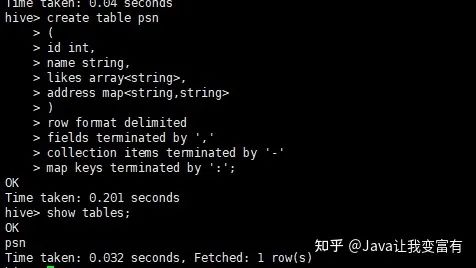
詳細(xì)建表語(yǔ)句
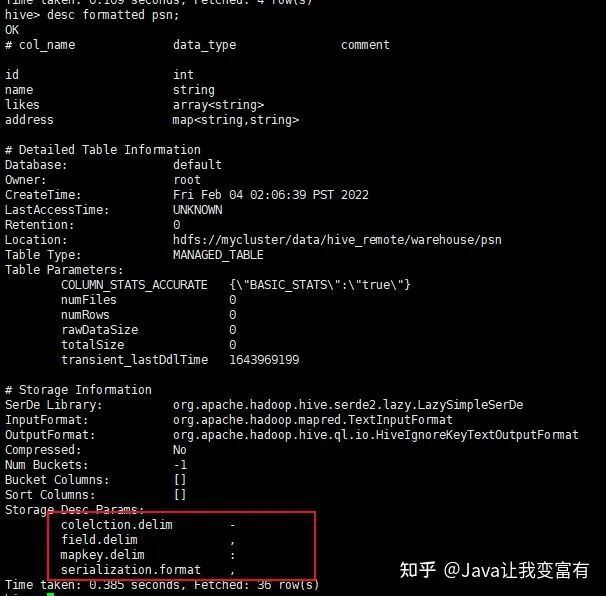
默認(rèn)分隔符1
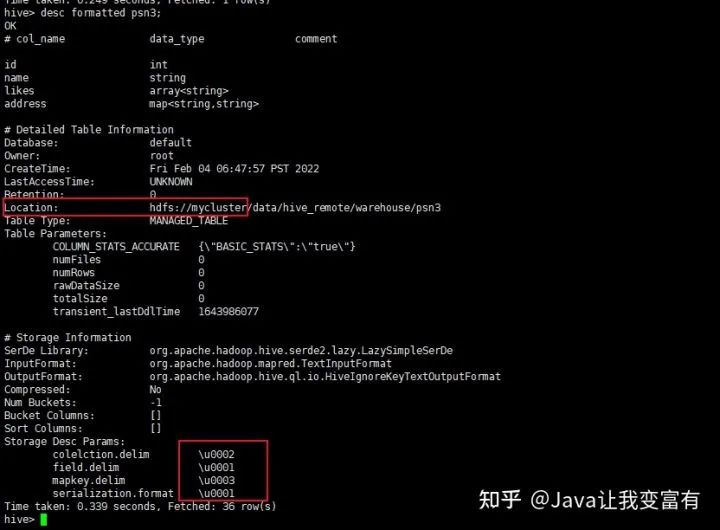
接下來(lái)我們使用默認(rèn)建表分隔符,導(dǎo)入數(shù)據(jù)的分割符也就必須使用默認(rèn)的了。下邊的標(biāo)識(shí)分別代表,- :
create table psn2
(
id int,
name string,
likes array<string>,
address map<string,string>
)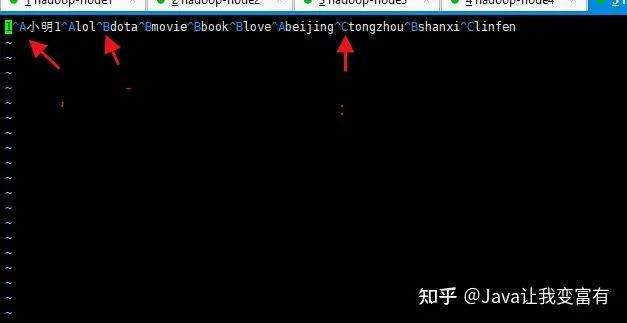
然后我們上傳數(shù)據(jù)到psn2表目錄下。
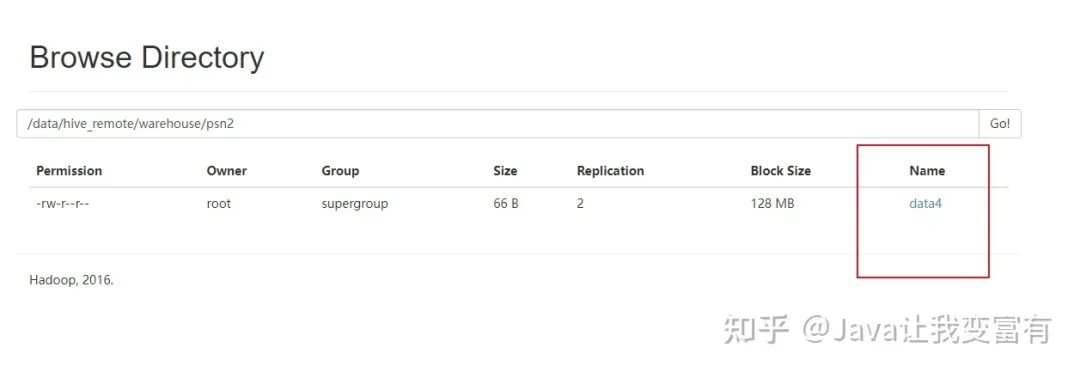
查詢(xún)結(jié)果正確。

默認(rèn)分隔符2
create table psn3
(
id int,
name string,
likes array<string>,
address map<string,string>
)
row format delimited
fields terminated by '\001'
collection items terminated by '\002'
map keys terminated by '\003';
通過(guò)上述建表語(yǔ)句,也可以識(shí)別默認(rèn)分隔符的數(shù)據(jù)。

分區(qū)表
分區(qū)的作用,如果有個(gè)字段代表男女,那么根據(jù)性別創(chuàng)建分區(qū)之后,查詢(xún)男性數(shù)據(jù),只需要去男性分區(qū)查詢(xún)就好了,不用混入女性查詢(xún),查詢(xún)效率會(huì)大大增加。一般都是根據(jù)時(shí)間做分區(qū)。
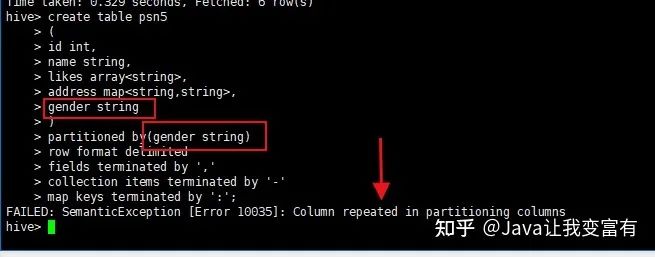
創(chuàng)建分區(qū)表的時(shí)候,分區(qū)描述本來(lái)就是個(gè)字段,所以不能重復(fù)寫(xiě)兩個(gè)。
create table psn5
(
id int,
name string,
likes array<string>,
address map<string,string>
)
partitioned by(gender string)
row format delimited
fields terminated by ','
collection items terminated by '-'
map keys terminated by ':';
如果寫(xiě)成如下方式會(huì)報(bào)錯(cuò),重復(fù)字段;
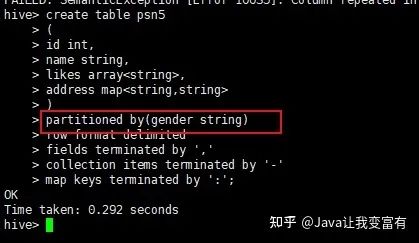
正確的如下:
分區(qū)表導(dǎo)入
分區(qū)表導(dǎo)入數(shù)據(jù)時(shí),我們可以通過(guò)導(dǎo)入單個(gè)分區(qū)數(shù)據(jù),同時(shí)指定分區(qū)字段的值。如下所示,我們導(dǎo)入男性分區(qū),就知道我們此次導(dǎo)入的數(shù)據(jù)都是男性的。因此我們就指定性別為男性。
load data local inpath '/root/data/data' into table psn5 partition(gender='man');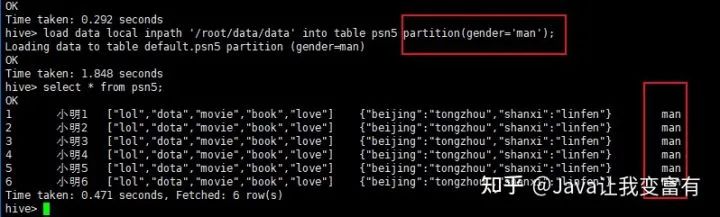
從文件目錄可以看出,以后查詢(xún)數(shù)據(jù),先查詢(xún)分區(qū)表,再查詢(xún)數(shù)據(jù)。
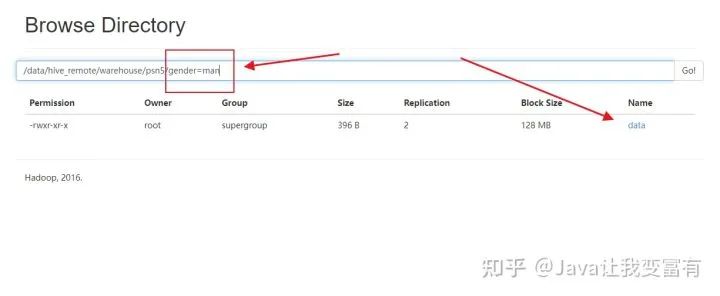
例如我們?cè)偌虞d一份women的數(shù)據(jù),分區(qū)指定值為women。
load data local inpath '/root/data/data' into table psn5 partition(gender='women');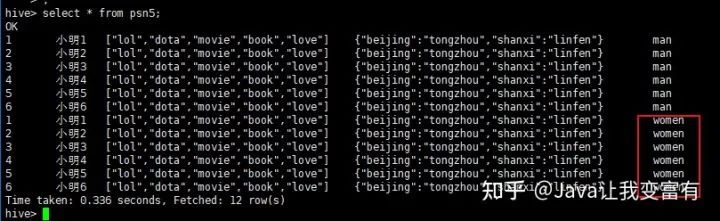
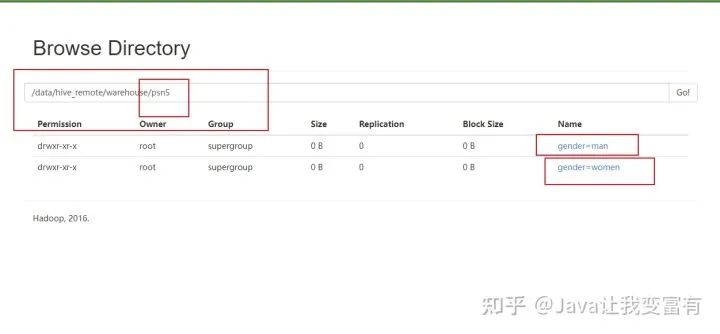
然后我們可以看到,psn5表存儲(chǔ)目錄如下所示:
多分區(qū)
當(dāng)創(chuàng)建了多個(gè)分區(qū)之后,每次導(dǎo)入數(shù)據(jù),必須指定所有分區(qū)的值,因?yàn)橹挥羞@樣,才知道數(shù)據(jù)最終應(yīng)該放到哪個(gè)目錄下邊。如下所示,我們?cè)賹⒛挲g也添加分區(qū)。
create table psn6
(
id int,
name string,
likes array<string>,
address map<string,string>
)
partitioned by(gender string,age int)
row format delimited
fields terminated by ','
collection items terminated by '-'
map keys terminated by ':';
如下,我們導(dǎo)入一個(gè)分區(qū)文件,指定年齡為11,性別為women。再導(dǎo)入一個(gè)分區(qū)文件,指定年齡為12,性別為man。
load data local inpath '/root/data/data' into table psn6 partition(age=11,gender='women');

load data local inpath '/root/data/data' into table psn6 partition(age=12,gender='man');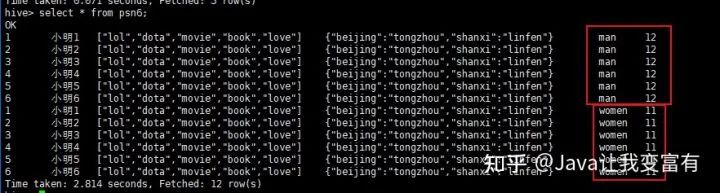
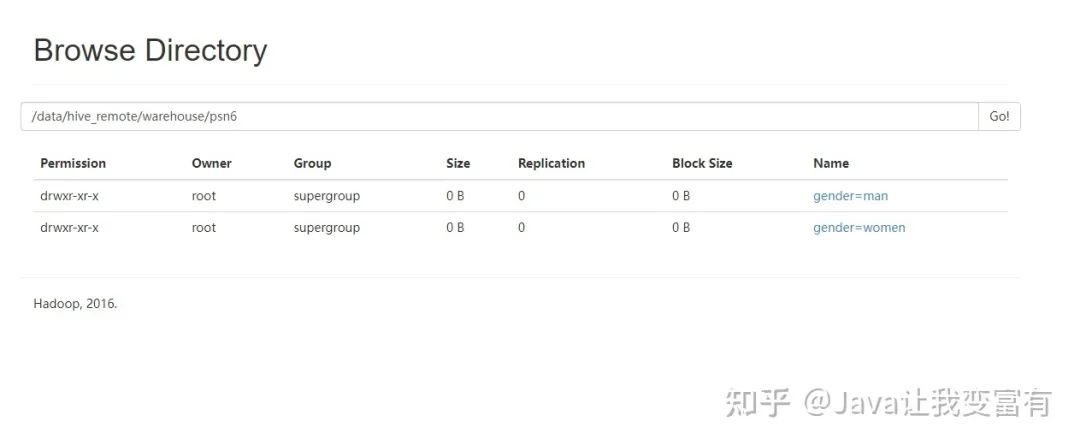
存儲(chǔ)目錄應(yīng)該會(huì)和我們猜想的差不太多。
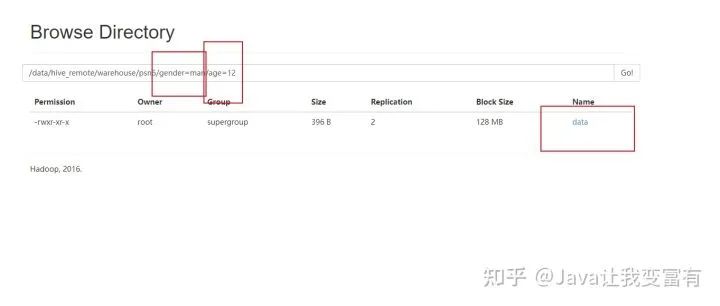
分區(qū)列添加
單獨(dú)添加一個(gè)分區(qū)列,不導(dǎo)入數(shù)據(jù),此時(shí)需要將其他分區(qū)的值也要帶上。不可只指定一個(gè)。如下為錯(cuò)誤操作:
alter table psn6 add partition(gender='girl');
如下為正確操作:
alter table psn6 add partition(gender='girl',age=12);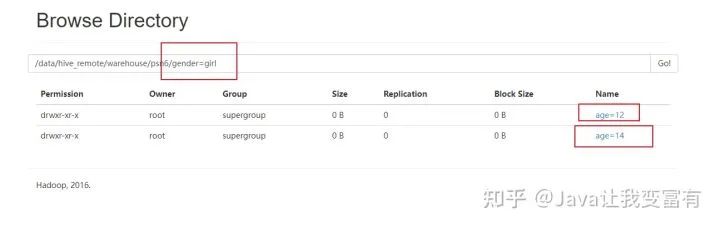
分區(qū)刪除
刪除表中非分區(qū)字段標(biāo)記的記錄不支持,但是可以支持刪除分區(qū)數(shù)據(jù),因?yàn)榉謪^(qū)本就是一個(gè)目錄來(lái)區(qū)分的,所以會(huì)刪除掉指定分區(qū)下的所有文件數(shù)據(jù)。會(huì)發(fā)現(xiàn)兩個(gè)都被刪除了。
alter table psn6 drop partition(gender='girl');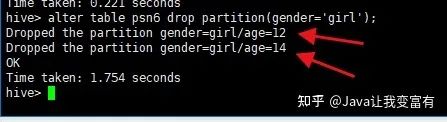
分區(qū)修復(fù)
當(dāng)我們沒(méi)有通過(guò)hive添加分區(qū),而是通過(guò)hdfs創(chuàng)建好了表的分區(qū)目錄時(shí),此時(shí)分區(qū)是沒(méi)有進(jìn)入元數(shù)據(jù)的,因此查詢(xún)表就會(huì)不止所蹤。如下我們先上傳數(shù)據(jù)至對(duì)應(yīng)分區(qū),查詢(xún)結(jié)果顯示無(wú)數(shù)據(jù)。
[root@node4 data]# hdfs dfs -put data /tengYue/age=10/
[root@node4 data]# hdfs dfs -put data /tengYue/age=20/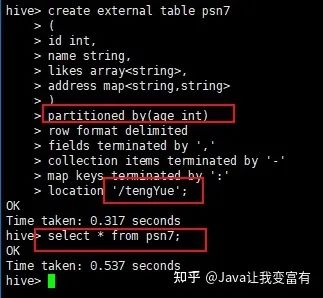
此時(shí)我們進(jìn)行分區(qū)修復(fù),因?yàn)閷?duì)表實(shí)行分區(qū)修復(fù),肯定是檢測(cè)表的目錄,然后按照規(guī)則將我們創(chuàng)建的分區(qū)添加到元數(shù)據(jù)中。使用如下命令,我們可以看到hive自動(dòng)將我們的分區(qū)添加到了元數(shù)據(jù)中。
msck repair table psn7;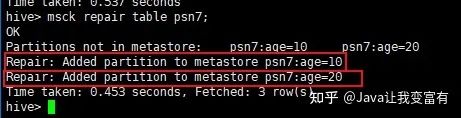
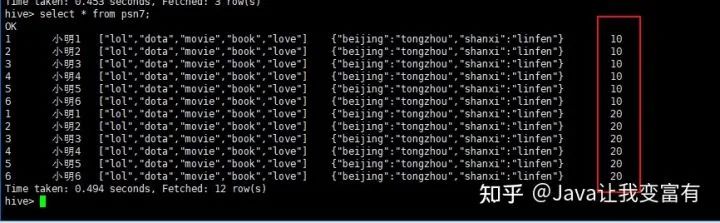
此時(shí)我們執(zhí)行查詢(xún)得到如下結(jié)果,分區(qū)修復(fù):
創(chuàng)建外部表
外部表創(chuàng)建需要指定存儲(chǔ)位置。
create external table psn4
(
id int,
name string,
likes array<string>,
address map<string,string>
)
row format delimited
fields terminated by ','
collection items terminated by '-'
map keys terminated by ':'
location '/tengYue';
然后我們給psn4加載數(shù)據(jù),用如下命令:
load data local inpath '/root/data/data' into table psn4;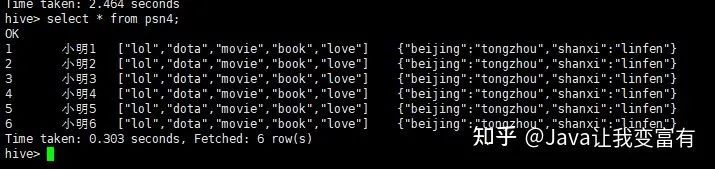
然后我們看下存儲(chǔ)數(shù)據(jù)的地方,就是我們剛才指定的目錄下邊。
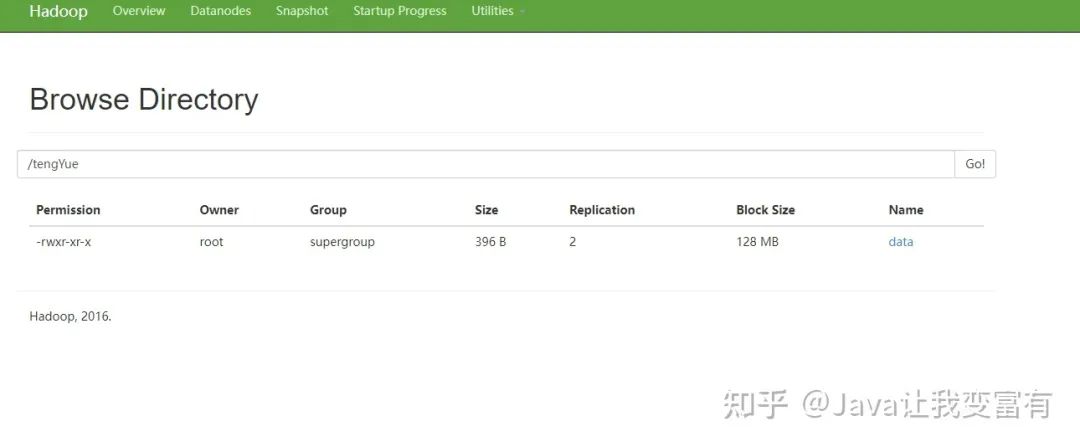
元數(shù)據(jù)中外部表的標(biāo)識(shí)如下:

Hive Serde
在我們導(dǎo)入數(shù)據(jù)的時(shí)候,可以先用正則表達(dá)式對(duì)導(dǎo)入的數(shù)據(jù)進(jìn)行一波清洗,將每條記錄格式化成我們想要的。例如如下數(shù)據(jù),我們想要得到的數(shù)據(jù)不包含[] 還有雙引號(hào):
192.168.57.4 - - [29/Feb/2019:18:14:35 +0800] "GET /bg-upper.png HTTP/1.1" 304 -
192.168.57.4 - - [29/Feb/2019:18:14:35 +0800] "GET /bg-nav.png HTTP/1.1" 304 -
192.168.57.4 - - [29/Feb/2019:18:14:35 +0800] "GET /asf-logo.png HTTP/1.1" 304 -
192.168.57.4 - - [29/Feb/2019:18:14:35 +0800] "GET /bg-button.png HTTP/1.1" 304 -
192.168.57.4 - - [29/Feb/2019:18:14:35 +0800] "GET /bg-middle.png HTTP/1.1" 304 -
192.168.57.4 - - [29/Feb/2019:18:14:36 +0800] "GET / HTTP/1.1" 200 11217
192.168.57.4 - - [29/Feb/2019:18:14:36 +0800] "GET / HTTP/1.1" 200 11217
192.168.57.4 - - [29/Feb/2019:18:14:36 +0800] "GET /tomcat.css HTTP/1.1" 304 -
192.168.57.4 - - [29/Feb/2019:18:14:36 +0800] "GET /tomcat.png HTTP/1.1" 304 -
192.168.57.4 - - [29/Feb/2019:18:14:36 +0800] "GET /asf-logo.png HTTP/1.1" 304 -
192.168.57.4 - - [29/Feb/2019:18:14:36 +0800] "GET /bg-middle.png HTTP/1.1" 304 -
192.168.57.4 - - [29/Feb/2019:18:14:36 +0800] "GET /bg-button.png HTTP/1.1" 304 -
192.168.57.4 - - [29/Feb/2019:18:14:36 +0800] "GET /bg-nav.png HTTP/1.1" 304 -
192.168.57.4 - - [29/Feb/2019:18:14:36 +0800] "GET /bg-upper.png HTTP/1.1" 304 -
192.168.57.4 - - [29/Feb/2019:18:14:36 +0800] "GET / HTTP/1.1" 200 11217
192.168.57.4 - - [29/Feb/2019:18:14:36 +0800] "GET /tomcat.css HTTP/1.1" 304 -
192.168.57.4 - - [29/Feb/2019:18:14:36 +0800] "GET /tomcat.png HTTP/1.1" 304 -
192.168.57.4 - - [29/Feb/2019:18:14:36 +0800] "GET / HTTP/1.1" 200 11217
192.168.57.4 - - [29/Feb/2019:18:14:36 +0800] "GET /tomcat.css HTTP/1.1" 304 -
192.168.57.4 - - [29/Feb/2019:18:14:36 +0800] "GET /tomcat.png HTTP/1.1" 304 -
192.168.57.4 - - [29/Feb/2019:18:14:36 +0800] "GET /bg-button.png HTTP/1.1" 304 -
192.168.57.4 - - [29/Feb/2019:18:14:36 +0800] "GET /bg-upper.png HTTP/1.1" 304 -
建表語(yǔ)句如下:
CREATE TABLE logtbl (
host STRING,
identity STRING,
t_user STRING,
time STRING,
request STRING,
referer STRING,
agent STRING)
ROW FORMAT SERDE 'org.apache.hadoop.hive.serde2.RegexSerDe'
WITH SERDEPROPERTIES (
"input.regex" = "([^ ]*) ([^ ]*) ([^ ]*) \\[(.*)\\] \"(.*)\" (-|[0-9]*) (-|[0-9]*)"
)
STORED AS TEXTFILE;
然后加載數(shù)據(jù)到hdfs中表的對(duì)應(yīng)目錄下。
load data local inpath '/root/data/log' into table logtbl;接著查詢(xún)數(shù)據(jù)可以看到數(shù)據(jù)已經(jīng)被我們格式化完成。
select * from logtbl;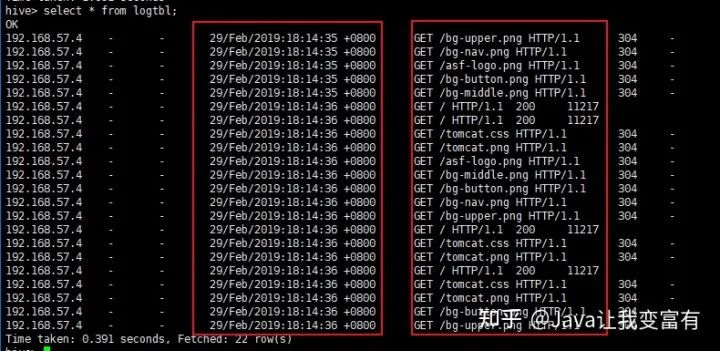
DDL刪表
內(nèi)部表的刪除
內(nèi)部表的刪除,會(huì)刪除元數(shù)據(jù)和表數(shù)據(jù)。
drop table psn;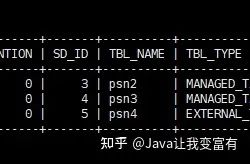
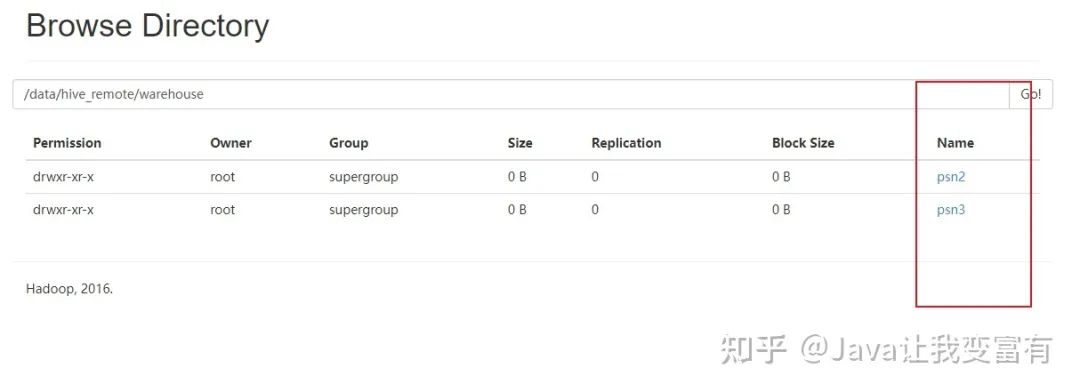
外部表的刪除
而外部表的刪除則只會(huì)刪除元數(shù)據(jù),并不會(huì)刪除數(shù)據(jù)。如下圖所示。
drop table psn4;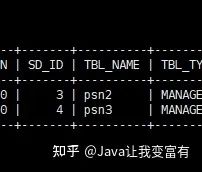
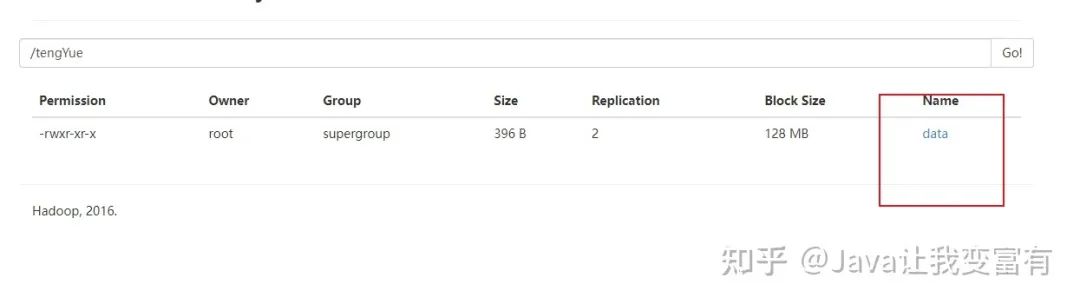
如果我們?cè)俅蝿?chuàng)建外部表,會(huì)發(fā)現(xiàn)不用加載數(shù)據(jù),psn4就可以查詢(xún)到數(shù)據(jù)。除非我們通過(guò)HDFS文件系統(tǒng)強(qiáng)行刪除數(shù)據(jù)文件。
create external table psn4
(
id int,
name string,
likes array<string>,
address map<string,string>
)
row format delimited
fields terminated by ','
collection items terminated by '-'
map keys terminated by ':'
location '/tengYue';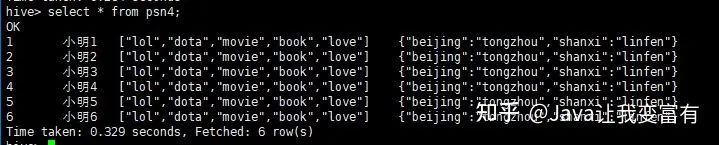
DML新增操作
通過(guò)文件導(dǎo)入
加載數(shù)據(jù)到hive數(shù)據(jù)庫(kù)中,可以通過(guò)load操作,直接將文件轉(zhuǎn)換成數(shù)據(jù)庫(kù)文件。
LOAD DATA [LOCAL] INPATH 'filepath' [OVERWRITE] INTO TABLE tablename [PARTITION (partcol1=val1, partcol2=val2 ...)]

LOAD DATA [LOCAL] INPATH 'filepath' [OVERWRITE] INTO TABLE tablename [PARTITION (partcol1=val1, partcol2=val2 ...)] [INPUTFORMAT 'inputformat' SERDE 'serde'] (3.0 or later)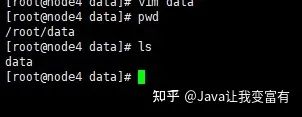
load data local inpath '/root/data/data' into table psn;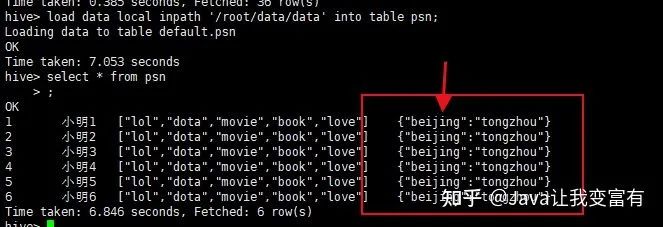
數(shù)據(jù)問(wèn)題
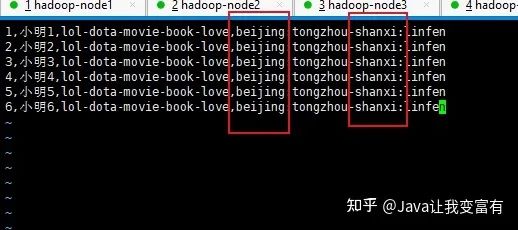
由于beijing這個(gè)key是一致的,所以發(fā)現(xiàn)地址上邊,兩個(gè)地址變成了最后一個(gè)地址,前邊的地址被相同的key給覆蓋掉了,根據(jù)推測(cè),修改地址上相同的key。
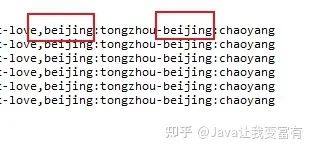
修改后的文件如下:
新數(shù)據(jù)導(dǎo)入
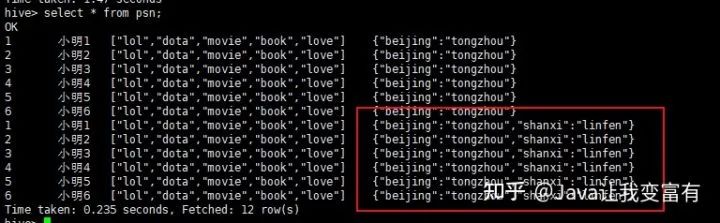
我們可以看到數(shù)據(jù)導(dǎo)入是追加操作,而且我們上述的推測(cè)是正確的,一行記錄中相同的key值會(huì)遭到覆蓋。
直接上傳hdfs
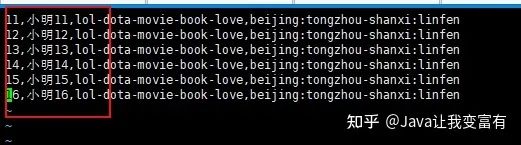
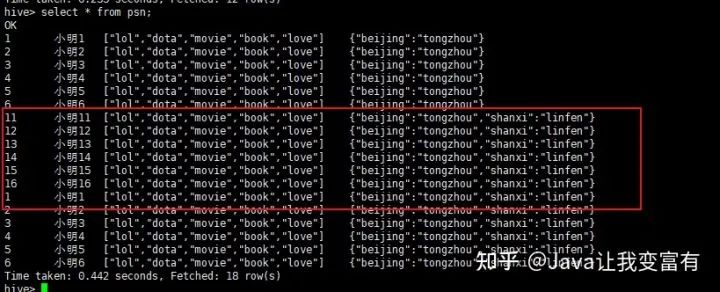
接下來(lái)我們直接上傳新文件至hive檢測(cè)的庫(kù)表目錄下,會(huì)發(fā)現(xiàn),其實(shí)hive直接會(huì)把表目錄下的文件全部讀取出來(lái)。
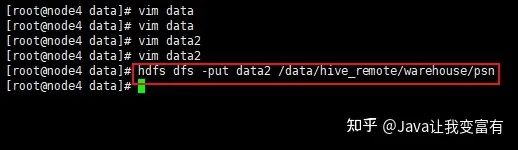
hdfs dfs -put data2 /data/hive_remote/warehouse/psn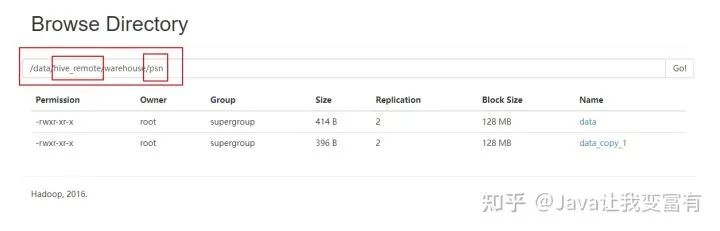
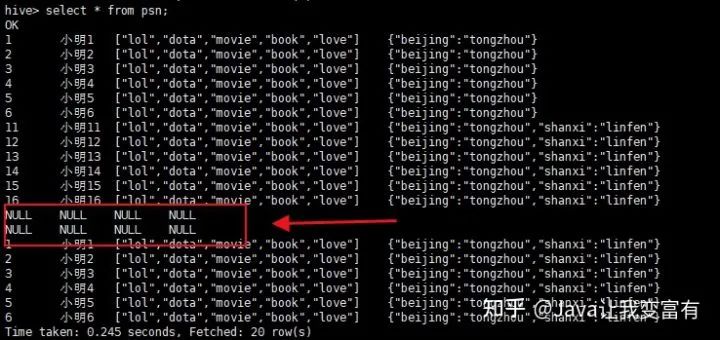
果然直接都讀取到了。看來(lái)這個(gè)東西一點(diǎn)也不像數(shù)據(jù)庫(kù)。在沒(méi)學(xué)習(xí)過(guò)它的時(shí)候,總覺(jué)得它和數(shù)據(jù)庫(kù)差別不大。現(xiàn)在發(fā)現(xiàn)mysql是寫(xiě)時(shí)檢查機(jī)制,會(huì)在插入數(shù)據(jù)的時(shí)候檢測(cè)是否符合數(shù)據(jù)庫(kù)規(guī)范,否則無(wú)法插入。而hive是讀時(shí)檢查,可以隨便放到它表的目錄下,但是讀取的時(shí)候,如果格式不對(duì)那么它會(huì)給出錯(cuò)誤的行記錄。按照自己的規(guī)則處理。
上傳錯(cuò)誤數(shù)據(jù)
hdfs dfs -put data3 /data/hive_remote/warehouse/psn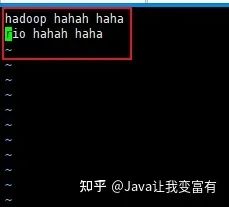
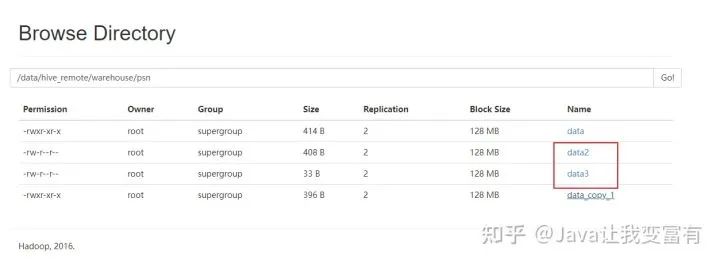
讀取到的錯(cuò)誤數(shù)據(jù)也按照自己的規(guī)則處理。
通過(guò)查表新增
insert into table psn9 select id,name from psn5 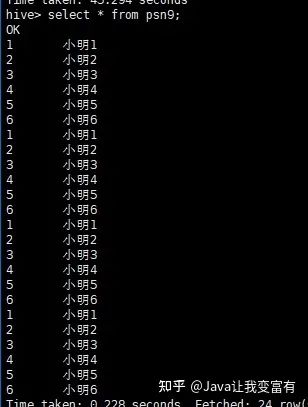
通過(guò)查表覆蓋
創(chuàng)建新表如下:
create table psn9
(
id int,
name string
)
row format delimited
fields terminated by ','
collection items terminated by '-'
map keys terminated by ':';
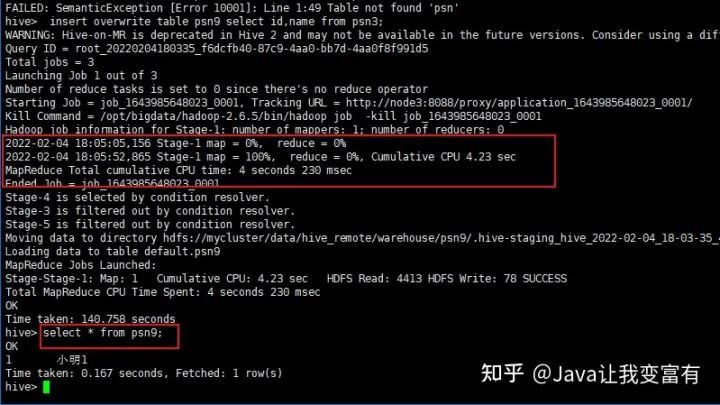
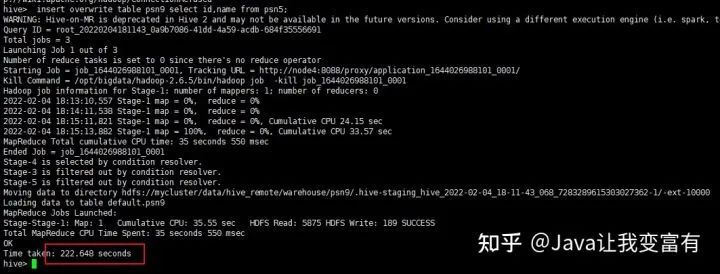
通過(guò)如下命令覆蓋數(shù)據(jù):
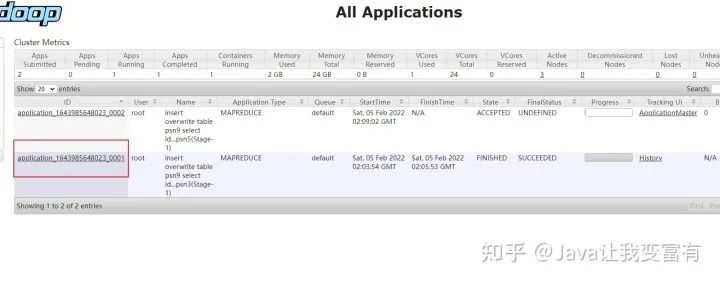
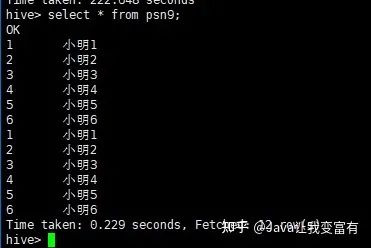
insert overwrite table psn9 select id,name from psn;這種方式會(huì)啟動(dòng)一個(gè)mapReduce任務(wù):
第二次再次執(zhí)行。
同時(shí)新增兩張表
新增psn10表
create table psn10
(
id int,
likes array<string>
)
row format delimited
fields terminated by ','
collection items terminated by '-'
map keys terminated by ':';
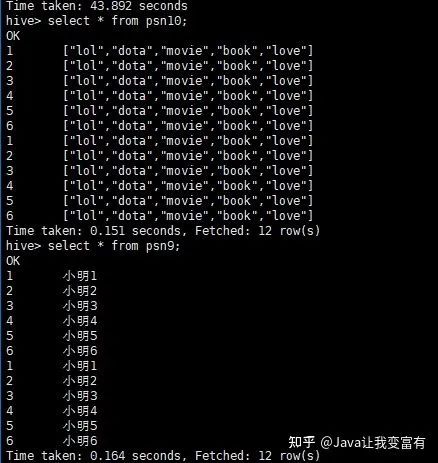
執(zhí)行如下命令:
from psn5
insert overwrite table psn9
select id,name
insert into table psn10
select id,likes;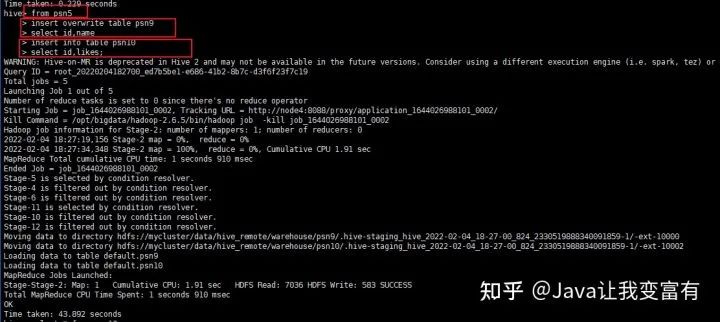
DML刪除操作
不支持非分區(qū)刪除
本想著把之前的數(shù)據(jù)刪除了,重新導(dǎo)入,發(fā)現(xiàn)無(wú)此操作。反正是測(cè)試,索性把新的文件直接導(dǎo)入吧。
Attempt to do update or delete using transaction manager that does not support these operations.
Hive操作符與函數(shù)
具體的詳細(xì)操作可以通過(guò)下方官方文檔查看:
LanguageManual UDFcwiki.apache.org/confluence/display/Hive/LanguageManual+UDF
復(fù)雜類(lèi)型操作符
例如我們的map類(lèi)型,直接通過(guò)key值,就可以取出來(lái)每條記錄該字段對(duì)應(yīng)的key值對(duì)應(yīng)的value值。
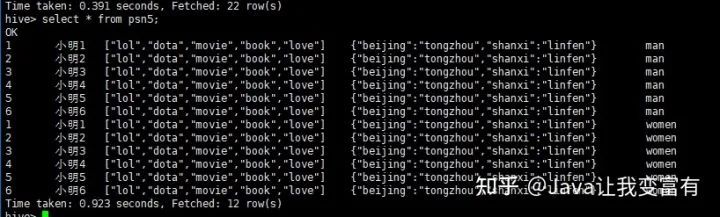
select address["beijing"] from psn5;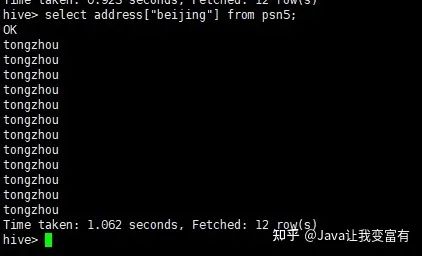
還有數(shù)組類(lèi)型的,直接通過(guò)索引下標(biāo)就可以取出來(lái)對(duì)應(yīng)索引的值。
hive> select likes[1] from psn5;
OK
dota
dota
dota
dota
dota
dota
dota
dota
dota
dota
dota
dota
Time taken: 0.334 seconds, Fetched: 12 row(s)
字符串拼接
hive> select name||' likes '||likes[0]||','||likes[1]||','||likes[2] from psn5;
OK
小明1 likes lol,dota,movie
小明2 likes lol,dota,movie
小明3 likes lol,dota,movie
小明4 likes lol,dota,movie
小明5 likes lol,dota,movie
小明6 likes lol,dota,movie
小明1 likes lol,dota,movie
小明2 likes lol,dota,movie
小明3 likes lol,dota,movie
小明4 likes lol,dota,movie
小明5 likes lol,dota,movie
小明6 likes lol,dota,movie
Time taken: 0.401 seconds, Fetched: 12 row(s)
內(nèi)置數(shù)學(xué)函數(shù)
sum函數(shù),不過(guò)每次使用函數(shù)都會(huì)提交一個(gè)mapReduce任務(wù)。
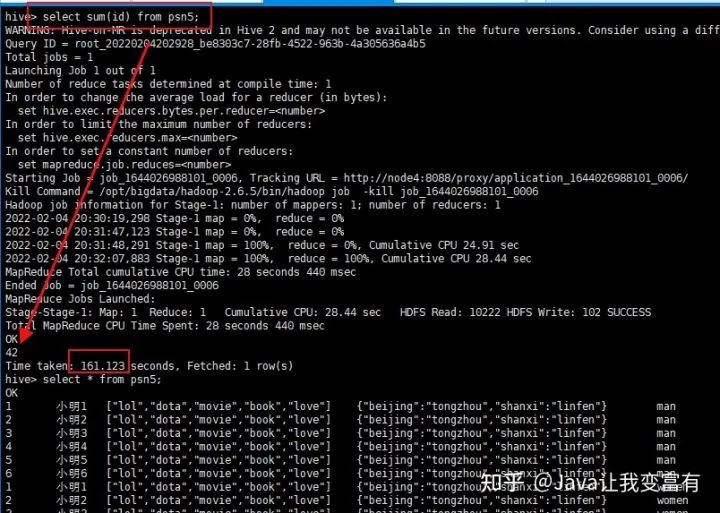
UDTF函數(shù)
如下一個(gè)數(shù)組字段,經(jīng)過(guò)explode函數(shù),就會(huì)被拆分成一個(gè)一個(gè)的元素。
select explode(likes) from psn5;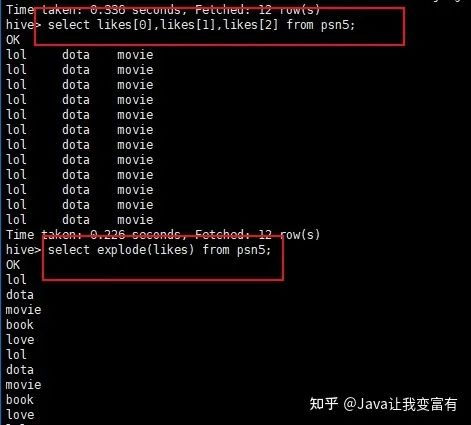
UDFs函數(shù)
自定義函數(shù)。自己使用編程語(yǔ)言,編譯成jar包,上傳到hive集群。然后創(chuàng)建自定義函數(shù),指向jar包函數(shù)定義類(lèi)的全類(lèi)名路徑。這樣就可以使用自己的自定義函數(shù)來(lái)處理數(shù)據(jù)了。
組合函數(shù)
例如,我們需要將一個(gè)文件中的單詞單個(gè)輸出,單詞都是以空格分割。那么我們可以通過(guò)使用split函數(shù)先將數(shù)據(jù)變成數(shù)組,然后再使用explode函數(shù),將數(shù)組拆分。
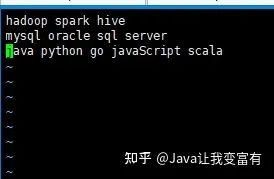
然后創(chuàng)建表words:
create external table words(line string) location '/words';上傳文件至hdfs的words表目錄空間下:
hdfs dfs -put words /words然后我們可以查詢(xún)到表數(shù)據(jù):
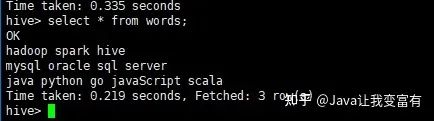
接著使用split函數(shù)可以得到每一行的數(shù)組。
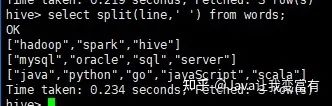
然后使用explode+split函數(shù)的組合,達(dá)到如下的效果。
select explode(split(line,' ')) from words;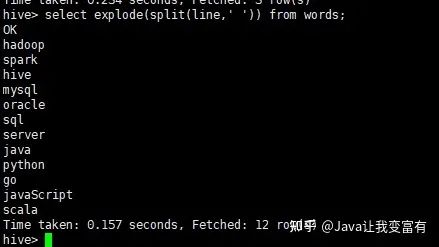
Hive參數(shù)設(shè)置
hive參數(shù)設(shè)置需要注意參數(shù)作用域。通過(guò)命令行啟動(dòng)的參數(shù),一般只在本次進(jìn)程中起作用。退出進(jìn)程,下次如果不帶入,則失去效果。想要記住效果,肯定需要提前持久化到某個(gè)配置文件中。
設(shè)置表頭信息
hive設(shè)置表頭顯示參數(shù)啟動(dòng)。
hive --hiveconf hive.cli.print.header=true;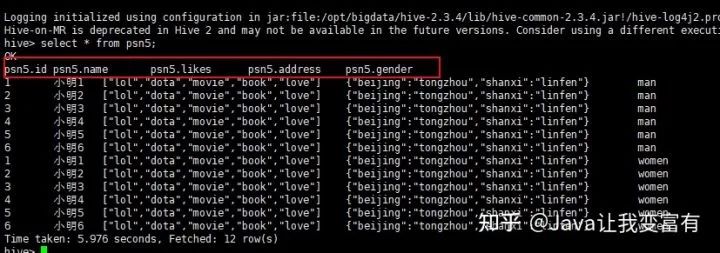
持久化設(shè)置
.hiverc 文件中得配置,在hive啟動(dòng)時(shí)就加載到本次會(huì)話中。
echo 'set hive.cli.print.header=true' >> .hiverc
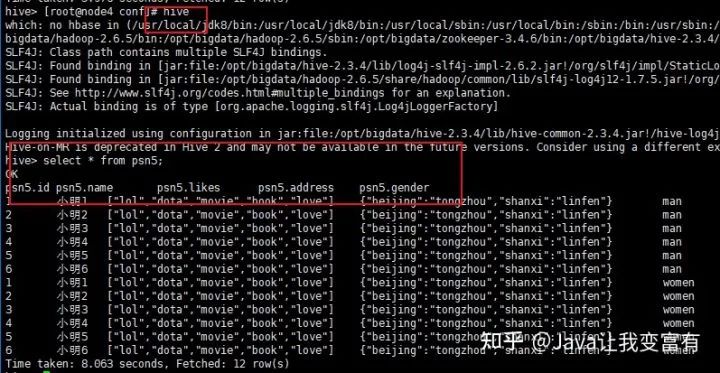
設(shè)置變量
hive -d abc=1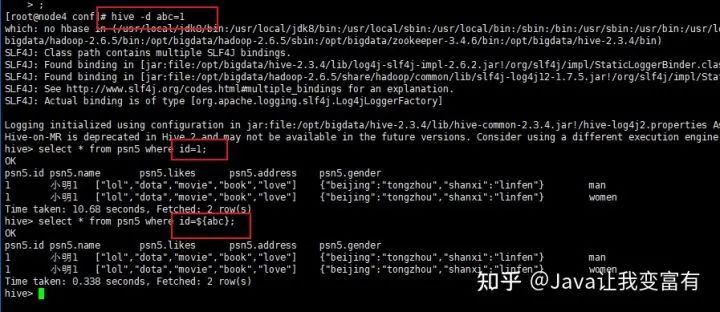
輸出結(jié)果文件
hive -e "select * from psn5" >> a.txt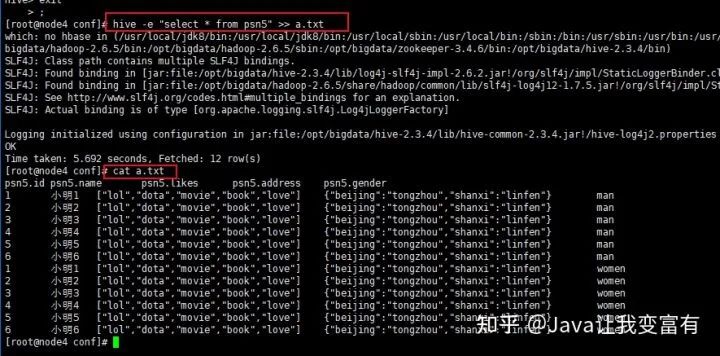
動(dòng)態(tài)分區(qū)
文章開(kāi)頭我們實(shí)操的是靜態(tài)分區(qū),每次加載數(shù)據(jù),都需要加載某個(gè)分區(qū)的數(shù)據(jù)文件。要男性的,都必須是男性的數(shù)據(jù)。而動(dòng)態(tài)分區(qū),可以根據(jù)每條記錄屬于哪個(gè)分區(qū)而動(dòng)態(tài)存儲(chǔ)到相應(yīng)的分區(qū)目錄下。首先我們需要先設(shè)置非嚴(yán)格模式,如果不設(shè)置就會(huì)出現(xiàn)如下錯(cuò)誤。
hive> insert into psn20 partition(age,gender) select id,name,likes,address,age,gender from psn6;
FAILED: SemanticException [Error 10096]: Dynamic partition strict mode requires at least one static partition column.
To turn this off set hive.exec.dynamic.partition.mode=nonstric
設(shè)置非嚴(yán)格模式
set hive.exec.dynamic.partition.mode=nostrict;執(zhí)行新增語(yǔ)句
insert into psn20 partition(age,gender) select id,name,likes,address,gender,age from psn6;然后發(fā)現(xiàn)提交了一個(gè)mapReduce任務(wù):
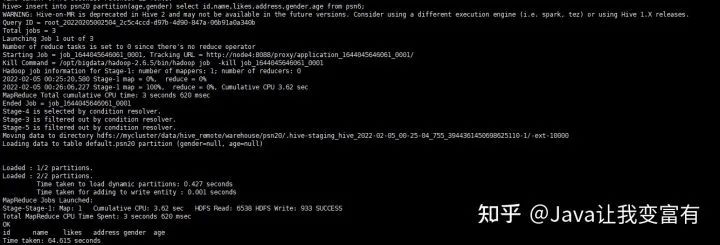
結(jié)果如下:
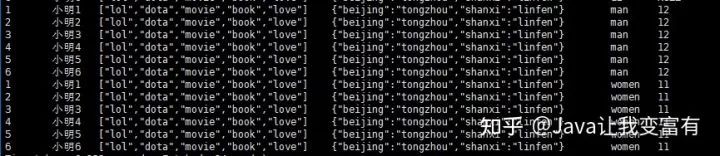
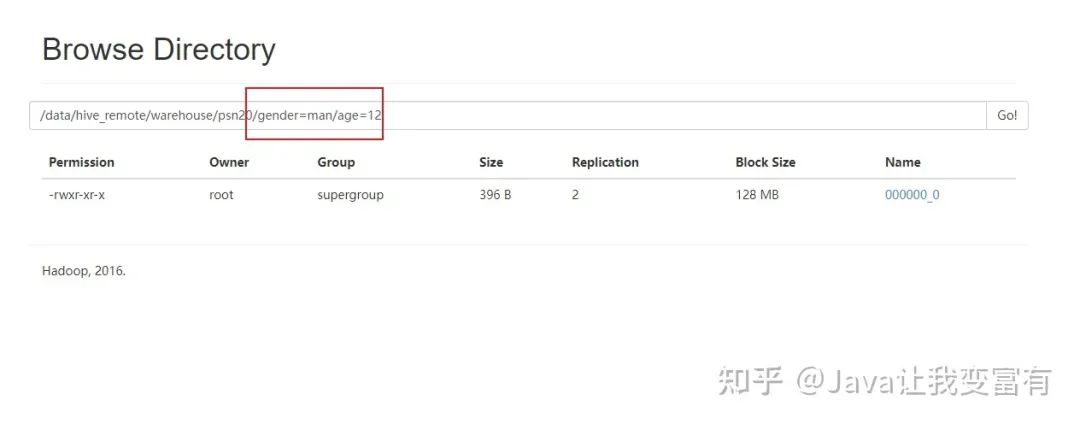
去HDFS文件系統(tǒng)查看表目錄,可以發(fā)現(xiàn),我們的分區(qū)已經(jīng)創(chuàng)建好了:
分桶操作
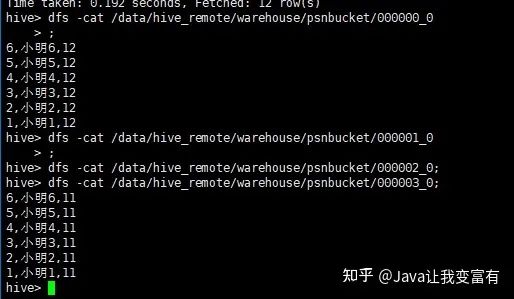
按照某個(gè)字段進(jìn)行分桶操作,可以將整個(gè)數(shù)據(jù)分割成幾個(gè)文件,文件數(shù)量就是我們指定的桶的數(shù)量。如下示例,我們按照年齡分桶,一共指定四個(gè)桶。
create table psnbucket(id int,name string,age int)
clustered by(age) into 4 buckets
row format delimited fields terminated by ',';
然后像表中插入數(shù)據(jù)。插入數(shù)據(jù)的時(shí)候按照hash算法,將記錄存放到不同的桶中。
insert into table psnbucket select id,name,age from psn6;查看hadoop文件系統(tǒng),可以發(fā)現(xiàn)一共四個(gè)文件存儲(chǔ)目錄。
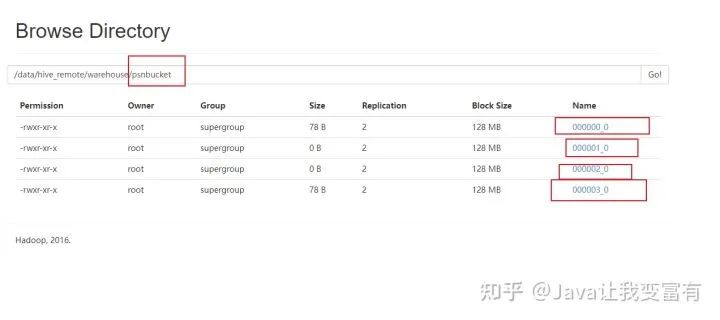
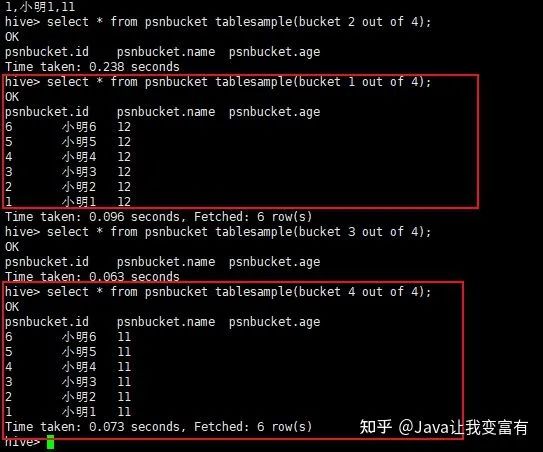
接下來(lái)我們查詢(xún)其中一個(gè)桶的數(shù)據(jù)。由于我們的年齡只有11和12,可想而知,我們的兩個(gè)桶肯定沒(méi)有數(shù)據(jù),兩個(gè)桶各自6條數(shù)據(jù)。
分桶取數(shù)據(jù):