
7個(gè)極其重要的Pandas函數(shù)!

公眾號(hào):尤而小屋
作者:Peter
編輯:Peter
大家好,我是Peter~
本文介紹Pandas中7個(gè)極其重要的函數(shù),它們?cè)谌粘5臄?shù)據(jù)分析會(huì)經(jīng)常使用。
isnull apply groupby unique reset_index sort_values to_csv
同時(shí)你還將學(xué)會(huì)如何造假數(shù)據(jù)。

模擬數(shù)據(jù)
通過numpy和pandas庫模擬一份數(shù)據(jù),使用了numpy.random.choice方法
In [1]:
import pandas as pd
import numpy as np
In [2]:
names = ["apple","orange","pear","grape","banana","cantaloupe"]

places = ["陜西","江西","山西","甘肅","新疆","江蘇","浙江"]
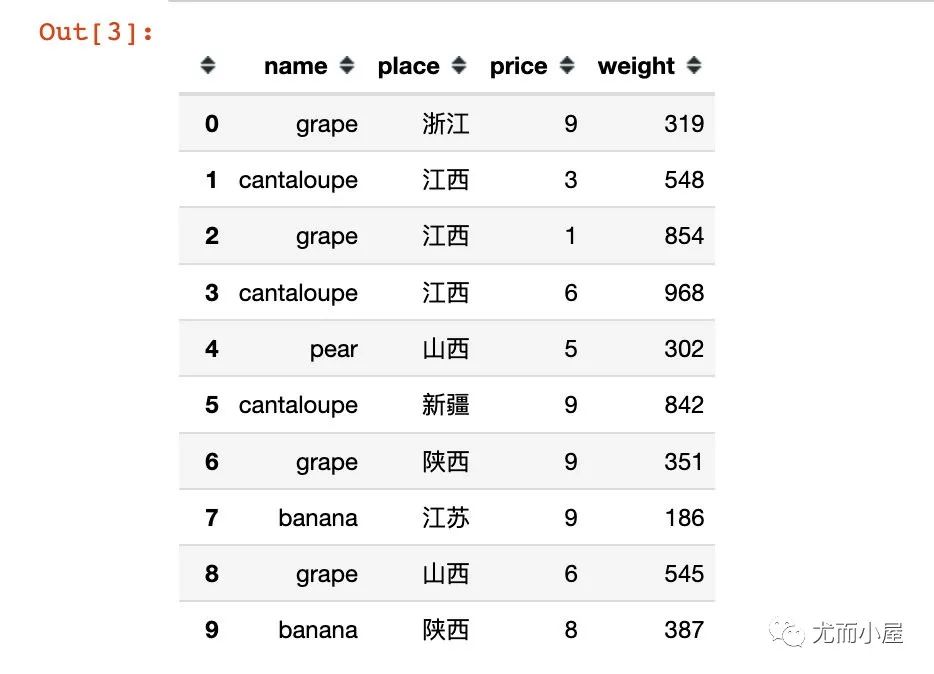
In [3]:
df = pd.DataFrame({"name": np.random.choice(names, 30),  # 名稱
                   "place": np.random.choice(places, 30),  # 產(chǎn)地
                   "price": np.random.randint(1,10,30),  # 單價(jià)
                   "weight":np.random.randint(100,1000,30)  # 重量
                  })

df.head(10)  # 顯示前10條數(shù)據(jù)
函數(shù)1:isnull
查看數(shù)據(jù)中的缺失值信息。
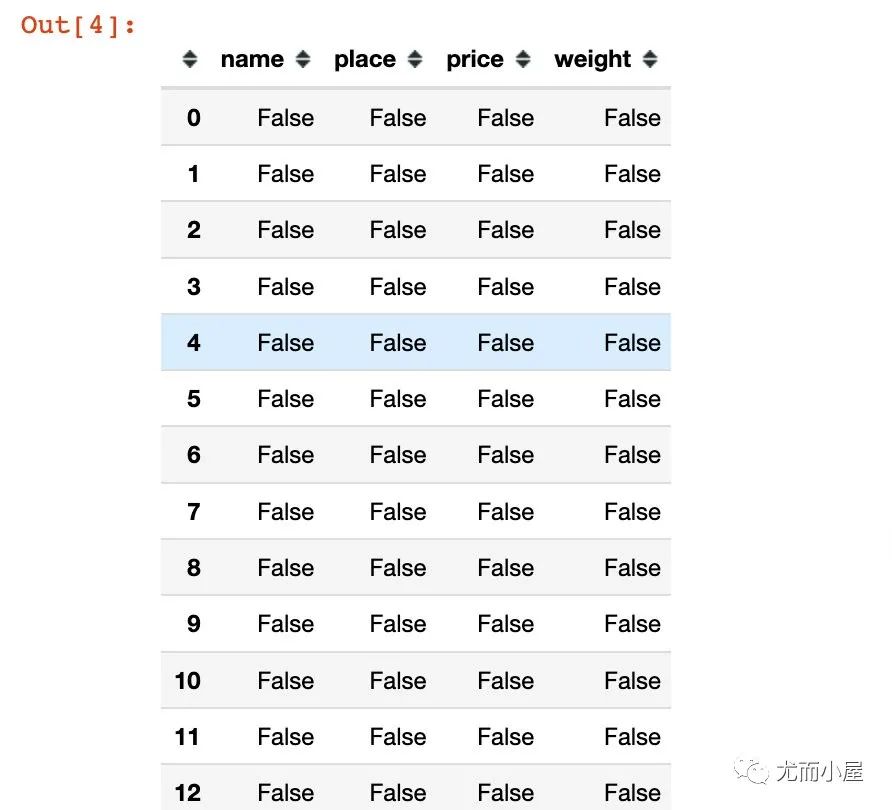
下面是直接查看數(shù)據(jù)中的每個(gè)位置是否為缺失值:是為True;否為False
In [4]:
df.isnull()
查看每個(gè)字段是否存在缺失值;在執(zhí)行sum的時(shí)候,F(xiàn)alse表示0,True表示1:
In [5]:
df.isnull().sum()
Out[5]:
name      0
place     0
price     0
weight    0
dtype: int64
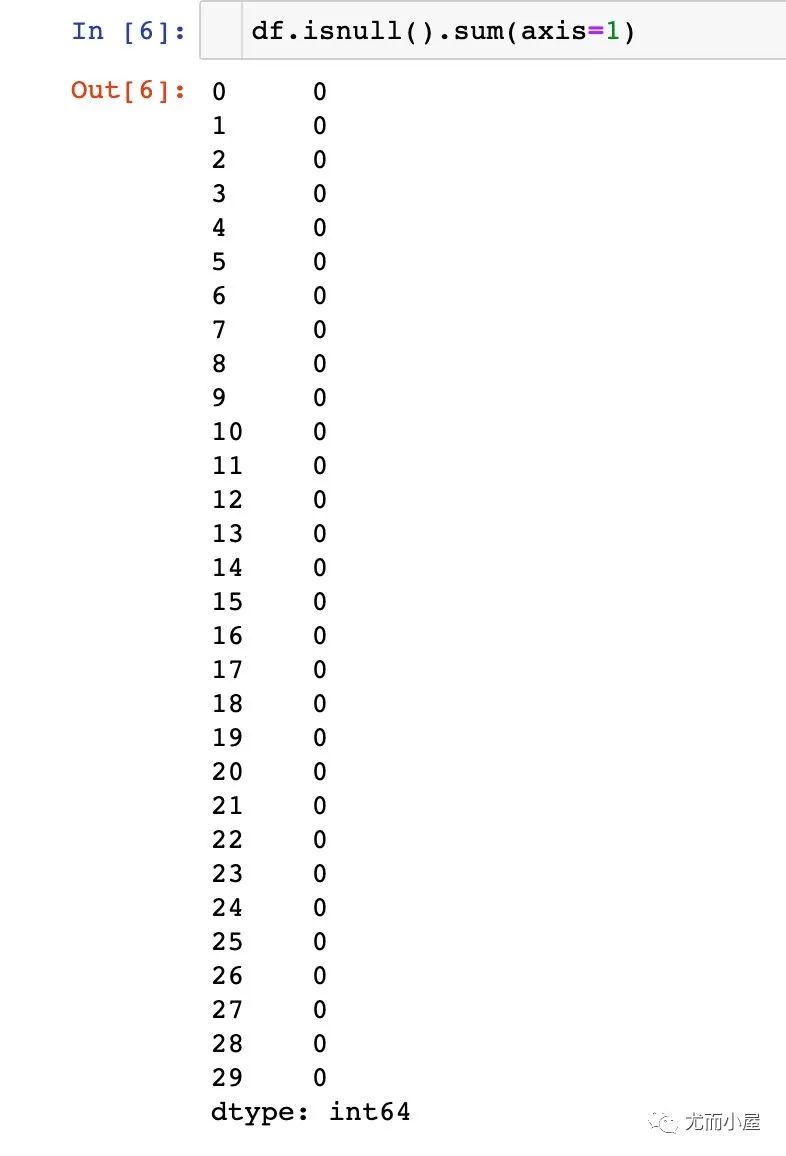
上面的結(jié)果默認(rèn)是在列方向上求和;可以執(zhí)行在行axis=1上求和:
In [6]:
df.isnull().sum(axis=1)
函數(shù)2:apply
apply能夠?qū)andas中的數(shù)據(jù)進(jìn)行批量操作。
1、單個(gè)字段的操作
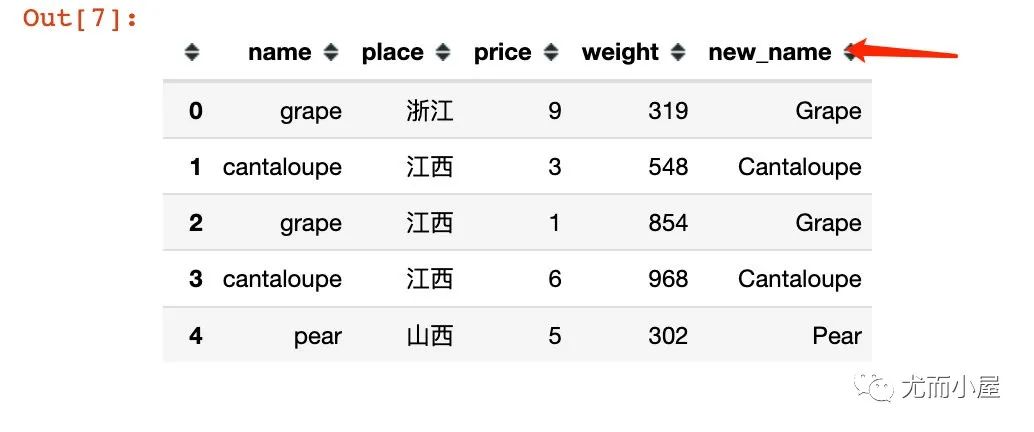
比如將name字段全部變成首字母大寫:
In [7]:
df["new_name"] = df["name"].apply(lambda x: x.title())

df.head()
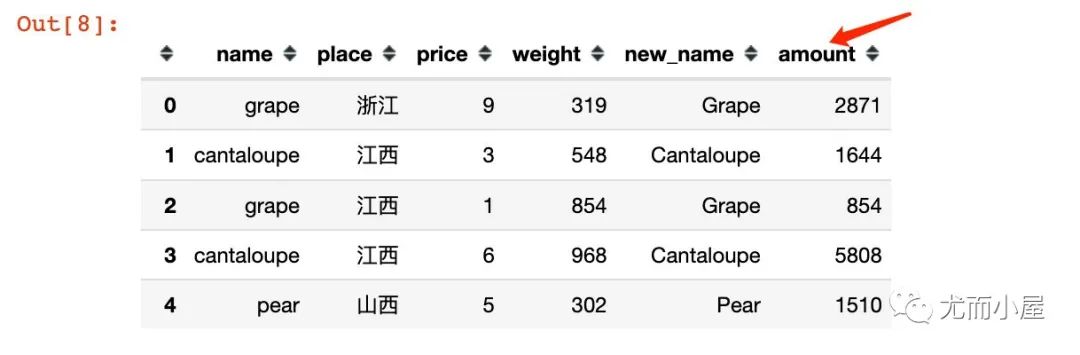
2、多個(gè)字段的同時(shí)操作:
比如根據(jù)price和weight求乘積,結(jié)果為amount:
In [8]:
df["amount"] = df[["price","weight"]].apply(lambda x: x["price"] * x["weight"], axis=1)

df.head()
函數(shù)3:groupby
進(jìn)行分組聚合的操作:
In [9]:
# 1、統(tǒng)計(jì)不同水果的總金額


df.groupby("name")["amount"].sum()
Out[9]:
name
apple         13360
banana        12570
cantaloupe    18777
grape         20960
orange        29995
pear           3694
Name: amount, dtype: int64
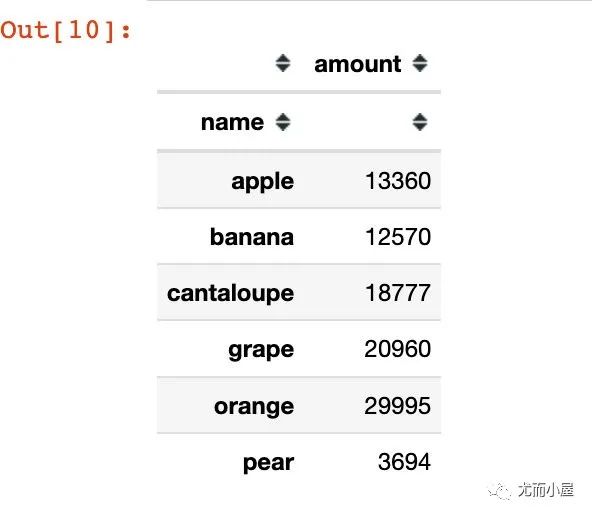
上面得到的結(jié)果是Series型數(shù)據(jù);如果是groupby + agg,得到的則是DataFrame型數(shù)據(jù):
In [10]:
# groupby + agg

df.groupby("name").agg({"amount":sum})
Out[10]:
In [11]:
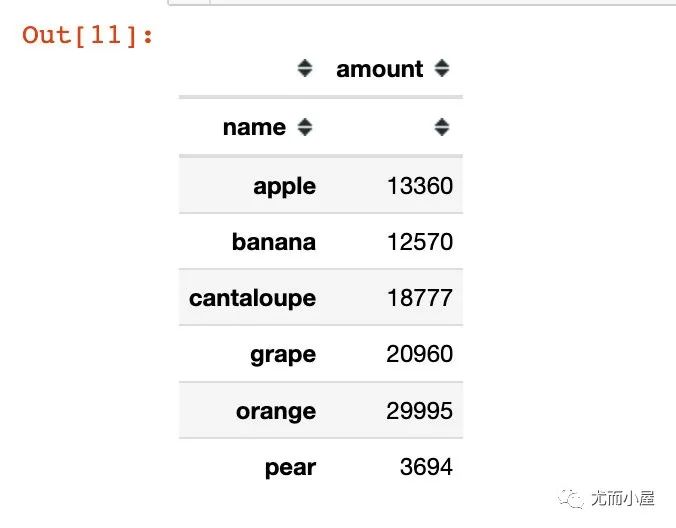
# groupby + to_frame 結(jié)果也變成了DataFrame型數(shù)據(jù)

df.groupby("name")["amount"].sum().to_frame()
Out[11]:
函數(shù)4:unique
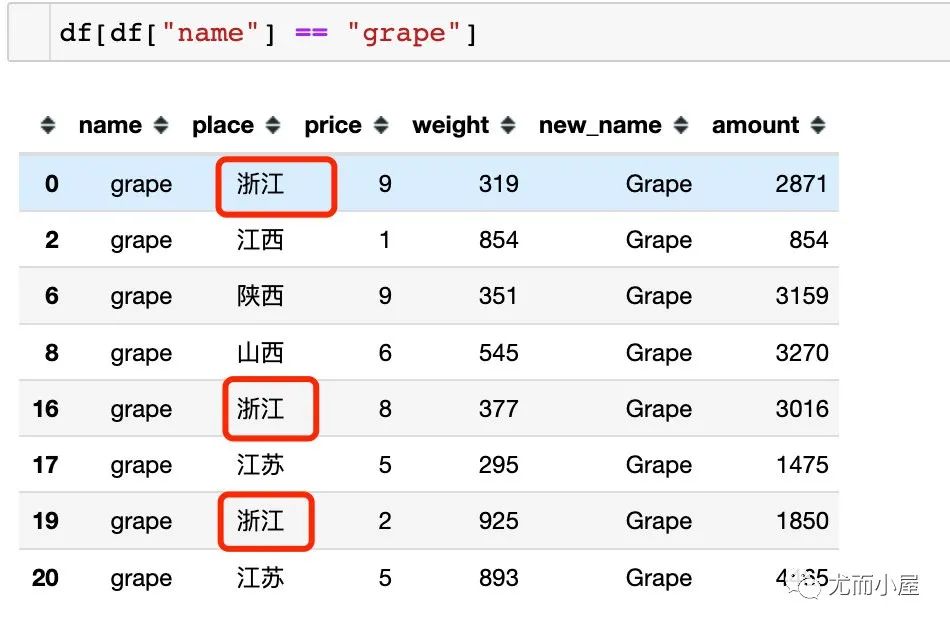
統(tǒng)計(jì)數(shù)據(jù)的唯一值信息。比如統(tǒng)計(jì)每個(gè)水果name對(duì)應(yīng)的產(chǎn)地信息place:
In [12]:
df.groupby("name")["place"].unique() # 有去重
Out[12]:
name
apple                         [浙江, 山西]
banana        [江蘇, 陜西, 山西, 江西, 甘肅, 浙江]
cantaloupe                [江西, 新疆, 山西]
grape             [浙江, 江西, 陜西, 山西, 江蘇]
orange                    [浙江, 山西, 江蘇]
pear                          [山西, 新疆]
Name: place, dtype: object
In [13]:
df.groupby("name")["place"].apply(list) # 不去重
Out[13]:
name
apple                                 [浙江, 山西]
banana                [江蘇, 陜西, 山西, 江西, 甘肅, 浙江]
cantaloupe                [江西, 江西, 新疆, 山西, 新疆]
grape         [浙江, 江西, 陜西, 山西, 浙江, 江蘇, 浙江, 江蘇]  # 有重復(fù)值
orange            [浙江, 山西, 山西, 江蘇, 山西, 浙江, 山西]
pear                                  [山西, 新疆]
Name: place, dtype: object
如果是直接使用list函數(shù),則會(huì)在對(duì)應(yīng)的列表中展示全部的數(shù)據(jù)(包含重復(fù)值):
函數(shù)5:reset_index
將DataFrame的索引進(jìn)行重置:
In [15]:
data = df.groupby("name")["amount"].sum()  # 不加reset_index()

data
Out[15]:
name
apple         13360
banana        12570
cantaloupe    18777
grape         20960
orange        29995
pear           3694
Name: amount, dtype: int64
In [16]:
type(data) # Series型數(shù)據(jù)
Out[16]:
pandas.core.series.Series
In [17]:
data = df.groupby("name")["amount"].sum().reset_index()  # 不加reset_index()

data
Out[17]:
| name | amount | |
|---|---|---|
| 0 | apple | 13360 |
| 1 | banana | 12570 |
| 2 | cantaloupe | 18777 |
| 3 | grape | 20960 |
| 4 | orange | 29995 |
| 5 | pear | 3694 |
In [18]:
type(data) # DataFrame數(shù)據(jù)
Out[18]:
pandas.core.frame.DataFrame
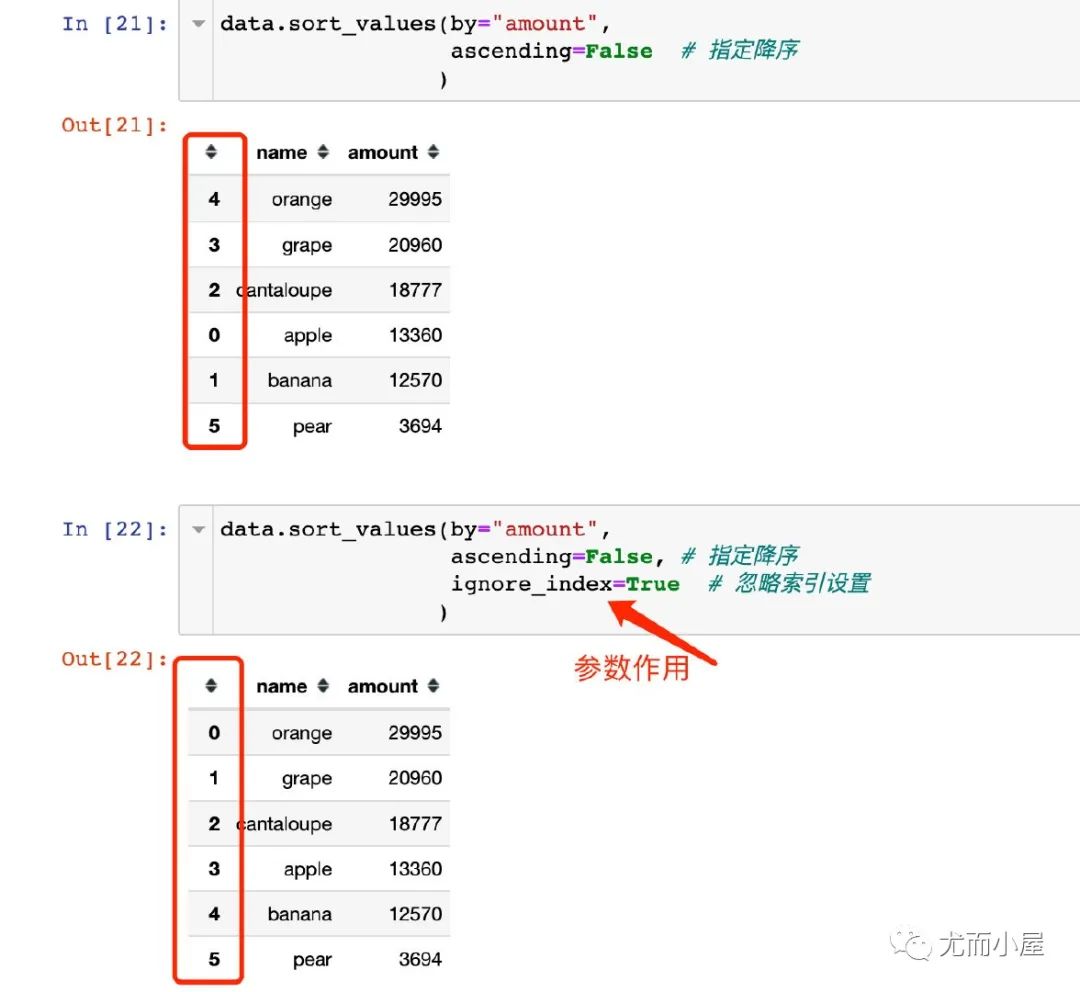
函數(shù)6:sort_values
sort_values是對(duì)數(shù)據(jù)進(jìn)行排序,默認(rèn)是升序
In [19]:
data # 使用上面的data數(shù)據(jù)
Out[19]:
| name | amount | |
|---|---|---|
| 0 | apple | 13360 |
| 1 | banana | 12570 |
| 2 | cantaloupe | 18777 |
| 3 | grape | 20960 |
| 4 | orange | 29995 |
| 5 | pear | 3694 |
In [20]:
data.sort_values(by="amount") # 默認(rèn)升序
Out[20]:
| name | amount | |
|---|---|---|
| 5 | pear | 3694 |
| 1 | banana | 12570 |
| 0 | apple | 13360 |
| 2 | cantaloupe | 18777 |
| 3 | grape | 20960 |
| 4 | orange | 29995 |
In [21]:
data.sort_values(by="amount",
                 ascending=False  # 指定降序
                )
Out[21]:
| name | amount | |
|---|---|---|
| 4 | orange | 29995 |
| 3 | grape | 20960 |
| 2 | cantaloupe | 18777 |
| 0 | apple | 13360 |
| 1 | banana | 12570 |
| 5 | pear | 3694 |
In [22]:
data.sort_values(by="amount",
                 ascending=False, # 指定降序
                 ignore_index=True  # 忽略索引設(shè)置
                )
Out[22]:
| name | amount | |
|---|---|---|
| 0 | orange | 29995 |
| 1 | grape | 20960 |
| 2 | cantaloupe | 18777 |
| 3 | apple | 13360 |
| 4 | banana | 12570 |
| 5 | pear | 3694 |
函數(shù)7:to_csv
將DataFrame保存成csv格式:
In [23]:
df.to_csv("newdata.csv",index=False)     # csv格式
# df.to_csv("newdata.xls",index=False)   # Excel格式
1、知網(wǎng)被罰 8760 萬元!全網(wǎng)沸騰
2、5 分鐘,教你用 Python 制作一個(gè)生日提醒!
3、教你用 Python 自制簡(jiǎn)單版《我的世界》
點(diǎn)擊關(guān)注公眾號(hào),閱讀更多精彩內(nèi)容
