
數(shù)據(jù)分析入門系列教程-微博熱點(diǎn)
你玩微博嗎
如果你玩微博,一定知道某些大 V 的一條微博,絕對(duì)擁有堵塞網(wǎng)絡(luò),撐爆服務(wù)器的威力。微博熱搜,也成了流量圣地,很多人為了上熱搜,已經(jīng)到了近乎抓狂的地步。
如果你玩微博,那么一定知道,微博下面的評(píng)論,可是一座金山,里面藏著太多的神人和經(jīng)典,絕對(duì)是不容錯(cuò)過的地方。
無論是官宣還是分手,無論是開撕還是出軌,都會(huì)到微博里攪動(dòng)一番。那么該如何快速獲取微博信息及評(píng)論呢,如何才能做出一個(gè)自動(dòng)化的,可落地的爬蟲工具呢。下面可以跟著我,一起看看怎么完成吧。
小試牛刀
先來看看對(duì)于某個(gè)微博的評(píng)論,該怎么做呢
微博頁面分析
我們先進(jìn)入如下的一個(gè)微博
https://weibo.com/1312412824/HxFY84Gqb?filter=hot&root_comment_id=0&type=comment#_rnd1567155548217
我們選擇林志玲宣布結(jié)婚的那條微博為例
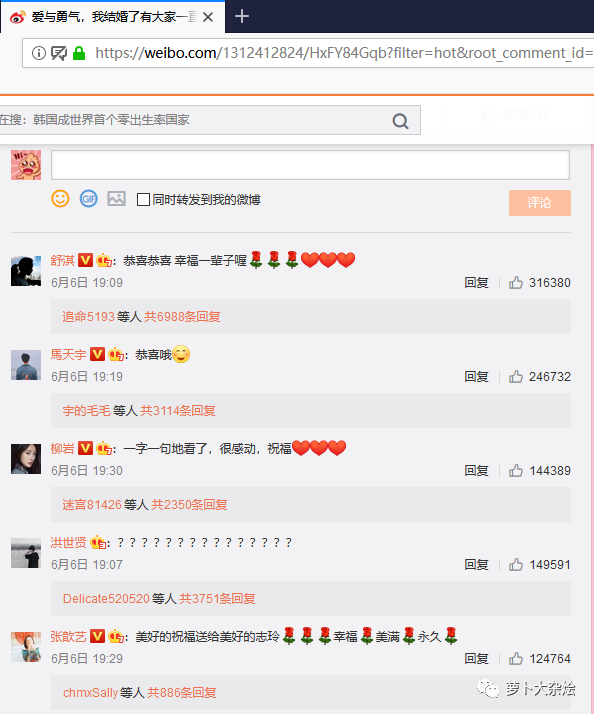
打開 Chrome 開發(fā)者工具(F12),切換到 Network 頁簽,再次刷新頁面,能夠看到一條請求,如下:
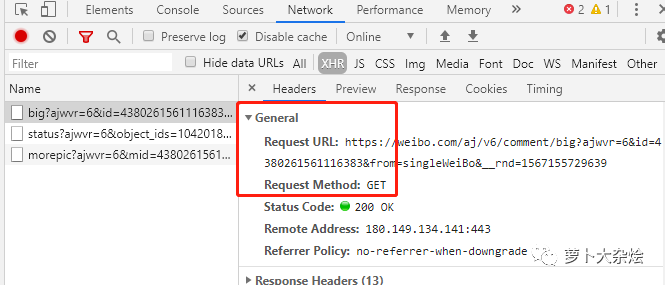
我們把這里的 URL 拷貝出來,放到 PostMan 中請求下(如果你還不知道 PostMan,那么趕緊去下載一個(gè),是很好用的接口測試工具),發(fā)現(xiàn)得到的響應(yīng)并不是正常的
https://weibo.com/aj/v6/comment/big?ajwvr=6&id=4380261561116383&from=singleWeiBo&__rnd=1567155729639
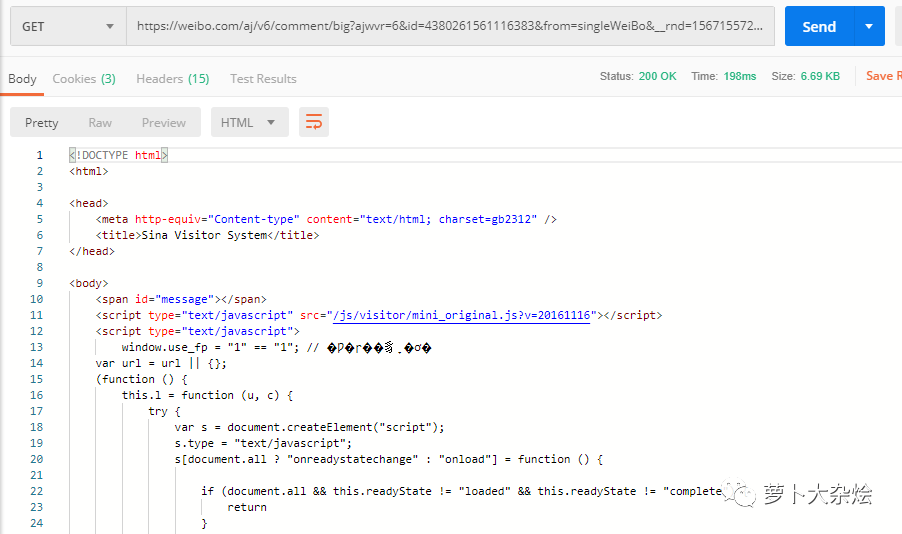
此時(shí),我們就應(yīng)該想到,嘗試著增加 cookie
再觀察剛剛 Network 中的請求,在 Request Headers 里,有一個(gè) Cookie 字段,把這個(gè)字段拷貝出來,放進(jìn) PostMan 中再試試
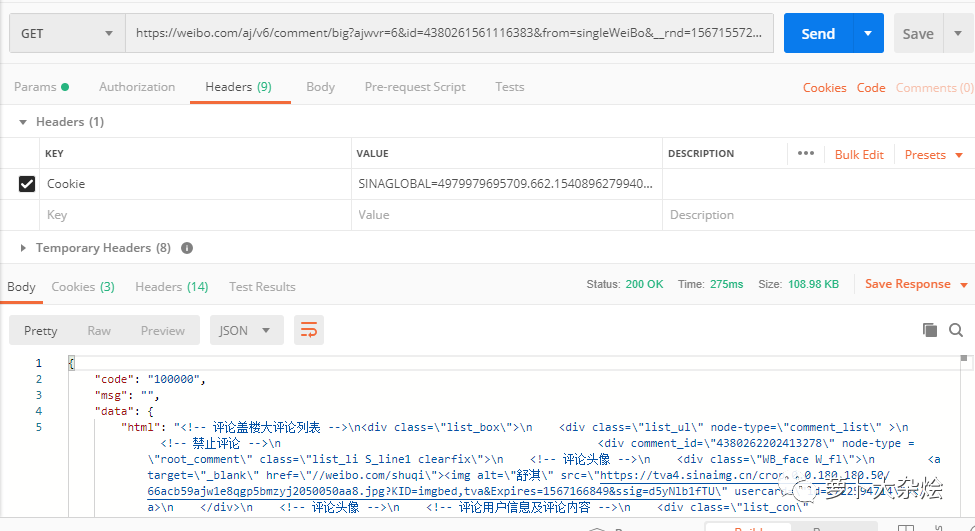
現(xiàn)在可以了,終于能夠正常返回我們想要的數(shù)據(jù)了。
請注意 PostMan 添加 Cookie 的方式哦
URL 精簡
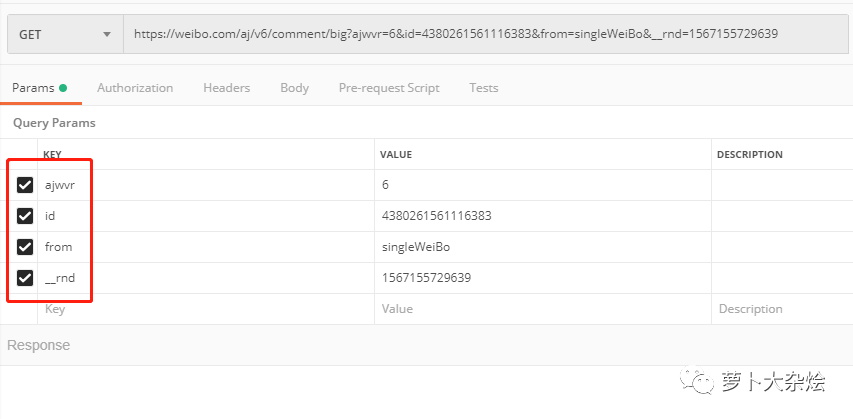
下面我們再來好好研究下這個(gè) URL,它有很多的參數(shù),有一些是可以精簡掉的。
其實(shí)這個(gè)過程就是一個(gè)一個(gè)的刪除參數(shù),然后使用 PostMan 發(fā)送請求,看看在哪些參數(shù)情況下,響應(yīng)是正常的。
最后我得到了如下的最精簡的 URL
https://weibo.com/aj/v6/comment/big?ajwvr=6&id=4380261561116383
這里我希望你真正的動(dòng)手去實(shí)操一下,逐個(gè)勾掉參數(shù)并發(fā)送請求,查看響應(yīng)情況,真正的搞清楚,上面的精簡 URL 是怎么來的。
URL 翻頁
在完成 URL 精簡之后,我們還需要處理評(píng)論分頁的問題。
再次查看響應(yīng)信息,發(fā)現(xiàn)在響應(yīng)信息的最后,有一個(gè) page 字段
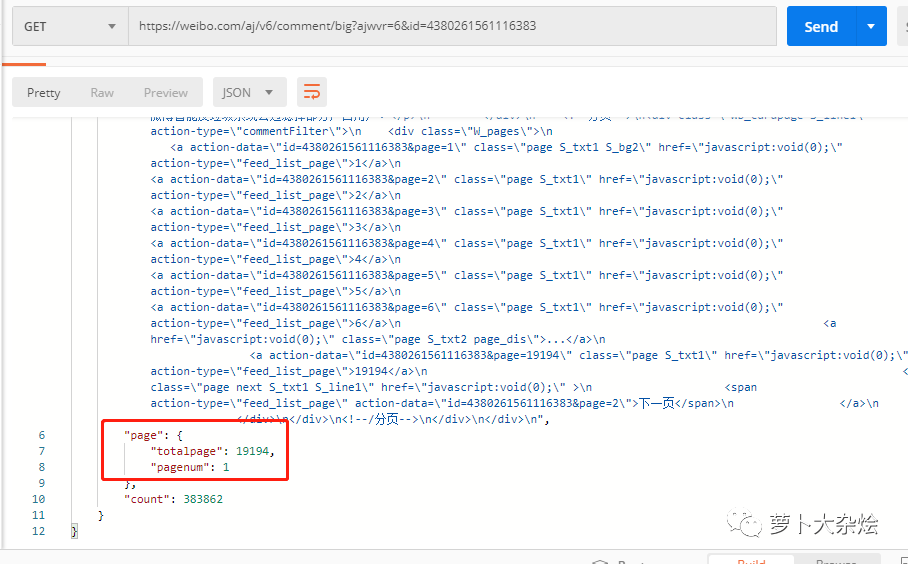
這里似乎是在告訴我們,當(dāng)前的頁數(shù)和總頁數(shù),那么出于經(jīng)驗(yàn),我們在 URL 中增加 page 參數(shù),并設(shè)置為2,再次請求,看看這個(gè)字段是否會(huì)改變呢
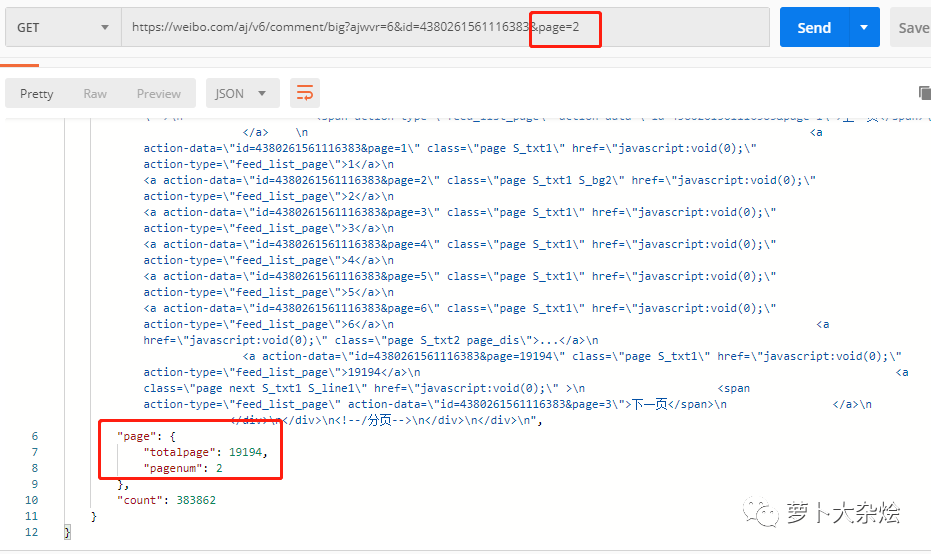
果然變了,說明參數(shù)設(shè)置成功,至此分頁問題也解決了。
獲取數(shù)據(jù)
既然可用的 URL 規(guī)則我們已經(jīng)找到,下面就是發(fā)送請求,提取數(shù)據(jù)了
import?requests
import?json
from?bs4?import?BeautifulSoup
import?pandas?as?pd
import?timeHeaders?=?{'Cookie':?'SINAGLOBAL=4979979695709.662.1540896279940;?SUB=_2AkMrYbTuf8PxqwJRmPkVyG_nb45wwwHEieKdPUU1JRMxHRl-yT83qnI9tRB6AOGaAcavhZVIZBiCoxtgPDNVspj9jtju;?SUBP=0033WrSXqPxfM72-Ws9jqgMF55529P9D9W5d4hHnVEbZCn4G2L775Qe1;?_s_tentry=-;?Apache=1711120851984.973.1564019682028;?ULV=1564019682040:7:2:1:1711120851984.973.1564019682028:1563525180101;?login_sid_t=8e1b73050dedb94d4996a67f8d74e464;?cross_origin_proto=SSL;?Ugrow-G0=140ad66ad7317901fc818d7fd7743564;?YF-V5-G0=95d69db6bf5dfdb71f82a9b7f3eb261a;?WBStorage=edfd723f2928ec64|undefined;?UOR=bbs.51testing.com,widget.weibo.com,www.baidu.com;?wb_view_log=1366*7681;?WBtopGlobal_register_version=307744aa77dd5677;?YF-Page-G0=580fe01acc9791e17cca20c5fa377d00|1564363890|1564363890'}def?sister(page):
????sister?=?[]
????for?i?in?range(0,?page):
????????print("page:?",?i)
????????url?=?'https://weibo.com/aj/v6/comment/big?ajwvr=6&id=4380261561116383&page=%s'?%?int(i)
????????req?=?requests.get(url,?headers=Headers).text
????????html?=?json.loads(req)['data']['html']
????????content?=?BeautifulSoup(html,?"html.parser")
????????comment_text?=?content.find_all('div',?attrs={'class':?'WB_text'})
????????for?c?in?comment_text:
????????????sister_text?=?c.text.split(":")[1]
????????????sister.append(sister_text)
????????time.sleep(5)????return?sister

if?__name__?==?'__main__':
????print("start")
????sister_comment?=?sister(1001)
????sister_pd?=?pd.DataFrame(columns=['sister_comment'],?data=sister_comment)
????sister_pd.to_csv('sister.csv',?encoding='utf-8')
注意這里的 Headers,有一定的過期時(shí)間,當(dāng)你運(yùn)行該代碼的時(shí)候,需要自行拷貝一份當(dāng)前的 Cookie 替換。
代碼解析:
由于響應(yīng)的信息是一個(gè) json,然后在 data 字段里面才是 HTML,所以要先解析 json 信息。可以使用 json.loads 來轉(zhuǎn)化字符串到 json,或者也可以直接使用 requests.get(url, headers=Headers).json() 來獲取響應(yīng)信息中的 json 數(shù)據(jù)。
存儲(chǔ)數(shù)據(jù),采用了 Pandas 的輸入輸出。先創(chuàng)建一個(gè) Pandas DataFrame 對(duì)象,然后通過 to_csv 函數(shù)保存至 csv 文件中。
至此,一個(gè)簡單的微博評(píng)論爬蟲就完成了,是不是足夠簡單呢?
自動(dòng)化爬蟲
下面我們來看看,我們爬取的流程是否有可以優(yōu)化的地方呢
現(xiàn)在的實(shí)現(xiàn)是,我們手動(dòng)找到了一篇微博,然后以該篇微博為起點(diǎn),開始爬蟲。那么以后的設(shè)想是,我只需要輸入某位大 V 的微博名稱,再輸入微博中出現(xiàn)的一些字段,就能夠自動(dòng)爬取微博信息及微博對(duì)應(yīng)的評(píng)論。
好的,讓我們向著這個(gè)目標(biāo)前進(jìn)
微博搜索
既然是某位大 V,這里就肯定涉及到了搜索的事情,我們可以先來嘗試下微博自帶的搜索,地址如下:
https://s.weibo.com/user?q=林志玲
同樣是先放到 PostMan 里請求下,看看能不能直接訪問
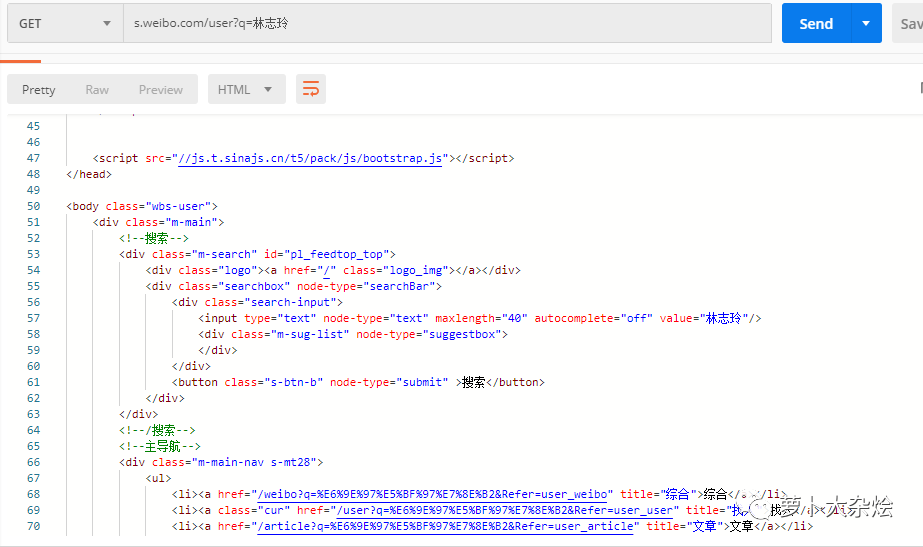
是可以正常返回?cái)?shù)據(jù)的的,這就省去了我們很多的麻煩。下面就是來分析并解析響應(yīng)消息,拿到對(duì)我們有用的數(shù)據(jù)。
經(jīng)過觀察可知,這個(gè)接口返回的數(shù)據(jù)中,有一個(gè) UID 信息,是每個(gè)微博用戶的唯一 ID,我們可以拿過來留作后面使用。
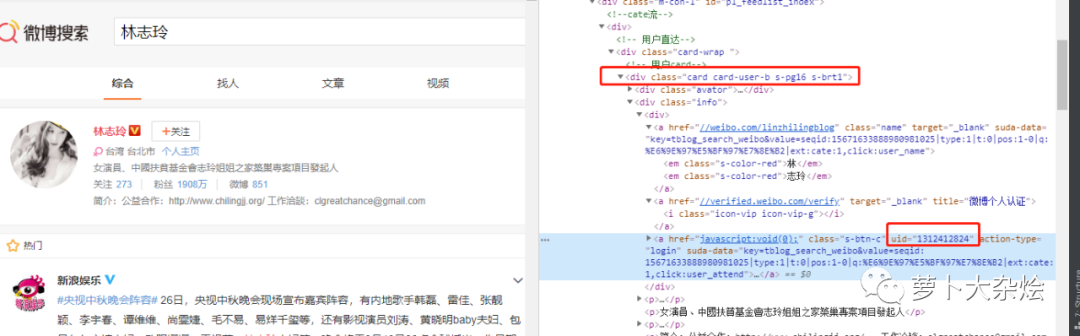
至于要如何定位到這個(gè) UID,我也已經(jīng)在圖中做了標(biāo)注,相信你只要簡單分析下就能明白。
def?get_uid(name):
????try:
????????url?=?'https://s.weibo.com/user?q=%s'?%?name
????????res?=?requests.get(url).text
????????content?=?BeautifulSoup(res,?'html.parser')
????????user?=?content.find('div',?attrs={'class':?'card?card-user-b?s-pg16?s-brt1'})
????????user_info?=?user.find('div',?attrs={'class':?'info'}).find('div')
????????href_list?=?user_info.find_all('a')
????????if?len(href_list)?==?3:
????????????title?=?href_list[1].get('title')
????????????if?title?==?'微博個(gè)人認(rèn)證':
????????????????uid?=?href_list[2].get('uid')
????????????????return?uid
????????????elif?title?==?'微博會(huì)員':
????????????????uid?=?href_list[2].get('uid')
????????????????return?uid
????????else:
????????????print("There?are?something?wrong")
????????????return?False
????except:
????????raise
代碼里都是我們講過的知識(shí),相信你完全可以看懂。
M 站的利用
M 站一般是指手機(jī)網(wǎng)頁端的頁面,也就是為了適配 mobile 移動(dòng)端而制作的頁面。一般的網(wǎng)站都是在原網(wǎng)址前面加“m.”來作為自己 M 站的地址,比如:m.baidu.com 就是百度的 M 站。
我們來打開微博的 M 站,再進(jìn)入到林志玲的微博頁面看看 Network 中的請求,有沒有什么驚喜呢?
我們首先發(fā)現(xiàn)了這樣一個(gè) URL
https://m.weibo.cn/api/container/getIndex?uid=1312412824&luicode=10000011&lfid=100103type%3D1%26q%3D%E6%9E%97%E5%BF%97%E7%8E%B2&containerid=1005051312412824
接著繼續(xù)拖動(dòng)網(wǎng)頁,發(fā)現(xiàn) Network 中又有類似的 URL
https://m.weibo.cn/api/container/getIndex?uid=1312412824&luicode=10000011&lfid=100103type%3D1%26q%3D%E6%9E%97%E5%BF%97%E7%8E%B2&containerid=1076031312412824&page=2
隨著該 URL 的出現(xiàn),頁面也展示了新的微博信息,顯然該 URL 就是請求微博的 API。同樣道理,把第二個(gè) URL 放到 PostMan 中,看看哪些參數(shù)是可以省略的
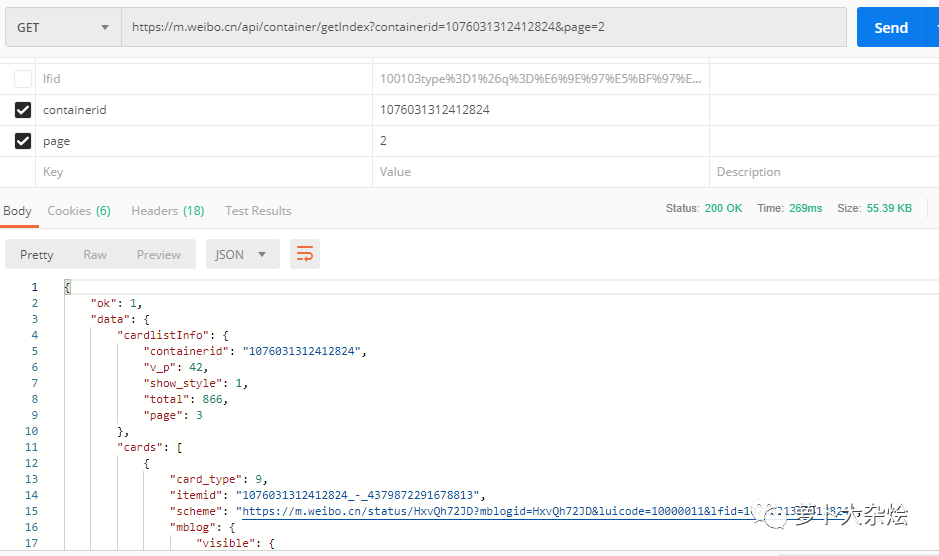
最后我們發(fā)現(xiàn),只要傳入正確的 containerid 信息,page 用來控制分頁,就能夠返回對(duì)應(yīng)的微博信息,可是 containerid 信息又從哪里來呢?我們剛剛獲得了一個(gè) UID 信息,現(xiàn)在來嘗試下能不能通過這個(gè) UID 來獲取到 containerid 信息。
這里就又需要一些經(jīng)驗(yàn)了,我可以不停的嘗試給接口“m.weibo.cn/api/container/getIndex”添加不同的參數(shù),看看它會(huì)返回些什么信息,比如常見的參數(shù)名稱 type,id,value,name 等等。最終,在我不懈的努力下,發(fā)現(xiàn) type 和 value 的組合是成功的,可以拿到對(duì)應(yīng)的 containerid 信息
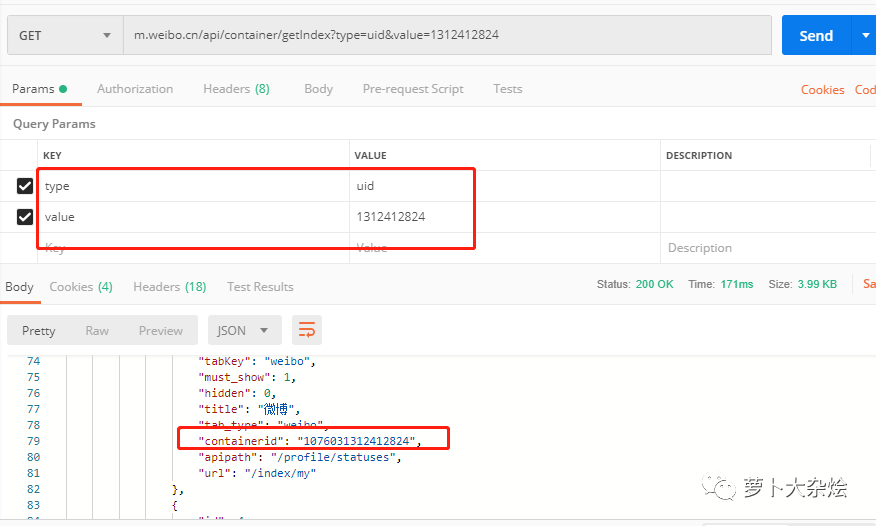
這個(gè)地方真的不有任何捷徑了,只能靠嘗試和經(jīng)驗(yàn),也是比較痛苦的地方,畢竟是靠全黑盒的形式來試探其他系統(tǒng)的 API。
現(xiàn)在就可以編寫代碼,獲取對(duì)應(yīng)的 containerid 了(如果你細(xì)心的話,還可以看到這個(gè)接口還返回了很多有意思的信息,可以自己嘗試著抓取)。
def?get_userinfo(uid):
????try:
????????url?=?'https://m.weibo.cn/api/container/getIndex?type=uid&value=%s'?%?uid
????????res?=?requests.get(url).json()
????????containerid?=?res['data']['tabsInfo']['tabs'][1]['containerid']
????????mblog_counts?=?res['data']['userInfo']['statuses_count']
????????followers_count?=?res['data']['userInfo']['followers_count']
????????userinfo?=?{
????????????"containerid":?containerid,
????????????"mblog_counts":?mblog_counts,
????????????"followers_count":?followers_count
????????}
????????return?userinfo
????except:
????????raise
代碼都是最基本的操作,就不做過多的解釋了。
下面就是保存微博信息了
微博信息就保存在 res['data']['cards'] 下面,有評(píng)論、轉(zhuǎn)發(fā),點(diǎn)贊數(shù)量等等信息。于是我們解析該 json 數(shù)據(jù)的函數(shù)就有了:
def?get_blog_info(cards,?i,?name,?page):
????blog_dict?=?{}
????if?cards[i]['card_type']?==?9:
????????scheme?=?cards[i]['scheme']??#?微博地址
????????mblog?=?cards[i]['mblog']
????????mblog_text?=?mblog['text']
????????create_time?=?mblog['created_at']
????????mblog_id?=?mblog['id']
????????reposts_count?=?mblog['reposts_count']??#?轉(zhuǎn)發(fā)數(shù)量
????????comments_count?=?mblog['comments_count']??#?評(píng)論數(shù)量
????????attitudes_count?=?mblog['attitudes_count']??#?點(diǎn)贊數(shù)量
????????with?open(name,?'a',?encoding='utf-8')?as?f:
????????????f.write("----第"?+?str(page)?+?"頁,第"?+?str(i?+?1)?+?"條微博----"?+?"\n")
????????????f.write("微博地址:"?+?str(scheme)?+?"\n"?+?"發(fā)布時(shí)間:"?+?str(create_time)?+?"\n"
????????????????????+?"微博內(nèi)容:"?+?mblog_text?+?"\n"?+?"點(diǎn)贊數(shù):"?+?str(attitudes_count)?+?"\n"
????????????????????+?"評(píng)論數(shù):"?+?str(comments_count)?+?"\n"?+?"轉(zhuǎn)發(fā)數(shù):"?+?str(reposts_count)?+?"\n")
????????blog_dict['mblog_id']?=?mblog_id
????????blog_dict['mblog_text']?=?mblog_text
????????blog_dict['create_time']?=?create_time
????????return?blog_dict
????else:
????????print("沒有任何微博哦")
????????return?False
函數(shù)參數(shù):
第一個(gè)參數(shù),接受的值為 res['data']['cards'] 的返回值,是一個(gè)字典類型數(shù)據(jù)
第二個(gè)參數(shù),是外層調(diào)用函數(shù)的循環(huán)計(jì)數(shù)器
第三個(gè)參數(shù),是要爬取的大 V 名稱
第四個(gè)參數(shù),是正在爬取的頁碼
最后函數(shù)返回一個(gè)字典
搜索微博信息
我們還要實(shí)現(xiàn)通過微博的一些文字片段,來定位到某個(gè)微博,從而抓取該微博下的評(píng)論的功能。
再定義一個(gè)函數(shù),調(diào)用上面的 get_blog_info 函數(shù),從其返回的字典中拿到對(duì)應(yīng)的微博信息,再和需要比對(duì)的我們輸入的微博字段做比較,如果包含,那么就說明找到我們要的微博啦
def?get_blog_by_text(containerid,?blog_text,?name):
????blog_list?=?[]
????page?=?1
????while?True:
????????try:
????????????url?=?'https://m.weibo.cn/api/container/getIndex?containerid=%s&page=%s'?%?(containerid,?page)
????????????res_code?=?requests.get(url).status_code
????????????if?res_code?==?418:
????????????????print("訪問太頻繁,過會(huì)再試試吧")
????????????????return?False
????????????res?=?requests.get(url).json()
????????????cards?=?res['data']['cards']
????????????if?len(cards)?>?0:
????????????????for?i?in?range(len(cards)):
????????????????????print("-----正在爬取第"?+?str(page)?+?"頁,第"?+?str(i+1)?+?"條微博------")
????????????????????blog_dict?=?get_blog_info(cards,?i,?name,?page)
????????????????????blog_list.append(blog_dict)
????????????????????if?blog_list?is?False:
????????????????????????break
????????????????????mblog_text?=?blog_dict['mblog_text']
????????????????????create_time?=?blog_dict['create_time']
????????????????????if?blog_text?in?mblog_text:
????????????????????????print("找到相關(guān)微博")
????????????????????????return?blog_dict['mblog_id']
????????????????????elif?checkTime(create_time,?config.day)?is?False:
????????????????????????print("沒有找到相關(guān)微博")
????????????????????????return?blog_list
????????????????page?+=?1
????????????????time.sleep(config.sleep_time)
????????????else:
????????????????print("沒有任何微博哦")
????????????????break????????except:
????????????pass
代碼雖然看起來比較長,但是其實(shí)都是已經(jīng)學(xué)習(xí)過的知識(shí)。
唯一需要說明的就是有一個(gè) checkTime 函數(shù)和 config 配置文件
checkTime 函數(shù)定義如下
def?checkTime(inputtime,?day):
????try:
????????intime?=?datetime.datetime.strptime("2019-"?+?inputtime,?'%Y-%m-%d')
????except:
????????return?"時(shí)間轉(zhuǎn)換失敗"????now?=?datetime.datetime.now()
????n_days?=?now?-?intime
????days?=?n_days.days
????if?days?????????return?True
????else:
????????return?False
定義這個(gè)函數(shù)的目的是為了限制搜索時(shí)間,比如對(duì)于 90 天以前的微博,就不再搜索了,也是提高效率。
而 config 配置文件里,則定義了一個(gè)配置項(xiàng) day,來控制可以搜索的時(shí)間范圍
day?=?90??#?最久抓取的微博時(shí)間,60即為只抓取兩個(gè)月前到現(xiàn)在的微博
sleep_time?=?5??#?延遲時(shí)間,建議配置5-10s
獲取評(píng)論信息
對(duì)于評(píng)論信息,和前面小試牛刀里的方法是一樣的,就不再重復(fù)了
def?get_comment(self,?mblog_id,?page):
????comment?=?[]
????for?i?in?range(0,?page):
????????print("-----正在爬取第"?+?str(i)?+?"頁評(píng)論")
????????url?=?'https://weibo.com/aj/v6/comment/big?ajwvr=6&id=%s&page=%s'?%?(mblog_id,?i)
????????req?=?requests.get(url,?headers=self.headers).text
????????html?=?json.loads(req)['data']['html']
????????content?=?BeautifulSoup(html,?"html.parser")
????????comment_text?=?content.find_all('div',?attrs={'class':?'WB_text'})
????????for?c?in?comment_text:
????????????_text?=?c.text.split(":")[1]
????????????comment.append(_text)
????????time.sleep(config.sleep_time)????return?commentdef?download_comment(self,?comment):
????comment_pd?=?pd.DataFrame(columns=['comment'],?data=comment)
????timestamp?=?str(int(time.time()))
????comment_pd.to_csv(timestamp?+?'comment.csv',?encoding='utf-8')
定義運(yùn)行函數(shù)
最后,我們開始定義運(yùn)行函數(shù),把需要用戶輸入的相關(guān)信息都從運(yùn)行函數(shù)中獲取并傳遞給后面的邏輯函數(shù)中。
from?weibo_spider?import?WeiBo
from?config?import?headers

def?main(name,?spider_type,?text,?page,?iscomment,?comment_page):
????print("開始...")
????weibo?=?WeiBo(name,?headers)
????print("以名字搜索...")
????print("獲取?UID...")
????uid?=?weibo.get_uid()
????print("獲取?UID?結(jié)束")
????print("獲取用戶信息...")
????userinfo?=?weibo.get_userinfo(uid)
????print("獲取用戶信息結(jié)束")
????if?spider_type?==?"Text"?or?spider_type?==?"text":
????????print("爬取微博...")
????????blog_info?=?weibo.get_blog_by_text(userinfo['containerid'],?text,?name)
????????if?isinstance(blog_info,?str):
????????????print("搜索到微博,爬取成功")
????????????if?iscomment?==?"Yes"?or?iscomment?==?"YES"?or?iscomment?==?"yes":
????????????????print("現(xiàn)在爬取評(píng)論")
????????????????comment_info?=?weibo.get_comment(blog_info,?comment_page)
????????????????weibo.download_comment(comment_info)
????????????????print("評(píng)論爬取成功,請查看文件")
????????????????return?True
????????????return?True
????????else:
????????????print("沒有搜索到微博,爬取結(jié)束")
????????????return?False
????elif?spider_type?==?"Page"?or?spider_type?==?"page":
????????blog_info?=?weibo.get_blog_by_page(userinfo['containerid'],?page,?name)
????????if?blog_info?and?len(blog_info)?>?0:
????????????print("爬取成功,請查看文件")
????????????return?True
????else:
????????print("請輸入正確選項(xiàng)")
????????return?Falseif?__name__?==?'__main__':
????target_name?=?input("type?the?name:?")
????spider_type?=?input("type?spider?type(Text?or?Page):?")
????text?=?"你好"
????page_count?=?10
????iscomment?=?"No"
????comment_page_count?=?100
????while?spider_type?not?in?("Text",?"text",?"Page",?"page"):
????????spider_type?=?input("type?spider?type(Text?or?Page):?")
????if?spider_type?==?"Page"?or?spider_type?==?"page":
????????page_count?=?input("type?page?count(Max?is?50):?")
????????while?int(page_count)?>?50:
????????????page_count?=?input("type?page?count(Max?is?50):?")
????elif?spider_type?==?"Text"?or?spider_type?==?"text":
????????text?=?input("type?blog?text?for?search:?")
????????iscomment?=?input("type?need?crawl?comment?or?not(Yes?or?No):?")
????????while?iscomment?not?in?("Yes",?"YES",?"yes",?"No",?"NO",?"no"):
????????????iscomment?=?input("type?need?crawl?comment?or?not(Yes?or?No):?")
????????if?iscomment?==?"Yes"?or?iscomment?==?"YES"?or?iscomment?==?"yes":
????????????comment_page_count?=?input("type?comment?page?count(Max?is?1000):?")
????????????while?int(comment_page_count)?>?1000:
????????????????comment_page_count?=?input("type?comment?page?count(Max?is?1000):?")
????result?=?main(target_name,?spider_type,?text,?int(page_count),?iscomment,?int(comment_page_count))
????if?result:
????????print("爬取成功!!")
????else:
????????print("爬取失敗!!")
雖然代碼比較長,但是大部分都是邏輯的判斷,并不難。
唯一的知識(shí)點(diǎn)就是輸入函數(shù) input(),它提供一個(gè)阻塞進(jìn)程,只有當(dāng)用戶按下回車鍵之后,才會(huì)繼續(xù)執(zhí)行后面的代碼。
你應(yīng)該注意到了這句代碼
weibo?=?WeiBo(name,?headers)
這里是把前面一系列的函數(shù)都封裝到了 WeiBo 這個(gè)類中,就是面向?qū)ο蟮乃季S了。
爬蟲類與工具集
我們來看下爬蟲類 WeiBo 是如何定義的
class?WeiBo(object):????def?__init__(self,?name,?headers):
????????self.name?=?name
????????self.headers?=?headers

????def?get_uid(self):??#?獲取用戶的?UID
????????...????def?get_userinfo(self,?uid):??#?獲取用戶信息,包括?containerid
????????...????def?get_blog_by_page(self,?containerid,?page,?name):??#?獲取?page?頁的微博信息
????????...????def?get_blog_by_text(self,?containerid,?blog_text,?name):??#?一個(gè)簡單的搜索功能,根據(jù)輸入的內(nèi)容查找對(duì)應(yīng)的微博
????????...????def?get_comment(self,?mblog_id,?page):??#?與上個(gè)函數(shù)配合使用,用于獲取某個(gè)微博的評(píng)論
????????...????def?download_comment(self,?comment):??#?下載評(píng)論
????...在類的初始化函數(shù)中,傳入需要爬取的大 V 名稱和我們準(zhǔn)備好的 headers(cookie),然后把上面寫好的函數(shù)寫到該類下,后面該類的實(shí)例 weibo 就能夠調(diào)用這些函數(shù)了。
對(duì)于工具集,就是抽象出來的一些邏輯處理,我們也都講解過
import?datetime
from?config?import?daydef?checkTime(inputtime,?day):
.????...def?get_blog_info(cards,?i,?name,?page):
????...
好了,至此,你就可以愉快的運(yùn)行爬蟲了,然后喝杯茶,慢慢的等著程序運(yùn)行完畢即可。
我們看一下最終的成果
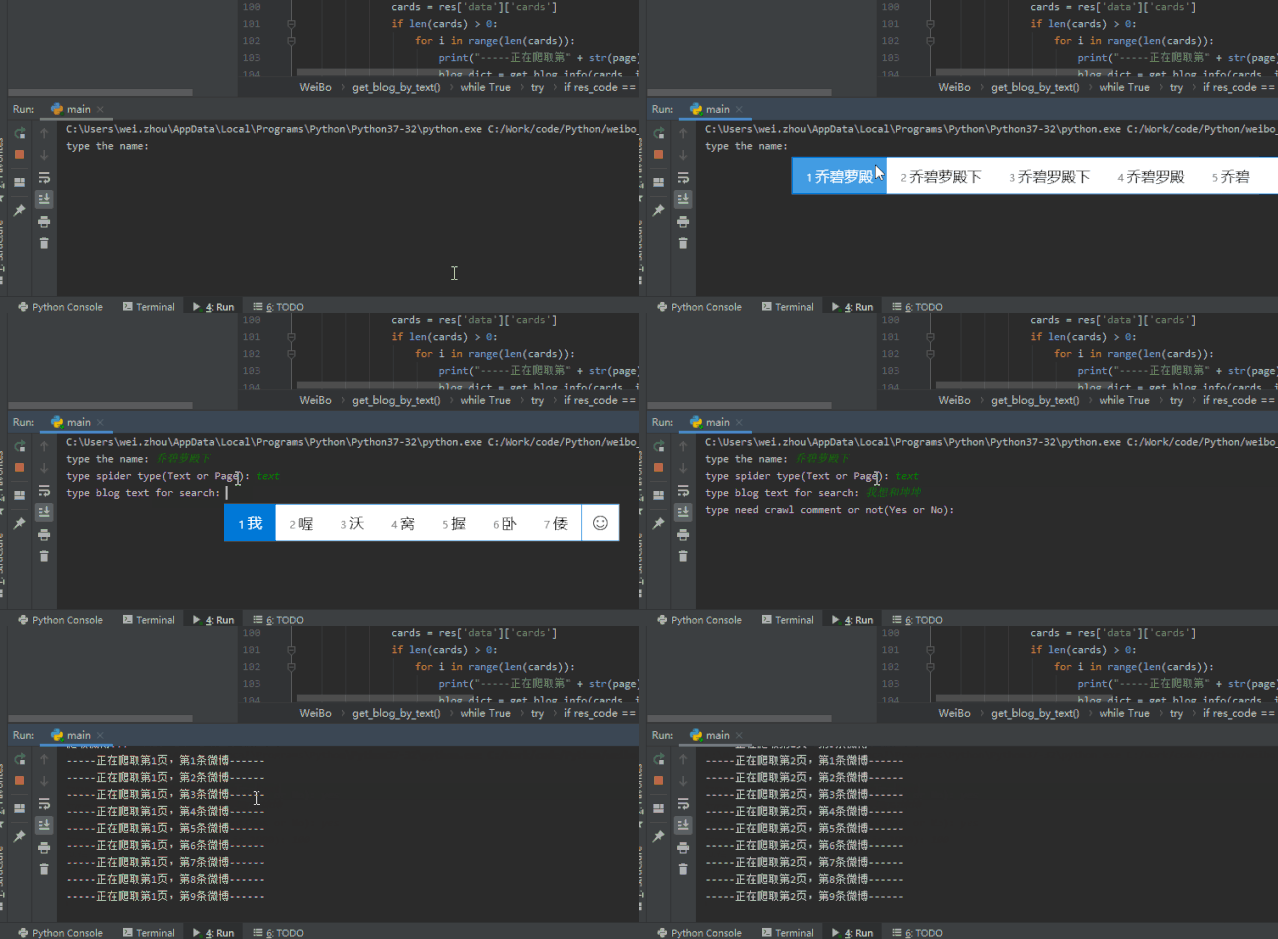
是不是有些許的滿足感呢!
完整的代碼戳這里:
小試牛刀
https://github.com/zhouwei713/DataAnalyse/tree/master/weibo_spider
自動(dòng)爬微博
https://github.com/zhouwei713/DataAnalyse/tree/master/auto_weibo_spider
總結(jié)
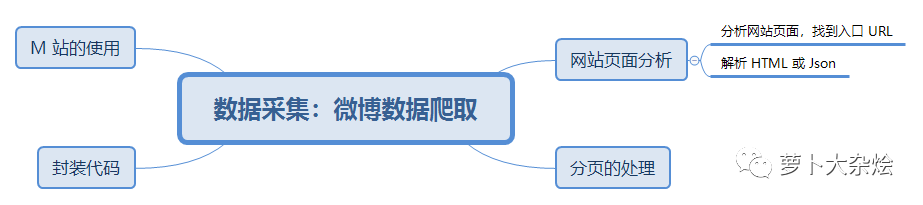
今天我以微博爬蟲為例,全面的講解了如何分析網(wǎng)頁,如何應(yīng)對(duì)反爬蟲,如何使用 M 站等技能。相信通讀完今天的課程,你應(yīng)該已經(jīng)可以勝任一些簡單的爬蟲工作了,是不是已經(jīng)蠢蠢欲動(dòng)了呢。
? ??