python爬蟲教程:爬取幽默笑話網(wǎng)站

爬取網(wǎng)站為:http://xiaohua.zol.com.cn/youmo/
查看網(wǎng)頁機構(gòu),爬取笑話內(nèi)容時存在如下問題:
1、每頁需要進入“查看更多”鏈接下面網(wǎng)頁進行進一步爬取內(nèi)容每頁查看更多鏈接內(nèi)容比較多,多任務(wù)進行,這里采用線程池的方式,可以有效地控制系統(tǒng)中并發(fā)線程的數(shù)量。避免當(dāng)系統(tǒng)中包含有大量的并發(fā)線程時,導(dǎo)致系統(tǒng)性能下降,甚至導(dǎo)致 Python 解釋器崩潰,引入線程池,花費時間更少,更效率。
創(chuàng)建線程 池threadpool.ThreadPool()
創(chuàng)建需要線程池處理的任務(wù)即threadpool.makeRequests(),makeRequests存放的是要開啟多線程的函數(shù),以及函數(shù)相關(guān)參數(shù)和回調(diào)函數(shù),其中回調(diào)函數(shù)可以不寫(默認是無)。
將創(chuàng)建的多個任務(wù)put到線程池中,threadpool.putRequest()
等到所有任務(wù)處理完畢theadpool.pool()
2、查看鏈接笑話頁內(nèi)容,div元素內(nèi)部文本分布比較混亂。有的分布在<p>鏈接內(nèi)有的屬于div的文本,可采用正則表達式的方式解決。
注意2種獲取元素節(jié)點的方式:
1)lxml獲取節(jié)點字符串
res=requests.get(url,headers=headers)html = res.textlxml 獲取節(jié)點寫法element=etree.HTML(html)divEle=element.xpath("http://div[@class='article-text']")[0] # 獲取div節(jié)點div= etree.tostring(divEle, encoding = 'utf-8' ).decode('utf-8') # 轉(zhuǎn)換為div字符串
2)正則表達式寫法1,過濾回車、制表符和p標簽
# 第一種方式:replacecontent = re.findall('<div class="article-text">(.*?)</div>',html,re.S)content = content[0].replace('\r','').replace('\t','').replace('<p>','').replace('</p>','').strip()
3)正則表達式寫法2,過濾回車、制表符和p標簽
# 第二種方式:subfor index in range(len(content)):content[index] = re.sub(r'(\r|\t|<p>|<\/p>)+','',content[index]).strip()list = ''.join(content)print(list)
3、完整代碼
index.py
import requestsimport threadpoolimport timeimport os,sysimport refrom lxml import etreefrom lxml.html import tostringclass ScrapDemo():next_page_url="" #下一頁的URLpage_num=1 #當(dāng)前頁detail_url_list=0 #詳情頁面URL地址listdeepth=0 #設(shè)置抓取的深度headers = {"user-agent": "Mozilla/5.0 (Windows NT 10.0; Win64; x64) AppleWebKit/537.36 (KHTML, like Gecko) Chrome/68.0.3440.84 Safari/537.36"}fileNum=0def __init__(self,url):self.scrapyIndex(url)def threadIndex(self,urllist): #開啟線程池if len(urllist) == 0:print("請輸入需要爬取的地址")return FalseScrapDemo.detail_url_list=len(urllist)pool=threadpool.ThreadPool(len(urllist))requests=threadpool.makeRequests(self.detailScray,urllist)for req in requests:pool.putRequest(req)time.sleep(0.5)pool.wait()def detailScray(self,url): # 獲取html結(jié)構(gòu)if not url == "":url='http://xiaohua.zol.com.cn/{}'.format(url)res=requests.get(url,headers=ScrapDemo.headers)html=res.text# element=etree.HTML(html)# divEle=element.xpath("http://div[@class='article-text']")[0] # Element divself.downloadText(html)def downloadText(self,ele): # 抓取數(shù)據(jù)并存為txt文件clist = re.findall('<div class="article-text">(.*?)</div>',ele,re.S)for index in range(len(clist)):'''正則表達式:過濾掉回車、制表符和p標簽'''clist[index]=re.sub(r'(\r|\t|<p>|<\/p>)+','',clist[index])content="".join(clist)# print(content)basedir=os.path.dirname(__file__)filePath=os.path.join(basedir)filename="xiaohua{0}-{1}.txt".format(ScrapDemo.deepth,str(ScrapDemo.fileNum))file=os.path.join(filePath,'file_txt',filename)try:f=open(file,"w")f.write(content)if ScrapDemo.fileNum == (ScrapDemo.detail_url_list - 1):print(ScrapDemo.next_page_url)print(ScrapDemo.deepth)if not ScrapDemo.next_page_url == "":self.scrapyIndex(ScrapDemo.next_page_url)except Exception as e:print("Error:%s" % str(e))ScrapDemo.fileNum=ScrapDemo.fileNum+1print(ScrapDemo.fileNum)def scrapyIndex(self,url):if not url == "":ScrapDemo.fileNum=0ScrapDemo.deepth=ScrapDemo.deepth+1print("開啟第{0}頁抓取".format(ScrapDemo.page_num))res=requests.get(url,headers=ScrapDemo.headers)html=res.textelement=etree.HTML(html)a_urllist=element.xpath("http://a[@class='all-read']/@href") # 當(dāng)前頁所有查看全文next_page=element.xpath("http://a[@class='page-next']/@href") # 獲取下一頁的urlScrapDemo.next_page_url='http://xiaohua.zol.com.cn/{}'.format(next_page[0])if not len(next_page) == 0 and ScrapDemo.next_page_url != url:ScrapDemo.page_num=ScrapDemo.page_num+1self.threadIndex(a_urllist[:])else:print('下載完成,當(dāng)前頁數(shù)為{}頁'.format(ScrapDemo.page_num))sys.exit()
runscrapy.py
from app import ScrapDemourl="http://xiaohua.zol.com.cn/youmo/"ScrapDemo(url)
運行如下:
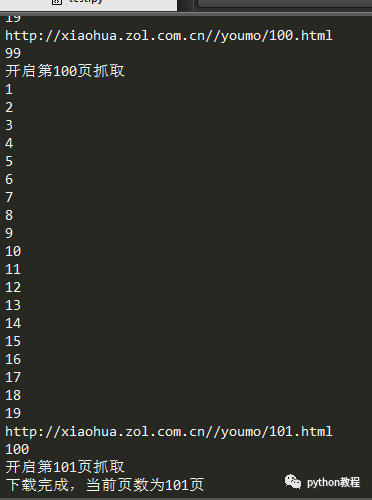
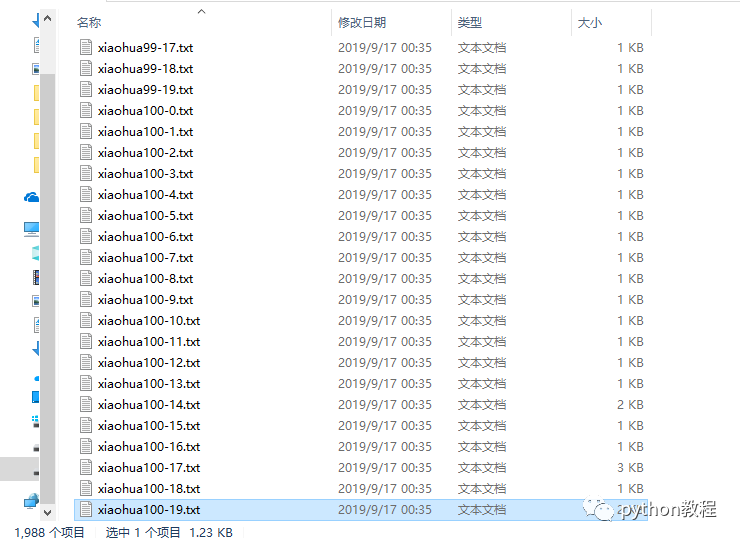
總共1988個文件,下載完成。
以上就是本文的全部內(nèi)容,希望對大家的學(xué)習(xí)有所幫助
原文鏈接:https://www.cnblogs.com/hqczsh/p/11531368.html
聲明:文章著作權(quán)歸作者所有,如有侵權(quán),請聯(lián)系小編刪除