【Python爬蟲】如何搞定字體反爬
首先聲明,本文章僅為學習技術(shù)使用,如作他用所負責任一概與作者無關。
前幾天有個私活,要爬取某車之家的口碑評論,沒有接單,但是對于其中涉及到的字體反爬有了濃厚的研究興趣,因此,打算鍛煉一下自己的反爬能力,盤它!!!
什么是字體反爬
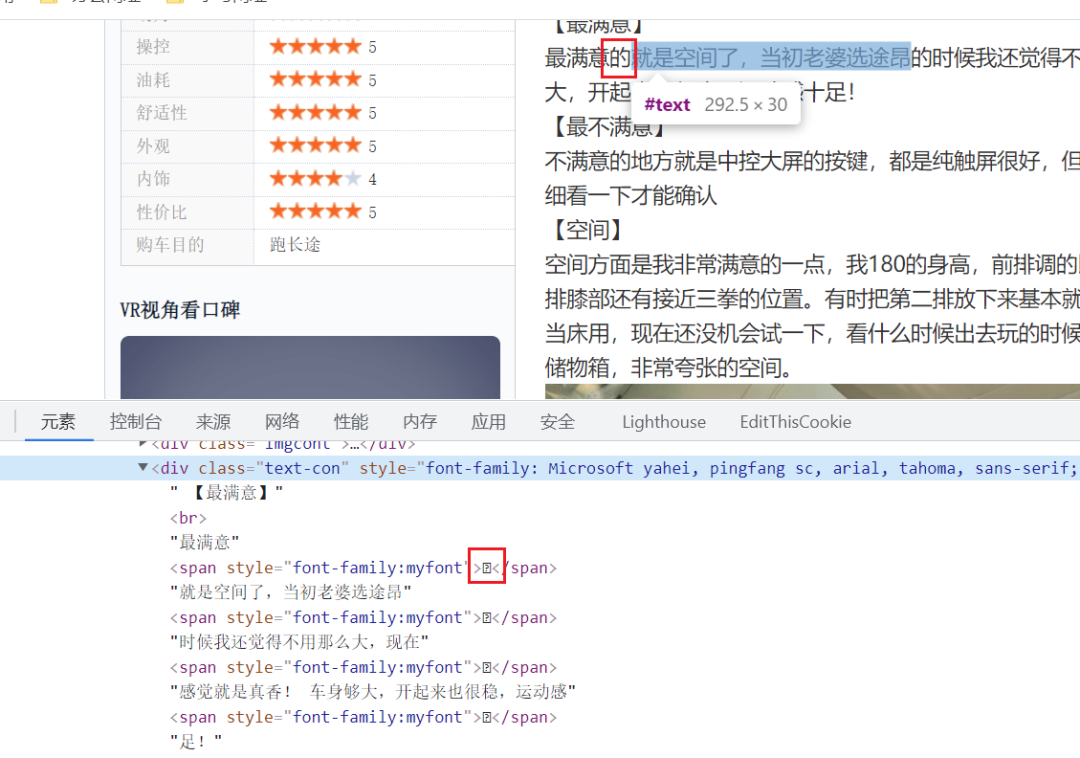
如圖所示,在網(wǎng)頁中能正常看到的文字,但是到代碼中文沒了,變成了一個span標簽,如果爬蟲不能解決這些文字問題,那么獲取下來的內(nèi)容就沒有什么意義了。關于字體反爬下面這個文章說的很清楚了:
反爬終極方案總結(jié)—字體反爬 - 笑看山河的文章 - 知乎
解決思路
在百度上搜了一下“字體反爬”有很多相關的文章,但基本無法解決某車之家的隨機變形字體,因此,需要另尋思路。在前面的知乎文章中,其實已經(jīng)給出了一個方向,那就是OCR。。。。。。
因此,思路就是:1爬取頁面->2下載頁面的自定義字體->3將自定義字體轉(zhuǎn)成圖片->4使用OCR識別出文字->5替換頁面文檔中的特殊字符
準備工作-安裝第三方包
嘗試了很多庫,最后使用cnocr這個庫的識別率最好,但在安裝這個庫時就遇到了問題,因此,這里先將解決安裝問題的過程記錄一下:
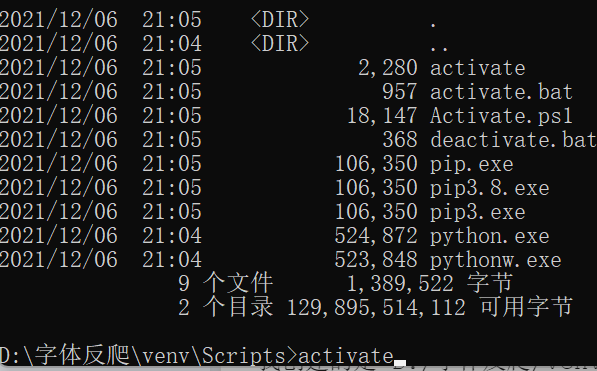
首先創(chuàng)建了一個干凈的虛擬環(huán)境,并激活
安裝cnocr 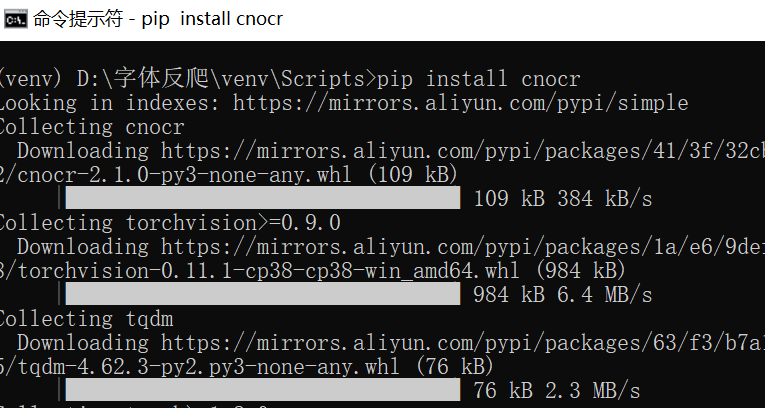
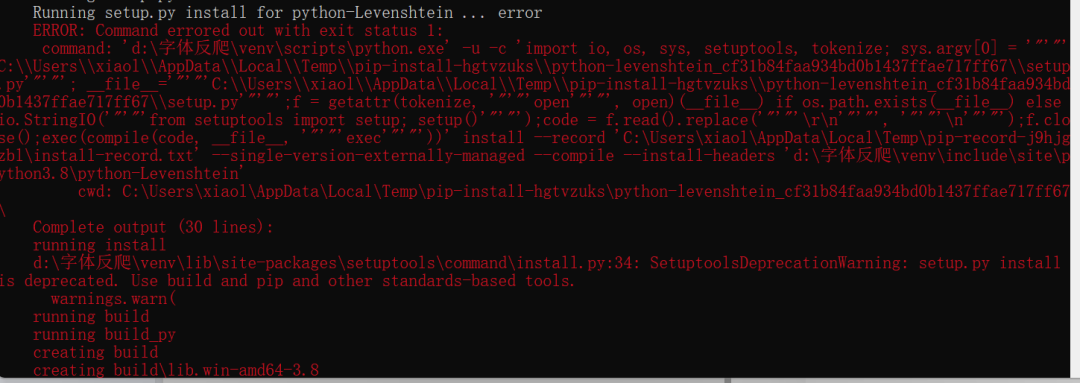
在安裝python-Levenshtein這個包時出錯了,一大堆的紅色英文,讓英語渣渣的我十分頭疼。不過,經(jīng)歷過無數(shù)次錘煉的我,已經(jīng)能夠熟練的解決問題了:把關鍵字復制下來,求助于萬能的百度^_^,果不其然,有很多解決方案。具體就自行百度了,這里直接上我的解決方法“直接下載whl文件到本地安裝”。點這里進入下載whl文件的地址搜索python-Levenshtein下載
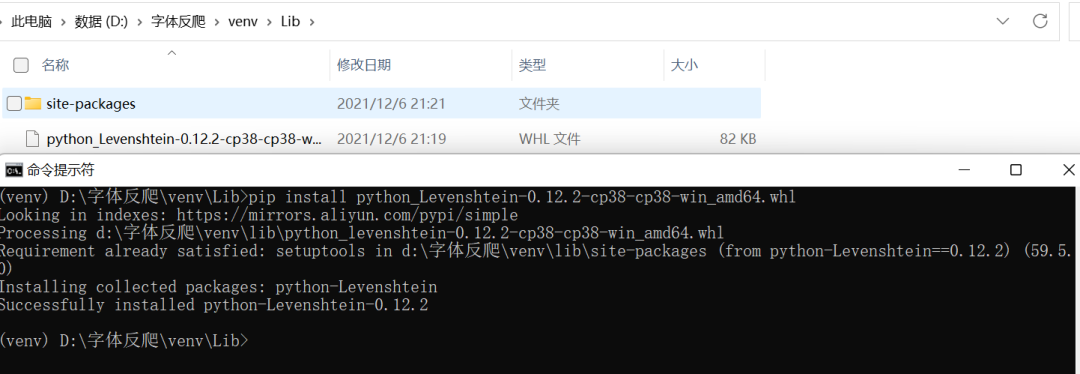 注意圖片中的安裝命令與文件名稱以及存放目錄間的關系,這個包安裝成功后,再次運行pip install cnocr就不再報錯了。
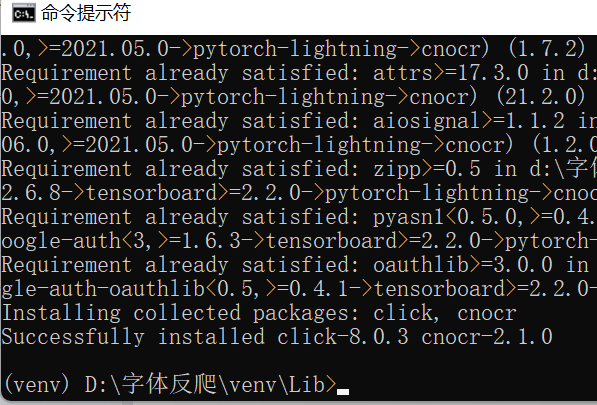
安裝fontTools、reportlab用于識別字體并畫圖 這個步驟正常的pip install即可,沒有碰到問題
分步實現(xiàn)
因為本文是專注解決字體反爬問題,因此,沒考慮爬蟲的其他步驟,直接隨機選擇了5個網(wǎng)頁的代碼和字體文件進行試驗:
讀取字體文件并逐個文字轉(zhuǎn)成圖片:
from?fontTools.ttLib?import?TTFont
from?fontTools.pens.basePen?import?BasePen
from?reportlab.graphics.shapes?import?Path
from?reportlab.lib?import?colors
from?reportlab.graphics?import?renderPM
from?reportlab.graphics.shapes?import?Group,?Drawing
import?os


class?ReportLabPen(BasePen):
????"""
????畫出字體的類
????"""
????def?__init__(self,?glyphset,?path=None):
????????BasePen.__init__(self,?glyphset)
????????if?path?is?None:
????????????path?=?Path()
????????self.path?=?path

????def?_moveTo(self,?p):
????????(x,?y)?=?p
????????self.path.moveTo(x,?y)

????def?_lineTo(self,?p):
????????(x,?y)?=?p
????????self.path.lineTo(x,?y)

????def?_curveToOne(self,?p1,?p2,?p3):
????????(x1,?y1)?=?p1
????????(x2,?y2)?=?p2
????????(x3,?y3)?=?p3
????????self.path.curveTo(x1,?y1,?x2,?y2,?x3,?y3)

????def?_closePath(self):
????????self.path.closePath()


class?TtfToImage:
????"""
????將ttf文件中的文字轉(zhuǎn)成image圖片的類
????"""
????def?__init__(self,?ttf_file,?fmt='png'):
????????"""
????????初始化對象
????????:param?ttf_file:?ttf文件的絕對路徑
????????:param?fmt:?輸出的圖片格式,默認png
????????"""
????????self.ttf_file?=?ttf_file
????????path,?file_name?=?os.path.split(self.ttf_file)
????????#?將ttf文件的文件名作為圖片輸出的文件夾名稱,并放置在與ttf文件相同的目錄下
????????self.out_path?=?os.path.join(path,?file_name.split('.')[0])
????????self.fmt?=?fmt

????def?check_out_path(self):
????????"""
????????檢查圖片文件輸出的路徑,如文件夾未創(chuàng)建,則直接創(chuàng)建
????????"""
????????if?os.path.isdir(self.out_path):
????????????pass
????????else:
????????????os.mkdir(self.out_path)

????def?draw_to_image(self):
????????"""
????????將字體畫圖輸出
????????"""
????????self.check_out_path()
????????font?=?TTFont(self.ttf_file)
????????gs?=?font.getGlyphSet()
????????glyphnames?=?font.getGlyphNames()
????????n?=?0
????????for?i?in?glyphnames:
????????????if?i[0]?==?'.':
????????????????continue
????????????g?=?gs[i]
????????????pen?=?ReportLabPen(gs,?Path(fillColor=colors.black,?strokeWidth=5))
????????????g.draw(pen)
????????????w,?h?=?g.width,?g.width
????????????g?=?Group(pen.path)
????????????g.translate(0,?400)

????????????d?=?Drawing(w,?h)
????????????d.add(g)
????????????image_file?=?os.path.join(self.out_path,?f'{i.replace("uni",?"")+"."+self.fmt}')
????????????renderPM.drawToFile(d,?image_file,?self.fmt)
????????????n?+=?1
????????????print(f'第{n}個字體制作完畢,圖片為{image_file}!')


if?__name__?==?'__main__':
????ttf?=?TtfToImage('d:/字體反爬/測試用例/途昂1/wKgHGlsV95yAIlpKAADWCPynXQc60..ttf')
????ttf.draw_to_image()
這個步驟就是將字體文件ttf中的文字畫出一張張圖片,大部分代碼是從百度上搜索的,感謝無數(shù)的代碼貢獻者,讓我不用重復造輪子!
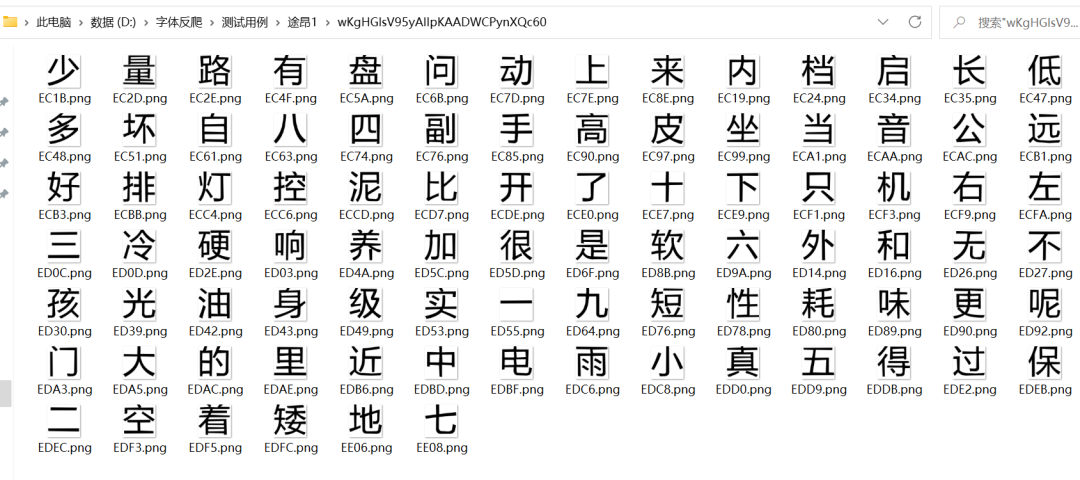
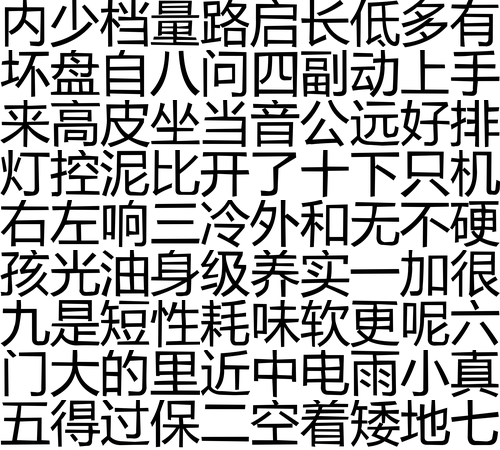
將文字圖片拼成矩陣圖片
在使用單字進行ocr識別時,正確率反而不如縮小后的矩陣文字,因此,將單字拼成矩陣 進行識別反而能夠提高正確率。
import?json
import?PIL.Image?as?Image
import?os
import?numpy?as?np


class?ImagesCompose:
????def?__init__(self,?font_files_path,?image_size=50,?each_row_num=10):
????????self.font_files_path?=?font_files_path
????????self.image_size?=?image_size??#?每張小圖片的大小
????????self.images?=?[i?for?i?in?os.listdir(self.font_files_path)]
????????self.column?=?each_row_num??#?圖片合并成一張圖后每行的字數(shù),默認10個字
????????image_count?=?len(self.images)
????????self.row?=?image_count?//?self.column??#?計算圖片合并成一張圖后,一共有幾行
????????if?image_count?%?self.column?!=?0:??#?如果余數(shù)不為0,則增加一行
????????????self.row?+=?1
????????????for?i?in?range(self.row?*?self.column?-?image_count):??#?并且用None字符補足數(shù)量以便后續(xù)轉(zhuǎn)換矩陣
????????????????self.images.append('None')
????????#?將self.images轉(zhuǎn)成row行column列的矩陣
????????self.images?=?np.array(self.images).reshape((self.row,?self.column))

????def?image_compose(self):
????????"""
????????組合圖片
????????"""
????????to_image?=?Image.new('RGB',?(self.column?*?self.image_size,?self.row?*?self.image_size))??#?創(chuàng)建一個新圖
????????#?循環(huán)遍歷,把每張圖片按順序粘貼到對應位置上
????????for?x,?y?in?np.argwhere(self.images):
????????????if?self.images[x,?y]?!=?'None':??#?當文件名不是None時,拼接圖片
????????????????from_image?=?Image.open(os.path.join(self.font_files_path,?self.images[x,?y])).resize(
????????????????????????(self.image_size,?self.image_size),?Image.ANTIALIAS)
????????????????to_image.paste(from_image,?(y?*?self.image_size,?x?*?self.image_size))
????????????????#?把矩陣中的文件名擴展名去除
????????????????self.images[x,?y]?=?os.path.splitext(self.images[x,?y])[0]
????????to_image.save(f'{self.font_files_path}.png')??#?保存新圖
????????#?將字體的編碼矩陣保存到TXT文件中,以便后續(xù)制作字典
????????with?open(f'{self.font_files_path}_keys.txt',?'w',?encoding='utf-8')?as?fin:
????????????fin.write(json.dumps(self.images.tolist(),?ensure_ascii=False))


if?__name__?==?'__main__':
????obj?=?ImagesCompose(r'D:\字體反爬\測試用例\途昂1\wKgHGlsV95yAIlpKAADWCPynXQc60')
????obj.image_compose()
使用ocr庫解析圖獲取文字,并生成文字編碼與漢字對應的字典
from?cnocr?import?CnOcr
import?json
import?numpy?as?np


class?GetFonts:
????def?__init__(self,?font_file,?key_file):
????????self.ocr?=?CnOcr()
????????self.font_file?=?font_file
????????with?open(key_file,?'r',?encoding='utf-8')?as?fout:
????????????self.key_array?=?np.array(json.loads(fout.read()))
????????self.font_dict?=?{}

????def?get_font_dict(self):
????????res?=?self.ocr.ocr(self.font_file)
????????res?=?[row[0]?for?row?in?res]
????????res?=?np.array(res)
????????for?x,?y?in?np.argwhere(self.key_array):
????????????if?self.key_array[x,?y]?!=?'None':
????????????????self.font_dict[self.key_array[x,?y]]?=?res[x,?y]

????????with?open(f'{self.font_file.replace(".png",?".txt")}',?'w',?encoding='utf-8')?as?fin:
????????????fin.write(json.dumps(self.font_dict,?ensure_ascii=False))


if?__name__?==?'__main__':
????fonts?=?GetFonts(
????????r'D:\字體反爬\測試用例\途昂1\wKgHGlsV95yAIlpKAADWCPynXQc60.png',
????????r'D:\字體反爬\測試用例\途昂1\wKgHGlsV95yAIlpKAADWCPynXQc60_keys.txt',
????)
????fonts.get_font_dict()
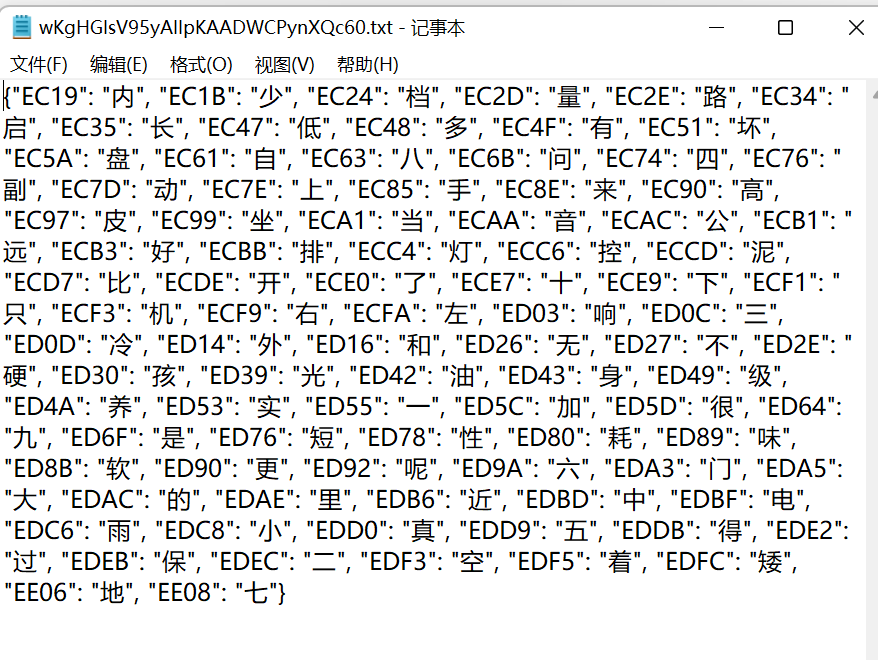
這一步是將前序步驟中處理完成的文字矩陣圖片與文字編碼矩陣進行匹配,將ocr識別出的文字與文字編碼構(gòu)造成字典。如下圖:
 4. 替換HTML中的自定義字符
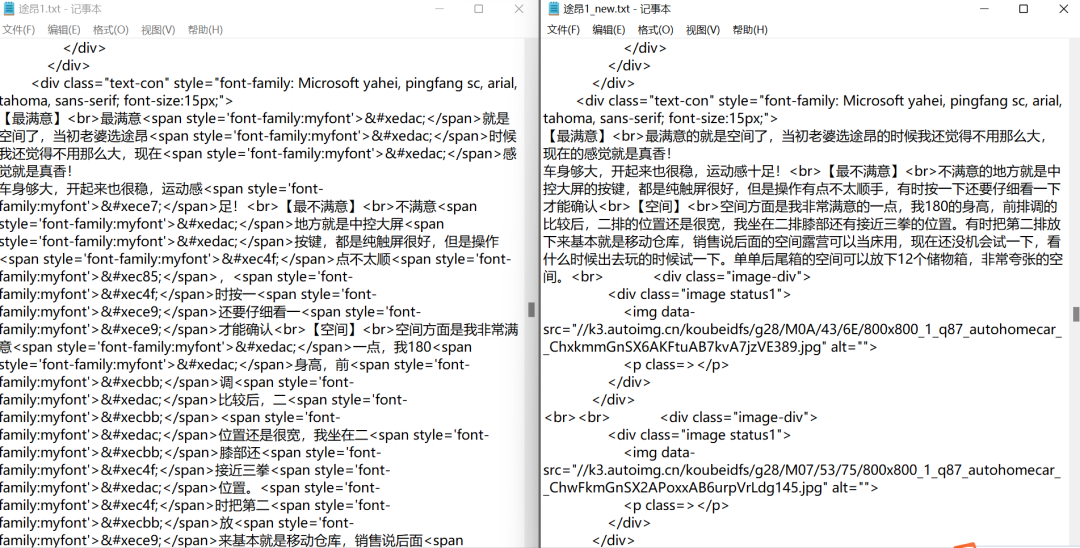
最后替換HTML中的span自定義字符標簽即可
4. 替換HTML中的自定義字符
最后替換HTML中的span自定義字符標簽即可
import?json


class?ParseHtml:
????def?__init__(self,?html,?font_dict_file):
????????self.html_path?=?html
????????with?open(html,?'r',?encoding='utf-8')?as?fin:
????????????self.html?=?fin.read()

????????with?open(font_dict_file,?'r',?encoding='utf-8')?as?fin:
????????????self.font_dict?=?json.loads(fin.read())

????def?replace_html(self):
????????for?k,?v?in?self.font_dict.items():
????????????p?=?f"&#x{k.lower()};"
????????????self.html?=?self.html.replace(p,?v)
????????with?open(self.html_path.replace('.txt',?'_new.txt'),?'w',?encoding='utf-8')?as?fout:
????????????fout.write(self.html)


if?__name__?==?'__main__':
????obj?=?ParseHtml(
????????'d:/字體反爬/測試用例/途昂1/途昂1.txt',
????????'d:/字體反爬/測試用例/途昂1/wKgHGlsV95yAIlpKAADWCPynXQc60.txt'
????)
????obj.replace_html()
其他測試案例
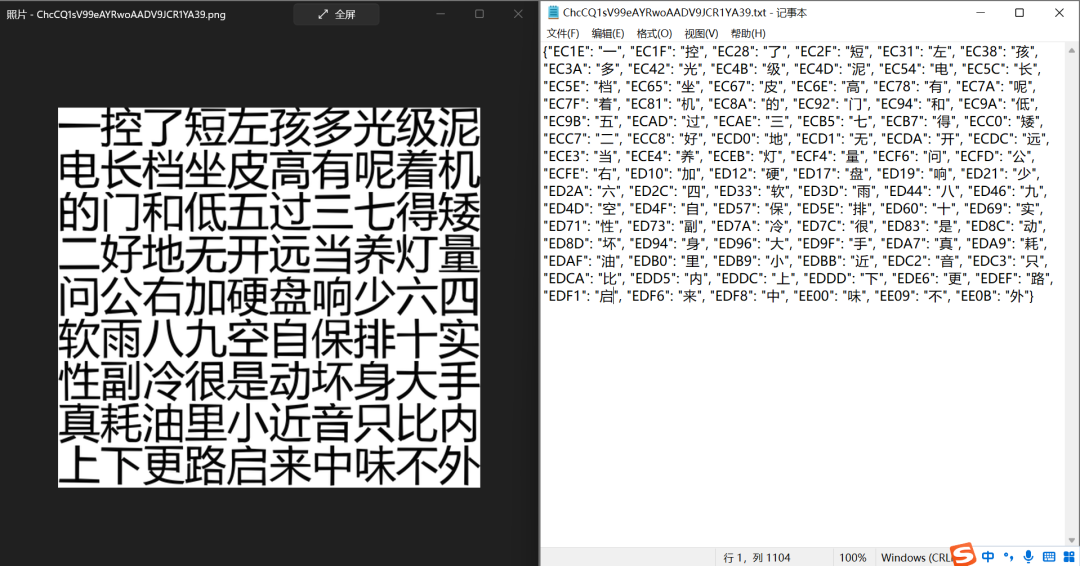
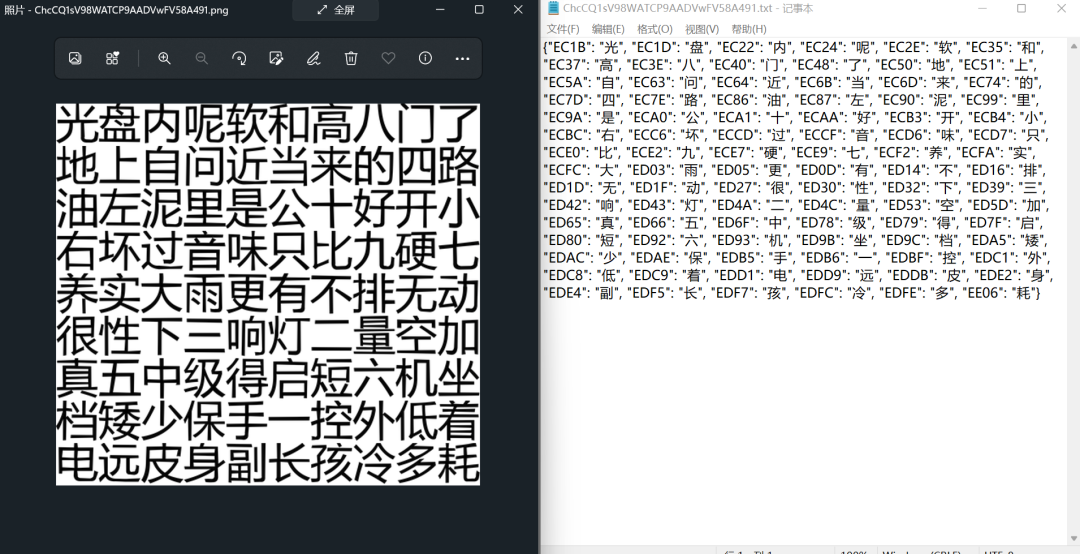
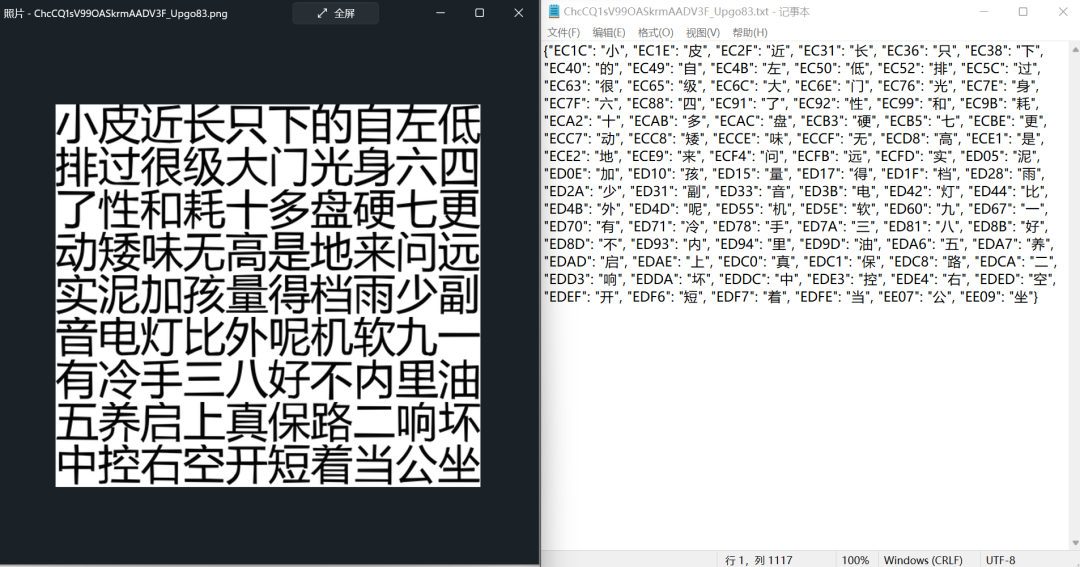
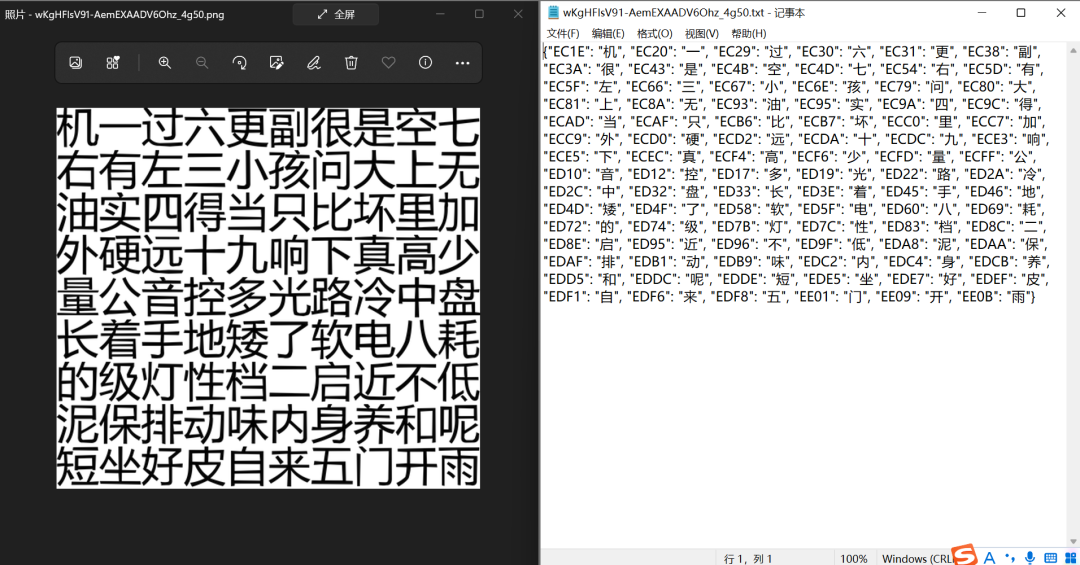
字體反爬的關鍵點就是構(gòu)造編碼與文字的字典,因此,將其他測試案例的原圖與結(jié)果進行一下匹配,看一下正確率,哇!完美!!!
最終總結(jié)
從測試的5個用例來看,字體反爬的難關算是攻克了,目前效果堪稱完美,這個解決方案總體用到了以下幾個庫:
fontTools、reportlab將字體生成圖片; PIL.Image庫進行圖片組合; cnocr進行ocr文字識別(這是核心,正確率與否主要取決于它); 其他還用到os、json、numpy等進行操作。爬蟲與反爬的博弈永無止境,也許沒過多久這個方案就失效了,但不變的是我們始終都在進步。
最后,推薦螞蟻老師的《零基礎Python到爬蟲到數(shù)據(jù)分析》課程
購買課程可以聯(lián)系老師副業(yè)接單,單子非常多!