
【機器學習】Optuna vs Hyperopt 超參數(shù)優(yōu)化哪家強?
選擇多了,也是個煩惱!兩者都很強,到底選用哪個呢?接下來在本文中,將和大家一起學習:(文章較長,建議點贊收藏!)
在實際問題上使用 Optuna 和 Hyperopt 的示例 在 API、文檔、功能等方面比較 Optuna 與 Hyperopt 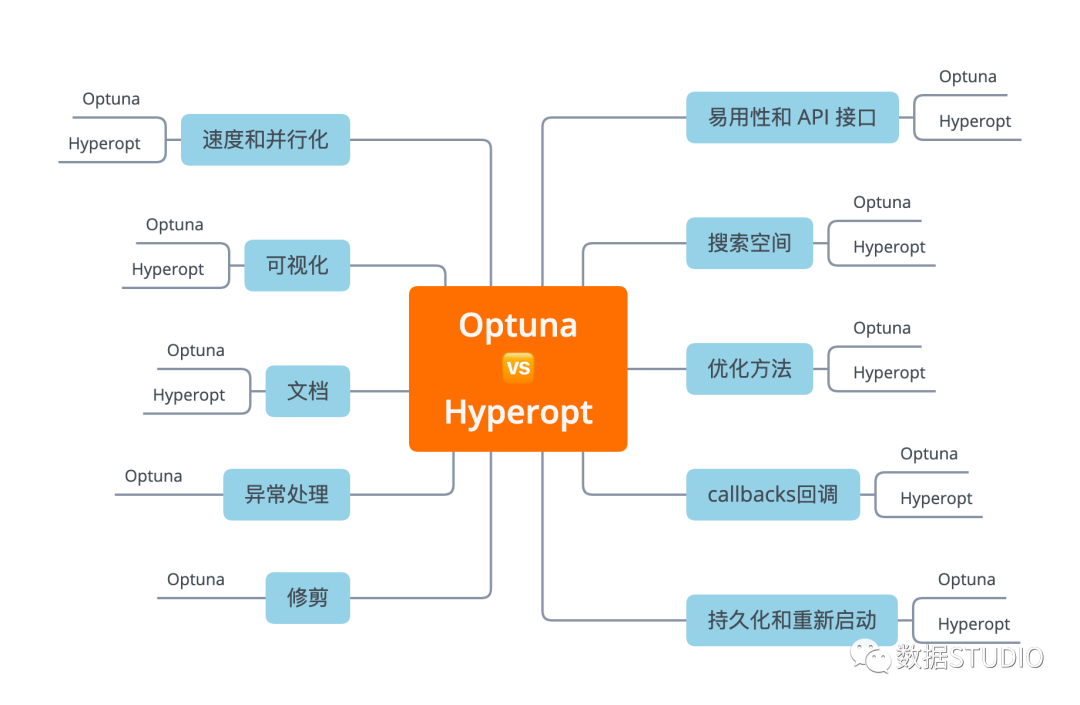
日前,已經(jīng)對Optuna和Hyperopt等幾個超參數(shù)優(yōu)化神器有介紹:
易用性和 API 接口
在本節(jié)中,我想了解如何使用這兩個庫運行基本的超參數(shù)調(diào)整代碼,了解它的易用性以和API。
Optuna
可以在一個函數(shù)中定義搜索空間和目標。
從 trail 對象中采樣超參數(shù)。因此, 參數(shù)空間是在執(zhí)行時定義的。
def objective(trial):
    params = {'learning_rate': trial.suggest_loguniform('learning_rate', 0.01, 0.5),
              'max_depth': trial.suggest_int('max_depth', 1, 30),
              'num_leaves': trial.suggest_int('num_leaves', 2, 100),
              'min_data_in_leaf': trial.suggest_int('min_data_in_leaf', 10, 1000),
              'feature_fraction': trial.suggest_uniform('feature_fraction', 0.1, 1.0),
              'subsample': trial.suggest_uniform('subsample', 0.1, 1.0)}
    return train_evaluate(params)
然后,創(chuàng)建 study 對象并對其進行優(yōu)化。可以選擇是否要 最大化或最小化 你的目標。這在優(yōu)化 AUC 等指標時很有用,因為不必在訓練前更改目標的符號,然后在訓練后再次轉(zhuǎn)換,將最佳結(jié)果(如果為負數(shù))轉(zhuǎn)換為正數(shù)。
study = optuna.create_study(direction='maximize')
study.optimize(objective, n_trials=100)
關(guān)于優(yōu)化的一切都可以在 optuna 的 study 對象中得到。
我喜歡Optuna的一點是,它非常靈活,我可以即時定義如何對搜索空間進行采樣。在AutoML的同時,還能夠選擇一個優(yōu)化的方向也是相當不錯的。
Hyperopt
首先定義參數(shù)搜索空間:
SPACE = {'learning_rate':
hp.loguniform('learning_rate',np.log(0.01),np.log(0.5)),
         'max_depth':
hp.choice('max_depth', range(1, 30, 1)),
         'num_leaves':
hp.choice('num_leaves', range(2, 100, 1)),
         'subsample':
hp.uniform('subsample', 0.1, 1.0)}
然后,創(chuàng)建一個要最小化的目標函數(shù)。這意味著你必須將 目標符號轉(zhuǎn)換為 像 AUC 等一樣的數(shù)值越高越好的指標。
def objective(params):
    return -1.0 * train_evaluate(params)
最后,實例化 Trials() 對象并最小化參數(shù)搜索空間 SPACE的目標。
trials = Trials()
_ = fmin(objective, SPACE, trials=trials,
         algo=tpe.suggest, max_evals=100)
所有關(guān)于被測試的超參數(shù)的信息和相應(yīng)的分數(shù)都保存在 trials 對象中。
即使在最簡單的情況下,我也需要實例化 Trials(),這里如果讓 fmin 返回 trials 并默認進行實例化,應(yīng)該會便利不少。
這兩個庫在這里都做得很好,但我覺得Optuna稍微好一些,因為它具有靈活性、命令式的參數(shù)采樣方法和較少的模板。
Optuna > Hyperopt
選項、方法與超參數(shù)
在現(xiàn)實生活場景中,運行超參數(shù)優(yōu)化需要許多遠離黃金路徑的額外選項。在本節(jié)中,將從以下幾個方面比較 Optuna 和 Hyperopt。
搜索空間 優(yōu)化方法/算法 回調(diào) 持久化和重新啟動參數(shù)掃描 修剪無效運行 處理異常
搜索空間
在本節(jié)中,比較搜索空間定義、定義復(fù)雜空間的靈活性以及每種參數(shù)類型(Float、Integer、Categorical)的采樣選項。
Optuna
可以找到所有超參數(shù)類型的采樣選項:
分類參數(shù): trial.suggest_categorical整數(shù)參數(shù): trial.suggest_int浮點數(shù)參數(shù):* trial.suggest_uniform*、trial.suggest_loguniform甚至更奇特的是trial.suggest_discrete_uniform
特別是對于整數(shù)參數(shù),可能希望有更多選項,但它處理大多數(shù)用例。這個庫的一大特點是可以從參數(shù)空間中即時采樣,且可以隨心所欲地進行采樣。可以使用 if 語句,可以更改搜索的間隔,可以使用來自 trail 對象的信息來指導搜索策略。
def objective(trial):
    classifier_name = trial.suggest_categorical('classifier', ['SVC', 'RandomForest'])
    if classifier_name == 'SVC':
        svc_c = trial.suggest_loguniform('svc_c', 1e-10, 1e10)
        classifier_obj = sklearn.svm.SVC(C=svc_c)
    else:
        rf_max_depth = int(trial.suggest_loguniform('rf_max_depth', 2, 32))
        classifier_obj = sklearn.ensemble.RandomForestClassifier(max_depth=rf_max_depth)

    ...
這簡直可以做任何事情~
Hyperopt
搜索空間是 Hyperopt 真正提供大量采樣選項的地方:
分類參數(shù): hp.choice整數(shù)參數(shù): hp.randit、hp.quniform、hp.qloguniform、hp.qlognormal浮點數(shù)參數(shù): hp.normal、hp.uniform、hplognormal、hp.loguniform
據(jù)我所知,這是目前最廣泛的采樣功能。
在運行優(yōu)化之前定義搜索空間,還 可以創(chuàng)建非常復(fù)雜的參數(shù)空間:
復(fù)雜的參數(shù)空間:
上下滑動查看更多源碼
SPACE = hp.choice('classifier_type', [
    {
        'type': 'naive_bayes',
    },
    {
        'type': 'svm',
        'C': hp.lognormal('svm_C', 0, 1),
        'kernel': hp.choice('svm_kernel', [
            {'ktype': 'linear'},
            {'ktype': 'RBF', 'width': hp.lognormal('svm_rbf_width', 0, 1)},
            ]),
    },
    {
        'type': 'dtree',
        'criterion': hp.choice('dtree_criterion', ['gini', 'entropy']),
        'max_depth': hp.choice('dtree_max_depth',
            [None, hp.qlognormal('dtree_max_depth_int', 3, 1, 1)]),
        'min_samples_split': hp.qlognormal('dtree_min_samples_split', 2, 1, 1),
    },
])不得不說,二者在這點上都表現(xiàn)非常優(yōu)秀!不僅可以輕松定義嵌套搜索空間,并且有很多針對所有不同參數(shù)類型的采樣選項。Optuna 具有命令式參數(shù)定義,提供了更大的靈活性,而 Hyperopt 具有更多的參數(shù)采樣選項。
Optuna = Hyperopt
優(yōu)化方法
Optuna 和 Hyperopt 都在后臺使用相同的優(yōu)化方法 。他們有:
rand.suggest(Hyperopt) samplers.random.RandomSampler(Optuna)
對參數(shù)的標準隨機搜索
tpe.suggest(Hyperopt) samplers.tpe.sampler.TPESampler(Optuna)
Parzen 估計器樹 (TPE)。這種方法使用廉價的代理模型來估計昂貴的目標函數(shù)在一組參數(shù)上的性能。
Tree Parzen Estimator 不是對給定配置 的觀測值 的概率 建模,而是對密度函數(shù) 和 建模。給定一個百分位數(shù) (通常設(shè)置為 15%),觀察結(jié)果分為好和壞,并且使用簡單的 1-d Parzen 窗口對這兩個分布進行建模。
通過使用 和 ,可以估計參數(shù)配置相對于先前最佳值的預(yù)期改進。
對于 Optuna 和 Hyperopt,都沒有選項可以在優(yōu)化器中指定 α 參數(shù)。
Optuna
integration.SkoptSampler
Optuna 接受使用來自 Scikit-Optimize (skopt) 的采樣器。Skopt 提供了一堆基于樹的方法作為代理模型的選擇。
創(chuàng)建一個 SkoptSampler實例,在skopt_kwargs參數(shù)中指定代理模型和采集函數(shù)的參數(shù)將采樣器 sampler實例傳遞給optuna.create_study方法
from optuna.integration import SkoptSampler
sampler = SkoptSampler(
      skopt_kwargs={'base_estimator':'RF',
                    'n_random_starts':10,
                    'base_estimator':'ET',
                    'acq_func':'EI',
                    'acq_func_kwargs': {'xi':0.02})
study = optuna.create_study(sampler=sampler)
study.optimize(objective, n_trials=100)
還可以使用一種稱為異步連續(xù)二分算法 (ASHA) 的多臂 bandid 方法[1]方法。如果對細節(jié)感興趣,請閱讀本文 大規(guī)模并行超參數(shù)調(diào)整系統(tǒng)[2] ,但總體思路是:
運行一堆參數(shù)配置一段時間 修剪(一半)最沒有希望的運行 運行一堆參數(shù)配置一段時間 修剪(一半)最沒有希望的運行 當只剩下一個配置時停止
通過這樣做,搜索可以集中在更有希望的運行。然而,配置預(yù)算的靜態(tài)分配在實踐中是一個問題(一種新的稱為HyperBand[3]的方法解決了這個問題)。
在Optuna中使用ASHA非常容易。只要傳遞一個SuccesiveHalvingPruner到.create_study() 即可實現(xiàn)。
from optuna.pruners import SuccessiveHalvingPruner
optuna.create_study(pruner=SuccessiveHalvingPruner())
study.optimize(objective, n_trials=100)
總體而言,目前在優(yōu)化功能方面有很多選擇。
Hyperopt
atpe.suggest
Hyperopt中優(yōu)化方法自適應(yīng) TPE 是由 ElectricBrain 發(fā)明的,實際上是他們在 TPE 之上進行的一系列小的改進。詳情請見對 TPE 的改進[4]
該方法使用非常方便。只需要將 atpe.suggest 傳遞給 fmin 函數(shù),而不是 tpe.suggest 。
from hyperopt import fmin, atpe
best = fmin(objective, SPACE,
            max_evals= 100 ,
            algo=atpe.suggest)
atpe.suggest方法是新的優(yōu)化算法,是原始方法的一種新的改進,而不僅僅是與現(xiàn)有算法的集成。
Optuna = Hyperopt
Callbacks回調(diào)
在本節(jié)中,看看在每次迭代后定義回調(diào)以monitor/snapshot/modify訓練是多么容易。它很有用,尤其是當模型訓練時間很長和/或分散時。
Optuna
.optimize() 方法中 的 callbacks 回調(diào)參數(shù)很好地支持用戶回調(diào) 。只需傳遞一個以study和trail為輸入的可調(diào)用對象列表。
import neptune
def neptune_monitor(study, trial):
    neptune.log_metric('run_score', trial.value)
    neptune.log_text('run_parameters', str(trial.params))
...
study.optimize(objective, n_trials=100, callbacks=[neptune_monitor])
可以同時訪問 study和trail ,所以擁有可能想要檢查點、提前停止或修改未來搜索的所有靈活性。
Hyperopt
本身沒有回調(diào),但可以將回調(diào)函數(shù)放在 Objective 中,并且每次調(diào)用目標時都會執(zhí)行它。
def monitor_callback(params, score):
    neptune.send_metric('run_score', score)
    neptune.send_text('run_parameters', str(params))

def objective(params):
    score = -1.0 * train_evaluate(params)
    monitor_callback(params, score)
    return score
在這一個點上,Hyperopt明顯輸了一截。
Optuna > Hyperopt
持久化和重啟
持久化保存和重新加載超參數(shù)搜索可以節(jié)省時間和金錢,并有助于獲得更好的結(jié)果。我們比較一下這兩個框架。
Optuna
只需使用 joblib.dump pickle trail 對象。
study.optimize(objective, n_trials= 100 )
joblib.dump(study, 'artifacts/study.pkl')
可以稍后使用 joblib.load 加載它以重新開始搜索。
study = joblib.load('../artifacts/study.pkl')
study.optimize(objective, n_trials= 200)
對于 分布式設(shè)置 ,可以使用study_name,分發(fā)研究的數(shù)據(jù)庫的 URL用于實例化新研究。例如
study = optuna.create_study(
                    study_name='example-study',
                    storage='sqlite:///example.db',
                    load_if_exists=True)
Hyperopt
與 Optuna 類似, joblib.dump pickle trail 對象。
trials = Trials()
_ = fmin(objective, SPACE, trials=trials,
         algo=tpe.suggest, max_evals=100)
joblib.dump(trials, 'artifacts/hyperopt_trials.pkl')
使用 joblib.load 加載它以重新開始搜索。
trials = joblib.load('artifacts/hyperopt_trials.pkl')
_ = fmin(objective, SPACE, trials=trials,
         algo=tpe.suggest, max_evals=200)
更多運行分布式超參數(shù)優(yōu)化詳情請見速度和并行化部分。
Optuna = Hyperopt
修剪
并非所有的超參數(shù)配置都是一樣的。其實很容易地發(fā)現(xiàn)其中一些參數(shù)并不會對模型最終效果得分產(chǎn)生很大貢獻。理想情況下,我們希望盡快停止這些運行,并留出更多的時間資源去嘗試其他不同的更有效的參數(shù)。
Optuna 中使用 Pruning Callbacks 選項執(zhí)行此操作。支持許多機器學習框架:
KerasPruningCallback, TFKerasPruningCallback TensorFlowPruningHook PyTorchIgnitePruningHandler, PyTorchLightningPruningCallback FastAIPruningCallback LightGBMPruningCallback XGBoostPruningCallback more[5]
例如,在訓練 lightGBM模型的情況下,可以將此Callbacks傳遞給 lgb.train 函數(shù)。
上下滑動查看更多源碼
def train_evaluate(X, y, params, pruning_callback=None):
    X_train, X_valid, y_train, y_valid = train_test_split(X, y, test_size=0.2, random_state=1234)
    train_data = lgb.Dataset(X_train, label=y_train)
    valid_data = lgb.Dataset(X_valid, label=y_valid, reference=train_data)
    callbacks = [pruning_callback] if pruning_callback is not None else None
    model = lgb.train(params, train_data,
                      num_boost_round=NUM_BOOST_ROUND,
                      early_stopping_rounds=EARLY_STOPPING_ROUNDS,
                      valid_sets=[valid_data],
                      valid_names=['valid'],
                      callbacks=callbacks)
    score = model.best_score['valid']['auc']
    return score

def objective(trial):
    params = {'learning_rate': trial.suggest_loguniform('learning_rate', 0.01, 0.5),
              'max_depth': trial.suggest_int('max_depth', 1, 30),
              'num_leaves': trial.suggest_int('num_leaves', 2, 100),
              'min_data_in_leaf': trial.suggest_int('min_data_in_leaf', 10, 1000),
              'feature_fraction': trial.suggest_uniform('feature_fraction', 0.1, 1.0),
              'subsample': trial.suggest_uniform('subsample', 0.1, 1.0)}

    pruning_callback = LightGBMPruningCallback(trial, 'auc', 'valid')
    return train_evaluate(params, pruning_callback)
Hyperopt 沒有此功能
Optuna > Hyperopt
異常處理
如果在一次運行由于錯誤的參數(shù)組合、隨機訓練錯誤或其他問題而失敗,可能會丟失 迄今為止在study中評估的所有 parameter_configuration:score 對。
其實可以在每次迭代后使用回調(diào)來保存此信息,或者使用數(shù)據(jù)庫來存儲它。
但是,即使發(fā)生異常,也可能希望繼續(xù)進行這項study。Optuna 中將異常傳遞給 .optimize() 方法。
def objective(trial):
    params = {'learning_rate': trial.suggest_loguniform('learning_rate', 0.01, 0.5),
              'max_depth': trial.suggest_int('max_depth', 1, 30),
              'num_leaves': trial.suggest_int('num_leaves', 2, 100)}
    print(non_existent_variable)
    return train_evaluate(params)

study = optuna.create_study(direction='maximize')
study.optimize(objective, n_trials=100, catch=(NameError,))
Hyperopt 沒有此功能
Optuna > Hyperopt
官方文檔
每當我們學習一個新庫或框架時,需要找到所需信息絕對至關(guān)重要,此時官方文檔相當有用。下面看看 Optuna 和 Hyperopt 在這方面的比較。
Optuna
Optuna 官方文檔[6] 解釋了所有基本概念,并向您展示了在哪里可以找到更多信息。
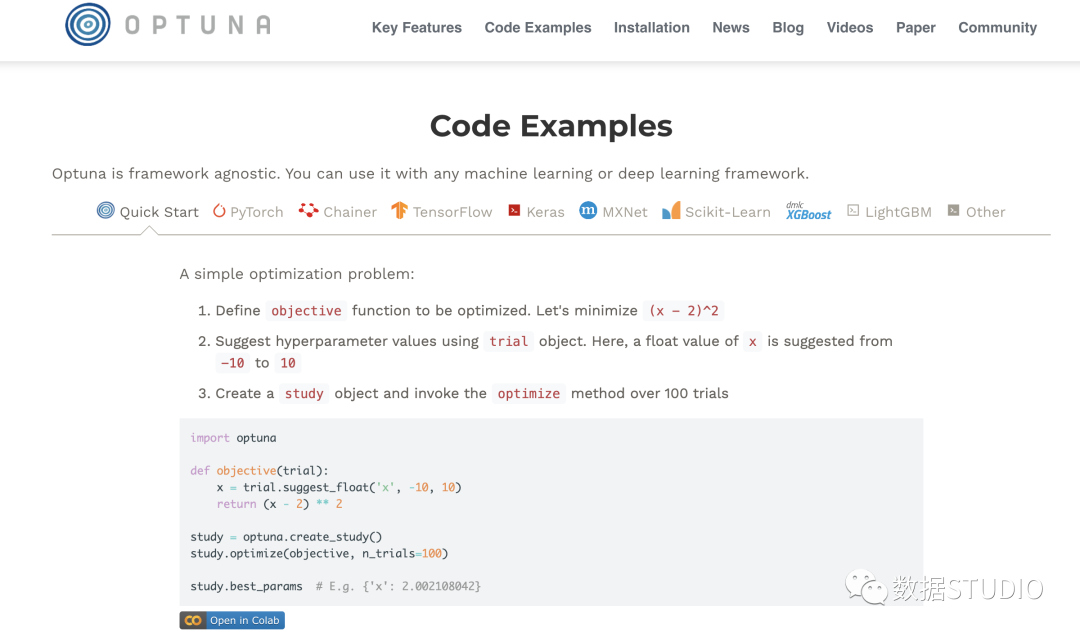
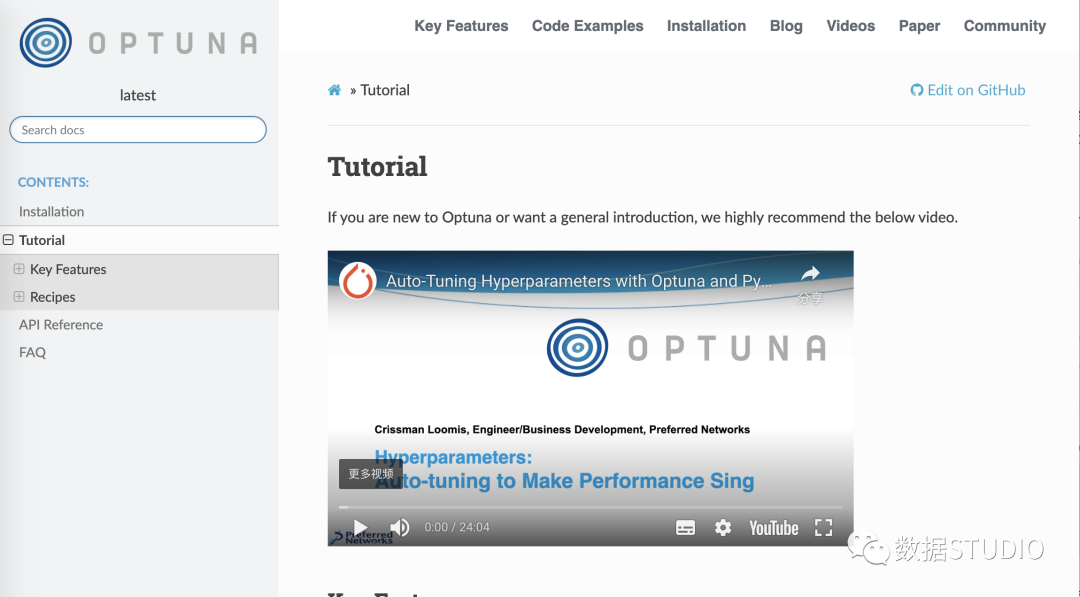
還有有一個完整且非常易于理解 read-the-docs文檔[7]。它包含:
包含簡單示例和高級示例的教程 包含文檔字符串的所有函數(shù)的 API 參考。
Hyperopt
你可以這里找到 Hyperopt官方文檔[8]。它包含以下信息:
如何開始 如何定義簡單搜索空間和高級搜索空間 如何運行安裝 如何通過 MongoDB 或 Spark 并行運行 Hyperopt
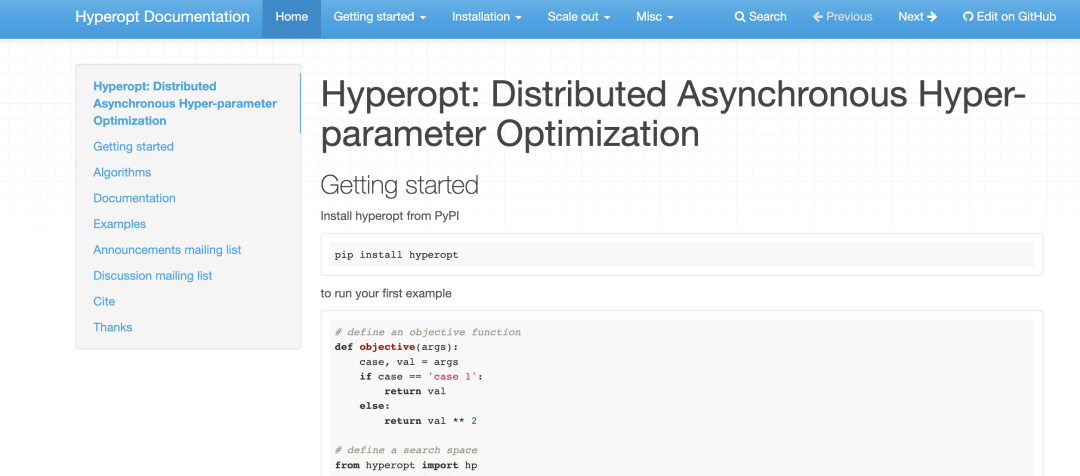
雖然文檔 不是Hyperopt最強大的一面 ,但因為它是經(jīng)典,所以有很多資源可供學習。
Optuna > Hyperopt
可視化超參數(shù)搜索
可視化超參數(shù)搜索可能非常有用。可以獲得有關(guān)參數(shù)之間交互的信息,并查看下一步應(yīng)該搜索的位置。
Optuna
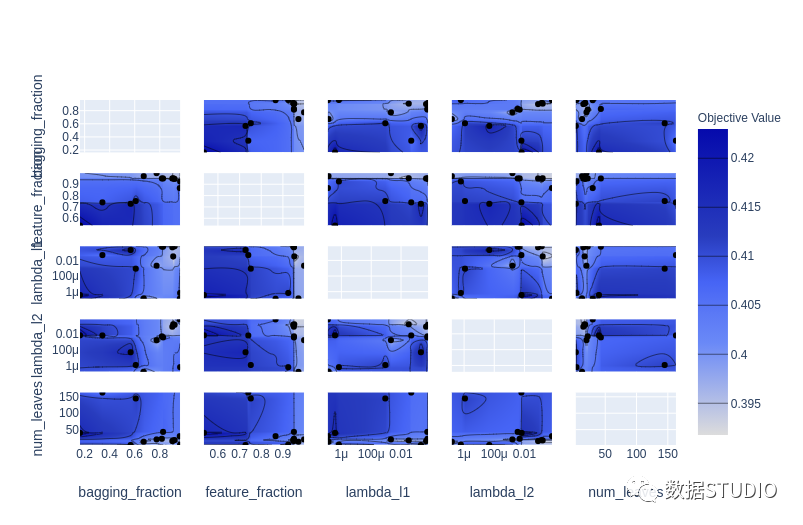
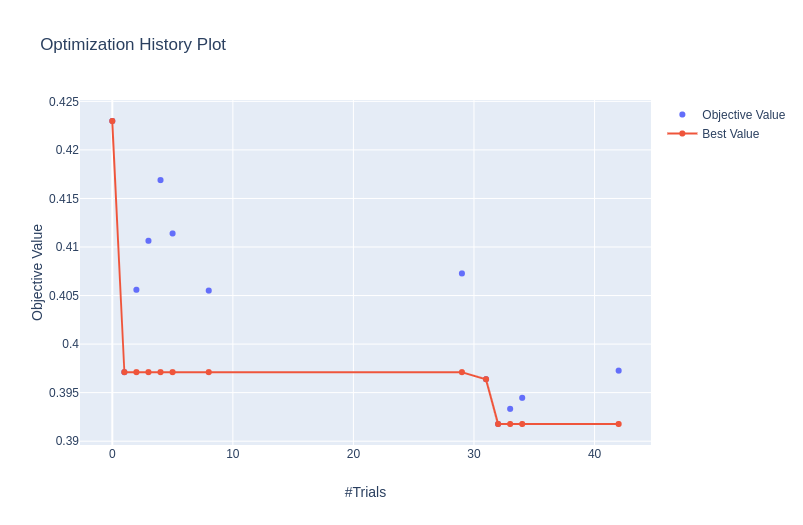
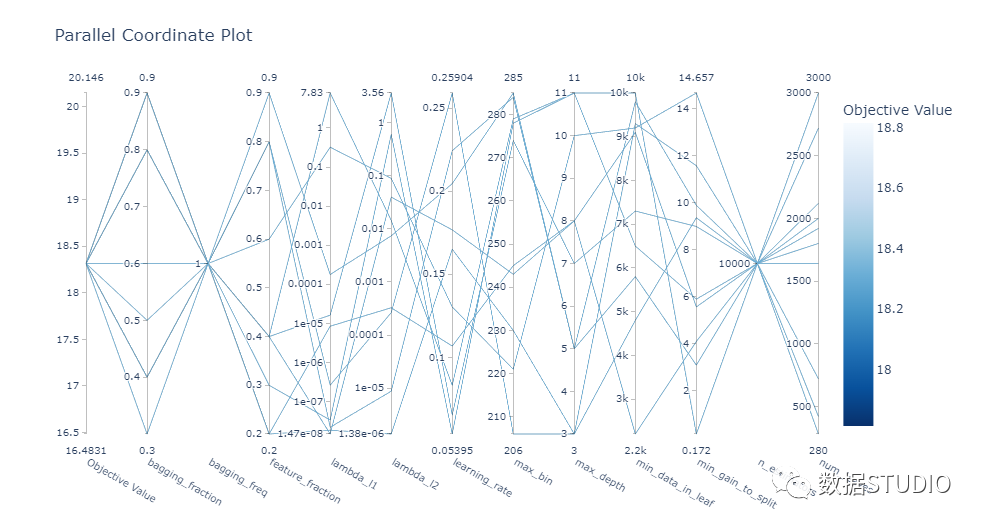
optuna.visualization 模塊中提供了一些很棒的可視化 :
plot_contour: 在交互式圖表上繪制參數(shù)交互。可以選擇要探索的超參數(shù)。
plot_contour(study, params=['learning_rate',
                            'max_depth',
                            'num_leaves',
                            'min_data_in_leaf',
                            'feature_fraction',
                            'subsample'])
plot_optimization_histor: 顯示所有試驗的分數(shù)以及迄今為止每個點的最佳分數(shù)。
plot_optimization_history(study)
plot_parallel_coordinate: 以交互方式可視化超參數(shù)和分數(shù)
plot_parallel_coordinate(study)
plot_slice: 顯示搜索的演變。可以看到搜索在超參數(shù)空間中的哪個位置以及空間的哪些部分被探索得更多。
plot_slice(study)
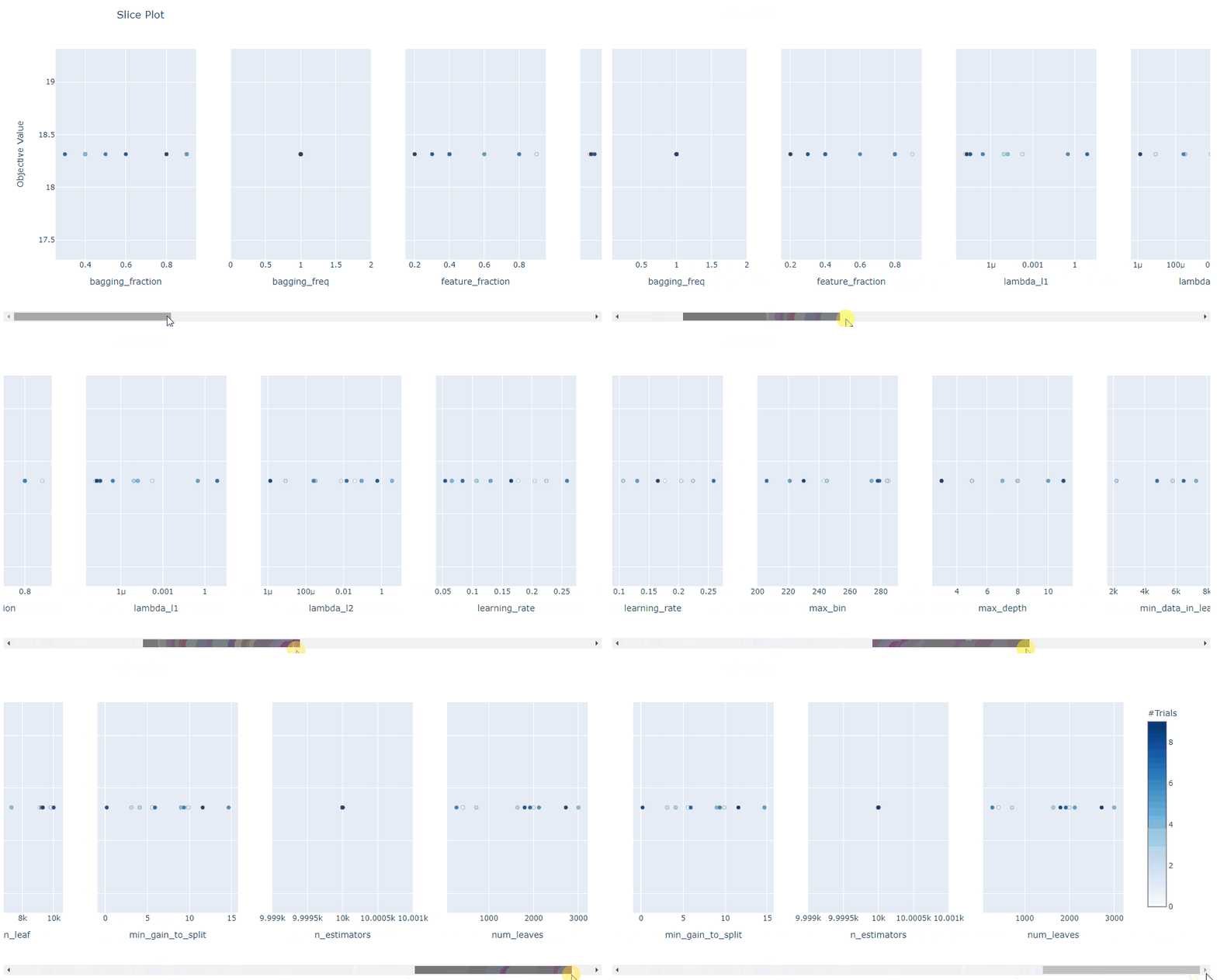
總體而言, Optuna 中的可視化效果真是太棒了。它們助你放大超參數(shù)交互并幫助你決定如何運行下一個參數(shù)掃描。
Hyperopt
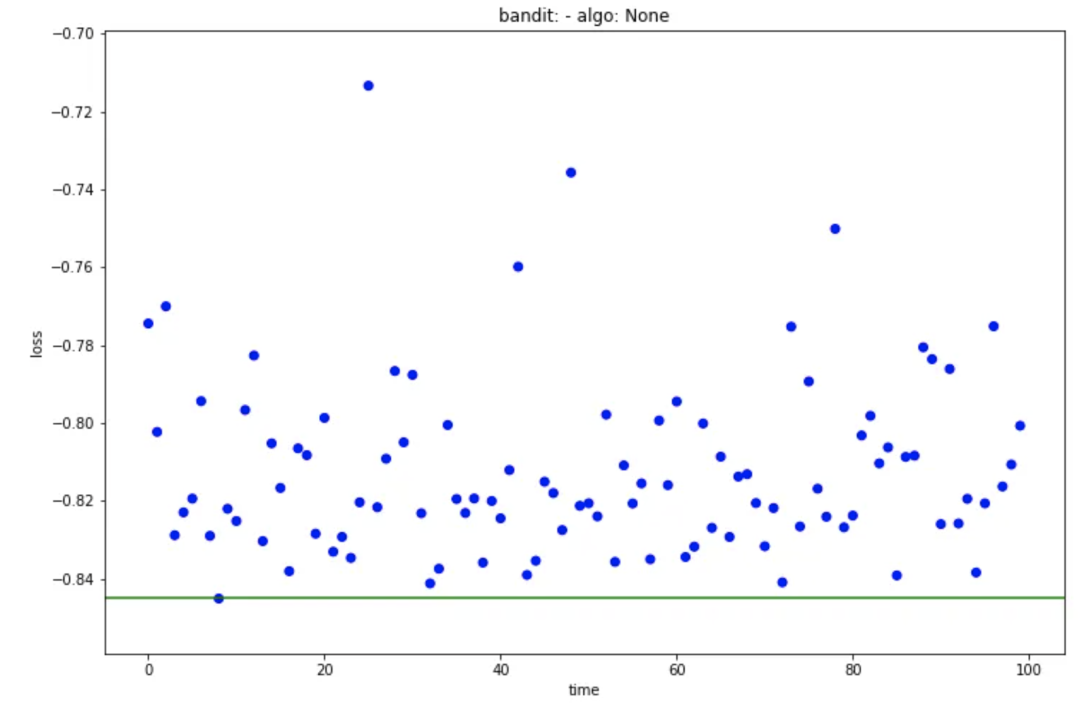
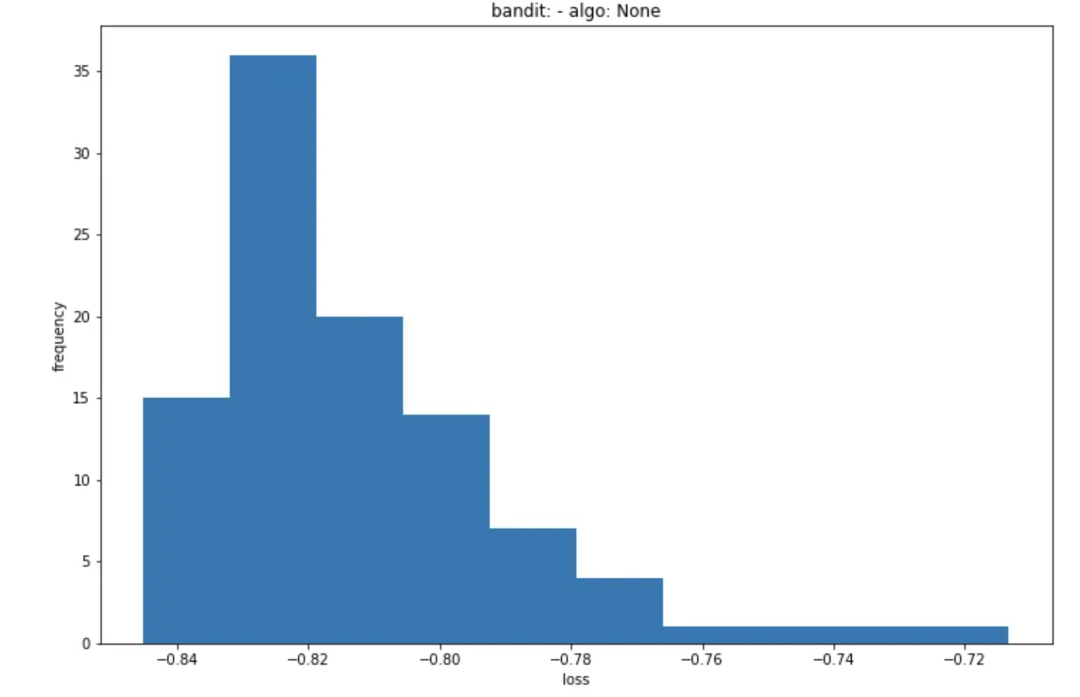
hyperopt.plotting 模塊中有三個可視化函數(shù):
main_plot_history: 顯示每次迭代的結(jié)果并突出顯示最佳分數(shù)。
main_plot_history(trail)
main_plot_histogram: 顯示所有迭代結(jié)果的直方圖。
main_plot_histogram(trail)
main_plot_vars: 暫時無法讓它運行,不知道它做了什么,也沒有文檔字符串或示例(文檔有些缺陷)。
總而言之,Hyperopt有一些基本的可視化實用程序,但它們并不是超級有用。
而 Optuna 中可用的可視化給我留下了深刻的印象。有用、可交互、美觀。
Optuna > Hyperopt
速度和并行化
在超參數(shù)優(yōu)化方面,能夠?qū)⒂柧毞植荚跈C器或多臺機器(集群)上可能至關(guān)重要。
Optuna
可以在一臺機器或一組機器上運行分布式超參數(shù)優(yōu)化,這實際上非常簡單。
對于一臺機器,只需更改 .optimize() 方法中的 n_jobs 參數(shù) 。
study.optimize(objective, n_trials=100, n_jobs=12)
如果要在多臺機器集群上運行它,需要創(chuàng)建一個駐留在數(shù)據(jù)庫中的study (可以在許多關(guān)系型數(shù)據(jù)庫中進行選擇)。
可以通過命令行界面執(zhí)行此操作:
optuna create-study \
    --study-name "distributed-example" \
    --storage "sqlite:///example.db"
還可以在優(yōu)化腳本中創(chuàng)建study。
通過使用 load_if_exists=True ,可以以相同的方式處理主腳本和工作腳本, 這大大簡化了流程。
study = optuna.create_study(
    study_name='distributed-example',
    storage='sqlite:///example.db',
    load_if_exists=True)
study.optimize(objective, n_trials=100)
最后可以在多臺機器上運行工作腳本,它們都將使用study數(shù)據(jù)庫中的相同信息。
terminal-1$ python run_worker.py
terminal-2$ python run_worker.py
Hyperopt
可以將計算分布在一組機器上。可以在Tanay Agrawal博客文章[9] 中找到好的分步說明, 但簡而言之,需要:
啟動一個帶有 MongoDB 的服務(wù)器 ,它將使用訓練腳本的結(jié)果并發(fā)送下一個參數(shù)集以嘗試, 在訓練腳本中, 創(chuàng)建一個指向你在上一步中啟動的數(shù)據(jù)庫服務(wù)器的 MongoTrials()對象,而不是Trials(),將 Objective函數(shù)移動到單獨的腳本并將其重命名為 objective.py 函數(shù),編譯你的 Python 訓練腳本, 運行 hyperopt-mongo-worker
雖然它能夠?qū)崿F(xiàn)分布式供能,但感覺并不完美。需要圍繞Objective函數(shù)進行一些調(diào)整,并且可以在 CLI 中提供啟動 MongoDB 以使事情變得更容易。
另外,可以通過 SparkTrials對象與 Spark 的集成。具體可以參考Scaling out search with Apache Spark[10],甚至可以使用 spark-installation 腳本更容易地處理分布式study。
best = hyperopt.fmin(fn = objective,
                     space = search_space,
                     algo = hyperopt.tpe.suggest,
                     max_evals = 64,
                     trials = hyperopt.SparkTrials())
這兩個庫都支持分布式訓練。但是Optuna 在更簡單、更用戶友好的界面方面做得更好。
Optuna > Hyperopt
一個用來比較的通用測試模版
一個示例,在 二分類 問題上調(diào)整 LightGBM 模型的超參數(shù)。所有的訓練和評估邏輯都放在 train_evaluate 函數(shù)中。我們可以將其視為一個黑匣子 ,它獲取數(shù)據(jù)和超參數(shù)集并產(chǎn)生 AUC 評估分數(shù)。
上下滑動查看更多源碼
import lightgbm as lgb
from sklearn.model_selection import train_test_split
import pandas as pd

NUM_BOOST_ROUND = 300
EARLY_STOPPING_ROUNDS = 30

def train_evaluate(X, y, params):
    X_train, X_valid, y_train, y_valid = train_test_split(X, y,
                                                          test_size=0.2,
                                                          random_state=1234)

    train_data = lgb.Dataset(X_train, label=y_train)
    valid_data = lgb.Dataset(X_valid, label=y_valid, reference=train_data)

    model = lgb.train(params, train_data,
                      num_boost_round=NUM_BOOST_ROUND,
                      early_stopping_rounds=EARLY_STOPPING_ROUNDS,
                      valid_sets=[valid_data],
                      valid_names=['valid'])
    score = model.best_score['valid']['auc']
    return score

N_ROWS=10000
TRAIN_PATH = './data/train.csv'

data = pd.read_csv(TRAIN_PATH, nrows=N_ROWS)
X = data.drop(['ID_code', 'target'], axis=1)
y = data['target']

MODEL_PARAMS = {'boosting': 'gbdt',
                'objective':'binary',
                'metric': 'auc',
                'num_threads': 12,
                'learning_rate': 0.3,
                }

score = train_evaluate(X, y, MODEL_PARAMS)
print('Validation AUC: {}'.format(score))多臂 bandid 方法: https://link.springer.com/content/pdf/10.1007/11564096_42.pdf
[2]大規(guī)模并行超參數(shù)調(diào)整系統(tǒng): https://arxiv.org/abs/1810.05934
[3]HyperBand: https://arxiv.org/abs/1603.06560
[4]對 TPE 的改進: https://github.com/electricbrainio/hypermax
[5]more: https://optuna.readthedocs.io/en/latest/reference/integration.html
[6]Optuna 官方文檔: https://optuna.org/
[7]read-the-docs文檔: https://optuna.readthedocs.io/en/latest/tutorial/index.html
[8]Hyperopt官方文檔: http://hyperopt.github.io/hyperopt/
[9]Tanay Agrawal博客文章: https://blog.goodaudience.com/on-using-hyperopt-advanced-machine-learning-a2dde2ccece7
[10]Scaling out search with Apache Spark: http://hyperopt.github.io/hyperopt/scaleout/spark/
往期精彩回顧
適合初學者入門人工智能的路線及資料下載 (圖文+視頻)機器學習入門系列下載 中國大學慕課《機器學習》(黃海廣主講) 機器學習及深度學習筆記等資料打印 《統(tǒng)計學習方法》的代碼復(fù)現(xiàn)專輯 機器學習交流qq群955171419,加入微信群請掃碼